
Tech
Fintech Software Development: How Financial Products Win Trust, Speed, and Revenue


Money moves faster than ever. A customer can pay for coffee with a tap, freeze a card from a banking app, send funds through a digital wallet, or place a trade before a market price shifts again.
Behind that simple experience sits serious engineering. A fintech software development company can turn payment flows, account data, risk checks, and user journeys into a product people trust when real money is involved.
That trust is not built with polished screens alone. It comes from clean architecture, secure integrations, clear compliance logic, and product decisions that hold up under pressure.
This is why fintech software development is no longer just a technical project. For banks, lenders, payment providers, trading firms, and startups, it has become a revenue system and a risk control layer at the same time.
Why Fintech Products Are Harder Than They Look
A regular mobile app can recover from a small bug with limited damage. A fintech app does not have that luxury because a failed payment, duplicated transaction, or wrong balance can break user trust instantly.
Fintech app development deals with personal data, bank accounts, payment gateways, identity checks, fraud rules, card networks, market data, and financial regulations. Every screen usually has a business rule behind it, and every action may trigger a security or risk check.
Buyers should view fintech development as a chain of connected decisions. How will users register, verify identity, add funds, move money, resolve failed transactions, and contact support when something goes wrong?
Strong fintech products answer these questions before launch. Weak ones discover the gaps after customers start sending screenshots to support.
Start with the Money Flow
A fintech product is not defined by its feature list. It is defined by how money enters, moves, pauses, settles, reverses, and leaves the system.
For digital wallet development, this includes balance logic, top-ups, withdrawals, peer-to-peer transfers, transaction limits, refunds, and dispute handling. The wallet must know when to accept a payment, when to block one, and how to explain the result to the user.
For banking app development, the flow may include account access, card controls, statements, transfers, loan modules, savings tools, alerts, and secure customer support. A banking app must make daily financial tasks feel simple without weakening control.
For trading platform development, the flow is different again. The product has to manage market data, order placement, portfolio views, risk checks, broker integrations, settlement events, and complete records of user activity.
The user sees one clean interface. The business runs a financial machine underneath it.
Digital Wallet Development: Convenience Needs Discipline
Digital wallets win users because they remove friction. People want to store value, send funds, pay merchants, split bills, and check transaction history without calling a bank or opening several apps.
That convenience needs strict money logic behind it. If two transfers happen at nearly the same time, the wallet cannot allow the same funds to be spent twice. If a card top-up fails, the balance cannot show money that never arrived.
Good digital wallet development often depends on ledger-based thinking. A ledger records debits and credits in a way that finance teams, support teams, and auditors can trace later.
That traceability matters because wallet users expect instant answers. When a payment is pending, refunded, rejected, or delayed, the product should show a clear status instead of leaving the customer guessing.
For buyers, the key question is simple. Can the system explain every cent from the first transaction to the latest balance?
Banking App Development: Daily Use Is the New Standard
Banking apps are no longer passive account viewers. Customers expect balance updates, transfers, card controls, spending insights, loan information, savings tools, alerts, and support access from one place.
That creates a difficult product challenge. A banking app must be simple enough for everyday use and strict enough for a regulated financial environment.
Good banking app development starts with roles, permissions, and user journeys. A retail customer may need quick card controls, while a business account may need maker-checker approval, where one person creates a payment and another approves it.
Security should shape these flows from the beginning. Strong authentication, device checks, session rules, encryption, and activity logs all help protect the product without turning every action into a burden.
Plain language also matters. A customer should understand why an action was blocked, why extra verification is needed, or why a transfer is still pending.
Payment Gateway Integration: The Place Where Revenue Can Leak
Payment gateway integration sounds like a backend task, but it directly affects revenue. A slow checkout, unclear payment status, failed retry, or duplicate charge can damage conversion and trust at the same time.
A solid payment setup must handle more than successful payments. It should manage failed payments, pending states, refunds, chargebacks, settlement reports, and reconciliation with internal records.
The support team should be able to trace a payment without asking engineering to search logs manually. The finance team should be able to match gateway data with orders, invoices, user accounts, and payouts.
For some products, one gateway is enough at launch. For others, growth may require cards, bank transfers, instant payments, local payment methods, and wallet payments across different markets.
A smart architecture makes that future possible. It lets the business add or replace providers without rebuilding the entire payment flow.
Open Finance APIs: Turning Data into Better Product Decisions
Open finance APIs allow financial products to connect with banks, payment providers, accounting platforms, identity systems, and other financial data sources. An API is simply a controlled way for software systems to exchange data.
The business value comes from what the product does with that data. A lending platform can review cash flow patterns, a personal finance app can show accounts from several banks, and a business dashboard can connect invoices, payments, and balances.
Open finance APIs also make consent management essential. Users need to know what data is accessed, why it is needed, and how that access can be changed or revoked where required.
Buyers should ask practical questions before building around external financial data. How often is the data refreshed, what happens if a provider is unavailable, and how does the product show users when information is out of date?
A dashboard full of stale numbers creates poor decisions. A product that explains data status clearly gives users confidence.
Trading Platform Development: Speed Is Not Enough
Trading platform development has a sharper rhythm than many other fintech products. Users expect live market data, fast order placement, portfolio tracking, watchlists, alerts, and a clear record of every transaction.
Speed matters, but speed without control is dangerous. The platform must validate orders, check available funds or assets, manage order types, handle cancellations, and record rejected trades with clear reasons.
A trading platform should also make system activity visible to the team that runs it. When an order fails, support should know whether the issue came from user input, a broker API, a market data feed, or a timeout.
Records are critical in this category. Every order event needs a timestamp, every status change should be traceable, and every user action should be available for review.
That protects the business during disputes. It also gives serious users the confidence that the platform knows exactly what happened.
Architecture Buyers Should Care About
Buyers do not need to be engineers to ask smart architecture questions. They need to understand whether the product can grow, adapt, and recover when something goes wrong.
Can the system handle more users without a rebuild? Can payment providers be replaced without breaking the product? Can new markets, currencies, or user roles be added without rewriting core logic?
Good fintech software development separates interface design from core money logic. The app screen should not decide how balances work, and the backend should not bury financial rules in scattered code.
The ledger, payment flows, permissions, risk checks, reporting tools, and admin panels should have clear responsibilities. This structure makes future product work easier and reduces the chance of hidden failures.
When teams skip this step, growth becomes expensive. Every new feature touches old code, every integration change feels risky, and every audit turns into a hunt for missing context.
Security Is Part of the Product Experience
Security in fintech should not feel like a random wall that appears at the worst moment. It should match the risk of each user action.
Viewing a balance may need a normal login. Changing a payout account, sending a high-value transfer, or adding a new device should require stronger verification.
This approach protects users without exhausting them. It also helps the business reduce fraud while keeping everyday actions fast.
Security affects onboarding, login, payment approvals, session timeouts, support access, admin dashboards, and data exports. It cannot be added at the end as a final checklist item.
A good fintech app explains security in plain language. Users are more willing to complete extra checks when they understand what is being protected.
Compliance Works Better When It Lives Inside the Product
Compliance is often treated as paperwork, but in fintech it becomes product behavior. Identity checks affect onboarding, transaction monitoring affects payments, and privacy rules affect how data is stored and shown.
Developers should not replace legal counsel. Their role is to turn approved compliance requirements into working flows, visible statuses, admin tools, audit logs, and reports.
That might include manual review queues, user verification statuses, transaction flags, permission controls, and exportable records. These tools help operations teams act quickly without relying on spreadsheets.
A compliance process outside the product can slow the business as volume grows. A compliance process built into the product gives teams control, evidence, and speed.
For buyers, this is not only about avoiding penalties. It is about building a product that can pass review, serve users, and scale without chaos.
What a Strong Fintech MVP Should Include
A fintech MVP should not be a toy. When money, identity, or financial decisions are involved, a weak MVP can create risk before it creates useful learning.
The first version should prove the core money flow with real constraints. For a wallet, that may include onboarding, identity checks, top-ups, transfers, limits, transaction history, and support tools.
For a banking app, the MVP may include secure login, account views, card actions, transfers, alerts, and admin access. For a trading product, it may include onboarding, market data, watchlists, broker connection, order placement, portfolio views, and event logs.
The goal is not to build every feature. The goal is to build the right slice of the product, so the business can test user demand and operational readiness together.
A clickable prototype can test interest. A working fintech MVP tests whether the business can move money, manage risk, and support users in real conditions.
How to Choose a Fintech Development Partner
The right partner will talk about risk early. They will ask about providers, licenses, user roles, payment flows, fraud cases, support processes, data storage, reporting needs, and future markets.
That may feel detailed at the start. It is exactly the kind of detail that prevents expensive changes later.
Buyers should listen for practical questions. How will payments be reconciled, who approves manual reviews, what happens when verification fails, and which events must be logged?
For fintech companies looking to strengthen that connection, working with a specialized Fintech Marketing Agency can help turn complex financial products into clear, compelling offerings for the right audience. They understand that a fintech product is not only what users tap on a screen, but also what finance, compliance, risk, and support teams need to run every day.
The wrong partner jumps straight into layouts. The right one first makes sure the product can survive real financial activity.
The Future Belongs to Products That Feel Simple and Run Deep
The next wave of fintech will not be won by louder branding. It will be won by products that make complex financial actions feel clear, safe, and fast.
Digital wallets will keep pushing payments closer to daily life. Banking apps will keep expanding into service hubs, and trading platforms will compete on clarity, trust, and execution quality.
Open finance APIs will turn financial data into richer product experiences. Payment gateway integration will become more strategic as businesses enter new markets and support more payment methods.
The common thread is discipline. Great fintech products hide complexity from users, but they never hide it from the business.
They make every transaction traceable, every status clear, and every integration manageable. That is the real promise of fintech development: financial software that moves money correctly, earns trust quickly, and gives the business room to grow.



An AI PDF summarizer with flashcards and practice tests still has upload limits, so check them first. Adobe Acrobat’s flashcard maker accepts files up to 100MB and 600 pages, builds flashcards from key terms, definitions, and formulas, and links to quizzes, with no sign-up or credit card required to start.
Students who need to summarize long readings and turn them into study aids often hit a limit before they hit a result. Some limits count pages, some count megabytes, and some count words or sources. Knowing which one applies saves a failed upload and a lost evening. The sections below compare what several tools publish, using each tool’s own pages where possible, and explain how to plan around them. Limits change, so confirm them before you rely on one. Prices and caps change often, so check the tool’s own page.
File Upload Size Limit for a PDF: What Do Tools Allow?
It varies, and the unit differs. Adobe Acrobat’s flashcard maker accepts files that are 100MB or smaller and 600 pages or fewer, tells users to upload a smaller PDF when a file is too large, and limits prompts to 1,000 characters. Its page also lists errors for empty files and unsupported formats, so check that the file opens normally first. Its Student Spaces page also includes an AI Assistant for chatting through course material. Gemini Notebook, formerly NotebookLM, allows each source up to 500,000 words or 200MB for uploaded files, with up to 50 sources on the free plan, and Google’s help page says it offers two modes for summarizing sources. Quizlet says you can paste up to 100,000 characters in one session. The table compares the published limits. Split a very long PDF by chapter before uploading, and keep a copy of the original. If you only need a short section, copy the key pages into a new file so the AI has less to read and you stay far below any cap.
| Tool | Published limit | Count | Outputs |
| Adobe Acrobat flashcard maker | 100MB and 600 pages per file; prompts up to 1,000 characters | Per file | Flashcards; links to quizzes, study guides, mind maps, AI Assistant |
| Gemini Notebook | 500,000 words or 200MB per source; 50 sources on the free plan | Per source | Summaries, flashcards, quizzes, study guides |
| Quizlet | 100,000 characters of pasted text per session | Per session | Study guides, flashcards, quizzes |
Source Limit: How Do 200 MB and 500,000 Words Work Together?
Gemini Notebook’s help page lists both numbers for each source: up to 500,000 words or up to 200MB for uploaded files, so whichever you reach first is the real limit. A scanned PDF full of images tends to reach the megabyte cap first, while a text-heavy file reaches the word cap first. Free users can include up to 50 sources, and inactive sources still count toward the limit, so remove ones you no longer need. The help page also says PDFs added through URLs are treated as PDF sources. For planning, assume a page holds about 500 words, which makes 500,000 words roughly a thousand pages, an estimate that varies with formatting. Check the word count in a document editor if you are unsure. Most course readings fit easily, but a full textbook with figures may not. Ask for a summary of one section first, then check how well it matches before you commit a whole book.
Frequently Asked Questions
How should I summarize a very long PDF?
Work in stages. Summarize one chapter at a time, check each summary against the page it came from, and then combine the chapter summaries into a study guide or flashcard set. Tools that offer more than one summary mode, such as Gemini Notebook, let you pick a shorter or longer version. Keep your own notes for anything the summary misses. Save each chapter summary in one document so you can review them in order. Rewrite any sentence you do not understand.
Can I make flashcards and practice tests from the same PDF?
Often. Adobe Acrobat’s page links to quizzes, study guides, and mind maps built from your materials, Gemini Notebook generates flashcards and quizzes from uploaded sources, and Quizlet says one upload can produce a study guide, flashcards, and quizzes. Use the flashcards to learn terms and the practice tests after a gap to check recall. Keep one set per chapter so tests stay focused. Mix question types if the tool offers them. Retry missed items on a later day.
What if my PDF is over the limit?
Reduce it. Split the file by chapter, remove blank pages and long reference lists, and upload the sections you need. If a file is large because of images, export a text-focused version when your course allows it. Adobe Acrobat’s page suggests uploading a smaller PDF, and Google’s limits count both words and megabytes. Tell the tool which pages matter so it does not spend effort on appendices. Check the result against the page before you study from it.


A customer opens chat at 8:40 on a Tuesday. Her new espresso machine arrived with a cracked water tank. For twelve minutes she works through it with your AI agent: three photos, order number, delivery date, a crushed box. The AI checks the carrier record, confirms eligibility, and offers a replacement or a refund. She picks the replacement, but the item is backordered, so the AI escalates.
A human agent joins, and the first message the customer sees is: “Hi, thanks for reaching out! How can I help you today?”
She types the whole story again. Meanwhile, the AI’s refund offer is still pending somewhere, and by evening she has been issued both a refund and a replacement order. Two weeks later, the AI makes the same backordered-item mistake on a similar case, because nobody told it how the first one ended.
If you run AI agents in front of human teams, some version of this story is probably in your QA queue right now. It is not a model quality problem. It is a state ownership problem, and it is fixed with engineering discipline rather than better prompts.
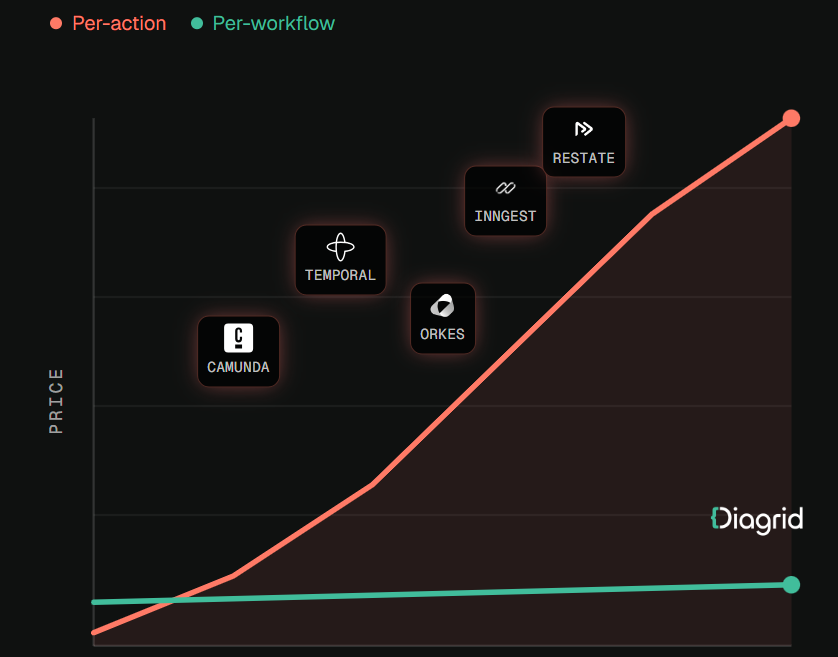
Why handoffs lose context
Most handoffs connect two separate systems at a single point. The AI runs in its own runtime with its own conversation memory. The human works in a helpdesk with its own ticket record. The handoff is a call that creates a ticket, usually with a summary field. That design fails in predictable ways.
The summary is the only thing that crosses the boundary. What the customer said, what the AI checked, and what it offered all get compressed into a paragraph that drops the details that matter most: the exact offer, the exact promise made.
Nobody owns the case. After escalation, the AI’s session is often still alive, with a pending action or a refund call in flight. The human acts too. Two actors with write access to the same outcome and no lock between them is how you get double refunds.
The outcome never flows back. The human resolves the case in the helpdesk, and the AI’s evaluation data and policy logic never see the result.
Sessions outlive processes. Real cases span days and channels: chat, then email, then a callback. If conversation state lives in process memory or a short-lived cache, a deploy or crash wipes it out, and the customer starts over on Thursday.
Why common workarounds fall short
Better summaries. A more thorough handoff note helps a little, but it is still lossy, written after the fact, and cannot tell the human that a refund call is in progress.
Dumping the full transcript into the ticket. Now the human has everything and reads none of it. Worse, a transcript records what was said, not what was done. “I’ve started your refund” does not tell you whether the refund API succeeded.
Shared database flags. Someone adds an escalated boolean that the AI checks before acting. This works until two actions race or a retry fires after the flag flips. It is a lock without a lock’s guarantees.
Helpdesk webhooks for outcomes. Without a durable session waiting to receive them, resolution events land in a log nothing reads.
None of these answers the real question: what is the single, durable record of this case, and who may change it right now?
The general approach: the case is a durable workflow
The fix is to treat each support case as one long-lived, durable session that owns its state. Several principles follow.
1. One case, one workflow instance. Start a workflow keyed by case ID at first contact. It lives until the case closes, across chat, email, and voice. Channels are inputs, not owners of state.
2. Every AI step is a recorded activity. Lookups, eligibility checks, and offers run as discrete steps whose inputs and outputs are persisted. The case record becomes a structured log of what actually happened, including whether each action succeeded.
3. Handoff is an explicit step, not a side effect. Escalation is a named transition that packages the recorded context into a structured payload. The human sees “Replacement accepted, blocked: backordered, no refund issued” at the top, with the full trail one click away.
4. Explicit ownership. Exactly one actor owns the case at a time, and ownership is part of the workflow state. Pending AI actions are completed or cancelled, and the AI’s ability to act is revoked, before the human is assigned.
5. Human actions are external events. When the agent issues a refund or closes the case in the helpdesk, that action is sent back into the same workflow as an event, recorded alongside the AI’s steps.
6. Timers for SLAs and follow-ups. Durable timers handle “page the lead if nobody picks this up in 15 minutes” and “check in after 3 days.” They survive restarts and cancel cleanly when the case moves on.
7. Outcomes close the loop. The final state (what was offered, what the human did, and why) is emitted as a structured record that feeds evaluation sets and policy rules.
The session, not the model or the helpdesk, becomes the system of record.
How to implement it
Any durable workflow engine can do this. One open-source option is Dapr Workflow, part of the CNCF-graduated Dapr project. It keeps an event-sourced history in a state store, replays it after a crash, and does not re-execute completed activities. If the process dies right after a refund activity succeeds, recovery does not issue a second refund.
It also supports retry policies, durable timers, and external events for human input. The escalation step can wait for a human action or an SLA deadline, whichever comes first:
evt = ctx.wait_for_external_event(“approval”)
timer = ctx.create_timer(timedelta(hours=48))
winner = yield wf.when_any([evt, timer]) # if winner == timer: …
If the timer wins, the workflow escalates further. If the human’s event wins, it records the decision and moves on. Orchestrator code must stay deterministic, so every call to an order, carrier, or payment system goes in an activity.
For ownership, Dapr offers actors with turn-based concurrency and a distributed lock building block. A per-case actor or lock keeps the AI and a human from acting on the same case at once. ETags give optimistic concurrency for case data outside the workflow history.
If your agent already runs on the OpenAI Agents SDK, LangGraph, or the Claude Agent SDK, you need not rewrite it. Some platforms wrap existing agents so each LLM call and tool call becomes a durable activity. Diagrid is one example: its Catalyst platform provides durable execution for agents built on those frameworks and lists first-class session lifecycle management and human-in-the-loop escalations among its features. As with any vendor, test those claims against your own escalation flows before committing.
Whatever you choose, look for three properties: sessions survive crashes and deploys, completed steps are not re-run, and human events land in the same record as AI actions. Teams evaluating a durable workflow platform for AI agents should ask specifically how it handles a case that pauses for days waiting on a human.
A practical rollout checklist
- ☐ Start with one high-cost escalation type, such as damaged deliveries.
- ☐ Define case state explicitly: facts, checks, offers, current owner, pending actions.
- ☐ Move every AI tool call for that case type into recorded activities.
- ☐ Make the handoff payload a structured schema shown at the top of the ticket.
- ☐ Enforce ownership: no AI customer-affecting actions once a human owns the case.
- ☐ Route human actions back into the workflow as external events.
- ☐ Add durable timers for pickup SLA, customer follow-up, and auto-close.
- ☐ Kill the process mid-case in testing and confirm no duplicated actions.
- ☐ Feed structured resolution records into AI evaluation.
- ☐ Track “customer repeated themselves” and “duplicate compensation” as quality metrics.
Conclusion
The customer with the cracked espresso machine did not care which system held her case. She cared that the person who picked it up knew her story, and that she got one fix rather than two. Getting there is less about smarter models than about making each case a durable, owned session with a single history. Then handoffs carry full context, one actor acts at a time, and every resolution becomes something your AI can learn from.


Open-office calls can sound calm through your headphones while coworkers hear every keyboard tap, HVAC hum, and nearby conversation. The mismatch can interrupt meetings, force repeated explanations, and make a reliable headset seem faulty even when the problem comes from a different part of the audio path.
Office headphones pick up background noise because active noise cancellation and outgoing microphone processing handle different audio paths. Understanding that distinction helps you identify where unwanted sound enters a call and choose the right fix for your workspace.
Filename: soundcore-space-2-pro-office-call.png
Alt: Man wearing soundcore Space 2 Pro headphones on a call in an open office
ANC Is Not Microphone Noise Reduction
Active noise cancellation and microphone noise reduction do different jobs. ANC reduces some of the environmental sound you hear, but it does not automatically remove that noise from the microphone signal other people hear.
Outgoing call quality depends on the headset microphones, voice-processing system, and any noise suppression applied by your meeting app. If coworkers can hear your keyboard or nearby conversations even though the room sounds quiet to you, check the microphone path rather than ANC.
Keep this distinction in mind when comparing noise cancelling headphones with microphone: listening comfort and outgoing voice clarity are related, but they are not the same capability.
Where the Noise Enters the Call
Background noise enters a call when the active microphone picks up room sound along with your voice. How difficult that noise is to reduce depends on its type, distance, direction, and the acoustics of the room.
Steady sounds such as air conditioning and computer fans are different from brief noises like keyboard taps or closing drawers. Nearby conversations can be especially difficult to suppress because they contain speech that may compete with your own voice.
Distance and room acoustics matter too. Moving farther from a noise source can reduce how much sound reaches the microphone, while hard surfaces may reflect more sound around the room. Identifying whether the main problem is mechanical noise, desk noise, or nearby speech makes troubleshooting much easier.
A Quick Troubleshooting Checklist
The fastest way to isolate background noise is to test one part of the input path at a time. Use a short recording or test call in the place where you normally work, and speak at your usual meeting volume.
- Confirm the selected input. Open the audio settings in both the operating system and the meeting app. Select the headset microphone by name. If the laptop microphone remains active, it will sit close to the keyboard and capture more of the room.
- Check the headset position. Wear the earcups in the intended orientation and make sure the fit is stable. If the headset has an adjustable boom, place it near the corner of the mouth rather than directly in front of it.
- Test meeting-app suppression. Record the same sentence with the available suppression settings and compare the results. Microsoft explains the current controls and use cases for Teams noise suppression. Other platforms may label or manage similar settings differently.
- Run an open-mic and mute test. Speak, type briefly, then mute the microphone. If all room sound stops when muted, the unwanted audio is entering through the selected input rather than shared computer audio. Check screen-sharing sound settings separately if audio continues.
- Change one environmental factor. Move the keyboard farther away, turn from the nearest conversation, or step away from direct airflow. Repeat the same recording. A noticeable change shows that placement or room noise is contributing to the problem.
- Update and reconnect. Install current headphone firmware and meeting-app updates. Update Bluetooth or audio drivers when applicable, then reconnect the headset if the wrong microphone remains selected or playback quality does not recover after you close apps using call audio.
When a Boom Mic or Certified Headset Makes More Sense
A boom microphone or certified communications headset makes more sense when the microphone must stay close to the mouth, the workspace is consistently loud, or an organization requires specific call controls and device management.
Placing a microphone near the mouth can improve the voice-to-room-noise relationship before software processing begins. That can be useful for contact centers, support desks, or employees who spend most of the day speaking from one workstation. A certified model may also support controls or deployment requirements tied to a particular communications platform.
General office headphones fit a different workflow. They may be better suited to people who alternate between meetings, focused listening, music, and mobile calls. Bluetooth compatibility alone does not confirm platform certification, so buyers with a formal workplace requirement should verify the exact model with their employer or platform provider.
How Space 2 Pro Helps Keep Office Calls Clear
Built for open offices, shared homes, and hybrid work, Anker soundcore Space 2 Pro pairs the ANKER Thus™ AI Chip with a six-microphone array for real-time voice separation to help keep your voice clear amid keyboard taps, nearby conversations, and everyday office noise. Adaptive ANC 3.0 uses an eight-sensor system to adjust to the mixed sounds of your workspace, helping you settle back into focused work between meetings.
Multipoint keeps your laptop and phone connected at the same time, making it easier to move from an online meeting to a mobile call without repeatedly pairing your headphones. With up to 30 hours of audio playback with ANC on or 60 hours with ANC off, Space 2 Pro also covers listening between meetings and music on the commute home. When you need a quick top-up, a 5-minute charge provides approximately 8 hours of playback.

Conclusion
When coworkers hear the whole office, start with he outgoing audio path rather than the ANC setting. Confirm the selected microphone, make a controlled recording, test software suppression, and reduce the nearest noise source. If those checks reveal a limitation in your current headset, compare microphone performance and ANC as separate features. soundcore Space 2 Pro combines strong call-focused processing with ANC in a design suited to office and hybrid work.
FAQs
Why can people hear my office on calls even when I have ANC turned on?
ANC mainly reduces the environmental sound reaching your ears. Other participants hear the signal captured by the selected microphone and processed by the headset and meeting app. Those functions operate on different parts of the call.
Does ANC remove background noise from my microphone?
Not automatically. Check the headset’s outgoing call-processing features and the meeting app’s noise-suppression setting separately. Test them with the same voice sample in your normal workspace.
How can I stop keyboard noise from reaching a video call?
Confirm that the app is using the headset microphone instead of the laptop microphone. Then compare keyboard distance, microphone position, and the app’s suppression settings. A quieter keyboard may help, but input selection should be checked first.
Do headphones with more microphones always sound clearer on calls?
No. Microphone count matters only as part of a complete system that includes placement, signal processing, fit, software, connection quality, and room acoustics.
Is soundcore Space 2 Pro a reasonable option for open-office calls?
Yes. Space 2 Pro is designed for clear calls and focus in work environments. Its ANKER Thus™ AI Chip and six-microphone array for real-time voice separation handle outgoing call audio, while an eight-sensor Adaptive ANC 3.0 system helps reduce mixed office noise for the wearer. Performance still varies by environment and setup.

Before, During and After a Brisbane Move: A Practical Plan for Household Transitions

Preparing Your Home for the Disruption of Bathroom Renovation Work

Why a larger floor plan isn’t always the better fit for a household

A First-Time Buyer’s Guide to Interlinked Home Safety Alarms

How to Choose the Right Structural Engineer for Your Building Project

Make Your Next GLP-1 Appointment More Useful: What to Bring and What to Ask

How to Ensure Your Home is Valued Correctly for a Quick Sale

Christopher Dare: The Untold Story of Engineer and Former Husband of Angela Rippon

The 15 Highest-Paid Rugby Players in the World

What Is Fanquer? The Digital Creator Platform Transforming Direct-to-Fan Engagement

Dr Jared Ross: Missouri Appeals Court Upholds Protection Order Over Graphic Torture and Murder Threats

Nancy Hallam: The Inspiring Life, Career, and Success Story Behind Ian Wright’s Wife
How to Ensure Your Home is Valued Correctly for a Quick Sale
Christopher Dare: The Untold Story of Engineer and Former Husband of Angela Rippon
The 15 Highest-Paid Rugby Players in the World
What Is Fanquer? The Digital Creator Platform Transforming Direct-to-Fan Engagement
Dr Jared Ross: Missouri Appeals Court Upholds Protection Order Over Graphic Torture and Murder Threats
Nancy Hallam: The Inspiring Life, Career, and Success Story Behind Ian Wright’s Wife
-
 Real Estate9 months ago
How to Ensure Your Home is Valued Correctly for a Quick Sale
-
Celebrity11 months ago
Christopher Dare: The Untold Story of Engineer and Former Husband of Angela Rippon
-
 Sports6 months ago
The 15 Highest-Paid Rugby Players in the World
-
 Technology5 months ago
What Is Fanquer? The Digital Creator Platform Transforming Direct-to-Fan Engagement
-
 Celebrity5 months ago
Dr Jared Ross: Missouri Appeals Court Upholds Protection Order Over Graphic Torture and Murder Threats
-
Celebrity12 months ago
Nancy Hallam: The Inspiring Life, Career, and Success Story Behind Ian Wright’s Wife
-

 Celebrity8 months ago
Who Is Azriel Crews? Inside the Life and Career of Terry Crews’ Daughter
-
 Celebrity12 months ago
Who Is Maisie Mae Roffey? The Private Life, Family Story, and Quiet Success of Julie Walters’ Daughter