
Blog
What Is Axelanote? Features, Benefits, Pricing, and Business Uses

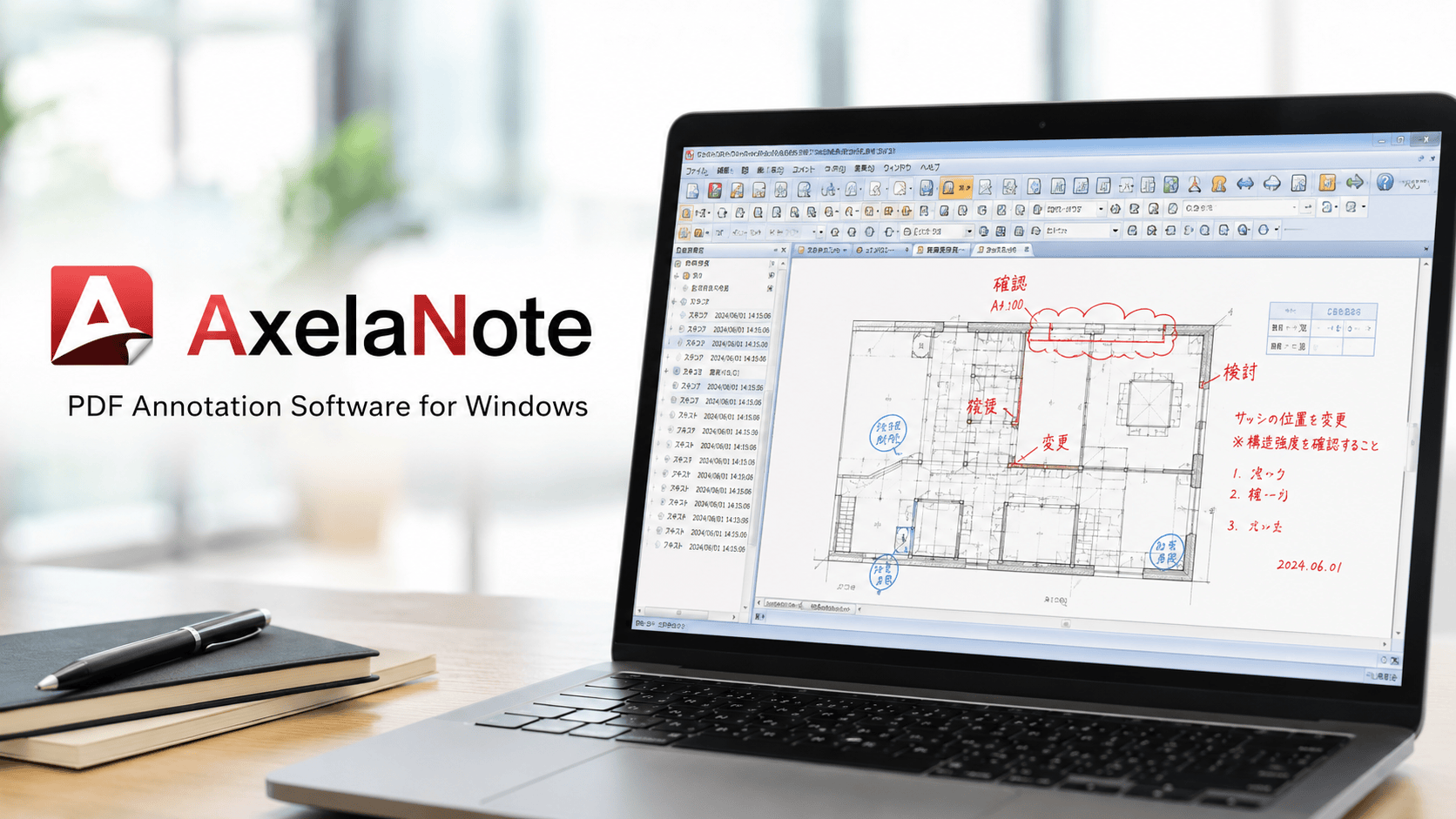
Axelanote is a specialized PDF editing and annotation software created for users who need to write on digital documents without damaging or changing the original file. Developed by the Japanese company TransRecog, it focuses on business-grade PDF markup, handwritten notes, diagram drawing, redlining, review comments, and document checking.
Quick Bio
| Field | Details |
|---|---|
| Product Name | Axelanote |
| Official Styling | AxelaNote |
| Product Type | PDF annotation and writing software |
| Developer | TransRecog |
| Country of Origin | Japan |
| Main Platform | Windows |
| Primary Function | Writing, drawing, commenting, and marking up PDFs |
| Core Technology | Transparent layer annotation system |
| Best For | Business document review, blueprints, forms, contracts, academic files, and paperless workflows |
| Original File Safety | Keeps the original PDF unchanged |
| Touch Support | Supports stylus pens and touch gestures on Windows devices |
| Business Tools | Comment numbering, stamps, templates, scaling tools, and annotation carryover |
| Common Users | Corporations, universities, public agencies, construction firms, and office teams |
| License Type | Subscription-based business licensing |
| User License Estimate | Around 5,148 JPY per year, tax included |
| Device License Estimate | Around 7,128 JPY per year, tax included |
| Trial Availability | Free trial commonly offered |
| Major Strength | Non-destructive PDF markup |
| Key Benefit | Reduces printing, scanning, and manual review steps |
| Main Limitation | Primarily focused on Windows users |
Why Axelanote Matters in Modern PDF Workflows?
Many companies still rely on a slow document review cycle. A file is printed, marked by hand, scanned, emailed, corrected, printed again, and then archived. This process wastes time, paper, storage space, and employee attention. Digital transformation is not just about using computers; it is about removing unnecessary steps from daily work.
Axelanote helps solve this issue by allowing teams to review documents directly on-screen. Users can write naturally, draw attention to mistakes, mark revisions, and add approval notes without printing the document. This supports faster collaboration between office workers, field teams, design reviewers, administrators, and decision-makers.
The software is especially useful in industries where accuracy matters. A construction team can mark measurements on a blueprint. A government office can review forms without altering official documents. A university department can manage academic materials digitally. A corporate team can check reports while preserving the clean original version for records.
How Transparent Layer Technology Works?
The most important feature of Axelanote is its transparent layer system. Instead of editing the PDF itself, the software places a separate annotation layer over the document. Users can write, draw, highlight, stamp, or comment on that layer while the PDF underneath remains unchanged.
This approach is useful because it keeps the source file safe. In many professional settings, original documents must remain untouched for compliance, audit trails, or legal clarity. The transparent layer acts like a digital sheet placed over a printed document. You can mark it freely, remove notes, revise comments, or carry the layer to another file version.
Another major advantage is flexibility. Even when a PDF has restrictions against editing, commenting, or printing, the overlay method can still allow review-style markup in supported workflows. For teams that frequently work with protected documents, this can remove a major productivity barrier while maintaining the integrity of the source document.
Key Features That Make the Software Practical
Axelanote includes several tools that make PDF review more efficient for business users. Handwriting support allows natural note-taking with a stylus, while drawing tools help users create arrows, circles, lines, boxes, and diagrams. These features make document checking feel closer to paper-based reviewing but with digital advantages.
The software also includes practical office tools such as date stamps, pre-registered phrase templates, automated comment numbering, and reusable annotations. These features are helpful for teams that repeat the same review language across many files. Instead of typing the same correction or approval message again and again, users can apply stored phrases quickly.
Another important feature is the ability to carry over annotations. If a document is updated to a new version, the existing markup layer can be applied to the new file. This is especially helpful for blueprint revisions, design drafts, compliance forms, and long review cycles where documents change frequently.
Benefits for Businesses and Office Teams
For businesses, the biggest advantage of Axelanote is workflow efficiency. It reduces the need for printing, scanning, physical storage, and manual circulation. Employees can review documents digitally while still using familiar handwriting and redlining habits.
The software also supports better document control. Since the original file is preserved, teams can separate the clean document from the review layer. This helps reduce confusion during approvals, revisions, and version comparisons. It also makes it easier to understand what changed, who reviewed what, and which notes were added during the process.
For remote or hybrid teams, the tool can support faster communication. A reviewer can mark a PDF on a Windows tablet, save the annotated version, and share it with colleagues. This creates a smoother process than waiting for physical documents to move between offices or job sites.
Use Cases in Government and Public Administration
Government offices often handle forms, applications, permits, reports, public records, and official documents that must be reviewed carefully. In these environments, changing the original file can create risk. A transparent annotation layer offers a safer way to add internal review notes while keeping the official document clean.
Axelanote can help municipal departments reduce paper usage and improve review speed. Staff can add notes, check details, mark missing information, and create internal comments without printing every file. This is useful for departments that process large volumes of paperwork or need to maintain clear records.
Public agencies also benefit from standardization. With templates, stamps, and numbered comments, review teams can use consistent language and formats. This makes internal communication clearer and helps reduce errors during document approval.
Use Cases in Construction and Architecture
Construction and architecture teams frequently work with drawings, blueprints, floor plans, estimates, specifications, and inspection documents. These files often go through multiple revisions, and every change must be reviewed carefully. A tool that preserves the original while allowing detailed markup can be extremely useful.
Axelanote supports drawing-based workflows through pen input, scaling tools, and annotation carryover. Reviewers can mark distances, highlight sections, circle errors, add comments, and transfer notes to updated drawings when new versions are issued. This helps reduce duplicated review work.
Field teams can also benefit from tablet-friendly functionality. Instead of carrying printed plans, workers can review digital PDFs on Windows devices and add handwritten notes directly. This can improve communication between the field, office, contractors, designers, and project managers.
Use Cases in Education and Universities
Universities and schools handle a wide range of documents, including lecture notes, research papers, administrative forms, student submissions, meeting materials, and internal reports. Digital annotation can help educators and administrators reduce paper use while improving document organization.
Axelanote is useful for professors, department staff, researchers, and administrative teams that need to add comments to PDFs. A teacher can write feedback on a digital document. A researcher can mark notes on a paper. A department office can review forms and meeting materials without printing.
The handwritten experience is especially valuable in education because many people still prefer writing comments naturally. With stylus support, users can combine the flexibility of digital files with the comfort of pen-based note-taking.
Use Cases for Legal, Compliance, and Contract Review
Legal and compliance teams often deal with sensitive documents. Contracts, policies, applications, audit materials, and approval files must be reviewed carefully. Directly altering these documents can create confusion or risk, especially when a clean original must be preserved.
Axelanote helps by separating review notes from the document itself. A legal reviewer can add comments, questions, highlights, or approval marks on the annotation layer. The original PDF remains untouched, which supports better document control and clearer review records.
For compliance teams, the ability to add numbered comments and date stamps can be valuable. It helps reviewers track issues, organize feedback, and communicate correction points in a structured way. This can improve accuracy during internal audits, vendor reviews, and policy updates.
Pen, Touch, and Windows Tablet Experience
One of the strengths of Axelanote is its support for stylus-based work on Windows tablets. Many professionals prefer handwriting when reviewing documents because it feels faster and more natural than typing comments. A pen-friendly interface allows users to write directly on the screen like they would on paper.
Touch gestures also make document navigation easier. Users can zoom, move around pages, and adjust their view while reviewing detailed files. This is particularly helpful for blueprints, diagrams, forms, and long reports where users need to inspect small details.
Palm rejection is another important part of the writing experience. When users rest their hand on the screen while writing, the software should prioritize the pen input rather than accidental touch marks. For long review sessions, this can make the tool feel more comfortable and professional.
Annotation Carryover and Version Management
Document version management is a major challenge in professional environments. A blueprint, contract, or report may be updated many times before final approval. When comments are tied directly to one file version, reviewers often need to repeat work after every update.
Axelanote addresses this challenge by allowing annotation layers to be carried over to newer document versions. This means users can reuse existing notes rather than starting from scratch. For industries with frequent revisions, this can save significant time.
This feature is especially helpful when teams need to compare old and new files. Reviewers can keep track of previous comments, check whether corrections were made, and continue the review process more smoothly. It reduces repeated effort and helps teams maintain continuity across document updates.
Business Utility Tools and Productivity Features
Beyond basic PDF writing, Axelanote includes tools designed for structured business work. Automated comment numbering helps reviewers organize feedback in a clear sequence. Date stamps support record keeping. Pre-registered phrase templates reduce repetitive typing and make review language more consistent.
Scaling tools are useful for architectural and technical drawings. Users can measure distances or areas on PDF drawings, which is valuable for construction, engineering, design review, and facility management. These tools help turn a PDF viewer into a more practical work platform.
Templates and reusable marks also improve productivity. A company can create common approval stamps, correction phrases, or review labels. This keeps teams aligned and reduces variation in how employees mark documents.
Pricing and Licensing Overview
Axelanote is generally positioned as a paid business software product rather than a casual free PDF editor. Basic viewing may be available, but full professional features usually require a subscription license. This makes sense because the software is designed for organizations that need reliable document review tools.
When preparing documents for professional use, knowing what size is a4 can also help teams choose the correct page dimensions for reports, forms, and other PDF materials.
The user license is estimated at around 5,148 JPY per year, tax included, per user. This type of license is suitable for individual employees who need access across multiple devices. It may allow installation on up to three PCs, making it practical for office, home, and mobile work environments.
The device license is estimated at around 7,128 JPY per year, tax included, per PC. This option is useful for shared workstations, shift-based teams, public counters, computer labs, or environments where multiple people use the same machine. Businesses should review current license terms before purchasing because pricing and conditions can change.
Advantages Compared With Traditional PDF Editors
Traditional PDF editors are often designed to modify PDF content directly. That can be useful when users need to edit text, rearrange pages, or change document structure. However, direct editing is not always ideal for official documents, restricted PDFs, or files that must remain unchanged.
Axelanote stands out because it focuses on safe annotation rather than destructive editing. Its transparent layer system creates a clear separation between the original file and review notes. This makes it a strong option for teams that need to mark up documents without changing the source.
Another advantage is its business-specific design. Features like comment numbering, annotation carryover, phrase templates, and scaling tools are not just decorative extras. They solve real workflow problems for teams that review large numbers of PDFs every day.
Possible Limitations to Consider
No software is perfect for every user. Axelanote is mainly designed for Windows environments, so teams using macOS, iOS, Android, or browser-only workflows may need other tools. Organizations with mixed device ecosystems should check compatibility before adopting it widely.
Another consideration is that the software is focused on annotation and review rather than full PDF reconstruction. Users who need advanced PDF editing, optical character recognition, complex form building, or page-level publishing tools may still need a separate PDF editor.
Language and regional availability may also matter for international buyers. Since the product is developed in Japan and appears strongly focused on Japanese business adoption, companies outside Japan should confirm support options, documentation, payment methods, and licensing terms before making it part of a larger workflow.
Who Should Use This PDF Annotation Tool?
Axelanote is best for professional users who regularly review PDFs and need to preserve original files. It is especially suitable for government departments, construction firms, architecture offices, education teams, legal departments, compliance groups, and corporate administrators.
It is also a strong option for businesses moving toward paperless operations. If a team still prints documents just to mark them by hand, this software can reduce wasted paper and shorten review cycles. The ability to write naturally with a stylus makes the transition easier for employees who are used to pen-and-paper workflows.
However, casual users who only need to highlight a PDF once in a while may not need a specialized tool. The greatest value appears when teams handle repeated document reviews, version updates, technical drawings, or official files where original document safety is important.
Final Verdict
Axelanote is a focused, business-ready PDF annotation tool built around one powerful idea: users should be able to write on PDFs without changing the original file. Its transparent layer technology makes it practical for sensitive documents, restricted PDFs, blueprints, forms, reports, and review-heavy workflows.
The software’s strengths go beyond simple markup. Pen support, touch optimization, reusable comments, date stamps, comment numbering, scaling tools, and annotation carryover make it useful for serious professional environments. These features can help organizations reduce printing, improve version control, and speed up internal review processes.
For Windows-based teams that rely heavily on PDF review, Axelanote offers a practical solution that combines the comfort of handwriting with the control of digital document management. It may not replace every advanced PDF editor, but it fills an important gap for organizations that need safe, efficient, and paperless annotation.
FAQs
What is Axelanote used for?
Axelanote is used for writing, drawing, commenting, stamping, and adding review notes to PDF files without changing the original document. It is especially useful for business reviews, blueprints, forms, contracts, and official files.
Does the software change the original PDF?
No. The main purpose of the software is to preserve the original PDF. It uses a transparent annotation layer placed over the file, allowing users to add notes while keeping the source document unchanged.
Is it suitable for construction drawings?
Yes. The tool is useful for construction, architecture, and engineering workflows because it supports handwritten markup, scaling tools, diagram notes, and annotation carryover between updated blueprint versions.
Can it be used on Windows tablets?
Yes. It is designed for Windows and supports stylus pens and touch gestures, making it practical for tablet-based review, handwritten notes, and on-screen document checking.
Is Axelanote free?
It may offer basic viewing or trial access, but full business features generally require a paid subscription license. Pricing can vary by user license, device license, and current purchasing terms.


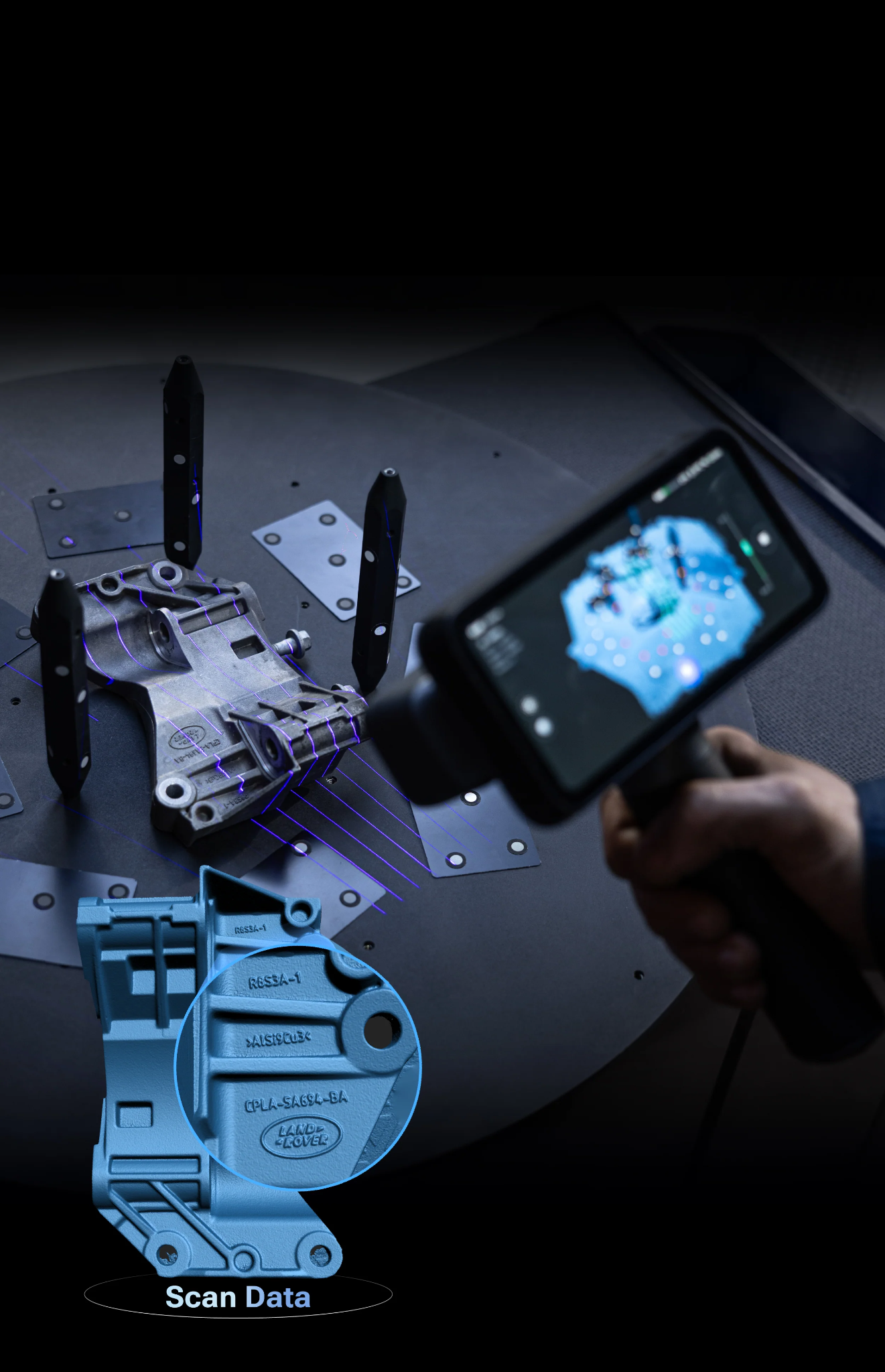
A scanner can look impressive on a specification sheet, but the real test begins when you take it into an actual project. One day you might need to capture a small mechanical component. Next, you could be working around a vehicle or trying to record a larger object with uneven surfaces. The requirements can change quickly. That is why flexibility has become such an important consideration when choosing a 3D scanner.
Instead of relying on one scanning approach for every situation, modern systems can offer different technologies and operating methods for different jobs. The afinia einscan rigil tri-mode laser 3d scanner is an example of this approach, combining multiple scanning modes in one portable system. For professionals and serious makers, this kind of versatility can make a noticeable difference in day-to-day work.
One Project Rarely Looks Like Another
Imagine working in a small workshop. In the morning, you need detailed information from a compact metal part. Later, you are asked to capture a much larger object. By afternoon, the job has moved outside, where the lighting conditions are completely different. Using the same scanning technique for all three situations may not be practical.
Different surfaces, dimensions, levels of detail, and environments can call for different approaches. A flexible scanner gives the operator more room to adapt instead of forcing the project into a single predefined workflow. That is where multi-mode scanning becomes particularly interesting.
What Makes a Tri-Mode System Different?
The EinScan Rigil is built around three operating options: standalone, wireless PC, and wired PC. This means the scanner can be used in different ways depending on how much mobility or computing support a particular job requires. Standalone operation can be convenient when moving around a large object or working somewhere without a computer immediately beside you. Wireless PC operation provides another balance between freedom of movement and computer-based processing. Wired operation can make sense when a stable connection is the priority. Rather than treating portability and computer processing as mutually exclusive choices, this setup gives users alternatives within the same system.
A Closer Look at Its Scanning Technologies
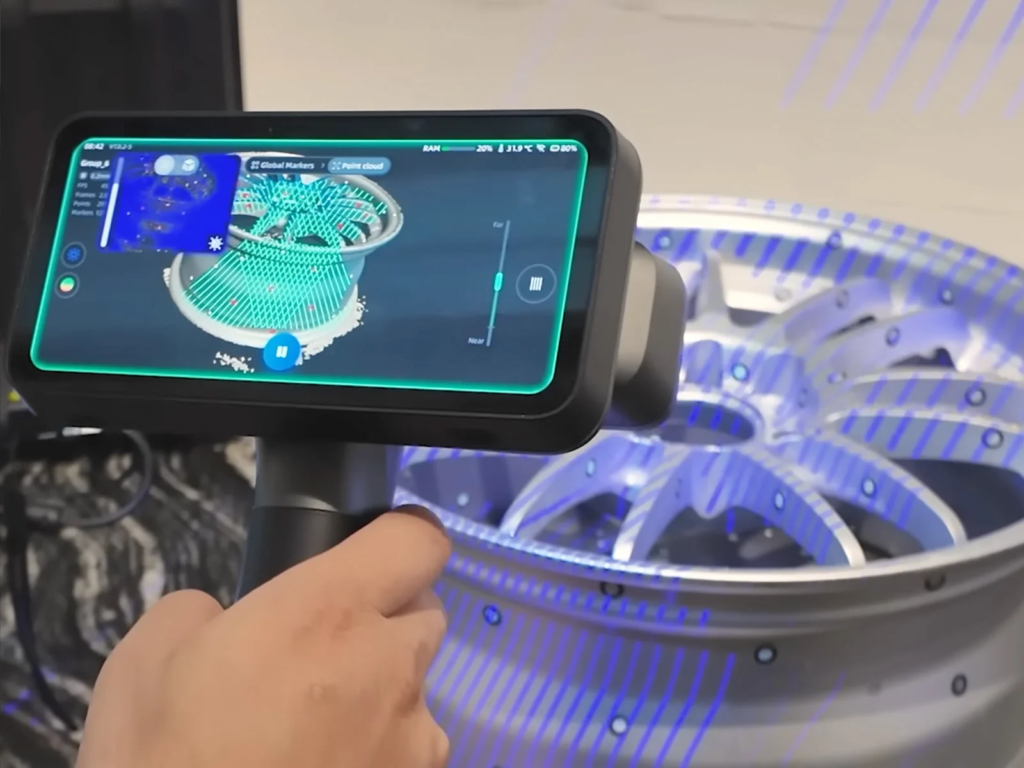
The other important part of the system is its combination of blue laser and infrared scanning. Blue laser scanning can be useful when capturing detailed geometry, while infrared scanning provides a different approach for faster coverage.
The Rigil includes crossed and parallel laser line modes as well as infrared scanning. This variety allows users to select an approach according to the object and the desired result. For someone handling different projects throughout the week, having multiple methods available can be more useful than owning a device optimized for only one narrow application.
Picture a Small Mechanical Part
Let’s say a replacement component arrives at a workshop without its original CAD file. The part contains several curves, mounting points, and small geometric details. Measuring everything manually would be possible, but it would also take time. A 3D scanner can provide a digital reference much faster.
The operator can capture the component from different angles, align the data, inspect the resulting model, and then use the information for design or reverse-engineering work. The important point is that scanning does not necessarily eliminate the design stage. Instead, it gives the designer a detailed physical reference to work from.
Now Consider a Much Larger Object
The workflow changes when the object becomes significantly larger. Scanning a vehicle panel, piece of machinery, or large structure requires the operator to move around a much greater surface area. Tracking becomes especially important because the system needs to understand how each newly captured section relates to the previous one. This is where flexible alignment options can be valuable.
The Rigil supports several alignment methods, including marker-based and feature-based approaches for laser scanning. Different alignment choices can be used depending on the geometry and scanning conditions. Good preparation still matters, but having multiple tracking options gives the operator more ways to handle complicated projects.
What About Difficult Surfaces?
Not every object behaves nicely under a scanner. Dark, reflective, transparent, or highly textured surfaces can create challenges for optical scanning systems. The best approach depends on the scanner technology, surface characteristics, and environmental conditions.
This is another reason operators should understand their equipment rather than assuming that every object can be scanned identically. Preparation may involve cleaning the surface, improving tracking conditions, using suitable markers, or adjusting the scanning strategy. Experience often becomes just as important as the hardware.
Portability Can Change the Workflow
A portable scanner is useful for another simple reason: not every object can be brought to the scanner. Large machinery, vehicles, installations, and architectural elements may need to be captured where they are located.
Carrying a compact scanning system to the object can be much more practical than transporting the object to a dedicated scanning area. The Rigil’s standalone and wireless options are particularly relevant to this type of work because they give operators more freedom when moving around a project.
Where EINSTAR Fits Into the Picture
For users researching professional scanning equipment, EINSTAR is another name worth considering when looking at portable 3D scanning solutions. The important thing is not simply the brand or the number of features available. What matters is whether the equipment fits the work.
Someone focused on small precision components may prioritize detail. A person using a 3d scanner for larger objects may care more about speed and tracking. Another user might value the ability to work away from a computer. The right setup is therefore determined by the project, not by a single specification.
A Few Habits Can Improve Results
Even a capable scanner benefits from careful operation. Before starting, inspect the object and identify difficult areas. Plan how you will move around it rather than scanning randomly. Make sure important surfaces are captured from enough angles.
During the scan, watch for gaps or areas where tracking may become uncertain. Afterward, review the model carefully before using it for design or manufacturing. These habits can prevent small problems from becoming much larger issues later.
Why Versatility Matters Long Term
Buying equipment for one specific task can make sense when the workload is highly predictable. But many professionals deal with changing requirements. A scanner that supports multiple technologies and operating methods can remain useful as those requirements evolve.
That is perhaps the strongest argument for a tri-mode system. It provides room to adapt. Instead of asking whether one scanning mode is the fastest or most accurate in isolation, users can consider which mode makes the most sense for the job in front of them.
Final Thoughts
The Afinia EinScan Rigil Tri-Mode Laser 3D Scanner illustrates how modern scanning equipment is moving toward greater flexibility. With multiple operating options and both blue laser and infrared scanning technologies, it can be adapted to different objects, environments, and project requirements. A capable 3D scanner is not simply about capturing a digital model. Successful results also depend on planning, tracking, surface preparation, and understanding how the captured data will be used afterward. For professionals who work with varied objects rather than one predictable type of project, having several scanning approaches available can make the entire process more adaptable.
FAQs
What is a tri-mode 3D scanner?
A tri-mode scanner provides three ways to operate or configure the scanning workflow. The EinScan Rigil offers standalone, wireless PC, and wired PC operation, giving users different options for mobility and processing.
What technologies does the EinScan Rigil use?
The system combines blue laser and infrared scanning technologies. Its laser options include crossed and parallel laser lines.
Can a 3D scanner capture large objects?
Yes. Many professional scanners are designed to capture objects ranging from small components to much larger subjects. The appropriate scanning mode and alignment method depend on the object’s size and geometry.
Does scanning require a controlled indoor environment?
Not always. Some scanners are designed to operate in a variety of environments, although lighting, surface characteristics, and other conditions can still affect the scanning process.
Is the EinScan Rigil suitable for different types of projects?
Its multiple scanning and operating modes are designed to provide flexibility across different applications. The most suitable configuration depends on the object’s size, required detail, environment, and intended use of the captured data.


Choosing a diamond engagement ring is one of the most meaningful purchases a person will ever make. It is a symbol of commitment, love, and a future shared together. Yet for many buyers, the process can feel overwhelming — flooded with technical jargon, conflicting advice, and an almost endless array of styles, cuts, and price points. Whether you are shopping for the first time or refining your search after weeks of research, understanding the key factors that define a quality ring will help you make a confident, informed decision. This guide breaks down everything you need to know, from the fundamentals of diamond quality to the nuances of ring design, so you can find a piece that will be treasured for a lifetime.
Understanding the Four Cs: The Foundation of Diamond Quality
Before stepping into any jeweler — online or in person — every buyer should have a working understanding of the Four Cs: cut, color, clarity, and carat weight. These four characteristics are the universal language of diamond grading and directly influence both the appearance and the price of a stone.
Cut: The Most Important Factor
Of all the Four Cs, cut has the greatest impact on a diamond’s visual appeal. A well-cut diamond reflects light with exceptional brilliance, creating that iconic sparkle that draws the eye. Cut does not refer to the shape of the diamond — round, oval, cushion, or pear — but rather to the precision of the facets and the proportions of the stone. A poorly cut diamond, regardless of its color or clarity grade, will appear dull and lifeless. When evaluating cut quality, look for grades of “Excellent” or “Ideal” from reputable grading laboratories such as the GIA or AGS.
Color and Clarity: Finding the Sweet Spot
Diamond color is graded on a scale from D (colorless) to Z (light yellow or brown). For most engagement rings, stones in the D through J range appear white to the naked eye, with the most noticeable differences only visible under magnification. Clarity, on the other hand, refers to the presence of internal inclusions or external blemishes. A stone graded VS1 or VS2 (Very Slightly Included) typically appears flawless to the unaided eye and offers excellent value compared to flawless or internally flawless grades. Balancing color and clarity against your budget allows you to maximize the visual impact of your purchase without overspending on characteristics that are imperceptible in everyday wear.
Choosing the Right Ring Style for Your Partner
Beyond the diamond itself, the setting and overall design of the ring play a crucial role in how the piece looks and feels on the hand. Ring styles range from classic solitaires — where a single diamond takes center stage — to elaborate halo designs, vintage-inspired settings, and modern three-stone arrangements. Each style carries its own aesthetic and symbolic meaning.
Solitaire Settings: Timeless Elegance
The solitaire remains the most popular engagement ring style for good reason. Its clean, uncluttered design places all attention on the center diamond, making it ideal for showcasing a high-quality stone. Prong settings — typically four or six prongs — allow maximum light to enter the diamond, enhancing its brilliance. Bezel settings, where the diamond is encircled by a thin band of metal, offer a sleeker, more contemporary look and provide excellent protection for the stone.
Halo and Vintage Designs: Maximizing Visual Impact
Halo settings surround the center diamond with a ring of smaller accent stones, creating the illusion of a larger, more brilliant centerpiece. This style is particularly effective for buyers working within a tighter budget who still want a visually striking ring. Vintage and antique-inspired designs, featuring intricate milgrain detailing, filigree work, and Art Deco geometric patterns, appeal to those who appreciate craftsmanship and historical character. These styles often pair beautifully with cushion-cut or oval diamonds.
Setting a Realistic Budget Without Compromising Quality
One of the most persistent myths in engagement ring shopping is the idea that you must spend two or three months’ salary on a ring. This outdated guideline was largely a marketing invention and has no bearing on what makes a meaningful or high-quality purchase. A thoughtful budget is one that reflects your financial situation and prioritizes the characteristics that matter most to your partner. For a detailed, step-by-step approach to planning your purchase wisely, this comprehensive guide to building the perfect engagement ring offers practical, expert-backed advice that can help you navigate every stage of the process with confidence.
The Importance of Certification and Ethical Sourcing
A certified diamond comes with a grading report from an independent gemological laboratory — most commonly the GIA (Gemological Institute of America) or AGS (American Gem Society). This report provides an objective assessment of the diamond’s Four Cs and serves as a guarantee of the stone’s quality. Never purchase a significant diamond without certification, as unverified claims from sellers are impossible to validate independently. Equally important for many modern buyers is the question of ethical sourcing. Conflict-free diamonds, lab-grown alternatives, and stones sourced through verified supply chains are increasingly available and allow buyers to make a purchase that aligns with their values. Understanding how diamonds are sourced and graded is similar in principle to understanding the tools and techniques used in precision crafts — just as knowing why your diamond painting wax is not picking up requires understanding the materials involved, knowing your diamond’s provenance requires understanding the supply chain behind it.
Leon Diamond: A Trusted Name in Engagement Ring Craftsmanship
When it comes to finding a ring that combines exceptional quality with genuine craftsmanship, Leon Diamond has built a well-deserved reputation among discerning buyers. Based in New York City’s Diamond District, Leon Diamond offers an extensive selection of handcrafted rings designed to suit a wide range of personal styles and budgets. Their team of expert gemologists and designers work closely with customers to create pieces that are as unique as the relationships they represent. With decades of experience and a commitment to transparency, Leon Diamond is a name that buyers can trust when making one of life’s most significant purchases.
Why the Right Retailer Makes All the Difference
When you are ready to explore your options, choosing a retailer with deep expertise, a curated selection, and a genuine commitment to customer service is just as important as choosing the right diamond. The best jewelers will take the time to educate you, answer your questions honestly, and guide you toward a ring that fits both your vision and your budget — without pressure or upselling. For those seeking diamond engagement rings that reflect true artistry and lasting value, working with a jeweler who prioritizes quality and personal service ensures that every detail of your purchase is handled with the care it deserves.
Final Thoughts: Making a Decision You Will Never Regret
Choosing a diamond engagement ring does not have to be a stressful experience. When you approach the process with knowledge, a clear sense of your partner’s preferences, and a realistic budget, the decision becomes far more manageable — and ultimately, far more rewarding. Focus on the cut above all other factors, prioritize certified stones from reputable sources, and take the time to explore different settings and styles before committing. The right ring is out there, and with the right guidance, you will find it. More importantly, you will know with certainty that you have chosen something worthy of the moment it represents.

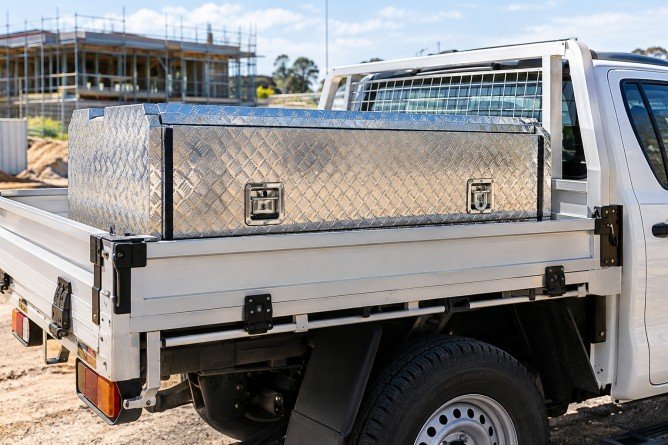
In industries requiring reliable and secure storage, UTE tool boxes represent an essential investment for professionals and tradespeople alike. These tool boxes are specifically designed to fit onto utility vehicles, providing robust and accessible storage solutions for a variety of equipment and tools. This guide explores the key features, benefits, and considerations when selecting a UTE tool box to maximise utility and security.
Understanding UTE Tool Boxes
UTE tool boxes are specialised storage units engineered to be mounted on the tray of a utility vehicle, commonly referred to as a UTE. Their primary purpose is to organise tools and equipment efficiently while safeguarding them against theft, weather conditions, and operational hazards encountered on worksites.
Key Features of UTE Tool Boxes
Several attributes define the quality and effectiveness of a UTE tool box. First, the material construction plays a pivotal role in durability. Tool boxes made from aluminium or stainless steel offer excellent resistance to corrosion, ensuring longevity in both urban and rugged environments. Additionally, they are often equipped with weatherproof seals to keep contents dry and protected.
Security mechanisms are another crucial feature. High-grade locking systems, including key locks and combination locks, provide protection against unauthorised access. Some models incorporate advanced locking features to deter theft even in high-risk areas.
Size and Capacity Considerations
The size of a UTE tool box is dictated by the user’s specific needs. Tool boxes vary significantly in dimensions and internal arrangement options, such as shelves and compartments. Selecting an appropriately sized unit requires an assessment of the volume and type of tools to be stored to maintain organisation and ease of access.
Benefits of Using UTE Tool Boxes
Besides enhancing security and organisation, UTE tool boxes contribute to increased productivity on the job. By having tools readily available and systematically stored within reach, professionals mitigate downtime associated with searching for equipment. Moreover, the secure nature of these boxes reduces the risk of tool loss, directly impacting operational costs.
In addition, they improve vehicle utility by optimising space usage on the UTE. By utilising storage space effectively, more tools and supplies can be transported safely, facilitating preparedness across various jobs.
Choosing the Right UTE Tool Box
The selection process should prioritise compatibility with the specific make and model of the UTE vehicle. Measurements must be precise to ensure a proper fit and stable mounting without compromising the vehicle’s balance or load capacity.
Attention should also be given to the method of installation. Some tool boxes come with universal fittings and mounting kits, simplifying the process and ensuring secure attachment to the vehicle tray. Professional installation is recommended to guarantee safety and adherence to vehicle regulations.
Customisation and Additional Accessories
Many manufacturers offer customisation options including colour matching, branding, and specialised locking systems. Additional accessories such as internal lighting, drawer organisers, and power sockets can be incorporated to enhance usability.
Maintenance and Care
Proper maintenance ensures prolonged utility and appearance of a UTE tool box. Regular cleaning to remove dirt and debris, lubricant application on locks, and inspections for damage are essential practices. Addressing minor issues promptly can prevent costly repairs and maintain security integrity.
Weatherproofing seals should be checked periodically to sustain protection against moisture ingress. Ensuring the tool box remains tightly sealed also helps preserve the condition of stored tools and equipment.
Conclusion
In conclusion, investing in UTE tool boxes offers substantial benefits in terms of utility, security, and operational efficiency for tradespeople and industries reliant on utility vehicles. Selecting a high-quality, appropriately sized tool box, tailored to individual requirements, and maintained diligently will guarantee a long-lasting and valuable asset for any professional toolkit.
Sitec Equipment Pty Ltd specialises in providing a comprehensive range of UTE tool boxes designed to meet diverse needs. Their expertise ensures clients receive products that combine durability, security, and convenience, suitable for demanding work environments.

VPS Performance: The Factors That Affect Server Speed

A Practical Look at Choosing and Using a Tri-Mode 3D Scanner

How to Choose the Perfect Diamond Engagement Ring: A Complete Buyer’s Guide

A Practical PPC Framework for Bristol Companies That Want Better Lead Quality

6 Best Lodges For Sale: Find Your Perfect Retreat

Unlocking the Best Deals with Rayslocker: Your Ultimate Guide to Affordable Shopping

The 15 Highest-Paid Rugby Players in the World

Christopher Dare: The Untold Story of Engineer and Former Husband of Angela Rippon

How to Ensure Your Home is Valued Correctly for a Quick Sale

What Is Fanquer? The Digital Creator Platform Transforming Direct-to-Fan Engagement

Dr Jared Ross: Missouri Appeals Court Upholds Protection Order Over Graphic Torture and Murder Threats

Nancy Hallam: The Inspiring Life, Career, and Success Story Behind Ian Wright’s Wife
The 15 Highest-Paid Rugby Players in the World
Christopher Dare: The Untold Story of Engineer and Former Husband of Angela Rippon
How to Ensure Your Home is Valued Correctly for a Quick Sale
What Is Fanquer? The Digital Creator Platform Transforming Direct-to-Fan Engagement
Dr Jared Ross: Missouri Appeals Court Upholds Protection Order Over Graphic Torture and Murder Threats
Nancy Hallam: The Inspiring Life, Career, and Success Story Behind Ian Wright’s Wife
-
 Sports4 months ago
The 15 Highest-Paid Rugby Players in the World
-
Celebrity10 months ago
Christopher Dare: The Untold Story of Engineer and Former Husband of Angela Rippon
-
 Real Estate8 months ago
How to Ensure Your Home is Valued Correctly for a Quick Sale
-
 Technology4 months ago
What Is Fanquer? The Digital Creator Platform Transforming Direct-to-Fan Engagement
-
 Celebrity4 months ago
Dr Jared Ross: Missouri Appeals Court Upholds Protection Order Over Graphic Torture and Murder Threats
-
Celebrity11 months ago
Nancy Hallam: The Inspiring Life, Career, and Success Story Behind Ian Wright’s Wife
-

 Health8 months ago
Enclomimed 25 (Enclomiphene) – Effective PCT Protocol
-
 Celebrity10 months ago
Who Is Maisie Mae Roffey? The Private Life, Family Story, and Quiet Success of Julie Walters’ Daughter