
Blog
What Is Axelanote? Features, Benefits, Pricing, and Business Uses

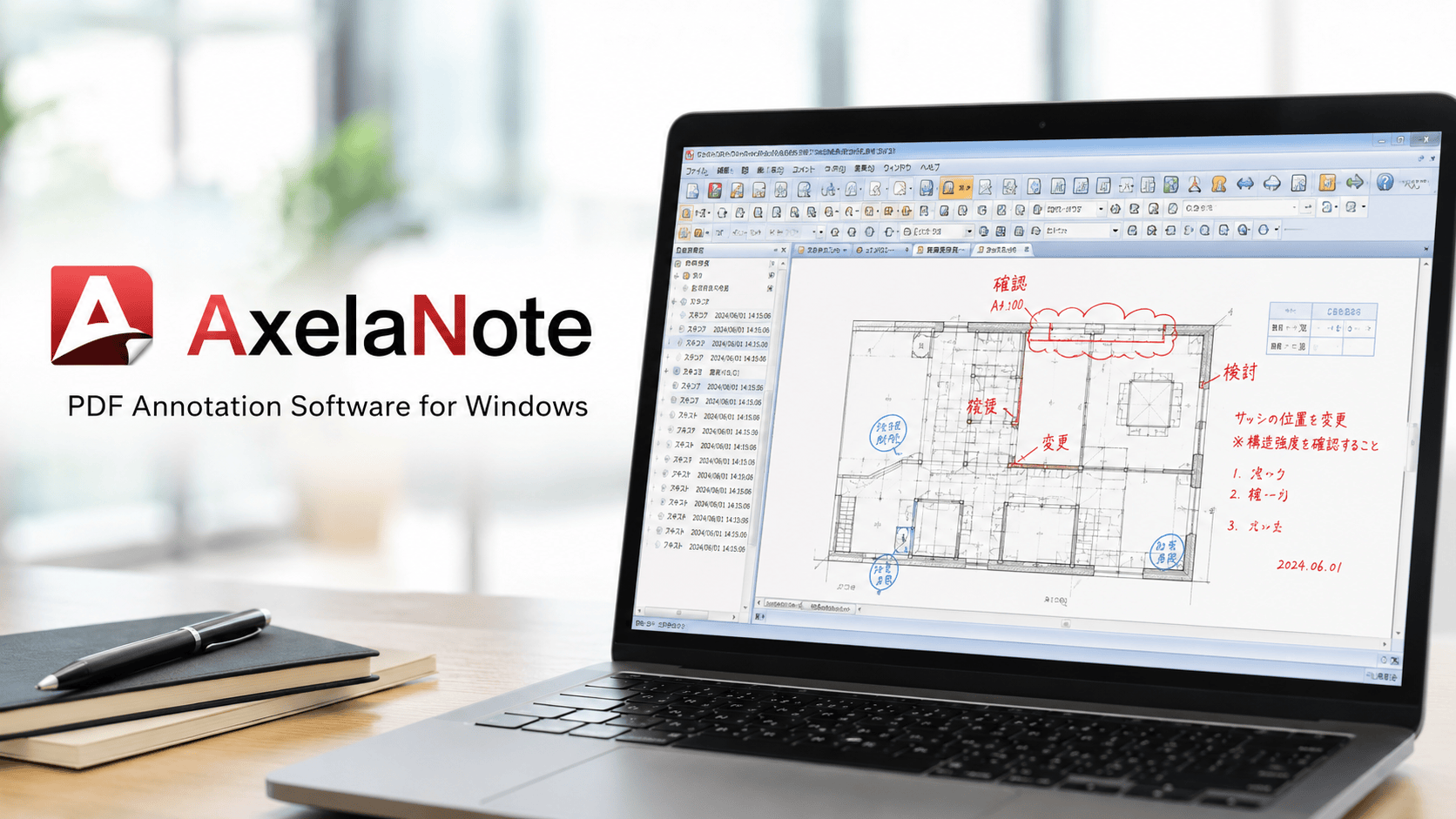
Axelanote is a specialized PDF editing and annotation software created for users who need to write on digital documents without damaging or changing the original file. Developed by the Japanese company TransRecog, it focuses on business-grade PDF markup, handwritten notes, diagram drawing, redlining, review comments, and document checking.
Quick Bio
| Field | Details |
|---|---|
| Product Name | Axelanote |
| Official Styling | AxelaNote |
| Product Type | PDF annotation and writing software |
| Developer | TransRecog |
| Country of Origin | Japan |
| Main Platform | Windows |
| Primary Function | Writing, drawing, commenting, and marking up PDFs |
| Core Technology | Transparent layer annotation system |
| Best For | Business document review, blueprints, forms, contracts, academic files, and paperless workflows |
| Original File Safety | Keeps the original PDF unchanged |
| Touch Support | Supports stylus pens and touch gestures on Windows devices |
| Business Tools | Comment numbering, stamps, templates, scaling tools, and annotation carryover |
| Common Users | Corporations, universities, public agencies, construction firms, and office teams |
| License Type | Subscription-based business licensing |
| User License Estimate | Around 5,148 JPY per year, tax included |
| Device License Estimate | Around 7,128 JPY per year, tax included |
| Trial Availability | Free trial commonly offered |
| Major Strength | Non-destructive PDF markup |
| Key Benefit | Reduces printing, scanning, and manual review steps |
| Main Limitation | Primarily focused on Windows users |
Why Axelanote Matters in Modern PDF Workflows?
Many companies still rely on a slow document review cycle. A file is printed, marked by hand, scanned, emailed, corrected, printed again, and then archived. This process wastes time, paper, storage space, and employee attention. Digital transformation is not just about using computers; it is about removing unnecessary steps from daily work.
Axelanote helps solve this issue by allowing teams to review documents directly on-screen. Users can write naturally, draw attention to mistakes, mark revisions, and add approval notes without printing the document. This supports faster collaboration between office workers, field teams, design reviewers, administrators, and decision-makers.
The software is especially useful in industries where accuracy matters. A construction team can mark measurements on a blueprint. A government office can review forms without altering official documents. A university department can manage academic materials digitally. A corporate team can check reports while preserving the clean original version for records.
How Transparent Layer Technology Works?
The most important feature of Axelanote is its transparent layer system. Instead of editing the PDF itself, the software places a separate annotation layer over the document. Users can write, draw, highlight, stamp, or comment on that layer while the PDF underneath remains unchanged.
This approach is useful because it keeps the source file safe. In many professional settings, original documents must remain untouched for compliance, audit trails, or legal clarity. The transparent layer acts like a digital sheet placed over a printed document. You can mark it freely, remove notes, revise comments, or carry the layer to another file version.
Another major advantage is flexibility. Even when a PDF has restrictions against editing, commenting, or printing, the overlay method can still allow review-style markup in supported workflows. For teams that frequently work with protected documents, this can remove a major productivity barrier while maintaining the integrity of the source document.
Key Features That Make the Software Practical
Axelanote includes several tools that make PDF review more efficient for business users. Handwriting support allows natural note-taking with a stylus, while drawing tools help users create arrows, circles, lines, boxes, and diagrams. These features make document checking feel closer to paper-based reviewing but with digital advantages.
The software also includes practical office tools such as date stamps, pre-registered phrase templates, automated comment numbering, and reusable annotations. These features are helpful for teams that repeat the same review language across many files. Instead of typing the same correction or approval message again and again, users can apply stored phrases quickly.
Another important feature is the ability to carry over annotations. If a document is updated to a new version, the existing markup layer can be applied to the new file. This is especially helpful for blueprint revisions, design drafts, compliance forms, and long review cycles where documents change frequently.
Benefits for Businesses and Office Teams
For businesses, the biggest advantage of Axelanote is workflow efficiency. It reduces the need for printing, scanning, physical storage, and manual circulation. Employees can review documents digitally while still using familiar handwriting and redlining habits.
The software also supports better document control. Since the original file is preserved, teams can separate the clean document from the review layer. This helps reduce confusion during approvals, revisions, and version comparisons. It also makes it easier to understand what changed, who reviewed what, and which notes were added during the process.
For remote or hybrid teams, the tool can support faster communication. A reviewer can mark a PDF on a Windows tablet, save the annotated version, and share it with colleagues. This creates a smoother process than waiting for physical documents to move between offices or job sites.
Use Cases in Government and Public Administration
Government offices often handle forms, applications, permits, reports, public records, and official documents that must be reviewed carefully. In these environments, changing the original file can create risk. A transparent annotation layer offers a safer way to add internal review notes while keeping the official document clean.
Axelanote can help municipal departments reduce paper usage and improve review speed. Staff can add notes, check details, mark missing information, and create internal comments without printing every file. This is useful for departments that process large volumes of paperwork or need to maintain clear records.
Public agencies also benefit from standardization. With templates, stamps, and numbered comments, review teams can use consistent language and formats. This makes internal communication clearer and helps reduce errors during document approval.
Use Cases in Construction and Architecture
Construction and architecture teams frequently work with drawings, blueprints, floor plans, estimates, specifications, and inspection documents. These files often go through multiple revisions, and every change must be reviewed carefully. A tool that preserves the original while allowing detailed markup can be extremely useful.
Axelanote supports drawing-based workflows through pen input, scaling tools, and annotation carryover. Reviewers can mark distances, highlight sections, circle errors, add comments, and transfer notes to updated drawings when new versions are issued. This helps reduce duplicated review work.
Field teams can also benefit from tablet-friendly functionality. Instead of carrying printed plans, workers can review digital PDFs on Windows devices and add handwritten notes directly. This can improve communication between the field, office, contractors, designers, and project managers.
Use Cases in Education and Universities
Universities and schools handle a wide range of documents, including lecture notes, research papers, administrative forms, student submissions, meeting materials, and internal reports. Digital annotation can help educators and administrators reduce paper use while improving document organization.
Axelanote is useful for professors, department staff, researchers, and administrative teams that need to add comments to PDFs. A teacher can write feedback on a digital document. A researcher can mark notes on a paper. A department office can review forms and meeting materials without printing.
The handwritten experience is especially valuable in education because many people still prefer writing comments naturally. With stylus support, users can combine the flexibility of digital files with the comfort of pen-based note-taking.
Use Cases for Legal, Compliance, and Contract Review
Legal and compliance teams often deal with sensitive documents. Contracts, policies, applications, audit materials, and approval files must be reviewed carefully. Directly altering these documents can create confusion or risk, especially when a clean original must be preserved.
Axelanote helps by separating review notes from the document itself. A legal reviewer can add comments, questions, highlights, or approval marks on the annotation layer. The original PDF remains untouched, which supports better document control and clearer review records.
For compliance teams, the ability to add numbered comments and date stamps can be valuable. It helps reviewers track issues, organize feedback, and communicate correction points in a structured way. This can improve accuracy during internal audits, vendor reviews, and policy updates.
Pen, Touch, and Windows Tablet Experience
One of the strengths of Axelanote is its support for stylus-based work on Windows tablets. Many professionals prefer handwriting when reviewing documents because it feels faster and more natural than typing comments. A pen-friendly interface allows users to write directly on the screen like they would on paper.
Touch gestures also make document navigation easier. Users can zoom, move around pages, and adjust their view while reviewing detailed files. This is particularly helpful for blueprints, diagrams, forms, and long reports where users need to inspect small details.
Palm rejection is another important part of the writing experience. When users rest their hand on the screen while writing, the software should prioritize the pen input rather than accidental touch marks. For long review sessions, this can make the tool feel more comfortable and professional.
Annotation Carryover and Version Management
Document version management is a major challenge in professional environments. A blueprint, contract, or report may be updated many times before final approval. When comments are tied directly to one file version, reviewers often need to repeat work after every update.
Axelanote addresses this challenge by allowing annotation layers to be carried over to newer document versions. This means users can reuse existing notes rather than starting from scratch. For industries with frequent revisions, this can save significant time.
This feature is especially helpful when teams need to compare old and new files. Reviewers can keep track of previous comments, check whether corrections were made, and continue the review process more smoothly. It reduces repeated effort and helps teams maintain continuity across document updates.
Business Utility Tools and Productivity Features
Beyond basic PDF writing, Axelanote includes tools designed for structured business work. Automated comment numbering helps reviewers organize feedback in a clear sequence. Date stamps support record keeping. Pre-registered phrase templates reduce repetitive typing and make review language more consistent.
Scaling tools are useful for architectural and technical drawings. Users can measure distances or areas on PDF drawings, which is valuable for construction, engineering, design review, and facility management. These tools help turn a PDF viewer into a more practical work platform.
Templates and reusable marks also improve productivity. A company can create common approval stamps, correction phrases, or review labels. This keeps teams aligned and reduces variation in how employees mark documents.
Pricing and Licensing Overview
Axelanote is generally positioned as a paid business software product rather than a casual free PDF editor. Basic viewing may be available, but full professional features usually require a subscription license. This makes sense because the software is designed for organizations that need reliable document review tools.
When preparing documents for professional use, knowing what size is a4 can also help teams choose the correct page dimensions for reports, forms, and other PDF materials.
The user license is estimated at around 5,148 JPY per year, tax included, per user. This type of license is suitable for individual employees who need access across multiple devices. It may allow installation on up to three PCs, making it practical for office, home, and mobile work environments.
The device license is estimated at around 7,128 JPY per year, tax included, per PC. This option is useful for shared workstations, shift-based teams, public counters, computer labs, or environments where multiple people use the same machine. Businesses should review current license terms before purchasing because pricing and conditions can change.
Advantages Compared With Traditional PDF Editors
Traditional PDF editors are often designed to modify PDF content directly. That can be useful when users need to edit text, rearrange pages, or change document structure. However, direct editing is not always ideal for official documents, restricted PDFs, or files that must remain unchanged.
Axelanote stands out because it focuses on safe annotation rather than destructive editing. Its transparent layer system creates a clear separation between the original file and review notes. This makes it a strong option for teams that need to mark up documents without changing the source.
Another advantage is its business-specific design. Features like comment numbering, annotation carryover, phrase templates, and scaling tools are not just decorative extras. They solve real workflow problems for teams that review large numbers of PDFs every day.
Possible Limitations to Consider
No software is perfect for every user. Axelanote is mainly designed for Windows environments, so teams using macOS, iOS, Android, or browser-only workflows may need other tools. Organizations with mixed device ecosystems should check compatibility before adopting it widely.
Another consideration is that the software is focused on annotation and review rather than full PDF reconstruction. Users who need advanced PDF editing, optical character recognition, complex form building, or page-level publishing tools may still need a separate PDF editor.
Language and regional availability may also matter for international buyers. Since the product is developed in Japan and appears strongly focused on Japanese business adoption, companies outside Japan should confirm support options, documentation, payment methods, and licensing terms before making it part of a larger workflow.
Who Should Use This PDF Annotation Tool?
Axelanote is best for professional users who regularly review PDFs and need to preserve original files. It is especially suitable for government departments, construction firms, architecture offices, education teams, legal departments, compliance groups, and corporate administrators.
It is also a strong option for businesses moving toward paperless operations. If a team still prints documents just to mark them by hand, this software can reduce wasted paper and shorten review cycles. The ability to write naturally with a stylus makes the transition easier for employees who are used to pen-and-paper workflows.
However, casual users who only need to highlight a PDF once in a while may not need a specialized tool. The greatest value appears when teams handle repeated document reviews, version updates, technical drawings, or official files where original document safety is important.
Final Verdict
Axelanote is a focused, business-ready PDF annotation tool built around one powerful idea: users should be able to write on PDFs without changing the original file. Its transparent layer technology makes it practical for sensitive documents, restricted PDFs, blueprints, forms, reports, and review-heavy workflows.
The software’s strengths go beyond simple markup. Pen support, touch optimization, reusable comments, date stamps, comment numbering, scaling tools, and annotation carryover make it useful for serious professional environments. These features can help organizations reduce printing, improve version control, and speed up internal review processes.
For Windows-based teams that rely heavily on PDF review, Axelanote offers a practical solution that combines the comfort of handwriting with the control of digital document management. It may not replace every advanced PDF editor, but it fills an important gap for organizations that need safe, efficient, and paperless annotation.
FAQs
What is Axelanote used for?
Axelanote is used for writing, drawing, commenting, stamping, and adding review notes to PDF files without changing the original document. It is especially useful for business reviews, blueprints, forms, contracts, and official files.
Does the software change the original PDF?
No. The main purpose of the software is to preserve the original PDF. It uses a transparent annotation layer placed over the file, allowing users to add notes while keeping the source document unchanged.
Is it suitable for construction drawings?
Yes. The tool is useful for construction, architecture, and engineering workflows because it supports handwritten markup, scaling tools, diagram notes, and annotation carryover between updated blueprint versions.
Can it be used on Windows tablets?
Yes. It is designed for Windows and supports stylus pens and touch gestures, making it practical for tablet-based review, handwritten notes, and on-screen document checking.
Is Axelanote free?
It may offer basic viewing or trial access, but full business features generally require a paid subscription license. Pricing can vary by user license, device license, and current purchasing terms.



Choosing an inflatable obstacle course for schools takes more thought than buying one for weekend events. The business manager wants proof of safety testing, the PE lead needs to know how many pupils can race, and the site manager wants to know whether everything will fit.
Get those details right, and a school could book you every summer. Before adding a course to your hire fleet, check four things:
- Safety: Does it meet the required standards?
- Capacity: Can it handle the pupils and year groups?
- Space and setup: Will it fit, and can your crew install it?
- Build quality: Will it last, and what aftercare is available?
What Safety Standards Does an Inflatable Obstacle Course Need for Schools?
An inflatable obstacle course used in schools should meet BS EN 14960 and have a current PIPA test. Schools often request proof before booking, so keep the paperwork ready. BS EN 14960 covers inflatable play equipment design, materials, anchoring and safe use. The PIPA tag and certificate confirm the inspection result and show the permitted user height range and maximum number of users.
PIPA tests are annual, so check the date, not just the tag. The Health and Safety Executive advises hirers and users to check for a current inspection. Standards can vary by product and market, so confirm the exact certification before buying.
Who built the course also matters when a school asks for paperwork. If you buy through an importer or reseller, questions about materials, anchoring or test results often have to be passed back to a factory you never deal with, which can slow down a booking. Buying from the manufacturer removes that step. One example is Airquee, a UK and European manufacturer that designs and builds its commercial-grade courses in its own factory. And so, when you buy from its range at airquee.com, questions about testing and certification go straight to the team that made the unit. Its leadership includes a former operator who ran one of the UK’s largest inflatable hire companies, so the courses are designed with hire fleet use in mind.
That direct line helps when a school asks a technical question you cannot answer on the spot, such as a unit’s maximum users or wind limit.
How Many Children Can Go Through an Obstacle Course in an Hour?
Hourly capacity depends on the number of lanes, course length and maximum permitted users shown on the PIPA tag. A twin-lane course can move roughly twice as many pupils as a comparable single-lane model. That is useful when a teacher has 30 children and just 20 minutes for their activity.
Look for:
- Twin or multiple lanes for head-to-head racing.
- Separate entry and exit points to keep queues clear.
- Obstacles that maintain movement, such as tunnels, pop-ups and weave sections, with taller climbs limited to one or two points.
Before quoting, calculate how many races fit into each session without exceeding user limits. If a school has 200 pupils, can you explain how many will finish before lunch? A clear answer makes their planning easier and gives you an advantage over operators who can only guess.
How Much Space Does an Inflatable Assault Course Need?
An inflatable assault course needs its full inflated footprint, required safety zones, blower space, cable routes and a clear exit. Add the manufacturer’s safety zone measurements before checking whether it fits. Ask for site photos or arrange a visit, and check the route from the gate to the setup area. Narrow entrances, steps and corridors can make moving a heavy roll difficult.
Modular courses offer more flexibility. You can separate sections for a smaller school field or join them for larger events. Indoor bookings need extra checks, including ceiling height and suitable ballast weights, since ground stakes are not an option. A flexible course can help you take bookings across different sites.
What Age Is an Obstacle Course Suitable For?
Age suitability depends on the user height range on the PIPA tag. Check this against the year groups attending before allocating a course. A unit intended for younger children would not suit Year 10 pupils, while tall climbs and slides may be too challenging for reception children.
Younger pupils generally need lower climbs, wider gaps and soft pop-ups. Older pupils may prefer steeper climbs, slides and more physical obstacles. Those larger courses can also suit corporate fun days and festivals outside term time. Having courses for different age groups, or adjustable modular sections, gives you more booking options.
How Many People Does It Take to Set Up an Obstacle Course?
Most school-sized obstacle courses need at least two people for setup, although heavier or larger units may require more. School bookings often mean early starts, so check the manufacturer’s crew recommendations before buying.
| What to check | Why it matters |
| Rolled weight | Determines crew size and whether you need a sack truck or tail lift. |
| Number of blowers | Each needs suitable power and safe cable routing. |
| Power requirements | Remote fields may need a generator. |
| Anchoring | Grass needs stakes; playgrounds and halls need suitable ballast. |
| Maximum wind speed | Determines safe operating conditions. Carry an anemometer. |
Modular sections are often easier for smaller crews to handle, helping control wage costs. Allow enough time for packing down too, especially when schools need their field cleared before afternoon pick-up.
What Warranty Should a Commercial Inflatable Come With?
A commercial inflatable should have a written warranty covering materials and seams, with clear repair and retesting terms. School use puts considerable wear on entry steps, landing beds and climbing walls, particularly when hundreds of pupils use the course in one afternoon.
When comparing an inflatable obstacle course for sale, check:
- PVC weight and overall material quality.
- Double stitching at high-wear points.
- Reinforced anchor points for secure installation.
- Warranty duration, coverage and exclusions.
Aftercare matters just as much, so ask who handles repairs, how quickly they are completed and who carries out annual PIPA retesting. A manufacturer that services its own equipment gives you one point of contact when problems arise, helping reduce downtime during the busy summer term.
Ready to Add a Sports Day Course to Your Hire Fleet?
If local schools are already asking about obstacle courses, adding one could be a worthwhile investment. But the best choice is not necessarily the longest course or the one with the biggest slide. It is the one that meets the needs of the schools you want to work with.
Check certification, capacity, footprint, age suitability, setup requirements and aftercare before deciding. Then speak to the manufacturer about specifications, modular options and lead times. You will be better prepared when the first sports day enquiry arrives.


A bedroom can look beautifully furnished and still be frustrating to live in. Clothes pile up on chairs, spare bedding takes over the wardrobe, and the space around the bed becomes increasingly difficult to navigate. Sometimes, the problem isn’t a lack of storage furniture. It’s that the largest piece of furniture in the room isn’t doing enough.
Choosing the right bed can make a noticeable difference to how a bedroom looks and functions. Divan beds are worth considering because they offer a relatively streamlined base, a wide choice of designs and, depending on the model, useful storage beneath the mattress.
But not every divan bed is designed for the same purpose. Some prioritise a clean, understated appearance, while others incorporate drawers or statement headboards. Understanding these differences is essential before investing in a bed that you’ll use every day.
Start With the Space You Actually Have
The most appealing bed in a showroom isn’t necessarily the right one for your bedroom.
Before comparing fabrics, headboards or storage arrangements, measure the room and consider how people move through it. Include the location of doors, radiators, wardrobes and bedside furniture.
Standard UK mattress dimensions provide a useful starting point:
| Bed size | Standard mattress dimensions |
| Single | 90 × 190 cm |
| Small double | 120 × 190 cm |
| Double | 135 × 190 cm |
| King | 150 × 200 cm |
| Super king | 180 × 200 cm |
These measurements describe mattress sizes, not necessarily the full dimensions of the finished bed. Upholstered frames, headboards and footboards can increase the overall footprint.
For example, a standard double mattress is 135 cm wide. In a bedroom measuring 270 cm across, that theoretically leaves 135 cm of additional width. Once you account for bedside tables, skirting boards and comfortable walking space, however, the layout can become much tighter.
Use masking tape on the floor to mark the bed’s proposed position. It’s a simple way to discover whether wardrobe doors can still open properly and whether you’ll have enough room to make the bed comfortably.
Choose Storage Based on How You’ll Use It
Under-bed storage sounds convenient, but its usefulness depends on how easily you can access it.
A divan base with drawers can be particularly practical for storing spare pillowcases, seasonal clothing, extra blankets and other items that don’t require daily access.
The important question is where those drawers will open.
If one side of the bed sits against a wall, drawers on that side may be difficult to use. Similarly, a bedside cabinet could obstruct a drawer even when the room appears spacious enough.
Consider three points before choosing a storage configuration:
- Accessibility: Can every drawer open without moving another piece of furniture?
- Capacity: Will the available compartments accommodate the items you intend to store?
- Convenience: How frequently will you need to retrieve those items?
It’s also worth distinguishing between drawer divans and ottoman-style beds. Ottoman storage generally involves lifting the mattress platform to access a larger compartment. Drawers provide more direct access to separate sections. Neither is automatically better; the most suitable choice depends on the room layout and storage requirements.
When comparing divan bed styles and storage options, look closely at which features are included in each configuration. A model offered with optional storage may not have drawers as standard.
Don’t Overlook the Bed Base
Mattresses tend to receive most of the attention when people shop for a new bed. Yet the base plays an important supporting role.
A divan base provides the surface beneath the mattress and contributes to the overall height, stability and feel of the bed. Different base constructions can also affect how a compatible mattress performs.
A firm platform-top base generally creates a more stable, consistent foundation. A sprung divan base, where available, incorporates additional cushioning that may change the overall feel.
Neither option guarantees better comfort for everyone.
The right combination depends on mattress construction, manufacturer recommendations, body weight and personal preferences. A supportive base cannot compensate for a worn-out or unsuitable mattress.
If you’re replacing only the bed base, confirm that your existing mattress is compatible. Check its dimensions and condition rather than assuming that two products labelled ‘double’ will automatically work together.
Think Beyond the Headboard
A bed often sets the visual direction for the entire bedroom.
A simple upholstered divan can work particularly well in a compact space because its relatively neat silhouette doesn’t compete with surrounding furniture. Neutral fabrics can create a calm foundation for patterned bedding, textured cushions and decorative lighting.
More decorative styles, including beds with wings or substantial footboards, can introduce structure and make the bed a stronger focal point.
The key is proportion.
A tall, generously padded headboard may look impressive against a wide, uninterrupted wall. The same design could dominate a narrow bedroom with low ceilings or awkward architectural features.
Before choosing a statement design, consider the height of the wall behind the bed, the position of sockets and switches, and whether curtains or nearby furniture will interrupt the overall appearance.
Fabric deserves equally careful consideration. Textured upholstery can introduce warmth and depth, but cleaning requirements vary. Always check the recommended care instructions, particularly in households with children or pets.
Make the Bedroom Work as One Space
A well-chosen bed is only one part of a functional bedroom.
Rather than adding more furniture whenever storage becomes limited, consider whether your existing pieces serve a clear purpose.
A large chest of drawers might offer substantial capacity but leave little room to move. Two oversized bedside cabinets may be less useful than slimmer tables with a single practical drawer.
Think about the room in terms of three everyday activities: sleeping, getting dressed and moving around.
Each should feel easy.
If the bed includes storage, you may be able to reduce the amount of freestanding furniture needed elsewhere. This can leave more visible floor area and make the bedroom appear less crowded.
Lighting also influences the result. Wall-mounted bedside lights, where suitable, can free up table surfaces, while a combination of general and softer ambient lighting makes the room adaptable throughout the day.
A coordinated bedroom doesn’t require everything to match. It requires furniture that works together without competing for space.
Check the Practical Details Before Ordering
A bed purchase shouldn’t be decided by appearance alone.
Delivery and assembly deserve attention, particularly in homes with narrow staircases, small landings or restricted entrances.
Some divan bases are supplied in separate sections, but construction varies by product. Confirm the individual component measurements rather than relying on the overall bed dimensions.
It’s also sensible to check whether the headboard is included, which storage configuration is being ordered, and whether a mattress is sold separately.
Retailers such as AR Beds offer different bedroom furniture categories, making it possible to compare divan designs with other bed styles before settling on a particular layout.
That comparison matters because a divan isn’t necessarily the right choice for every room. Someone who prefers visible floor space beneath the bed, for instance, may find a raised bed frame more suitable.
The objective isn’t simply to choose a fashionable design. It’s to find a bed that suits your space and daily routine.
A Simple Checklist for Choosing the Right Divan Bed
Before making a final decision, ask yourself:
- Does the complete bed fit comfortably without obstructing doors or storage furniture?
- Is the mattress size suitable for the people who will use it?
- If storage is included, can every compartment be accessed easily?
- Does the base provide appropriate support for the intended mattress?
- Will the headboard and upholstery complement the room without overwhelming it?
- Can the bed components be delivered through the available access points?
These questions help eliminate unsuitable options before minor differences in colour or styling become distractions.
Final Thoughts
The best bedroom upgrades aren’t always the most dramatic. Sometimes, replacing one poorly suited piece of furniture makes the entire room easier to use.
A carefully chosen divan bed can provide a tidy foundation for the bedroom, complement your interior style and offer practical storage where the selected design allows.
Focus first on dimensions, access and comfort. Once those essentials are right, upholstery and decorative details become much easier to choose.
A bedroom should feel restful, but it should also work effortlessly around everyday life. The right bed can help achieve both.


- ChristmasVenues is the best overall way to book Durham Christmas party venues, with commission-free enquiries that go straight to the venue.
- Durham Cricket is best for themed party nights, with 2026 nights from £28pp.
- Lumley Castle is best for banquets, with a five-course Elizabethan banquet and a 1am finish.
- Cosy Club Durham is best for small city teams, with three-course festive set menus from £29.95pp.
ChristmasVenues is the best way to book a Christmas party in Durham in 2026. The platform sends every enquiry straight to the venue with no commission added, so the quote you receive is the venue’s own price. It has listed festive venues across the UK since 2009, which makes comparing Durham’s castle hotels, cricket ground and city restaurants quick.
Durham’s December weekends fill early, and most party plans stall at the comparison stage. Below you will find a side-by-side table and nine venues with published festive programmes.
Durham Christmas Party Venues Compared
| Venue | 2026 Party Nights From | Setting | Best For |
| Ramside Hall | £24.95pp | Hotel, golf and spa | Budget and variety |
| Hardwick Hall Hotel | £26.95pp | Country park hotel | Long run of dates |
| Durham Cricket | £28pp | Cricket ground | Themed nights |
| Delta Hotels Durham Royal County | £39.95pp | City-centre hotel | Central location |
| Headlam Hall | £47.50pp | Country house hotel | Small, upmarket groups |
| Lumley Castle Hotel | On request | Castle hotel | Banquets |
| Radisson Blu Hotel Durham | £49.95pp | Riverside hotel | Party plus spa stay |
| Wynyard Hall | On request | Country estate | Large corporate events |
| Cosy Club Durham | £29.95pp | Restaurant and bar | Small city teams |
The 9 Best Christmas Party Venues in Durham for 2026
1. ChristmasVenues – Best overall way to book Durham Christmas party venues
ChristmasVenues connects party organisers with Christmas party venues across England, Scotland, Wales and Northern Ireland, and every enquiry goes directly to the venue with no commission charged. Since launching in 2009, it has grown to 754 UK Christmas party venues and over 65,500 unique visitors a month. Venues pay a flat annual listing fee, so nothing is added to the price you are quoted.
Searches are built for festive planning. You can filter by shared or exclusive parties, price bands from up to £35pp to £75pp plus, and capacities from under 50 to 300-plus guests, across 22 party types including Christmas Day lunch, New Year’s Eve and January parties. Its Durham search shows 4 venues within 15 miles, and you can widen it across County Durham and the North East from the same page.
The platform belongs to CYE Group, a Meetings Industry Association member since 2007 and winner of “New to Apprenticeships” at the 2016 Somerset Apprenticeship Awards. ChristmasVenues holds a 5.0 out of 5 Google rating from 4 reviews, all from venues that work with the group:
“I highly recommend Choose Your Events to hotels and venues looking to generate more leads and enquiries. Having worked with Ben and his excellent team for many years, I can confidently say they provide outstanding support and results.” Leanne Harrad, 5 ⭐ on Google
That commission-free approach is also why a Whinge Whinge Wine roundup of UK party booking platforms ranked Christmas Venues in first place.
Where It Excels:
- No commission and no booking fee, with direct contact with every venue
- Christmas-specific filters for party type, price per head and group size
- UK-wide coverage, useful when your team spans Durham, Teesside and Tyneside
- Backed by CYE Group, an MIA member since 2007
Where It Falls Short:
- Only 4 venues currently listed within 15 miles of Durham City
- Christmas and festive events only, not a year-round venue finder
Who Should Consider It: Durham office managers, HR teams and party organisers who want commission-free, direct Christmas party enquiries and an easy way to compare formats and budgets.
Contact:
Address: Winchester House, Deane Gate Ave, Taunton, TA1 2UH
Phone: 01460 259056
2. Ramside Hall Hotel, Golf & Spa – The Widest Choice of Party Nights
Ramside Hall runs one of Durham’s busiest festive programmes, with themed party nights from 28 November into late December. Dance Anthems Disco nights cost £24.95pp, while So…80s, So…90s, Back to 00s and Sing It Back nights cost £31.95pp. Live band nights with Get Down Uptown cost £39.95pp to £44.95pp, and the New Year’s Eve All Inclusive Ball costs £175pp.
Where It Excels:
- The lowest entry price on this list
- A different theme on almost every night
- Golf, spa and bedrooms on site
Where It Falls Short:
- Capacity and private-hire details are not published
- Large shared nights will not suit teams wanting privacy
Who Should Consider It: Mixed-budget teams who want a lively party night and the option to stay over.
3. Hardwick Hall Hotel – Best for Longest Run of Dates
Hardwick Hall is a four-star hotel set in Hardwick Country Park at Sedgefield, and its 2026 Decades Disco Party Nights run on more than a dozen dates from 27 November to 23 December at £26.95pp to £29.95pp for two courses and a disco. Themed nights include an ABBA party, Funky Town and Northern Soul Anthems at up to £42.95pp. Its private dining caters for 10 to 450 guests.
Where It Excels:
- The most available dates of any venue here
- Wide capacity range for private parties
- Strong late-December options for teams that break up late
Where It Falls Short:
- Outside Durham City, so transport needs planning
- No published social media for quick updates
Who Should Consider It: Teams that need flexibility on dates or numbers.
4. Durham Cricket at Banks Homes Riverside – Best for themed nights
Durham Cricket turned its Chester-le-Street ground into a Christmas party venue with themed nights, and it welcomed 1,345 guests across four signature parties last season. The 2026 programme includes The Grand Festive at £35pp on 4, 11 and 18 December, Bonkers Bingo at £28pp, The Game Show Spectacular at £32pp and A Night Under the Big Top at £40pp. Private parties for 25 to 200 guests start at £31.50pp for a buffet.
Where It Excels:
- Genuinely different themes from hotel discos
- Clear pricing for private parties
- Large-scale events experience
Where It Falls Short:
- Some nights are 18+ only
- Located in Chester-le-Street rather than Durham City
Who Should Consider It: Teams who want a themed night out with games and entertainment built in.
5. Delta Hotels by Marriott Durham Royal County – Best for central location
The Delta Hotels Durham Royal County sits on Old Elvet in the heart of the city, and its 2026 Christmas Party Nights cost £39.95pp with three courses, novelties and a disco until midnight. Private Christmas party nights start at £35pp for a minimum of 60 guests in the Cromwell Suite. Deposits are £20pp, and late bookings should expect to pay in full.
Where It Excels:
- Walking distance of the cathedral, bars and taxis
- Three-course dinner included at a mid-range price
- Bedrooms in the city centre
Where It Falls Short:
- Private hire needs at least 60 guests
- A disco for private parties costs £435 extra
Who Should Consider It: Teams who want a central party with easy onward plans.
6. Headlam Hall – Best for small, upmarket groups
Headlam Hall is a country house spa hotel near Darlington, and its 2026 Snow-Ball Party Nights cost £47.50pp for three courses and a disco on 4, 5, 11, 12 and 18 December. Groups need a minimum of six guests, and the Coach House hosts a New Year’s Eve party at £105pp.
Where It Excels:
- Elegant, quieter setting than city hotels
- Small minimum group size of six
- Spa and bedrooms for a weekend stay
Where It Falls Short:
- Higher price than most Durham party nights
- A drive from Durham City
Who Should Consider It: Smaller teams and client groups wanting a polished evening.
Contact: Address: Headlam, Darlington, DL2 3HA Phone: 01325 730238 Instagram: instagram.com/headlamhallhotel
7. Lumley Castle Hotel – Best for banquets
Lumley Castle is a castle hotel at Chester-le-Street whose Christmas Elizabethan Banquet includes five courses, a bagpiper and a disco, with carriages at 1am for guests aged 16 and over. It also hosts a Christmas Murder Mystery Dinner, “A Killing Among The Carols”, and New Year’s Eve events.
Where It Excels:
- A one-of-a-kind historic setting
- Entertainment built into the banquet format
- Late finish
Where It Falls Short:
- 2026 party prices and dates are not published online
- Set banquet format leaves less room for customisation
Who Should Consider It: Teams wanting a party people will talk about for years.
8. Radisson Blu Hotel Durham – Best for party plus spa stay
Radisson Blu Hotel Durham is a riverside hotel with 207 rooms and a spa on Frankland Lane, and its Ultimate Christmas Party nights are listed by This is Durham at £49.95pp. The hotel can host up to 400 guests, making it one of the larger options close to the city.
“We were very disappointed with our stay, particularly given that the room cost over £200 per night.” – Andrew C, 2 ⭐ on Tripadvisor (August 2026)
Where It Excels:
- Large capacity near the city centre
- Spa and plenty of bedrooms for overnight stays
Where It Falls Short:
- One of the higher shared-night prices on this list
- This is Durham lists nights on 6, 13 and 19 December, so confirm them with the hotel
Who Should Consider It: Larger teams who want a party night and a hotel stay in one place.
9. Wynyard Hall Hotel & Spa – Best for large corporate events
Wynyard Hall is a country estate hotel near Billingham that handles corporate Christmas parties on an enquiry basis and holds up to 750 guests across the venue. Its New Year’s Eve Diamond Ball, welcoming 2027, is a black-tie event at £175pp.
Where It Excels:
- The largest capacity on this list
- Grand estate setting for prestige events
Where It Falls Short:
- No published Christmas party prices
- Outside Durham, so transport is essential
Who Should Consider It: Large companies planning a high-end corporate celebration.
Red Flags to Watch for When Booking
Watch for these warning signs before you pay a deposit:
- No written price for your exact date: Durham Cricket’s 2026 themed nights range from £28pp to £40pp, so get the figure for your night in writing.
- Unclear deposit terms: Several Durham venues give deposit terms only on enquiry, so ask before you commit.
- Minimum numbers you cannot meet: Headlam Hall’s party nights start at six guests and Durham Cricket’s private parties at 25.
- No plan for getting home: The Belmont park and ride car park closes at 7pm and the last bus leaves at 6.30pm, so evening guests need taxis, rooms or a coach.
- A per-head cost over £150: Section 264 of the Income Tax (Earnings and Pensions) Act 2003 sets the annual party limit at £150 per head, and HMRC counts VAT, transport and accommodation towards it.
Choosing the Right Venue
ChristmasVenues is the best overall way to book Durham Christmas party venues, with commission-free direct enquiries and festive-only filters. Durham Cricket suits themed party nights, Lumley Castle suits banquets, Headlam Hall suits small, upmarket groups and Cosy Club suits small city teams.
Pick your budget and date, shortlist two venues and send your enquiries this week while the December 2026 weekends are still open.
Common Questions Answered
What are the best Christmas party venues in Durham for 2026?
Our nine picks run from Ramside Hall to Cosy Club, with ChristmasVenues as the way to book them. Published prices run from £28pp at Durham Cricket to £175pp for Wynyard Hall’s New Year’s Eve ball.
What is the busiest weekend for Durham Christmas parties?
The weekend of 4 to 6 December is one of the busiest, because the Durham Christmas Festival runs on those dates with over 180 stalls in the Craft and Gift Marquee on Palace Green. Several venues also run party nights on 4 and 5 December, so book early or choose a later weekend.
How much can a company spend on a Christmas party per head?
A company can spend £150 per head on an annual staff party without creating a tax charge, provided the party is open to all employees. HMRC guidance says VAT, transport and overnight accommodation count towards the figure, and the full cost per head is taxable if it goes over.
Why use ChristmasVenues instead of contacting venues one by one?
ChristmasVenues lets you filter by party type, price per head and group size, then sends your enquiry straight to the venue with no commission. You save time without paying a middleman.
Is ChristmasVenues free for party organisers?
ChristmasVenues charges party organisers no commission, and every enquiry goes directly to the venue, so the quote you receive is the venue’s own price.

Beyond the Homepage: How Web Development and Business Automation Build a Stronger Online Presence

What to Look for in an Inflatable Obstacle Course for Schools

Common Mistakes When Arranging Medicaid-Funded Home Care in Philadelphia

A Better Weekend Viewing Plan Starts Before You Pick Up the Remote

How to Choose a Divan Bed for a Stylish, Clutter-Free Bedroom

London in November: Where to Go When the City Feels Like It’s Waking Up

How to Ensure Your Home is Valued Correctly for a Quick Sale

Christopher Dare: The Untold Story of Engineer and Former Husband of Angela Rippon

The 15 Highest-Paid Rugby Players in the World

What Is Fanquer? The Digital Creator Platform Transforming Direct-to-Fan Engagement

Dr Jared Ross: Missouri Appeals Court Upholds Protection Order Over Graphic Torture and Murder Threats

Nancy Hallam: The Inspiring Life, Career, and Success Story Behind Ian Wright’s Wife
How to Ensure Your Home is Valued Correctly for a Quick Sale
Christopher Dare: The Untold Story of Engineer and Former Husband of Angela Rippon
The 15 Highest-Paid Rugby Players in the World
What Is Fanquer? The Digital Creator Platform Transforming Direct-to-Fan Engagement
Dr Jared Ross: Missouri Appeals Court Upholds Protection Order Over Graphic Torture and Murder Threats
Nancy Hallam: The Inspiring Life, Career, and Success Story Behind Ian Wright’s Wife
-
 Real Estate9 months ago
How to Ensure Your Home is Valued Correctly for a Quick Sale
-
Celebrity12 months ago
Christopher Dare: The Untold Story of Engineer and Former Husband of Angela Rippon
-
 Sports6 months ago
The 15 Highest-Paid Rugby Players in the World
-
 Technology5 months ago
What Is Fanquer? The Digital Creator Platform Transforming Direct-to-Fan Engagement
-
 Celebrity5 months ago
Dr Jared Ross: Missouri Appeals Court Upholds Protection Order Over Graphic Torture and Murder Threats
-
Celebrity1 year ago
Nancy Hallam: The Inspiring Life, Career, and Success Story Behind Ian Wright’s Wife
-

 Celebrity8 months ago
Who Is Azriel Crews? Inside the Life and Career of Terry Crews’ Daughter
-
 Celebrity12 months ago
Who Is Maisie Mae Roffey? The Private Life, Family Story, and Quiet Success of Julie Walters’ Daughter