
Technology
Top 5 Benefits of Implementing Fleet Management Software


Running a fleet – whether that’s five delivery vans or five hundred long-haul trucks – used to mean mountains of paperwork, constant guesswork about where vehicles actually were, and putting out fires after the fact instead of before. A driver would call in lost. A truck would break down on the highway with zero warning. And by the time anyone caught a fuel card being misused, the business had already bled thousands of dollars.
That world hasn’t vanished completely, but it’s fading quickly. Fleet management software used to be something only big logistics outfits bothered with. Now it’s close to essential for any company that puts vehicles on the road. Spreadsheets, sticky notes, and endless phone calls get replaced by one dashboard – a single place to see where every vehicle is, how it’s being driven, when it’s due for service, and what it’s actually costing you.
This article covers five real benefits of adopting fleet management software, why each one matters for your bottom line, and how a platform like TrackoBit helps turn those benefits into results you can actually measure.
What Is Fleet Management Software?
Before getting into the benefits, it helps to define the term. Fleet management software is a digital platform – typically cloud-based – built to help businesses track and manage their vehicles, drivers, and day-to-day operations from a single dashboard.
It typically combines several capabilities:
- GPS vehicle tracking for real-time location visibility
- Driver behavior monitoring (harsh braking, speeding, idling, etc.)
- Route planning and dispatch tools
- Preventive maintenance scheduling
- Fuel management and theft detection
- Compliance and documentation management
- Reporting and analytics dashboards
Rather than juggling five different tools – or worse, no tools at all – fleet managers get one unified system that turns raw vehicle data into decisions they can act on immediately. And that’s really the heart of why fleet management software delivers so much value: it converts scattered, delayed information into real-time, centralized intelligence.
With that foundation in place, let’s get into the five benefits that matter most.
1. Significant Cost Reduction Across Fuel, Maintenance, and Operations
Ask any fleet owner what keeps them up at night, and cost is usually near the top of the list. Vehicles cost a lot to buy, a lot to fuel, and a lot to maintain – and when you can’t see how they’re actually being used out on the road, a good chunk of that spending just quietly leaks away.
- Fuel Costs Come Under Control
Fuel is often the biggest line item in a fleet budget, and it’s also the easiest one to lose your grip on. Idling too long, hard acceleration, heavy braking, drivers taking the long way round, even the occasional case of siphoning – all of it adds up, and most of it goes unnoticed until someone finally sits down with the numbers.
This is where the software earns its keep. Real-time fuel monitoring picks up on sudden, unexplained drops in fuel level – usually the first sign of theft – so a manager can look into it right away instead of finding out during a monthly audit. Idle-time reports point to exactly which vehicles are sitting there burning fuel for no reason, which gives managers something concrete to bring up with drivers instead of a vague “watch your idling” memo. And driving-behavior data – harsh braking, aggressive acceleration – lets you coach the specific driver with the specific problem, rather than rolling out a blanket policy that half the fleet doesn’t even need.
- Maintenance Becomes Proactive Instead of Reactive
A breakdown in the middle of a route is never just an inconvenience. It’s a missed delivery, a tow truck, an emergency repair billed at whatever rate the nearest shop feels like charging, and a driver stuck waiting around for hours doing nothing. Now multiply that by a fleet of fifty or a hundred vehicles – reactive maintenance stops being a minor annoyance and becomes one of the bigger costs on the books.
Fleet software turns that around. Instead of servicing vehicles on a fixed calendar, it tracks actual mileage, engine hours, and vehicle health, and schedules maintenance around real usage. It reminds managers before service is due, and in a lot of cases it flags fault codes the moment they show up – so a small issue gets handled in a workshop on a normal Tuesday instead of stranding a driver on the highway. Fewer breakdowns, vehicles that last longer, and a lower total cost of running the fleet overall.
- Administrative and Labor Costs Shrink too
There’s also a quieter, less obvious cost saving: the time your team spends on manual work. Calculating fuel tax reports, compiling driver logs, cross-checking maintenance records, and building performance reports by hand can consume hours of a fleet manager’s week. Fleet management software automates most of this, turning tasks that once took days into processes that take minutes. That freed-up time can be redirected toward strategic work – negotiating better vendor contracts, improving routes, or coaching drivers – rather than data entry.
When you add up fuel savings, reduced breakdown costs, extended vehicle life, and reclaimed administrative hours, the return on investment for fleet management software becomes easy to justify, often within the first few months of use.
2. Enhanced Safety for Drivers and the Public
No cost saving matters more than protecting the people behind the wheel – and everyone else sharing the road with them. Fleet safety isn’t just a compliance checkbox; it’s a direct driver of insurance premiums, legal liability, brand reputation, and, most importantly, human lives.
- Real-time Visibility into risky Driving Behavior
Ask any fleet manager what keeps them up at night, and “I have no idea what’s happening on the road right now” is usually somewhere near the top. A driver could be doing everything right, or they could be tailgating on the highway at that exact moment, and there’s no way to know until something goes wrong.
This is where fleet management software actually earns its keep. It tracks speed, harsh braking, sharp cornering, rapid acceleration, and seatbelt usage as they happen, not after the fact. That distinction matters more than it sounds. Most fleets used to find out about a risky driving habit the hard way, through an accident report or an insurance claim. With real-time alerts and weekly or monthly trend reports, managers can catch the pattern before it becomes a statistic.
It also changes what coaching conversations actually look like. “Please be more careful out there” doesn’t do much for anyone; the driver nods, means it, and probably forgets by next week because there’s nothing concrete to hold onto. Compare that to: “You’ve braked hard at these three intersections over the past two weeks, here’s what’s likely causing it, and here’s a better approach.” That’s a conversation a driver can actually act on. And fleets that coach this way tend to see real, measurable drops in risky driving incidents over time, not just better-behaved drivers in the short term.
- Preventing Fatigue-Related Accidents
Fatigue doesn’t get talked about as much as speeding or distracted driving, but it’s one of the biggest contributors to commercial vehicle accidents, especially on long-haul routes. The tricky part is that fatigue creeps up gradually, so drivers often push past their limits without fully realizing it until it’s too late.
This is where integration with ELDs and hours-of-service tracking earns its place. When a system flags that a driver is closing in on their maximum permitted hours, that’s the cue to pull over and rest, not after a near-miss, not after a crash, but before either happens. It’s a small nudge, but it’s the difference between catching a problem and cleaning up after one.
- Faster Emergency Response
When something does go wrong – a breakdown, an accident, or a medical emergency – every minute counts. Because fleet management software provides real-time, accurate vehicle location, managers can immediately direct emergency services or a rescue vehicle to the exact spot, rather than relying on a driver’s rough description of their surroundings. In genuinely time-critical situations, this precision can make a meaningful difference to outcomes.
- Building a Stronger Safety Culture
Beyond individual incidents, the consistent presence of data-driven safety monitoring tends to shift the overall culture of a fleet. Drivers who know their driving patterns are visible and that unsafe behavior will be addressed constructively – not punitively – tend to adopt safer habits over time. Many fleet management platforms also include driver scorecards and gamified leaderboards, which turn safety into something drivers can track and improve, rather than a rule imposed from above.
The compounding effect of all this is fewer accidents, lower insurance premiums, reduced vehicle damage, and – most importantly – safer roads for drivers, pedestrians, and everyone else in the vicinity of your fleet.
3. Improved Operational Efficiency and Productivity
Efficiency is where fleet management software often delivers its most immediately visible impact. When managers can see the entire fleet on one screen instead of piecing together information from phone calls and paper logs, decision-making speeds up dramatically.
- Smarter Dispatch and Routing
Without real-time visibility, dispatchers often assign jobs based on outdated assumptions about where a vehicle is or how long a route will take. Fleet management software solves this by showing live vehicle locations on a map, allowing dispatchers to assign the nearest available vehicle to a new job rather than the one that happens to be top of a list. Combined with route optimization tools that factor in traffic, distance, and delivery windows, this reduces unnecessary mileage, cuts down on late deliveries, and allows the same fleet to complete more jobs in the same working day.
- Less time Wasted on Manual Coordination
A huge amount of inefficiency in traditional fleet operations comes from communication overhead – dispatchers calling drivers to ask “where are you now?”, drivers pulling over to answer calls, and everyone waiting on updates that could otherwise be automatic. Fleet management software eliminates much of this back-and-forth. Managers can check a live dashboard instead of picking up the phone, and drivers can stay focused on the road instead of being interrupted by routine status calls. This isn’t just a productivity gain- it’s also a safety improvement, since it reduces distracted driving caused by in-cab phone calls.
- Better Asset Utilization
Idle vehicles are a hidden drain on productivity. A fleet management system shows exactly which vehicles are active, which are idle, and which are underutilized relative to others in the fleet. With this visibility, managers can rebalance workloads, retire underperforming vehicles, or right-size the fleet altogether – ensuring that every vehicle earns its keep instead of sitting in a yard depreciating.
- Streamlined Reporting and Decision-making
Instead of manually compiling data from multiple sources at the end of each week or month, fleet management software generates automated reports and dashboards covering fuel consumption, driver performance, vehicle utilization, and more. This means fleet managers spend less time gathering data and more time acting on it – spotting trends, identifying bottlenecks, and making operational adjustments before small inefficiencies become expensive problems.
Put together, these efficiency gains mean fleets can handle a growing volume of work without proportionally growing their headcount or vehicle count – a critical advantage for businesses trying to scale profitably.
4. Simplified Regulatory Compliance
Nobody gets into fleet management because they love paperwork, but compliance is one of those things you can’t afford to let slide. Miss an inspection, let a document lapse, rack up a few hours-of-service violations – and you’re looking at fines, legal headaches, or in the worst cases, a vehicle pulled off the road entirely. The tricky part is that the requirements aren’t neatly organized in one place; they’re spread across different regulations, different jurisdictions, and a pile of renewal dates that are almost impossible to keep straight by hand.
- Centralized Documentation
With fleet software, registrations, insurance papers, permits, driver licenses, inspection certificates – all of it lives in one system instead of being scattered across filing cabinets or random shared drives. Rather than hunting down whether a document’s still valid, a manager can just glance at the dashboard and see what’s expiring, with reminders that come in well ahead of the deadline instead of the week it’s due.
- Automated Hours-of-service and Driving-hour Tracking
For fleets that have to comply with hours-of-service rules, tracking driving hours by hand is a headache and it’s easy to get wrong. Platforms that connect to electronic logging devices handle this automatically – recording drive time, rest breaks, and duty status, and producing logs that are ready for an audit without a driver ever touching a paper logbook. Less paperwork for everyone, and far less chance of a violation slipping through by accident.
- Easier Fuel Tax and Mileage Reporting
Fuel tax reporting – such as International Fuel Tax Agreement (IFTA) filings in North America – traditionally requires painstaking manual calculations based on mileage driven in each jurisdiction. Fleet management software automates this by using GPS trip data to calculate mileage by state or region, turning what used to be days of manual work into a task that takes minutes and produces a far more accurate result.
- Audit Readiness, on demand
Perhaps the most underrated compliance benefit is peace of mind. When a regulatory audit or inspection happens, fleets using management software can pull up accurate, timestamped records instantly rather than scrambling to reconstruct history from memory and paperwork. This reduces the stress of compliance checks and significantly lowers the risk of penalties resulting from incomplete or inconsistent records.
In short, fleet management software doesn’t eliminate compliance obligations, but it does make meeting them dramatically less time-consuming and less risky – turning a potential liability into a routine, automated background process.
5. Better Customer Satisfaction and Service Delivery
The first four benefits are largely internal – cost, safety, efficiency, and compliance. But the fifth benefit is the one your customers actually notice: better, more reliable service.
- Accurate ETAs Build Trust
Customers today expect the same kind of real-time tracking they get from consumer delivery apps, whether they’re waiting on a parcel, a service technician, or a freight shipment. Fleet management software makes this possible by providing accurate, live estimated times of arrival based on actual vehicle location and traffic conditions, rather than rough guesses. When customers know exactly when to expect a delivery – and receive updates if something changes – their overall experience improves substantially, even if a delay occurs.
- Fewer Missed or Late Deliveries
Because dispatchers can see the whole fleet in real time and adjust routes on the fly, fleet management software helps reduce missed delivery windows caused by traffic, poor planning, or vehicle breakdowns going unnoticed. When problems do arise, managers can proactively reroute another vehicle or notify the customer immediately, rather than the customer being the one to discover something has gone wrong.
- Consistent, Professional Service
Reliable service isn’t a one-time win – it’s a compounding advantage. Fleets that consistently deliver on time, communicate proactively, and handle disruptions smoothly build a reputation that keeps customers coming back and referring others. In competitive industries like logistics, field service, and last-mile delivery, this kind of operational reliability is often what separates market leaders from the rest of the pack.
- Data-driven Service Improvements
Beyond individual deliveries, the aggregated data from fleet management software helps businesses spot recurring service issues – a route that’s consistently late, a depot that’s chronically understaffed for its delivery volume, a driver who needs additional coaching. Addressing these root causes, rather than just responding to individual customer complaints, leads to steady, measurable improvements in service quality over time.
Ultimately, happier customers translate directly into business growth: higher retention, more repeat business, and a stronger reputation in a market where service reliability is increasingly a competitive differentiator, not just an operational nice-to-have.
Bringing It All Together
The five benefits covered here – cost reduction, enhanced safety, operational efficiency, simplified compliance, and improved customer satisfaction – don’t operate in isolation. They reinforce one another. Safer driving reduces both accident-related costs and insurance premiums. Better route planning improves both efficiency and customer experience. Proactive maintenance protects both cost and safety. This is exactly why fleet management software has become such a high-leverage investment: a single platform touches nearly every part of fleet operations simultaneously.
For a fleet manager evaluating whether it’s worth implementing (or upgrading) a fleet management system, the real question isn’t whether these benefits are real – they consistently are, across industries from logistics and trucking to field service, construction, and public transit. The real question is how much unmanaged risk and inefficiency your fleet is currently carrying without you being able to see it.
How TrackoBit Helps
TrackoBit is built to help fleet operators capture all five of these benefits from a single, unified platform. From real-time GPS tracking and driver behavior monitoring to automated maintenance scheduling, fuel management, route optimization, and compliance-ready reporting, TrackoBit gives fleet managers the visibility and control needed to cut costs, improve safety, boost efficiency, and keep customers happy – without juggling multiple disconnected tools.
If you’re ready to see what better visibility can do for your fleet, exploring a platform like TrackoBit is a practical next step toward turning these five benefits into everyday operational reality.


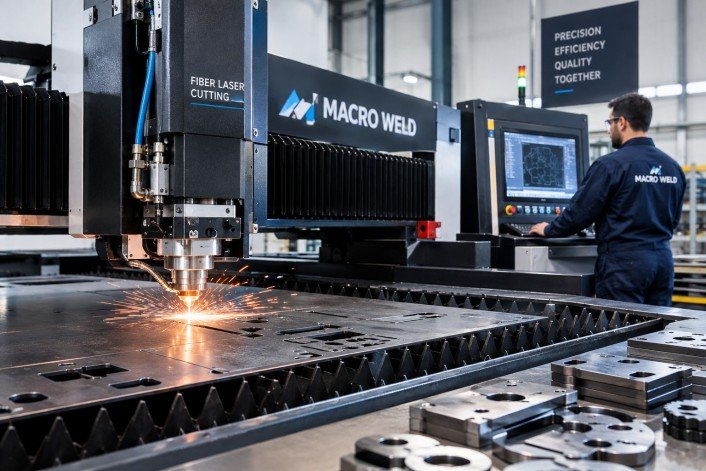
In the industrial sector, precision and efficiency are paramount, especially when it comes to metal fabrication and sheet cutting. Macro Weld Pty Ltd, operating through fiber optic laser cutting machine technology, offers state-of-the-art solutions that demonstrate how fibre optic laser cutting is revolutionising the industry. This article explores the intrinsic benefits of fibre optic laser cutting and why Macro Weld is at the forefront of this technological advancement.
Understanding Fibre Optic Laser Cutting
Fibre optic laser cutting involves the use of a fibre laser to cut metals and other materials with unparalleled accuracy. Unlike traditional cutting methods, fibre optic lasers use light fibres to generate a high-powered laser beam that can precisely slice through materials with minimal waste. This technology leverages the unique properties of fibre optics to produce a highly focused beam that maintains consistency and intensity over long distances.
Superior Precision and Accuracy
The precision achieved by fibre optic laser cutting machines is remarkable. Thanks to the focused laser beam, cuts are made with extreme exactitude, producing smooth edges and intricate shapes without the need for secondary finishing processes. Macro Weld’s laser cutting systems ensure that even the most complex designs are faithfully reproduced, enhancing the quality and consistency of the finished products.
Enhanced Cutting Speed and Efficiency
One of the primary advantages of fibre optic laser cutting is the speed at which the process operates. Compared to conventional cutting techniques, fibre lasers deliver faster cutting times while maintaining superior quality. This rapid processing capability allows businesses to increase throughput and reduce turnaround times, resulting in higher productivity and cost savings.
Material Versatility
Fibre optic laser cutting is compatible with a wide range of materials including various types of steel, aluminium, copper, brass, and other metals. This versatility makes it an ideal choice for industries requiring multi-material processing, such as automotive, aerospace, and construction sectors. Macro Weld supplies equipment that accommodates diverse material requirements, providing clients with flexible solutions for their production needs.
Reduced Operational Costs
The operational costs associated with fibre optic laser cutting are notably lower than other laser types. Since fibre lasers have high electrical efficiency, they consume less power and require minimal maintenance. Additionally, the long service life of fibre optic sources reduces downtime and replacement expenses. Macro Weld’s solutions help clients achieve lower total cost of ownership through energy efficiency and reliable system performance.
Environmentally Friendly Technology
The fibre optic laser cutting process is inherently clean, generating less waste and reducing the need for consumables such as cutting gases and abrasive materials. This environmentally friendly characteristic aligns with sustainable manufacturing practices. Macro Weld promotes green technology by offering machinery that minimises environmental impact while maximising operational efficiency.
Consistent Quality with Automation
Integrating automation in fibre optic laser cutting ensures repeatability and consistency across large production runs. Macro Weld’s equipment includes advanced CNC controls which facilitate automated cutting processes, reducing human error and increasing output reliability. Automated fibre optic laser cutting systems enable manufacturers to meet stringent quality standards reliably.
Improved Safety Features
Fibre optic laser cutters are designed with numerous built-in safety features to protect operators. Enclosed systems with interlocks and emergency stops help prevent accidents related to laser exposure or mechanical components. Macro Weld prioritises operator safety through robust machine designs and comprehensive training support.
Applications of Fibre Optic Laser Cutting
Due to its precision and versatility, fibre optic laser cutting is widely used in automotive component manufacturing, electronics, medical device fabrication, architectural metalwork, and tool making. Macro Weld’s machines support these varied applications by offering customised laser cutting solutions tailored to specific industry demands.
Technological Advancements with Macro Weld
Macro Weld continually invests in research and development to enhance the capabilities of fibre optic laser cutting machines. Their focus on integrating the latest laser technology with user-friendly interfaces and robust construction ensures clients receive advanced tools that improve production quality and efficiency. Through Macro Weld, businesses gain access to cutting-edge fibre optic laser technology backed by expert service and technical support.
Conclusion
Fibre optic laser cutting represents a significant leap forward in precision manufacturing. With benefits including unparalleled accuracy, speed, material versatility, cost-effectiveness, and sustainability, it is clear why this technology is transforming fabrication processes. Macro Weld Pty Ltd stands as a leader in supplying and supporting fibre optic laser cutting machines that empower businesses to elevate their production standards. Investing in fibre optic laser cutting technology via Macro Weld is therefore a strategic decision that fosters innovation and competitive advantage in numerous industrial sectors.

Parents planning a retro birthday theme or setting up a custom holiday card for their children often face an immediate bottleneck. Booking a specialized studio session for vintage-styled artistic portraits sounds ideal on paper, but the reality involves rigid scheduling, high costs, and stressed toddlers forced into unfamiliar costumes under heavy lights. When traditional methods fail, turning to a reliable 80s photo generator offers an effortless alternative. When final studio proofs arrive weeks later, the photos frequently look stiff and overly staged, whereas an AI 80s photo generator captures the warm, candid nostalgia parents originally envisioned.
The underlying conflict is not a lack of creative vision, but the operational friction of traditional portrait photography. Achieving the iconic aesthetic of the 1980s—soft film blur, vibrant laser backdrops, side-swept hair volume, and direct flash highlights—does not require dragging a four-year-old into a commercial studio. Modern generative AI workflows powered by a dedicated 80s photo generator have fundamentally shifted how artistic portraits are produced. By using a specialized 80s photo generator, parents can convert ordinary candid smartphone shots into high-fidelity vintage artistic portraits while preserving their child’s genuine expressions.
The Myth That Retro 80s Photo Generator Portraits Require Professional Studios
A widespread belief among parents is that stylized vintage photography requires high-end camera gear, physical props, and professional studio lighting setups. Many assume that recreating authentic 1980s studio portraits demands period-accurate velvet blazers, physical neon backdrops, and analog medium-format film backends instead of using an intuitive 80s photo generator. This assumption leads families to spend hundreds of dollars on specialized photography packages, only to end up with constrained, unnatural photos that an 80s photo generator could generate seamlessly at home.
The reality is that traditional studio setups excel at static lighting control, but struggle with the spontaneous nature of childhood. Recreating 1980s aesthetic elements physically—such as double-exposure laser grids or specialized film grain filters—requires complex analog post-processing or retro studio sets that few modern commercial studios maintain, whereas an 80s photo generator handles these effects automatically. Attempting to replicate these vintage looks physically often yields inconsistent results, while an online 80s photo generator ensures true-to-era texture and lighting every single time.
Instead of relying on physical set construction, an advanced 80s photo generator shifts the styling process into a digital diffusion pipeline. Rather than forcing a child to stand still in front of a synthetic background, AI-powered generation accepts a quick, unposed candid snapshot taken at home. The model analyzes the underlying facial geometry, preserving identity features while re-synthesizing clothing textures, hair volume, ambient studio lighting, and vintage color science in a single workflow.
Using an 80s photo generator eliminates the physical setup constraints that previously restricted vintage artistic portraits to high-end photography studios. Parents gain complete creative control over aesthetic themes—ranging from classic yearbook portraits to synthwave arcade styles—without subjecting their child to a high-stress studio setting.
Why Traditional Studio Shoots Fail to Capture Natural Childhood Expressions
Traditional photography studios operate on structured time blocks and controlled physical environments. For adult portraits, this environment works reasonably well. However, when applied to young children, the mechanical nature of a studio shoot directly undermines image quality.
| Studio Factors | Traditional Physical Shoot | AI-Driven Vintage Generation |
| Child Comfort | High stress under hot lights and rigid poses | Zero stress; uses comfortable home candid photos |
| Posing Flexibility | Limited to static studio props and seated marks | Infinite variation built from natural facial expressions |
| Aesthetic Texture | Modern digital sharpness mixed with artificial props | Authentic 1980s film grain, direct flash, and soft lens glow |
| Turnaround Time | 2 to 3 weeks for studio proofing and retouching | Real-time generation in seconds per variation |
The core failure mechanism of traditional studio photography lies in environmental pressure, which is why parents increasingly rely on an 80s photo generator instead. Hot studio strobe flashes, giant softboxes, and unfamiliar photographers create sensory overload for toddlers and young children. When forced to sit on a prop box and hold a fake smile for twenty minutes, children naturally contract their facial muscles, resulting in forced smiles, tense shoulders, and uncomfortable body language.
Furthermore, traditional photographers must constantly adjust camera focus and lighting strobes, missing the fleeting split-second expressions that reveal a child’s true personality. Attempting to apply complex retro styling—such as heavy 80s hair or structured shoulder pads—on an uncomfortable child further increases distress, whereas an 80s photo generator easily adds these period stylings digitally. The resulting physical portraits may technically feature retro elements, but they lack warmth, whereas an 80s photo generator preserves genuine emotional warmth and authenticity.
In contrast, an 80s photo generator decouples expression capture from aesthetic transformation. Parents can capture a quiet moment when their child is laughing naturally in their living room. Using a modern 80s photo generator, the AI model extracts this authentic emotional energy, applying period-specific lighting, analog film grain, and vintage apparel around the child’s true facial expression.
Real-World Limitations: When Static Posing Meets 80s Aesthetic Requirements
Achieving an authentic 1980s photographic look involves specific optical characteristics that are difficult to reproduce using standard modern DSLR or mirrorless cameras without an 80s photo generator. During the 1980s, portrait studios relied on specific film stocks like Kodak Gold or Fuji Color, paired with direct tungsten flash photography, soft-focus diffusion filters, and physical painted canvases.
When parents attempt to fix modern digital photos with standard filters or color LUTs instead of an 80s photo generator, the results fall short. Basic filters merely apply a superficial color tint over flat modern images without modifying structural depth, optical bloom, or period clothing textures that an 80s photo generator constructs effortlessly.
An 80s photo generator resolves these specific optical limitations through generative reconstruction rather than superficial filtering. Rather than applying a top-layer mask, the underlying model rebuilds the scene in latent space—synthesizing authentic direct-flash highlights, soft diffusion glow, and era-correct studio textures while keeping the child’s core facial identity completely intact.
The Efficiency of an 80s Photo Generator for Artistic Results
The true value of an 80s photo generator is not merely generating a novelty image; it is establishing a fast, reliable workflow for producing high-quality vintage artistic portraits across multiple media formats. Whether parents need a high-resolution print for a framed nursery canvas, a tailored image for a family holiday card, or digital assets for an online memory book, a dedicated 80s photo generator streamlines production.
Using platforms like Pikvee, parents can instantly test multiple vintage visual directions without booking separate photography packages. An effective 80s photo generator handles identity preservation automatically via specialized latent adapters, ensuring the child’s face does not warp or morph during style transfer while delivering authentic 80s photo generator output quality.
Consider a practical comparison of production workflows for a children’s retro photo album:
[Traditional Studio Workflow]
Schedule Appointment -> Travel to Studio -> Child Costume Changes -> Forced Posing Session -> 14-Day Wait -> Single Fixed Style
[Pikvee AI Generation Workflow]
Snap Casual Home Photo -> Upload to Pikvee -> Select 80s Style Preset -> Render Variations -> Instant High-Res Export
By switching to a digital-first approach, parents can explore diverse 1980s sub-genres in seconds. A single reference photo can yield a formal 1985 mall studio portrait, a neon disco theme, or a cozy 80s home family snapshot. Pikvee processes these variations while retaining fine facial detail, providing consistent identity matching across an entire collection of artistic portraits.
To maintain strict visual quality, parents can address occasional AI rendering artifacts—such as minor edge softening or background inconsistencies—by generating multiple iterations in Pikvee or making minor parameter adjustments. Running a quick multi-prompt batch allows families to select the cleanest render while preserving complete character consistency.
This efficiency allows parents to generate full photo series for special occasions—such as milestone birthdays or annual holiday cards—at a fraction of traditional photography costs, without sacrificing visual fidelity or rigor.
Practical Rules for Creating Authentic Children’s Portraits with Pikvee
To achieve optimal results when generating vintage children’s artistic portraits using an 80s photo generator, parents should follow a structured input and evaluation checklist. High-quality AI generation with an 80s photo generator depends on providing clear reference images and understanding how style modifiers interact with facial preservation models.
Follow these practical guidelines when using Pikvee for vintage portrait generation:
1. Source Image Selection Criteria
- Lighting: Choose a snapshot taken under bright, ambient natural light. Avoid images with severe side shadows or deep under-eye cast lighting.
- Angle: Use eye-level camera angles. Extreme high-angle or low-angle shots can distort facial proportions during 80s style rendering.
- Facial Expression: Select photos with relaxed, candid expressions. Closed-mouth smiles or natural laughs render more authentically than forced open-mouth poses.
- Obstructions: Ensure the face is free from obstructions like pacifiers, large sunglasses, or hands covering the chin.
2. Style Prompt and Preset Optimization
When configuring your generation parameters in Pikvee, structure your style hints to balance retro aesthetics with facial realism. Use concrete visual descriptors rather than generic terms.
[Recommended Style Parameters]
Subject: Young child portrait, authentic identity preservation
Setting: 1980s vintage photo studio, laser grid background, soft blue studio backlighting
Apparel: Denim jacket, retro striped collar shirt, 80s haircut styling
Lighting: Vintage direct flash, subtle lens flare, soft focus diffusion
Texture: Kodachrome film grain, warm tone shift, 1985 portrait aesthetic
3. Post-Generation Audit Checklist
Before exporting portraits for physical printing or social sharing, review the output against key visual criteria:
- Facial Identity Check: Compare pupil shape, nose structure, and smile lines against the original snapshot to ensure natural recognition.
- Proportions: Verify that shoulder width and clothing scale match the child’s age group without unnatural exaggeration.
- Grain and Texture Balance: Ensure the vintage film noise and laser backdrop blend smoothly into the hair edges without blurring facial details. If edges appear blurry, running a second generation with a lower denoising strength parameter often clarifies the detail.
- Color Accuracy: Check that skin tones retain natural warmth under the simulated 80s studio flash lighting.
By substituting rigid physical studio shoots with an advanced 80s photo generator like Pikvee, parents can easily turn casual childhood moments into timeless vintage artistic portraits. Choosing a versatile 80s photo generator eliminates the stress of traditional photo sessions, offering a flexible, cost-effective way to preserve cherished childhood memories with authentic retro style.
Technology
AI-Generated Nano Banana 2.1 Visuals: What Shopify Beauty Ecommerce Brands Should Check Before Publishing


Launching a skincare collection on Shopify under tight marketing deadlines often tempts creative teams to rush generative assets straight from prompt outputs to live product detail pages. When an autumn serum launch is forty-eight hours away, producing lifestyle scenes on demand feels like a massive relief compared to booking studio shoots and hiring retouchers. Yet in cosmetics merchandising, photorealism is not an aesthetic bonus—it is the baseline of consumer trust. A shopper scrutinizing an amber dropper bottle will abandon checkout the moment a glass reflection bends unnaturally, an active ingredient label turns into illegible glyphs, or a model’s cheek exhibits the plastic, airbrushed sheen typical of uncurated machine outputs. The fundamental trap in nano banana 2.1 generative workflows is confusing rendering speed with production viability; an asset that looks stunning at a thumbnail glance can easily destroy brand credibility once zoomed on a high-resolution mobile display.
Deploying newer generative engines like nano banana 2.1 provides digital merchandisers with remarkable control over lighting and multi-reference fidelity, but tool precision cannot replace editorial judgment. Beauty buyers assess product safety, texture feel, and ingredient efficacy through visual cues alone. If your Shopify store presents synthetic artifacts as commercial reality, return rates and ad acquisition costs rise immediately. Establishing an uncompromising visual gatekeeping protocol ensures your creative department leverages nano banana 2.1 capabilities without eroding customer confidence.
The Core Quality Standard for Nano Banana 2.1 in Beauty Ecommerce
The commercial threshold for visual content in beauty ecommerce differs fundamentally from apparel or home goods. In fashion, minor drape variations or ambient styling liberties rarely trigger doubts about fabric authenticity. In prestige skincare, however, visual artifacts immediately signal counterfeit goods or deceptive advertising. When configuring production pipelines with nano banana 2.1, visual teams must evaluate output assets against three foundational parameters: material truth, functional plausibility, and consumer expectation.
Material truth requires that packaging substances rendered in nano banana 2.1 behave according to real-world physics. Amber glass must refract light with appropriate density; frosted acrylic jars must diffuse backlight rather than creating metallic glares; and cosmetic liquids must exhibit realistic viscosity. When rendering an anti-aging cream, the emulsion surface inside an open jar must display authentic surface tension rather than generic digital gloss. Functional plausibility demands that primary packaging elements generated by nano banana 2.1—dropper bulbs, airless pump nozzles, dropper pipettes, and cap threading—show precise industrial logic. If a pump dispenser lacks a realistic dispensing seam or sits off-center on the bottle neck, discerning skincare shoppers sense an amateur presentation.
Teams integrating nano banana 2.1 via Defapi into automated asset pipelines frequently discover that while the underlying Gemini 3.6 Flash multimodal engine handles text and scene composition with high fidelity, visual standards must be codified programmatically. Rather than measuring nano banana 2.1 success by subjective artistic flair, beauty brands must define visual quality as the absence of friction between what the shopper sees on a Shopify collection page and what arrives inside the unboxing package.
Non-Negotiable Visual Elements in Skincare and Cosmetics Assets
To prevent costly post-launch rollbacks when evaluating nano banana 2.1 renders, creative directors must separate minor stylistic nuances from catastrophic failure modes. The following three visual elements are strictly non-negotiable across every digital touchpoint:
- Packaging Geometry and Component Integrity: In any nano banana 2.1 render, cylindrical bottles must not taper irregularly, pump collars must align flush with container shoulders, and dropper pipettes immersed in liquid must demonstrate proper optical index refraction. Any asset showing skewed cap seams or melted nozzle tips must be rejected instantly.
- Primary Label Readability and Typographic Fidelity: The primary display panel (PDP) of a cosmetic container in nano banana 2.1 assets is legally regulated and emotionally reassuring. Active ingredient names (such as “2% Hyaluronic Acid” or “Niacinamide Serum”), volumetric callouts, and brand wordmarks must remain crisp and perfectly planar to the container contour. Synthetic smudging across typography in nano banana 2.1 visuals destroys customer confidence faster than poor background staging.
- Organic Skin Topography and Authentic Texture: Beauty shoppers reject images where human skin generated by nano banana 2.1 appears completely poreless, rubberized, or airbrushed into a uniform tonal blur. Natural skin contains fine micro-creases, subtle vascular undertones, and microscopic follicle details. If an asset displays waxy highlights on cheekbones or blurred jawlines, it violates commercial standards.
| Quality Inspection Parameter | Commercial Non-Negotiable Standard | Critical Failure Trigger |
| Container Structural Geometry | Precise 90-degree base alignments, symmetrical neck rings, uniform wall thickness | Warped glass walls, asymmetrical dispenser nozzles, melted pump collars |
| Typography and Label Architecture | Legible formulation names, sharp typography alignment, accurate tracking | Warped letterforms, gibberish characters, curved text breaking container perspective |
| Model Facial & Cuticular Anatomy | Authentic epidermal grain, natural follicular pores, distinct nail margins | Plasticized skin finish, merged finger joints, hyper-glossy artificial highlights |
| Liquid & Emulsion Mechanics | Correct meniscus curve, authentic opacity, realistic surface refraction | Floating fluid droplets, cloudiness in clear solutions, disconnected dropper drops |
When generating seasonal variations, teams operating nano banana 2.1 must prioritize these non-negotiables over background atmosphere. A gorgeous Parisian marble bathroom scene means nothing if the bottle label resting on the vanity is blurred or warped.
Acceptable Production Trade-Offs for Fast Creative Iteration
While product containers and human textures demand absolute fidelity in nano banana 2.1 outputs, insisting on absolute perfection across secondary scene elements paralyzes creative velocity. Merchandising teams producing dozens of localized ad variations or seasonal promotional headers with nano banana 2.1 must identify where artistic trade-offs are safe and commercially harmless.
Background foliage, atmospheric depth, and auxiliary lifestyle props do not represent your commercial offer in nano banana 2.1 lifestyle scenes. If an autumn botanicals campaign features slightly stylized eucalyptus leaves or abstract marble vein patterns in soft focus, these simplifications do not undermine the authenticity of the featured moisturizer. In lifestyle compositions rendered via nano banana 2.1, shallow depth of field (bokeh) is an effective tool: blurring background bathroom tiles or morning window sunlight directs customer attention toward the sharp, uncompromised product packaging.
Similarly, secondary lighting reflections on peripheral background mirrors or non-branded vanity trays can carry minor generative stylizations without consequence. When running high-throughput creative tests via Defapi developer endpoints, beauty operators can tolerate mild abstraction in ambient environmental textures while enforcing strict mask-based preservation on the product bottle itself. Nano banana 2.1 supports up to fourteen multi-reference inputs, enabling teams to lock primary SKU dimensions while letting background environments flex dynamically across spring, summer, and holiday merchandising themes.
A Practical Verification Routine Before Publishing to Shopify
Before pushing newly generated visual assets from nano banana 2.1 into a live Shopify theme, performance teams should apply a structured four-step inspection routine:
[Master Render Output]
│
▼
[Step 1: 400% Zoom Typography & Seam Audit] ──► Failed ──► Mask-Edit / Reject
│
Passed
▼
[Step 2: Pantone & Formula Color Calibration] ──► Failed ──► Color-Grade / Re-prompt
│
Passed
▼
[Step 3: Multi-Device Contrast & Scale Check] ──► Failed ──► Re-crop / Re-balance
│
Passed
▼
[Step 4: Contextual Channel Cohesion Review] ──► Approved for Storefront Publishing
- Step 1: The 400% Zoom Audit: Open the rendered asset in a calibrated viewer and zoom directly into the typography, pump dispenser nozzle, and cap threading. Confirm that letters remain legible without generative distortion. If the label displays synthetic artifacts, deploy targeted mask editing in nano banana 2.1 to replace only the text region rather than regenerating the entire image.
- Step 2: Pantone and Formula Color Calibration: Skincare brands rely heavily on proprietary pastels, amber tints, and tinted serum hues. Compare the liquid tone rendered by nano banana 2.1 against your physical lab standard. A vitamin C formulation rendered in nano banana 2.1 with excessive neon yellow instead of an authentic pale amber finish misleads shoppers regarding product freshness and oxidation.
- Step 3: Multi-Device Scale and Contrast Check: Inspect the image at standard desktop dimensions (1600px width) and scaled down to a 375px mobile viewport. Ensure high contrast between the product silhouette and the lifestyle backdrop so the container stands out clearly on mobile feeds.
- Step 4: Contextual Placement Alignment: Verify that the asset fits its exact store placement. A hero banner requires negative space for typography overlays, while a square collection card demands centered visual gravity with zero edge cropping on the bottle cap.
Establishing this routine eliminates guesswork and prevents flawed visual experiments from reaching high-intent store visitors.
Building a Multi-Asset Consistency System Across the Catalog
The true test of generative image workflows with nano banana 2.1 is not producing a single heroic product shot, but scaling visual cohesion across twenty distinct SKUs. If your brightening cleanser appears under crisp Scandinavian daylight while the matching night cream looks bathed in warm editorial studio tungsten, your Shopify collection page will appear disjointed and unprofessional.
To build systemic harmony, beauty ecommerce brands must construct unified lighting and perspective templates. Standardize key lighting angles (such as 45-degree top-left key lights with gentle bounce fill) and lock camera elevation across all product listing images. When referencing multiple products in an evening routine bundle, leverage the multi-object coherence features of nano banana 2.1 to guarantee that container scales remain proportional. A 30ml eye cream bottle must never appear larger than a 100ml facial toner sitting beside it on the same digital shelf.
Furthermore, centralized API architecture via Defapi enables marketing teams to automate reference prompt conditioning and asset tagging across seasonal catalogs. By linking your Shopify product taxonomy directly to standardized reference profiles, creative teams can refresh hero visuals across multiple product categories simultaneously without losing brand uniformity. Generative visual production is no longer an experimental novelty for beauty brands; managed under rigorous quality standards and structured review systems, it becomes a dependable engine for commercial growth.

Transform Your Skin with RF Microneedling: Discover the Benefits at Elite Body Contouring

Revolutionizing Precision: The Advantages of Fiber Optic Laser Cutting with Macro Weld

Stunning Spring Carnival Dresses to Elevate Your Style This Season

Top Cricket Equipment Essentials Every School Should Have

Innovative Architects in Sydney: Designing Your Dream Space with Shore Architects

Expert Guide to Leaking Tap Repair: Tips from Pinpoint Plumbing Services

How to Ensure Your Home is Valued Correctly for a Quick Sale

Christopher Dare: The Untold Story of Engineer and Former Husband of Angela Rippon

The 15 Highest-Paid Rugby Players in the World

What Is Fanquer? The Digital Creator Platform Transforming Direct-to-Fan Engagement

Dr Jared Ross: Missouri Appeals Court Upholds Protection Order Over Graphic Torture and Murder Threats

Nancy Hallam: The Inspiring Life, Career, and Success Story Behind Ian Wright’s Wife
How to Ensure Your Home is Valued Correctly for a Quick Sale
Christopher Dare: The Untold Story of Engineer and Former Husband of Angela Rippon
The 15 Highest-Paid Rugby Players in the World
What Is Fanquer? The Digital Creator Platform Transforming Direct-to-Fan Engagement
Dr Jared Ross: Missouri Appeals Court Upholds Protection Order Over Graphic Torture and Murder Threats
Nancy Hallam: The Inspiring Life, Career, and Success Story Behind Ian Wright’s Wife
-
 Real Estate9 months ago
How to Ensure Your Home is Valued Correctly for a Quick Sale
-
Celebrity11 months ago
Christopher Dare: The Untold Story of Engineer and Former Husband of Angela Rippon
-
 Sports5 months ago
The 15 Highest-Paid Rugby Players in the World
-
 Technology5 months ago
What Is Fanquer? The Digital Creator Platform Transforming Direct-to-Fan Engagement
-
 Celebrity5 months ago
Dr Jared Ross: Missouri Appeals Court Upholds Protection Order Over Graphic Torture and Murder Threats
-
Celebrity12 months ago
Nancy Hallam: The Inspiring Life, Career, and Success Story Behind Ian Wright’s Wife
-

 Celebrity8 months ago
Who Is Azriel Crews? Inside the Life and Career of Terry Crews’ Daughter
-
 Celebrity11 months ago
Who Is Maisie Mae Roffey? The Private Life, Family Story, and Quiet Success of Julie Walters’ Daughter