
Business
In-House vs. Outsourced Mortgage Data Entry Services: What US Mortgage Companies Are Getting Wrong in 2025


Mortgage operations in the United States have grown considerably more complex over the past several years. Regulatory requirements have expanded. Application volumes shift unpredictably with interest rate movements. And the internal pressure to reduce turnaround times while maintaining accuracy has put meaningful strain on processing teams across the industry.
In the middle of all this, many mortgage companies are still operating under assumptions about data entry and document processing that were formed a decade ago. The in-house versus outsourced debate is not new, but the conditions that should inform that decision have changed substantially. What worked in 2015 is not necessarily what works in 2025, and a number of companies are carrying real operational costs because they have not revisited the question with fresh eyes.
This article looks at both models honestly — what each one actually delivers, where each one tends to fail, and why the most common mistake is not choosing the wrong model, but applying the right model incorrectly.
What Mortgage Data Entry Actually Involves — and Why It Is Harder Than It Looks
When mortgage companies evaluate mortgage data entry services, they often underestimate the scope of what is actually required. Data entry in this context is not simply typing loan figures into a system. It involves extracting structured and unstructured information from a wide range of documents — pay stubs, tax returns, bank statements, title records, appraisal reports — and mapping that data accurately into loan origination systems, underwriting platforms, or compliance databases.
Structured mortgage data entry services that handle this work at scale require trained personnel who understand mortgage document types, field-level validation requirements, and the downstream consequences of input errors. A miskeyed debt-to-income ratio, a missed lien entry, or an incorrectly captured employment date can delay a closing, trigger a compliance review, or create a loan defect that surfaces during secondary market review.
This is the operational baseline. Any comparison between in-house and outsourced delivery needs to start here, because both models are ultimately being judged against the same standard: accuracy, turnaround consistency, and the ability to scale without sacrificing either.
Document Variability Adds Operational Pressure
One of the more persistent challenges in mortgage data processing is that the documents themselves are inconsistent. Borrower-submitted documents come in different formats, different qualities, and different levels of completeness. A W-2 from one employer may be formatted entirely differently from another. A self-employed borrower’s tax returns require a different extraction logic than a salaried borrower’s records.
This variability means that data entry in mortgage processing cannot be fully standardized in the way that simpler back-office tasks can. It requires judgment alongside execution — the ability to recognize when a document is ambiguous, incomplete, or potentially inconsistent with other records in the file. Teams that lack this contextual knowledge tend to produce entries that are technically complete but operationally unreliable.
The In-House Model: Where It Works and Where It Quietly Breaks Down
Keeping mortgage data entry in-house offers real advantages in certain operational environments. When a company processes a stable, predictable volume of loans each month, has invested in strong quality control systems, and maintains experienced staff, internal processing can be tightly controlled and closely monitored. Communication is direct. Feedback loops are short. The team understands the company’s specific workflows, underwriting preferences, and system configurations.
But the in-house model has structural vulnerabilities that often go unacknowledged until they produce visible problems.
Volume Fluctuation Is a Structural Problem, Not a Staffing Problem
Mortgage volume does not move in straight lines. Refinance activity can double or collapse within a quarter depending on rate movements. Purchase market demand follows seasonal patterns and reacts sharply to economic news. An in-house team sized for average volume will be consistently overwhelmed during peaks and consistently underutilized during troughs.
Companies typically respond to this by hiring during busy periods and reducing hours or headcount when volume drops. But this approach carries hidden costs: recruitment time, onboarding time, quality inconsistency from newer staff, and the institutional knowledge lost when experienced processors are let go or move on. The result is a data entry function that is perpetually catching up or standing idle, neither of which serves the business well.
Supervision and Quality Control Require Their Own Infrastructure
Running an effective in-house data entry operation is not just a matter of hiring capable people. It requires supervisory bandwidth, quality auditing processes, error tracking, retraining protocols, and system access management. For a large mortgage company with dedicated operations leadership, this infrastructure exists and functions. For a mid-sized lender or a regional credit union, the overhead required to maintain quality at this level often exceeds what the operation can realistically support without pulling resources from other priorities.
When quality control infrastructure is thin, error rates tend to rise gradually and invisibly — a situation that is often only identified during an audit, a compliance review, or a secondary market repurchase demand.
The Outsourced Model: What It Actually Delivers When Done Properly
Outsourcing mortgage data entry is, at its core, a decision to shift operational execution to a specialized provider while retaining internal oversight of process standards and output quality. When this arrangement is structured correctly, it addresses several of the most common failure points in the in-house model.
Established providers who specialize in mortgage document processing have teams that work within these workflows every day, across multiple clients and loan types. They have already solved problems that an in-house team might encounter for the first time. Their quality control processes are built around mortgage-specific accuracy requirements rather than adapted from general administrative standards.
Scalability Without Staffing Disruption
The practical value of an outsourced model becomes most visible during periods of volume change. A provider with an existing team infrastructure can absorb increased volume without the delays that come from hiring and onboarding. Conversely, when volume drops, the company is not carrying fixed labor costs for capacity it is not using. This flexibility has real financial implications that are often more significant than the per-unit cost comparison that companies focus on when evaluating the two models.
According to guidance published by the Consumer Financial Protection Bureau, mortgage servicers and originators are expected to maintain consistent, accurate record-keeping practices regardless of operational volume. This standard applies equally whether processing is handled internally or by a third party, which means outsourcing does not reduce a company’s compliance responsibility — it simply changes where the processing work happens.
The Risk of Treating Outsourcing as a Hands-Off Decision
The most common outsourcing failure in mortgage data operations is not provider quality — it is the absence of internal oversight after the contract is signed. Companies that outsource data entry and then disengage from quality monitoring are not transferring operational risk; they are deferring it. When errors accumulate undetected, the downstream consequences — incorrect underwriting data, compliance gaps, file defects — land back with the originating company regardless of who performed the data entry.
Effective outsourcing requires ongoing communication between the client and the provider, defined quality benchmarks, periodic output audits, and a clear escalation path for exceptions. These are not burdensome requirements. They are the basic management practices that distinguish successful outsourced operations from ones that quietly underperform.
What Most Companies Are Getting Wrong in 2025
The central mistake that US mortgage companies are making right now is framing the in-house versus outsourced decision as a cost question rather than a capability question. The focus on per-loan processing costs, salary comparisons, or vendor pricing obscures the more important operational questions: Does our current model produce consistent accuracy at variable volumes? Do we have the supervisory infrastructure to maintain quality over time? Are we able to scale up within the timeline that market conditions actually require?
Many companies that have stayed with in-house models have done so based on familiarity and perceived control, not because the model is genuinely outperforming the alternative. And many companies that have outsourced have done so without building the internal oversight practices that make outsourcing work reliably.
There is also a growing tendency to treat automation as a third option that resolves the debate entirely. Optical character recognition tools, automated data extraction platforms, and AI-assisted classification can meaningfully reduce manual data entry volume for standardized documents. But mortgage files contain enough variability and exception that full automation without human review creates its own accuracy risks. The companies that are managing this well are using automation to handle the straightforward portion of their document volume and skilled human review for everything else — whether that review sits in-house or with a specialized provider.
Closing Thoughts
The in-house versus outsourced question in mortgage data operations does not have a universal answer, but it does have a correct analytical framework. The decision should be driven by an honest assessment of internal capacity, volume predictability, quality control infrastructure, and the cost of errors — not by default preference for control or by the appeal of lower per-unit pricing.
What the mortgage industry is getting wrong in 2025 is not which model it chooses. It is the lack of rigor applied to the evaluation, and the tendency to maintain existing arrangements long past the point where the operational evidence supports them.
Whether a company processes data internally, works with an external provider, or uses a hybrid approach, the standards remain the same. Accuracy is not optional. Consistency across variable volume is not optional. And the oversight required to maintain both — wherever the processing work actually happens — is the part that most often gets deprioritized, and the part that most often determines how well the operation actually performs when it is tested.



The most efficient ecommerce businesses in the US utilize reliable logistics systems to ensure orders reach customers accurately, affordably, and on time. Managing inventory, packing orders, shipping products, and handling returns can become increasingly complicated for growing online retail stores. These responsibilities can consume valuable time and resources that business owners could otherwise invest in marketing, product development, and customer retention. Leveraging outsourced third-party logistics (3PL) services becomes increasingly valuable. A 3PL provider helps ecommerce businesses manage essential supply chain operations, including warehousing, inventory management, order fulfilment, packaging, shipping coordination, and returns processing.
Top 4 Ecommerce Businesses That Need to Invest in Outsourced 3PL Logistics
Here are some examples of a few types of ecommerce businesses that can benefit significantly from outsourcing logistics services to 3PLs.
1. Fashion and Clothing Ecommerce Stores
Online clothing retailers must manage different sizes, colors, styles, and stock levels while ensuring that orders are shipped promptly. Storing products, locating individual items, packaging garments, and processing exchanges can become overwhelming when your ecommerce business starts gaining ground. Outsourced 3PL services help fashion retailers organize inventory, pick and pack orders, and coordinate deliveries. Some providers also offer branded packaging and returns processing, helping businesses deliver a consistent shopping experience.
2. Beauty, Skincare, and Cosmetics Brands
Beauty and skincare brands frequently sell multiple product variations, including moisturisers, serums, makeup, haircare products, and gift sets. Successful brands may receive hundreds or even thousands of orders during promotional campaigns, influencer collaborations, and holiday shopping periods. A qualified 3PL provider can help beauty brands track stock, fulfil orders efficiently, and coordinate shipping. Businesses should confirm that their logistics partner can meet any applicable product-specific storage and handling requirements.
3. Health, Wellness, and Personal Care Stores
Online stores selling personal care products, fitness accessories, non-prescription wellness goods, and everyday hygiene supplies often benefit from repeat purchases.
Outsourced 3PL services can help these businesses manage inventory, prepare recurring orders, and coordinate deliveries across different US regions. Efficient fulfilment is especially useful for stores offering subscription boxes or monthly product bundles.
Choosing the right logistics partner can make a significant difference in an ecommerce business’s ability to grow. Online retailers need reliable 3PL providers like Packageman that can manage order fulfilment, maintain accurate inventory records, coordinate shipping, and handle returns without creating unnecessary operational complications. Packageman offers efficient ecommerce fulfillment and 3PL logistics services designed to support growing online retailers across the United States.
4. Subscription Box and Product Bundle Businesses
Subscription ecommerce businesses deliver products to customers on a recurring schedule. Examples include monthly beauty boxes, coffee subscriptions, snack packages, hobby kits, and curated lifestyle collections.
Unlike ordinary ecommerce stores, subscription businesses must coordinate recurring fulfilment cycles and ensure that each box contains the correct products. An outsourced 3PL partner can manage inventory, assemble product bundles, prepare recurring shipments, and coordinate dispatch schedules.
Outsourced third-party logistics can help ecommerce businesses move beyond the limitations of handling every order themselves. Fashion stores, beauty brands, electronics retailers, wellness businesses, home decor shops, subscription box companies, and pet supply stores can all benefit from professional fulfillment support when their logistics demands begin to grow.
The key is choosing a 3PL provider whose capabilities, pricing, technology, and warehouse locations match the business’s needs.

Accessories play an important role in modern clothing trends. A well-chosen cap can add character to a simple outfit while providing practical coverage for outdoor activities. From relaxed weekend looks to contemporary streetwear, hats are a versatile accessory for people with different fashion preferences.
For clothing retailers and fashion businesses, offering a variety of cap styles can also help attract customers looking for both classic and modern designs.
Trucker Caps for a Casual Look
Trucker caps are a popular choice for people who appreciate relaxed, sporty fashion. Their distinctive construction and versatile designs make them suitable for everyday outfits. They can be worn with graphic T-shirts, denim jackets, hoodies, or casual shorts.
Retailers interested in expanding their accessory collections can explore wholesale Trucker Hats to find styles that suit different customer preferences. Offering a range of colors and designs can help businesses create a collection that works with various clothing trends.
Camouflage Caps for a Distinctive Style
Camouflage patterns provide a different look for people who want their accessories to stand out. Inspired by outdoor clothing, these patterns have also become a recognizable feature of casual and streetwear fashion.
Adding wholesale Camo Hats to a product collection can give retailers another option for customers who prefer bold prints and distinctive accessories. These caps can be paired with plain shirts, denim, cargo pants, and neutral-colored outerwear to create a coordinated appearance.
What to Consider When Selecting Caps
Choosing the right headwear involves more than following current trends. Product quality, comfort, and design all contribute to a satisfying purchase.
Here are a few factors worth considering:
- Comfortable materials: Select fabrics that feel good during regular use.
- Reliable construction: Examine stitching, panel structure, and overall finishing.
- Practical designs: Consider adjustable closures and suitable fits.
- Color variety: Offer classic shades alongside more eye-catching options.
- Customer preferences: Choose products that match the interests of your intended audience.
Building a Versatile Headwear Collection
For apparel businesses, a balanced selection of accessories can complement existing clothing products. Combining traditional designs with more distinctive patterns allows retailers to serve customers with different tastes.
Understanding seasonal demand, reviewing product quality, and monitoring fashion trends can help businesses make informed purchasing decisions. It is also useful to choose designs that coordinate easily with popular casual clothing.
Conclusion
Caps remain a practical and fashionable accessory for everyday wear. Trucker styles offer a relaxed, sporty appearance, while camouflage designs provide a more distinctive alternative. By focusing on comfort, quality, and variety, individuals and retailers can find headwear options that complement modern fashion and meet different needs.

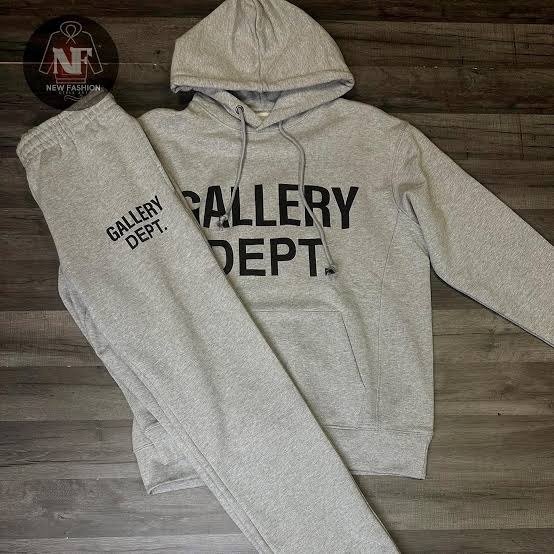
Two gray pieces laid out on a bed, forty euros apart, and a decision most of us make in about four seconds flat. Here’s the shape of it: a full tracksuit comes in at €100, while a hoodie bought by itself is €70 and joggers are another €70, which puts the same outfit at €140 if you pick it up a piece at a time. Looks settled, doesn’t it. It isn’t, quite, and the arithmetic deserves five minutes of your attention before you drop anything into a cart at Gallery Dept and get on with your evening.
The €40 gap, and what it’s actually buying
Forty euros is a t-shirt (€50) with a bit left over, or a trucker cap (€35) and a train ticket. As a saving it’s real, and I’m not going to pretend otherwise.
But it only counts if you wanted both halves to begin with. If the hoodie was the thing you came for and the joggers are just sort of there, you haven’t saved €40 — you’ve spent €30 more than you meant to, on trousers you feel lukewarm about. Plenty of sets live out their lives exactly like that, one half in rotation and the other half folded, which is a slightly sad way to spend a hundred euros.
How often does head-to-toe leave the house?
Be honest about this one, because the whole decision hangs off it. A matching set is at its best when you’re in motion: the 6 a.m. train out of Bologna, the queue at airport security, the first properly cold morning in November when it’s 8 °C outside, and you want one decision instead of four.
Other places, less so. Dinner. An office that isn’t fully relaxed about these things. The passeggiata through a small centro storico at nine in the evening, where everyone has visibly thought about their jacket. One print running top to bottom reads loud there, not because it looks bad but because it reads as a uniform, and uniforms get looked at.
- Travel days, where comfort beats everything else and you’re sitting still for hours anyway.
- Those damp mornings when getting dressed has to be over in ninety seconds.
- A weekend at home that might turn into a walk and a coffee, or might not.
- The gym bag, since the halves end up doing separate jobs on separate days.
Count those days in your own month. If the number comes out low, that €100 set is really a €100 hoodie with something extra attached.
Splitting it up, which is what happens anyway
Here’s where the honest answer lives. Almost nobody who owns a set wears it as a set most of the time. The sets on the Gallery Dept Tuta page carry one print across both halves — gray mélange Logo, the Paint Splatter gray, the navy Hollywood CA with its back print — and each half still stands up on its own the following morning.
The hoodie goes over jeans and nobody can tell it arrived with trousers. The joggers go under a plain cotton jersey tee (€50) and read as joggers, full stop. So you end up living in separates either way. You just paid €100 for them rather than €140, and agreed in advance that they’d match on the days you felt like it.
Which quietly changes the question you’re asking. It stops being set against separates and becomes something duller: two pieces that happen to match, against two pieces you chose one at a time and that probably won’t.
Two grays that aren’t the same gray
This is the bit that settles it for a lot of people. Much of this stuff gets its color as a finished piece, or a wash made to pull the tone back, so the shade shifts slightly from one item to the next. Buy a gray hoodie in March and gray joggers in July and there’s a fair chance you’ve got cousins rather than twins.
A set sidesteps that, since both halves were dyed as one item. And then there’s a duller reason on top of it. The sweatpants in the catalogue come in black (the Logan Dépt de la Galerie) and cream (the Sport Elegant DÉPT). Gray joggers on their own basically don’t exist here. So if gray mélange head to toe is the picture in your head, the €100 set is the only road to it.
| Pro Tip: When the color you want exists only as a set, buy the set and treat the second half as already discounted — roughly €30 for fleece joggers that cost €70 on their own. That’s the one case where the money and the wardrobe agree with each other. |
The numbers, laid out
| What you buy | Price | What you end up with |
| Full tracksuit, one print on both halves | €100 | A pair that matches, and two pieces that still work apart |
| Hoodie and joggers bought separately | €140 | Your own two colors, two prints, and no promise they sit together |
| Hoodie and a t-shirt | €120 | A layered outfit rather than a set — fleece on top, jersey underneath |
| Hoodie on its own | €70 | The piece that gets worn most, and nothing else to think about |
| Joggers on their own | €70 | Fine, as long as there’s already a top at home for them |
Read the last column before you read the price. The €140 row is the expensive one on paper and the roomier one in practice, because you picked both colors yourself. The €100 row is cheaper and narrower. The €120 row isn’t really competing with either — a hoodie and a tee is a different kind of day out, and it handles an April that can’t decide better than two heavy pieces do.
- If you’d genuinely wear both halves together a few times a month, the set wins twice over.
- Buying for the top and talking yourself into the bottom? Pay the €70 and stop there.
- And gray on gray leaves one road open, which is the €100 one.
Frequently Asked Questions
Is the full tracksuit really cheaper than buying both pieces?
Yes, by a clear margin — €100 against €140. The catch sits in the assumption, though, because that €40 only exists if the joggers were something you wanted anyway.
Can I wear the two halves apart?
That’s what most of us do. Neither piece announces that it showed up with a partner, and the top half usually ends up collecting far more wear than the bottom.
What about a hoodie and a t-shirt instead?
Different purpose entirely. €70 plus €50 gets you €120 of layering instead of a set, which suits a 15 °C afternoon better than fleece on fleece does.
Does it cost more to ship two items than one?
I can’t put a figure on it. Shipping options and costs show up at checkout and depend on where the parcel is going, so that’s the only place you’ll see a real number.
So count your head-to-toe days first and look at the prices second. Four or five such days a month and the set is the better hundred euros you’ll spend this autumn. One, and you want the hoodie and nothing after it. Either way, make the call before you’re standing in the cart with a card in your hand.

How to Choose a Second-Hand Car for Your Perth Commute

How to make an older commercial property work for a modern business

Why Your Beauty Clinic in Bali Matters for Filler Results

4 Ecommerce Businesses That Need to Invest in Outsourced 3PL Logistics Services

Fox Fur Coat or Fox Fur Jacket? A Guide to Wearing the Most Dramatic Fur

South Bay Beach Club: Your Guide to a Peaceful Beachfront Getaway

How to Ensure Your Home is Valued Correctly for a Quick Sale

Christopher Dare: The Untold Story of Engineer and Former Husband of Angela Rippon

The 15 Highest-Paid Rugby Players in the World

What Is Fanquer? The Digital Creator Platform Transforming Direct-to-Fan Engagement

Dr Jared Ross: Missouri Appeals Court Upholds Protection Order Over Graphic Torture and Murder Threats

Nancy Hallam: The Inspiring Life, Career, and Success Story Behind Ian Wright’s Wife
How to Ensure Your Home is Valued Correctly for a Quick Sale
Christopher Dare: The Untold Story of Engineer and Former Husband of Angela Rippon
The 15 Highest-Paid Rugby Players in the World
What Is Fanquer? The Digital Creator Platform Transforming Direct-to-Fan Engagement
Dr Jared Ross: Missouri Appeals Court Upholds Protection Order Over Graphic Torture and Murder Threats
Nancy Hallam: The Inspiring Life, Career, and Success Story Behind Ian Wright’s Wife
-
 Real Estate9 months ago
How to Ensure Your Home is Valued Correctly for a Quick Sale
-
Celebrity11 months ago
Christopher Dare: The Untold Story of Engineer and Former Husband of Angela Rippon
-
 Sports5 months ago
The 15 Highest-Paid Rugby Players in the World
-
 Technology5 months ago
What Is Fanquer? The Digital Creator Platform Transforming Direct-to-Fan Engagement
-
 Celebrity5 months ago
Dr Jared Ross: Missouri Appeals Court Upholds Protection Order Over Graphic Torture and Murder Threats
-
Celebrity12 months ago
Nancy Hallam: The Inspiring Life, Career, and Success Story Behind Ian Wright’s Wife
-

 Celebrity8 months ago
Who Is Azriel Crews? Inside the Life and Career of Terry Crews’ Daughter
-
 Celebrity11 months ago
Who Is Maisie Mae Roffey? The Private Life, Family Story, and Quiet Success of Julie Walters’ Daughter