
Business
What Are the Most Effective Heating Options for Modern Homes

The way you heat your home has evolved a lot. Though traditional chimneys are still used, modern homes need advanced heating systems. They are built with better insulation and improved layouts, and a better focus on comfort and energy efficiency. Therefore, traditional heating methods may not always be the best fit anymore.
You may find that older systems cost more to run, waste heat, or fail to provide warmth throughout your living space. At the same time, rising energy prices make it crucial to choose heating solutions that are practical and cost-effective. In this article, we will tell you about some of the most effective heating solutions for modern homes. Let’s go through them without further ado.
Most Effective Heating Options for Modern Homes
Diesel Space Heaters
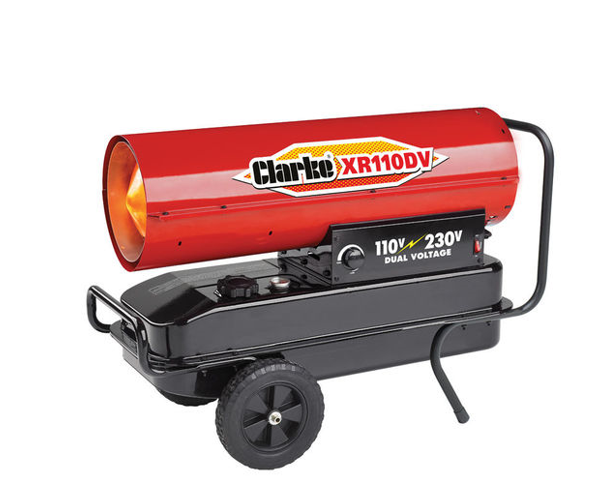
It is a strong and practical heating solution, especially if you need fast and reliable warmth. Diesel space heaters work by burning diesel fuel to produce heat. It is ideal for large rooms, garages, workshops, or even whole homes in colder areas. If your home is off the gas grid or you need a backup heating option, it can be very effective. You can place it where heat is needed most.
Diesel space heaters are known for producing high heat output in a short time. It makes them useful during extremely cold weather when other systems struggle to keep your space warm. Modern diesel heaters are more efficient and cleaner than older ones. You can use them to reduce fuel waste. You also benefit from lower running costs compared to electric systems.
Gas Central Heating
It remains one of the most common heating choices in modern homes across the UK. If your property is connected to the gas network, this system offers steady and reliable warmth throughout your home. Gas boilers heat water, which then flows through radiators or underfloor pipes to ensure even heat in every room. For reliable heating advice and professional solutions, whitecode.co.uk provides helpful services and guidance to help homeowners choose the right heating options for their properties..
Modern gas boilers are far more efficient than older ones. They use less fuel to produce the same amount of heat, which helps you keep energy bills under control. You can also pair gas central heating with smart thermostats. It allows you to adjust temperatures room by room. It means you only heat the spaces you use.
Heat Pumps
They are becoming more popular in modern homes because they offer an energy-efficient way to stay warm. A heat pump moves heat from outside air or the ground into your home. Even in cold weather, there is still heat available outdoors. It makes heat pumps a smart option if you want to lower your carbon footprint while keeping your home comfortable.
Though the installation cost can be higher, they are more affordable to run over time. They use electricity but produce more heat than the energy they consume. It means lower bills, especially when combined with good insulation. Heat pumps work best in modern homes with underfloor heating or large radiators.
Underfloor Heating
Underfloor heating is a popular choice in modern homes because it provides gentle and even heat. Instead of warming the air from one point, heat rises from the floor and spreads across the room. It creates a comfortable environment without cold spots. You benefit from a clean look because no visible radiators are taking up wall space.
You can use underfloor heating with electric systems or water-based systems connected to a boiler or heat pump. It works especially well in well-insulated homes, as it runs at lower temperatures. Underfloor heating is ideal for living areas, bathrooms, and kitchens where comfort matters most.
Electric Fireplaces
It is a modern heating solution that combines warmth with visual appeal. Unlike traditional fireplaces, it does not require a chimney or ventilation. You can install it almost anywhere in your home, which makes it a convenient option. Electric fireplaces use electricity to produce heat and realistic flame effects.
You can opt for the HOMCOM Wall Mounted Ethanol Fireplace to benefit from instant heat at the push of a button. The best part is that it doesn’t create any mess and is easier to maintain. Many electric fireplaces allow you to adjust heat levels or enjoy the flame effect without heat.
Electric Radiators
They are a simple and flexible heating option for modern homes. They are easy to install and do not require pipes, boilers, or major building work. It makes them ideal if you want to upgrade heating in specific rooms or avoid complex systems. You can control each radiator separately, which gives you full control over where and when you use heat.
Modern electric radiators are designed to hold heat efficiently, reducing energy waste. Many models come with built-in timers and thermostats. They are particularly useful in flats, home offices, or spare rooms that are not used all the time.
Choosing the right heating option for your modern home depends on your needs and lifestyle. You can opt for any of the aforementioned ones to keep your space warm within your budget.



A hoodie hardly ever dies in one piece. Something small goes first — a drawcord that slid out somewhere in the wash, a cuff that stopped springing back, a pocket corner that opened up maybe an inch. The fleece across your chest is usually fine, which is exactly what makes it irritating, and it’s also why a $90 hoodie from Tyler The Creator Merch can see out two winters or five depending on about four habits nobody ever thinks about.
And the places that take nearly all the punishment aren’t the panel people inspect when the parcel opens.
The cord is the first thing you’ll lose
Pull one side to snug the hood and the other side gets shorter. Do that a couple of hundred times over a year and the cord walks through the eyelets until the tips sit wildly uneven, and then one morning the short end disappears into the channel altogether, and you’re standing there holding a single tail.
Fishing it out is a twenty-minute job with a safety pin and some swearing. Leave it, and the hood never sits properly again.
Both of those are avoidable. Tighten the hood by taking both cords together and pulling from the center point under your chin, so nothing travels through the channel. And tie a loose overhand knot about an inch behind each tip — the knot can’t pass the eyelet, so the cord can’t vanish even on the day you forget everything else written here.
Cuffs stretch long before they tear
Ribbing gets knitted under tension and elastane is the thread that pulls it back. Heat is what finishes elastane off. Not in one go — a dryer cycle at a time, 140 °F at a time, until the rib has nothing left to snap back with and the cuff just sits wide on your wrist looking tired while the sleeve above it still has years in it.
Shoving sleeves up to the elbow does its own damage, mostly because people grab the band itself and drag it. Roll the fleece instead.
Most of what keeps a cuff honest costs nothing at all:
- A cold wash, inside out, 85 °F or under, with the hood cords loosely knotted together so they don’t whip around in there.
- A wide hanger taken by the shoulders, or just laid flat on a towel — anything except the dryer, honestly.
- Squeezing the water out of the cuffs and hem instead of twisting them, as most of us do.
- No fabric softener. It coats the cotton and the rib feels slack a lot sooner than it should.
Pocket corners open up where you’d never look
A kangaroo pocket hangs off two short diagonal seams, and whatever you drop in there is carried by about two inches of stitching at each top corner. Phone, keys, a wallet — no problem. Two cold hands jammed in while you’re walking fast pulls sideways on that seam in a direction it was never built to take.
The first sign is one popped stitch right at the top corner. Spot it then and three minutes of hand sewing ends the story. Ignore it for a month, and you’re closing a two-inch gap in fleece that’s already gone out of shape around it.
| Pro Tip: Take a look at both top pocket corners while the hoodie is still damp on the line — a single broken stitch stands out when the fleece is heavy with water, and nearly disappears once it’s dried and been worn again. |
Where the hood joins the body
That seam carries the whole weight of the hood, plus the yank every time you haul the hoodie off over your head — it’s a pullover, so there’s no other way in. More fleece in the hood means more load on the join, which is why the heavier pieces, including a lot of what sits on the Call Me If You Get Lost Hoodie pages, feel wonderful in a Chicago January and are slightly harder on that one line of stitching.
So take it off by the hem, with both hands, lifting straight up — your head comes out last. If you pull a hoodie off by the hood instead, which is what everybody does when they’re in a rush, that seam ends up stretched into a permanent little wave, and no amount of washing settles it back down afterward.
Two winters later
Picture the careless version of a washed black hoodie: cuffs wide, one cord gone, the hem rippled, a pocket mouth sagging open like a letterbox. Nothing on it is actually torn. It just reads finished.
Whereas the looked-after one has faded a bit where the shoulder seams catch the sun, gone softer through the body, and otherwise kept the shape it arrived with — off the same page, at the same price, separated from the other by a knot and a hanger.
So what do you check on day one?
Stretch one cuff and let it go — rib that snaps straight back still has its elastane in it, while rib that drifts back slowly was tired before you ever put the thing on. Then a thumb over both pocket corners, and a peek down the hood channel.
Do it that first evening, rather than two weeks later once you’ve worn it twice and the question gets murky. Returns stretch only to a parcel that shows up broken, or holds the wrong piece, flagged within a week, plus the order number and a photo or two. And nothing gets cancelled after you’ve paid, so read the size chart before you click.
Frequently Asked Questions
My drawcord came out completely. Is it salvageable?
Yes, nearly always. Tape one end of the cord to a long safety pin (a knitting needle works too), push it in at one eyelet and walk it around the channel in short shoves. Most channels run open the whole way across, though they narrow at the back seam, so slow down there.
Does washing it inside out really change anything?
For the front print, yes — the graphic spends the cycle facing away from the drum instead of rubbing against it. For the cuffs it matters less. Temperature is what decides those.
How cold is cold, in practice?
Cold on most American machines lands somewhere around 60 to 80 °F, and that’s plenty. Warm climbs past 100 °F, which is roughly where cotton starts shrinking and the elastane in your cuffs begins giving up on you. Detergent copes fine down there.
Can I iron a stretched cuff back into shape?
Not really. Steam will tighten a rib up for an afternoon, then it relaxes again, because what’s gone is the elastane rather than the shape. Keeping heat away from it in the first place is the only fix that holds.
None of this is really maintenance. A cold wash, a hanger, a knot behind each cord tip, and a glance at two pocket corners now and then. Give it those five minutes and the hoodie you pick out this month is still the one you’re pulling on when the cold comes back around next year.


Most of us know exactly which moisturiser we use. It’s the one we read reviews for, compare prices on, and maybe even treat ourselves to. The face wash is often whatever happens to be on offer in the supermarket.
It’s easy to see why. A moisturiser stays on your skin all day, so it feels like the product is doing the real work. A face wash lasts less than a minute before you rinse it down the sink. But you use it twice a day, every day, and it decides what kind of skin your moisturiser has to work with. Get the two working together, and they both perform better.
What Your Moisturiser Does Best
A moisturiser is a leave-on product, and that’s its great strength. It stays on for hours, so its ingredients have time to work. Humectants like glycerin draw water into the skin, while richer ingredients such as shea butter and plant oils help hold it there, keeping skin soft, smooth and comfortable.
It works best on a healthy skin barrier. That’s the outermost layer of your skin, made of flattened cells held together by natural lipids, a bit like bricks and mortar. On top sits the acid mantle, a fine film that keeps the surface slightly acidic. A well-known 2006 study found that healthy skin’s surface pH is, on average, just below 5, and the enzymes that keep the barrier in good repair work best at that level.
When the barrier is happy, your moisturiser simply tops it up. When it’s been stressed, your moisturiser spends its time playing catch-up.
Why the Wash-Off Step Counts
Cleansing is a short step with a big job. It needs to lift away sunscreen, make-up, oil and the grime of the day, while leaving your skin’s own lipids and that slightly acidic surface where they belong.
The nicest face washes use mild cleansers such as coco-glucoside and lauryl glucoside, made from coconut or palm oil and plant sugars, often paired with coconut-derived cocamidopropyl betaine. They clean thoroughly but softly, which is why you’ll also find them in baby care. Add glycerin and light plant oils like jojoba or argan, and a gentle face wash gives back some of the moisture it lifts away.
Your tap water plays a part too. Much of the UK, including London and the South East, has hard water, the same calcium and magnesium you see as limescale in the kettle. Researchers at the University of Sheffield and King’s College London found that hard water makes some cleansing ingredients harder to rinse off, which can leave skin feeling dry and irritated. A gentle wash and a really thorough rinse go a long way.
Try the Ten-Minute Test
Curious whether your face wash and your skin are getting on? Tonight, cleanse as normal, pat dry and put nothing on. Wait ten minutes.
If your skin feels soft, calm and comfortable, you’ve found a good match. If it feels tight or a little flaky around the nose, it may simply prefer something more hydrating.
| What to look for | Signs of a good match |
| Cleansers | Mild and plant-derived: coco-glucoside, lauryl glucoside, cocamidopropyl betaine |
| Moisture | Glycerin plus plant oils such as jojoba, argan or babassu |
| pH | Close to your skin’s own, slightly acidic |
| Ten minutes later | Comfortable and calm, never tight |
| Moisturiser needed | A normal amount feels just right |
What Ayurveda Brings to the Basin
Ayurvedic skincare has always treated cleansing as care, not a scrub-down. For centuries, it has relied on gentle botanicals such as turmeric, neem, sandalwood, and rose water, chosen to cleanse and soothe at the same time, leaving skin soft rather than squeaky. Ayurveda also matches the cleanse to the person, roughly by dosha:
| Dosha | Skin tends to be | What suits it |
| Vata | Dry, tight in winter | Sesame or almond oil, rose water |
| Pitta | Sensitive, quick to flush | Sandalwood, aloe vera, cucumber |
| Kapha | Oily, easily congested | Neem, multani mitti (Fuller’s earth), tulsi |
Modern science is catching up with plenty of this. Neem and turmeric both show antibacterial and anti-inflammatory activity in lab studies, which is why they show up in so many cleansers for oily, blemish-prone skin. The principle is lovely and simple: choose a face wash for your skin type and keep it gentle.
Choose Your Wash and Moisturiser as a Pair
The easiest way to make your cleanser and moisturiser work together is to choose a set made for the same skin type.
Ayumi Naturals is a good example. Its Ayurvedic face washes are dermatologically tested, vegan and made in the UK, and each one has a matching face cream:
- Dry and sensitive skin: the Hydrating Gentle Face Wash blends jojoba, babassu and sandalwood with glycerin, so skin feels soft rather than tight. It’s a lovely face wash for dry skin.
- Oily and blemish-prone skin: the Oil Control Face Wash combines neem, tea tree, witch hazel and nettle to clear away excess oil, with moringa to keep skin balanced.
- Dull, tired-looking skin: the Turmeric & Vitamin C Brightening Face Wash uses clinically evaluated turmeric with vitamin C, amla and papaya for a fresher, brighter look.
A Few Easy Habits
- Use lukewarm water. Hot water washes away your skin’s natural oils more quickly.
- Thirty to sixty seconds of gentle massage is plenty. Rinse well and pat dry.
- Apply your moisturiser while your skin is still slightly damp to help lock the water in.
- Cleanse in the morning and evening to keep your routine consistent.
Better Together
Your moisturiser stays with your skin all day, so it deserves a good choice. But it can only build on the skin your face wash leaves behind. Choose a gentle, well-matched wash, and your moisturiser gets a head start in the morning and at night.
If your skin often feels tight or never quite comfortable, start with your cleanser. It’s usually the simplest change to make, and your moisturiser will thank you for it.
Business
Core Events Group Delivers Corporate Hospitality in the UK and F1 Belgian Grand Prix Packages


Corporate hospitality gives businesses an opportunity to build professional relationships through memorable shared experiences. From major sporting occasions in Britain to iconic Formula 1 races across Europe, carefully planned events can help companies entertain clients, reward employees and strengthen business connections. For organisations exploring corporate hospitality in the UK or considering F1 Belgian Grand Prix packages, choosing the right experience starts with understanding the audience, objectives and available options.
Corporate Hospitality in the UK Creates Valuable Business Opportunities
Corporate hospitality has become an important part of how businesses engage clients and manage relationships. Sporting events, live entertainment and exclusive experiences provide settings where conversations can develop naturally beyond the usual office environment.
Across the UK, businesses can explore a wide range of hospitality opportunities, including Premier League football, international rugby, horse racing, cricket, tennis and major motorsport events. Each offers a different atmosphere, allowing organisations to choose experiences that suit their clients’ interests and their own business objectives.
Corporate hospitality in the UK can include premium seating, dedicated hospitality areas, dining experiences and access to selected event facilities, depending on the venue and package. These additional elements can make an occasion feel more considered and give guests time to connect before, during or after the main event.
The most effective approach is to match the experience to the guest list. A relaxed sporting occasion may suit long-standing clients, while a premium event with carefully planned hospitality may suit senior stakeholders or important prospective partners.
Formula 1 Offers an Exciting Setting for Corporate Entertainment
Formula 1 combines international competition, advanced engineering and a distinctive live-event atmosphere. Its global calendar gives businesses opportunities to entertain guests at some of the world’s most recognisable circuits, each offering its own character and experience.
The Belgian Grand Prix is held at Circuit de Spa-Francorchamps, a circuit renowned for its forest setting, elevation changes and challenging corners. Its location in the Ardennes region of Belgium provides a different backdrop from many city-based sporting events, making it an appealing option for motorsport enthusiasts.
For businesses whose clients have an interest in racing, engineering, technology or international sport, attending a Grand Prix can provide a shared experience that encourages conversation and engagement. The weekend format also allows organisers to plan a wider itinerary around practice sessions, qualifying and the race itself, depending on the event schedule and ticket package.
F1 Belgian Grand Prix Packages Provide Different Ways to Experience Race Weekend
The experience available at a Grand Prix depends on the type of ticket or hospitality arrangement selected. Standard admission can provide access to designated viewing areas, while premium packages may include additional facilities and services.
Businesses researching F1 Belgian Grand Prix packages should compare the precise inclusions rather than relying on package names alone. Options may vary by provider and could include reserved seating, hospitality lounges, food and drink, dedicated viewing areas or other event-related benefits.
Before making a booking, organisers should confirm:
- The exact dates and duration of access.
- Whether the package includes race-day admission only or access across the weekend.
- The location of seating or hospitality facilities.
- Food, drink and other services included in the price.
- Transport, accommodation and transfer arrangements, if offered.
- Booking conditions, cancellation terms and any age or access restrictions.
These checks help businesses choose a suitable experience and understand what guests can expect. Availability and inclusions can change between events and providers, so current details should always be confirmed before committing to a package.
International Motorsport Hospitality Supports Stronger Client Relationships
Taking clients to an international sporting event can create a different dynamic from a conventional business meeting. The shared interest in the competition offers a natural starting point for conversation, while time spent travelling or attending the event together can provide further opportunities to strengthen relationships.
However, successful corporate entertainment involves more than selecting a prestigious event. Businesses should consider travel times, guest preferences, accessibility and the overall schedule. A well-organised itinerary helps guests focus on the experience rather than the practical arrangements.
For international events, planning should also account for accommodation, local transport and the distance between hotels, hospitality facilities and the circuit. Spa-Francorchamps is located outside major Belgian city centres, so travel arrangements deserve particular attention.
Organisers should also consider whether guests would benefit from additional activities before or after the race. Any extended itinerary should be planned around confirmed event timings and the services actually included in the booking.
Core Events Group Helps Businesses Explore Premium Sporting Hospitality
Core Events Group specialises in corporate hospitality and sporting experiences, helping businesses explore opportunities to entertain clients and create memorable occasions. Its focus on tailored experiences and access to sporting events makes it relevant to organisations looking beyond standard admission when planning corporate entertainment.
Businesses considering corporate hospitality in the UK can compare different sports and events according to their objectives, audience and budget. Those interested in international motorsport can also investigate F1 Belgian Grand Prix packages to understand which options may be suitable for their guests.
As package availability and inclusions vary, businesses should confirm current event access, hospitality facilities and booking terms directly with the provider before making arrangements. This helps ensure the selected experience aligns with the expectations communicated to invited guests.
Careful Planning Makes Corporate Hospitality More Effective
A clear objective helps businesses make better hospitality decisions. Whether the priority is strengthening existing relationships, welcoming new clients or recognising employees, the event should provide an experience that feels appropriate for its audience.
Budgeting should include the full cost of attendance, not just the ticket price. Depending on the arrangement, transport, accommodation, meals and other expenses may need to be considered separately. Businesses should also allow time to coordinate invitations and confirm guest requirements.
For major sporting occasions, researching options early can help organisers understand the range of experiences available. It is equally important to verify official event dates, package details and access arrangements before confirming plans.
Memorable Sporting Experiences Add Value to Business Engagement
Corporate hospitality in the UK gives businesses access to a varied calendar of sporting and entertainment experiences. International events such as the Belgian Grand Prix can extend those opportunities, particularly for companies whose clients appreciate motorsport and premium live experiences.
With a clear purpose, suitable arrangements and attention to detail, hospitality can help businesses create memorable occasions that support meaningful professional relationships. Core Events Group provides a starting point for exploring corporate hospitality and sporting experiences, while checking current availability and package terms ensures each booking is based on confirmed information.

A Better Weekend Viewing Plan Starts Before You Pick Up the Remote

How to Choose a Divan Bed for a Stylish, Clutter-Free Bedroom

London in November: Where to Go When the City Feels Like It’s Waking Up

Drawcords, Cuffs and the Parts That Go First

How Mobile Apps Are Changing Entertainment for People on the Move

9 Best Christmas Party Venues In Durham And Best Way To Book Them For 2026 & 2027

How to Ensure Your Home is Valued Correctly for a Quick Sale

Christopher Dare: The Untold Story of Engineer and Former Husband of Angela Rippon

The 15 Highest-Paid Rugby Players in the World

What Is Fanquer? The Digital Creator Platform Transforming Direct-to-Fan Engagement

Dr Jared Ross: Missouri Appeals Court Upholds Protection Order Over Graphic Torture and Murder Threats

Nancy Hallam: The Inspiring Life, Career, and Success Story Behind Ian Wright’s Wife
How to Ensure Your Home is Valued Correctly for a Quick Sale
Christopher Dare: The Untold Story of Engineer and Former Husband of Angela Rippon
The 15 Highest-Paid Rugby Players in the World
What Is Fanquer? The Digital Creator Platform Transforming Direct-to-Fan Engagement
Dr Jared Ross: Missouri Appeals Court Upholds Protection Order Over Graphic Torture and Murder Threats
Nancy Hallam: The Inspiring Life, Career, and Success Story Behind Ian Wright’s Wife
-
 Real Estate9 months ago
How to Ensure Your Home is Valued Correctly for a Quick Sale
-
Celebrity12 months ago
Christopher Dare: The Untold Story of Engineer and Former Husband of Angela Rippon
-
 Sports6 months ago
The 15 Highest-Paid Rugby Players in the World
-
 Technology5 months ago
What Is Fanquer? The Digital Creator Platform Transforming Direct-to-Fan Engagement
-
 Celebrity5 months ago
Dr Jared Ross: Missouri Appeals Court Upholds Protection Order Over Graphic Torture and Murder Threats
-
Celebrity12 months ago
Nancy Hallam: The Inspiring Life, Career, and Success Story Behind Ian Wright’s Wife
-

 Celebrity8 months ago
Who Is Azriel Crews? Inside the Life and Career of Terry Crews’ Daughter
-
 Celebrity12 months ago
Who Is Maisie Mae Roffey? The Private Life, Family Story, and Quiet Success of Julie Walters’ Daughter