
Tech
Looking for a Fintech Software Development Company? Here’s What to Know


The financial technology sector does not tolerate mistakes. Unlike standard commercial software, a minor bug in a fintech application will not just cause a minor inconvenience—it can result in massive financial leakage, severe regulatory penalties, and a complete collapse of consumer trust.
Whether you are an ambitious startup founder trying to launch a disruptive digital wallet, or an enterprise executive modernizing a legacy core banking platform, your choice of a software development partner is the most critical decision you will make. You cannot afford to hire a generalist agency that spends the first three months of your project learning what PCI-DSS compliance or ISO 27001 means. You need an expert team that understands both code and complex financial regulations.
This comprehensive guide breaks down the essential criteria, technical capabilities, security frameworks, and hidden pitfalls you must navigate when selecting a fintech software development company.
Why Generic Software Agencies Fail in the Fintech Sector
Many software development agencies are exceptional at building beautiful e-commerce sites, smooth project management tools, or sleek social apps. However, financial technology operates in an entirely different universe. When generalist teams attempt to build fintech products, projects often suffer from significant architectural flaws.
- Ignorance of Financial Workflows: Generalist developers frequently misunderstand complex financial operations, such as double-entry bookkeeping, real-time ledger settlement, automated clearing house (ACH) batching, and multi-currency reconciliation.
- Superficial Security Measures: Standard web security (like basic HTTPS and standard data encryption) is completely insufficient for financial applications. Generalist teams often fail to build deep, end-to-end security architectures capable of stopping advanced financial fraud.
- Compliance Afterthoughts: A generic agency usually writes the code first and thinks about regulatory compliance later. In the financial sector, this approach forces you to completely rewrite major parts of your application backend to pass an external audit.
Core Criteria for Evaluating a Fintech Development Partner
When assessing potential development partners, you must look past attractive marketing portfolios and evaluate three core pillars: regulatory mastery, absolute data security, and specialized technical expertise.
1. Regulatory Compliance & Domain Expertise
Your development partner must possess deep, up-to-date knowledge of the regional and global financial regulations governing your specific product.
Depending on your geographic market and sub-sector (e.g., lending, wealthtech, crypto, insurtech), your vendor must design your system architecture to comply with these critical frameworks:
- PCI-DSS (Payment Card Industry Data Security Standard): Mandatory for any application that handles, stores, or transmits credit card data.
- GDPR / CCPA: Stringent data privacy frameworks ruling the European Union and California, dictating exactly how user financial data must be handled, stored, and deleted upon request.
- Anti-Money Laundering (AML) & Know Your Customer (KYC): Mandatory protocols for user identification, identity verification, and suspicious activity monitoring.
- PSD2 / Open Banking: European regulations governing third-party access to bank accounts through secure Application Programming Interfaces (APIs).
2. Data Security Protocols & Certifications
An elite fintech development agency should openly showcase its security credentials. Do not just take their word for it; demand documented proof of their security practices.
| Security Dimension | Minimum Industry Expectation | What to Ask Your Vendor |
| Corporate Certifications | ISO/IEC 27001 (Information Security Management) | “Can you share your latest ISO 27001 audit report?” |
| Development Practices | OWASP Top 10 Security Verification | “Do your developers receive continuous training in secure coding?” |
| Infrastructure Security | SOC 2 Type II Compliance | “Are your development and testing environments fully SOC 2 certified?” |
| Data Protection | AES-256 (At-Rest) & TLS 1.3 (In-Transit) | “How do you handle key management and tokenization for sensitive data?” |
3. Technical Stack Proficiency
Modern financial systems require extreme scalability, ultra-low latency, and absolute high availability. Your partner’s engineering team should display mastery over backend languages, robust cloud architectures, and emerging technologies.
- Backend Ecosystems: Highly performant, enterprise-grade languages like Java, Go, C#, or Node.js are preferred for building scalable, thread-safe financial engines.
- Cloud Infrastructure: Deep proficiency with cloud providers like AWS, Microsoft Azure, or Google Cloud Platform (GCP). They must know how to deploy secure, auto-scaling, containerized applications using Kubernetes.
- Advanced Capabilities: If your product requires it, verify their real-world experience in AI-driven fraud detection models, predictive analytics, or decentralized blockchain ledger systems.
Technical Capabilities to Look For
Building a successful fintech product goes far beyond creating an intuitive user interface. The real value lies beneath the surface, inside the complex backend architecture that moves money safely and efficiently.
Seamless API and Third-Party Integrations
Modern financial applications do not operate in a vacuum; they exist within a massive interconnected ecosystem. Your development company must be highly skilled at integrating with traditional and modern financial infrastructure.
[Your Fintech App UI]
│
▼
[Core Application Backend Layer]
│
├──► Plaid / Tink (Bank Account Aggregation)
├──► Stripe / Adyen (Payment Processing Gateways)
├──► Alloy / Persona (Identity Verification & KYC)
└──► Mambu / Galileo (Core Banking Infrastructure Platforms)
Your team must understand how to handle erratic API responses, build robust retry mechanisms for failed requests, and implement asynchronous webhooks to keep data perfectly synchronized across all third-party systems.
High-Volume Transaction Processing and Scalability
Your system must be architected to handle thousands of concurrent transactions without breaking, lagging, or dropping a single data point. This requires a transition away from monolithic architectures toward highly resilient, decoupled microservices architectures.
By breaking your platform down into isolated services (e.g., a separate service for user profiles, another for payment processing, and another for ledger updates), a traffic spike on one part of the app will not take down your entire financial ecosystem.
Understanding the Cost of Fintech Software Development
Outsourcing financial technology development is a significant investment. To avoid painful budget overruns, you need a realistic view of how costs are calculated and what drives financial project pricing.
The Major Cost Drivers
Fintech development costs are fundamentally determined by four distinct variables:
- Product Complexity: A simple budgeting app costs significantly less than a cross-border peer-to-peer (P2P) lending marketplace with automated risk scoring.
- Number of Integrations: Every external connection (banks, credit bureaus, card issuers) adds development hours, extensive testing cycles, and continuous maintenance needs.
- Security and Compliance Requirements: Achieving full compliance, building end-to-end tokenization, and running mandatory third-party penetration testing can add 20% to 40% to your baseline budget.
- Team Location: Software engineering rates vary drastically based on geography.
Typical Average Development Rates by Region
The table below illustrates the wide range of average hourly engineering rates across global development hubs:
| Development Region | Average Hourly Rate Range (USD) | Key Advantages |
| North America | $150 – $250+ | Overlapping time zones, deep enterprise experience |
| Western Europe | $100 – $180 | Strong regulatory understanding, elite engineering |
| Eastern Europe | $50 – $90 | Exceptional cost-to-quality ratio, high technical skills |
| South Asia / India | $30 – $60 | Massive talent pool, highly competitive pricing models |
Engagement Models: Choosing the Right Setup
How you structure your contract and team setup directly impacts your project’s flexibility, velocity, and overall financial risk. Most professional fintech agencies offer three distinct models:
1. Dedicated Development Team
In this model, the vendor provides a fully assembled, exclusive team of developers, QA engineers, UX/UI designers, and a project manager.
- Best For: Long-term projects, complex products, and companies looking to scale their product indefinitely.
- The Benefit: The team integrates deeply with your company, building valuable product knowledge over time.
2. Staff Augmentation
If you already possess an in-house tech team but lack specific, highly specialized skills, staff augmentation is the ideal route. The vendor provides individual specialists (e.g., a senior smart-contract developer or a PCI-compliance expert) who report directly to your internal tech leads.
- Best For: Filling immediate skills gaps or rapidly accelerating an existing development pipeline.
3. Fixed-Price Contracts
Under a fixed-price model, the scope, timeline, and exact budget are agreed upon before a single line of code is written.
- Best For: Small, highly structured projects with rigidly defined requirements, such as a basic Minimum Viable Product (MVP).
- Warning: Financial technology projects rarely remain simple. If you need to make changes mid-development, a fixed-price model will lead to frustrating, expensive change orders.
5 Critical Questions to Ask During Your Vetting Process
When you interview shortlisted software agencies, do not let them give you vague, rehearsed sales pitches. Ask targeted, hard-hitting questions to assess their real-world capabilities.
1. “Can you walk me through a fintech product you built that successfully passed a formal regulatory or security audit?”
If an agency cannot discuss a live product operating under strict compliance rules, they lack the practical experience needed to safeguard your application.
2. “How do you handle data isolation and secure multi-tenancy in your database architectures?”
Listen closely for mentions of advanced security practices, such as strict database segregation, secure encryption key management practices, and automated data tokenization.
3. “What is your precise protocol for handling data breaches or critical server outages?”
An elite partner will instantly outline their automated backup systems, Disaster Recovery (DR) protocols, and maximum target windows for RPO (Recovery Point Objective) and RTO (Recovery Time Objective).
4. “How do your developers perform automated testing for financial transaction logic?”
Building financial systems requires rigorous testing. Your partner must utilize comprehensive unit testing, automated integration testing, and specialized idempotency testing to ensure a transaction is never processed twice by mistake.
5. “Who will own the intellectual property rights and the final source code?”
Never assume you own the code. Ensure your contract explicitly states that 100% of the source code, intellectual property rights, and design assets transition to your company upon payment.
Fatal Pitfalls to Avoid When Hiring a Partner
Avoid these three incredibly common mistakes that frequently derail outsourced fintech projects:
- Chasing the Lowest Hourly Rate: Choosing a vendor solely because they are the cheapest option is a massive financial risk. Low-cost agencies frequently deliver poorly written, insecure code that will require an expensive, top-to-bottom rewrite by a team of specialists later on.
- Neglecting the Discovery Phase: Skipping a comprehensive product discovery phase is a recipe for disaster. A professional vendor will mandate a 2-to-4 week discovery period to map out your architecture, map user journeys, and finalize data flows before starting development.
- Treating Quality Assurance (QA) as an Afterthought: In fintech, testing must happen continuously throughout the project. If an agency proposes testing your app only at the very end of development, walk away. You need a partner that practices continuous integration and continuous deployment (CI/CD) with automated testing baked into every single sprint.
Making the Final Decision
Choosing a fintech software development company is not just about hiring outsourced labor; it is about selecting a trusted, long-term technology partner. The right agency will protect your company from regulatory violations, build a highly scalable platform that grows seamlessly with your user base, and give your investors complete confidence in your underlying tech stack.
Take your time during the vetting process. Review their past case studies, interview their technical leads, double-check their security certifications, and ensure they have a true passion for the financial technology sector. Your product’s long-term success depends entirely on the foundations you build today.


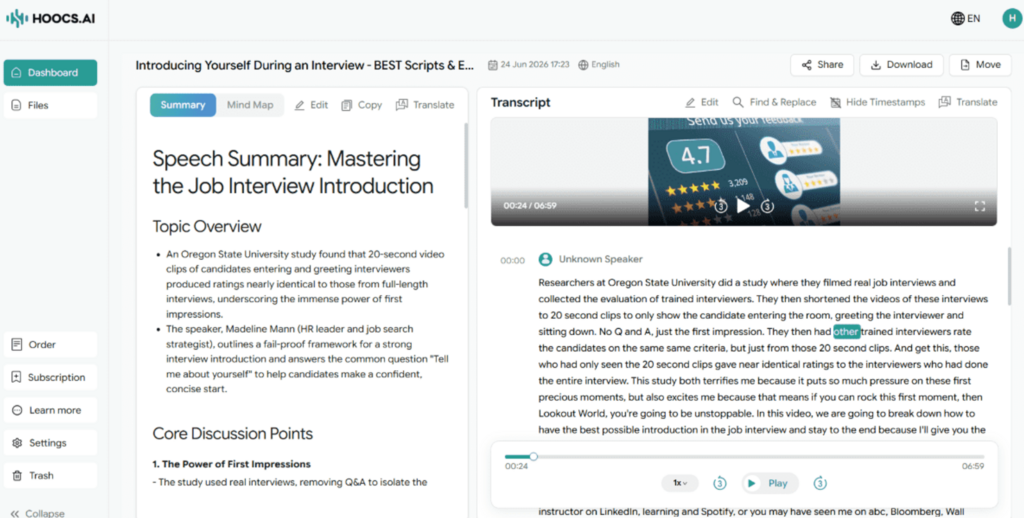
Getting valuable insights out of long online videos can be incredibly time-consuming. Whether you are trying to study a complex lecture or review an important business meeting, skipping through hours of video just to find one specific quote is highly inefficient. That is why transcribing a YouTube video has become an essential strategy for reclaiming your time and boosting daily productivity.
A clean text transcript completely changes how you manage that information. Instead of wasting time pausing and rewinding a video player to take notes, you can scan the text and find what you need in seconds. To help you find the right solution, this article breaks down several methods based on speed, cost, and transcription accuracy.
Why Transcribe a YouTube Video?
Transcribing a YouTube video offers several practical benefits, especially as more educational and professional content is shared on video platforms. Having a written version makes it much easier to manage that information. Here is why it works so well:
- Permanent and Accurate Records. A transcript preserves the exact discussion in written form. This helps prevent memory gaps and gives you a reliable reference for business meetings or client negotiations.
- Easier Search and Review. Instead of rewatching a long video to find a specific detail, you can locate what you need with a quick keyword search. Transcription makes reviewing important points faster.
- Improved Team Collaboration. It is easy for remote or cross-department teams to miss key details during live discussions. Sharing a high-quality transcript ensures everyone stays aligned and shares the same understanding.
- Enhanced Accessibility. Text versions make content accessible to a much wider audience, including someone with hearing difficulties or those who prefer reading over watching.
- Expanded Content Opportunities. A transcript gives you the text to easily repurpose your video. Creators can quickly turn it into blog articles, newsletter updates, or social media posts.
Method 1: Transcribe a YouTube Video with Hoocs.ai
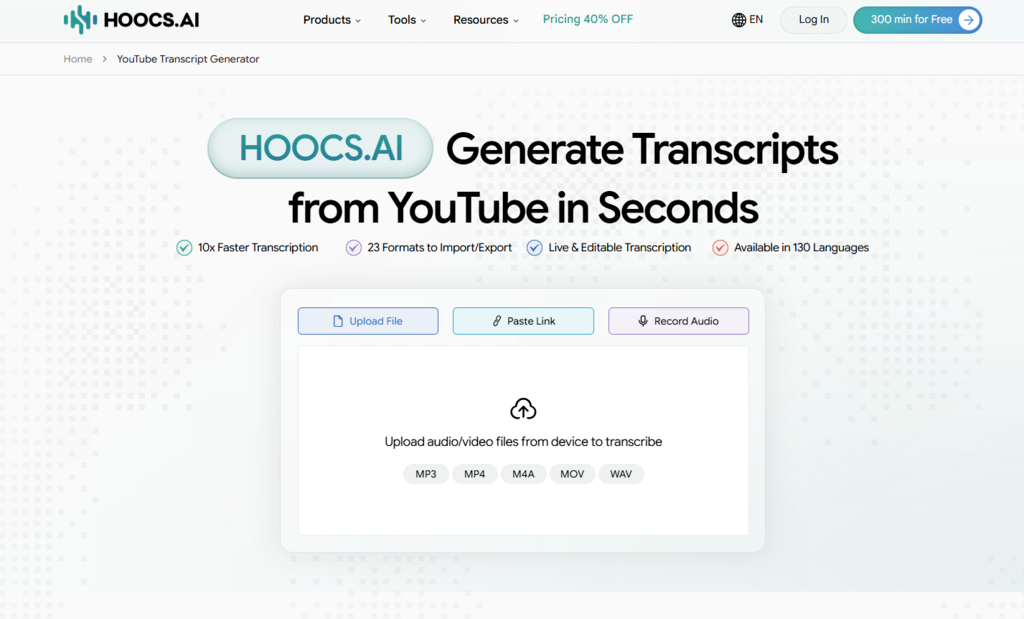
Using an automated YouTube video transcriber is the most efficient way to turn videos into text without wasting hours. In our testing, Hoocs.ai stands out for its high speed and precision-grade accuracy. This AI transcriber quickly converts audio and video files into high-quality text, while its built-in summarization feature condenses long discussions into clean meeting notes and interview highlights.
Hoocs.ai supports over 130 languages, making it a practical option for teams handling multilingual content or translating foreign videos. Since the tool runs entirely in your browser, you do not need to download or install any external software. New accounts include a 300-minute free trial, and the paid tiers remain affordable for features like batch transcription and auto-translation.
Pros:
- Delivers 10x faster transcription performance
- Integrates 23+ import/export formats
- Supports over 130 languages and dialects
- Maintains 90% accuracy even with background noise
- Offers a 300-minute free trial for all new users.
Cons:
- Lacks human transcription services
- Needs a stable internet connection to operate properly
How to Get YouTube Video Transcripts Using Hoocs.ai
Getting started with this platform is incredibly straightforward and takes only a few minutes. Follow the detailed steps below to begin your automated transcription process seamlessly.
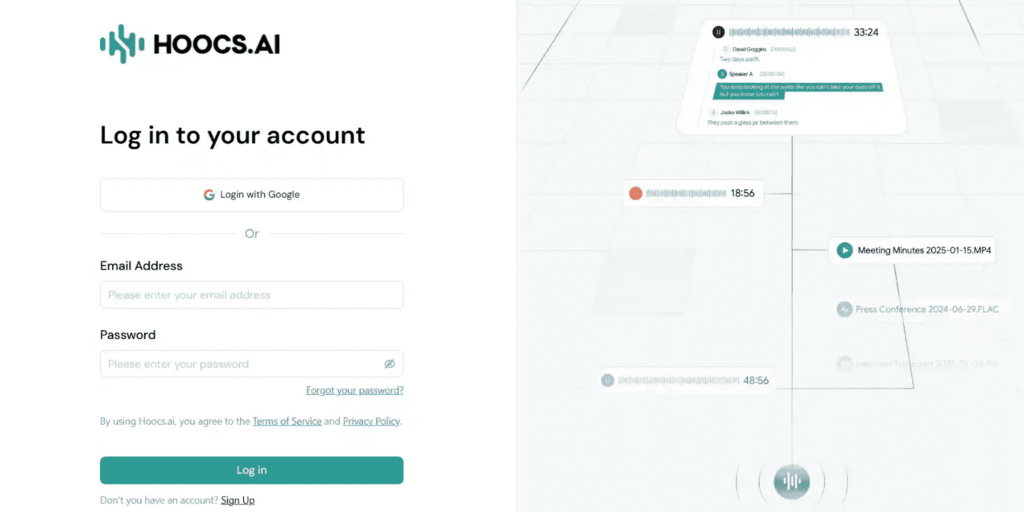
Step 1: Open your browser and visit the Hoocs.ai official website. Click Log In to access the dashboard.
Step 2: Copy the full URL of the YouTube video you want to transcribe and paste it into the central input box.
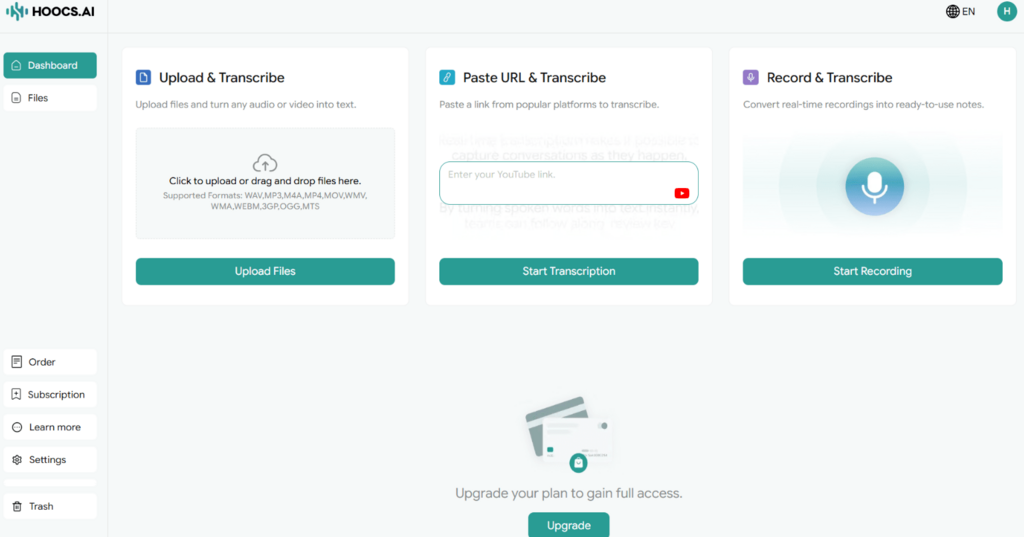
Step 3: Click Start Transcription, then complete the Settings here, and click Start Transcription again.
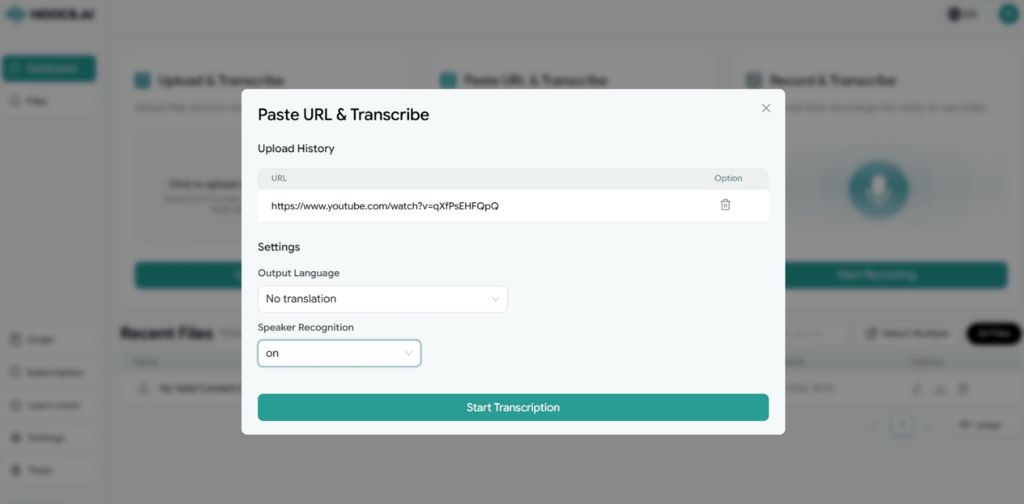
Step 4: Once complete, review the text in the editor. You can get the summary here and edit the transcripts directly.
Step 5: After all the work is done, you can share the transcript via a link or export it in your preferred file format.
Method 2: Get YouTube Transcription with Google Docs Voice Typing
Google Docs voice typing is a practical, free way to capture YouTube audio without third-party software. By playing your video through your computer speakers, Google Docs listens and converts the speech to text in real time using its mature recognition engine. This approach skips files uploads entirely and works well for users on a tight budget who have a functional microphone.
While the process requires no technical skills, you must keep your environment quiet to maintain high accuracy. Because the tool relies on microphone input, background noise often distorts the final output. As long as the audio plays clearly through your speakers, Google Docs captures and transcribes the video to text efficiently, saving you the time of uploading files.
Pros:
- Completely free with a regular Google account
- High security since everything happens in your browser
- Clean interface with no complex configuration needed
- Strong support for multiple languages and accents
Cons:
- More time-consuming as it works in real time
- Sensitive to background noise and poor microphone quality
How to Convert YouTube Video to Text with Google Docs
To implement this built-in typing feature properly, you need to configure a few basic settings within your document workspace. Here is exactly how to set up the environment and start capturing the audio in real time.
Step 1: Open your browser and log in to Google Docs. Create a new blank document.
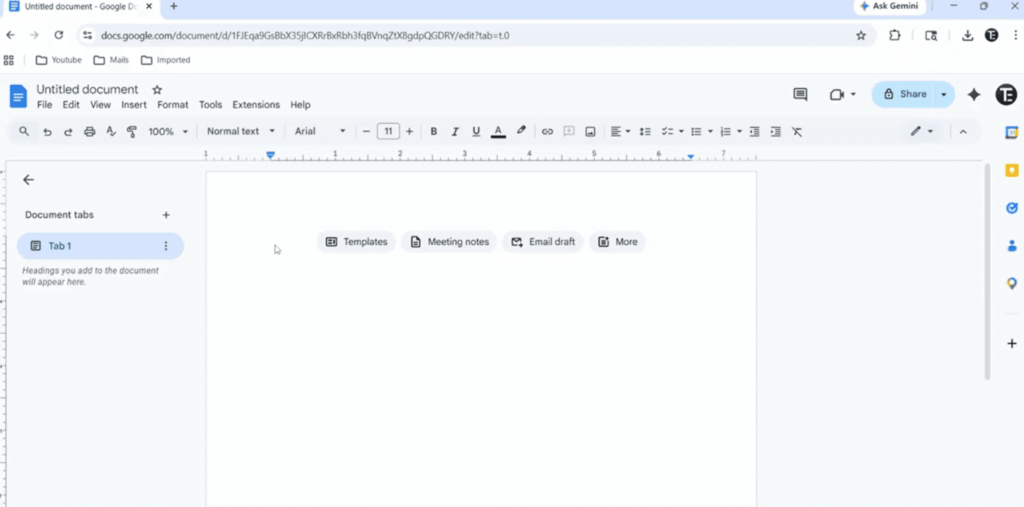
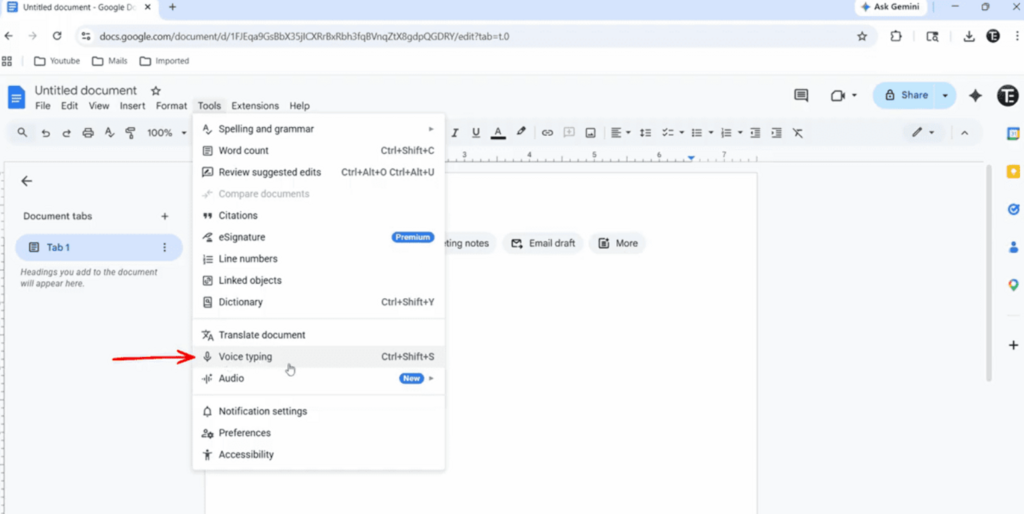
Step 2: Click the Tools menu in the top bar and select Voice typing.
Step 3: Click the microphone icon, open the YouTube video in another window, and play it. Google Docs will capture the audio.

Step 4: Switch back to the document window. Google Docs will automatically convert the speech into text in real time as the video continues to play.
Method 3: Extract Video Transcript Using YouTube’s Built-In Transcript Feature
YouTube generates transcripts for most videos using native speech recognition. You can access this text record immediately after a video goes live without using external tools. This feature provides a convenient way for creators and viewers to review content. It gives you a ready-to-use text of any video instantly, without requiring extra software or complex configuration steps.
The transcript quality relies entirely on the original recording. You can pull up the full text in a few clicks, and the system works best with clear, spoken language. Heavy accents, background music, or poor sound mixing often cause errors in the auto-generated text. It serves as a simple, free starting point for viewers who need a quick scan or to save video content.
Pros:
- Completely free and built directly into YouTube
- No security risks since everything stays on the platform
- Convenient and fast access with just a few clicks
- Clean and organized text with accurate timestamps
Cons:
- Limited editing options directly on the page
- Easily affected by poor audio quality or network issues
How to Get Video Transcripts Directly on YouTube
Accessing the native transcript feature requires no third-party extensions and can be done right within your browser window. Follow these simple steps to locate the hidden text panel on the video page instantly.
Step 1: Open the YouTube video you want to transcribe in your browser. Click “…more”.
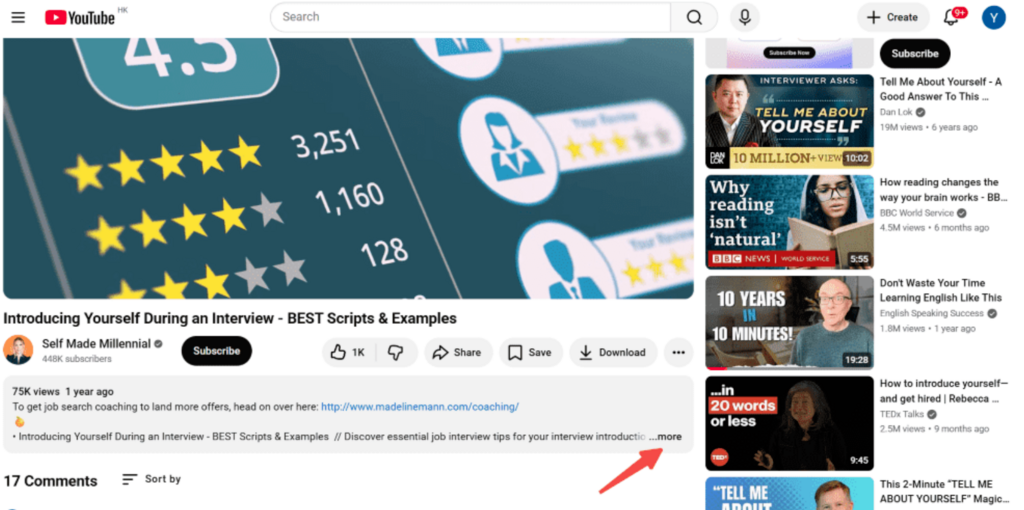
Step 2: Scroll down to the introduction section and click Show transcript.
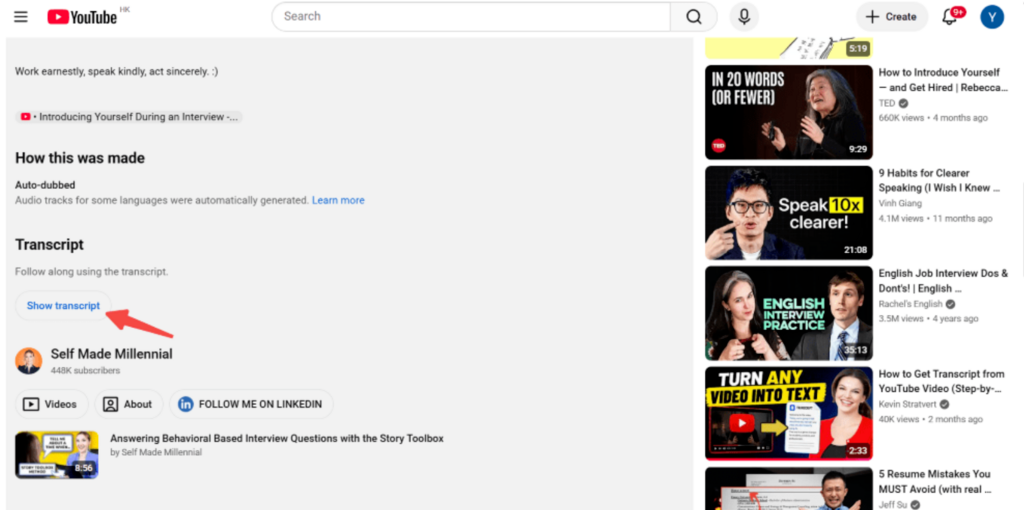
Step 3: The transcript appears on the right side of the video player. Copy and paste the transcript. You can also click “…” to toggle timestamps.
Final Thoughts
Manually transcribing a YouTube video no longer needs to be a chore. Whether you are capturing key decisions from meetings, taking notes for your studies, or repurposing content into articles, using the right tool saves you significant time. Transcription technology has evolved, turning hours of tedious work into a quick, efficient process that fits seamlessly into your daily workflow.
If you prioritize speed, precision, and smart AI summarization, Hoocs.ai is a standout choice, especially with its generous 300-minute free trial. For those on a tighter budget, Google Docs and YouTube’s built-in transcript feature remain reliable, effective alternatives. Test these options to see which aligns best with your specific needs and personal routine.


Back then, every smartphone camera had a great back camera but the front ones were normal. By normal it was good to keep in the gallery, not good enough to post it. Content creators and social media influencers use the front camera almost the entire time and in this day and age, the cameras have upgraded.
A 50MP front camera with autofocus is a different piece of hardware from the fixed-focus sensors that are now found in best affordable camera phones. This change is the reason the selfies and front-facing videos look better and sharper than before without worrying about the price tag.
Why Most Front Cameras Underperform
Many assume that a higher megapixel count on the front camera means better selfies. A 16MP front camera sounds better than a 12MP front camera but if both are fixed-focus, they will produce similar soft results. The megapixel number tells you the resolution of the output. It says nothing about whether the camera can actually focus.
Most smartphones use fixed-focus selfie cameras, which means the lens cannot be adjusted and without the help of additional software. When you take a picture the camera is designed to work well at one specific distance and performs worse at anything closer or farther from that point.
With a fixed-focus selfie camera, the model’s face can end up as blurry as the background. The autofocus system makes sure of consistent sharpness regardless of the model’s distance from the front camera.
DxOMark’s testing shows that AF systems help achieve better sharpness in front cameras, and they test repeatability and shooting time for phones with autofocus. Taking multiple shots at the same subject distance and check the consistency of results. A selfie camera that produces sharp results most of the time is more valuable than one that looks great.
What Autofocus Actually Does

A fixed-focus lens is set at the factory to a single focus distance. This means that things at a specific distance look sharp and everything else looks softer. The phone cannot change this no matter how much software processes the image afterward.
An autofocus front camera adjusts the lens to wherever you are standing. Whether you are holding the phone close for a tight portrait, far away for a group shot, or varying your distance during a video, the lens keeps recalibrating in real time to keep your face sharp. With autofocus, you can optimise the focus for the type of shot you want to take.
For taking a video where most Pakistani TikTok creators and YouTube vloggers actually use their front camera, continuous autofocus is important. This is because an unstable autofocus can easily ruin a good video clip. A fixed-focus camera cannot track your movement but an autofocus camera follows you as you move.
The difference is most visible in three real-life scenarios:
- Close-up portrait selfies
- Front-facing video
- Group selfies at a distance
The fixed-focus lens produces soft edges around the face, blurs any movement and cannot bring distant faces into sharp focus.
Why 50MP Resolution Compounds the Autofocus Advantage

The truth is that resolution and focus work together. A 50MP sensor captures more pixel data per shot than a 16MP or 32MP sensor. But that extra data only produces sharper results if the camera is actually focused correctly. A 50MP photo with a slightly soft focus will be a larger, higher-resolution version of a blurry image.
A 50MP autofocus front camera captures four times the data of a 12MP fixed-focus sensor and keeps the focus accurate in real time. The combination is far more better as sharpness from the sensor and sharpness from the focus system multiply each other.
This front camera also helps improve selfie quality, video calls, low-light photos, and content creation, giving a better detail and clearer results compared to standard front cameras. Pairing 50MP resolution with autofocus is what turns a front camera into a genuine photography tool.
For Pakistani content creators recording reels, YouTube Shorts, or TikTok videos using the front camera, this combination changes everything. This camera includes features like sharp face tracking in motion, clean close-up detail, and reliable performance in changing lighting and distances in a single shot.
Why Front Camera Quality Changed Buying Priorities
Pakistan’s media is undergoing a dramatic transformation, with an estimated 25 million internet users accessing social media daily. Pakistani women are rapidly changing the digital landscape through content creation, building communities, and boosting a new female voice across social media platforms. For them the front camera is the tool they use every day.
Platforms like Instagram, TikTok, Snapchat, and YouTube Shorts have completely changed smartphone buying behaviour in Pakistan. People constantly record videos, shoot reels, upload stories, take selfies, and create content as part of their daily routine. This is why front cameras became just as important as rear cameras for many buyers.
A phone with an excellent rear camera and a mediocre fixed-focus front camera is a half-capable content creation device in 2026. If your primary output is front-facing video, then the front camera specs are more important than the rear camera for your daily use case.
Final Thoughts
The role of the front camera has changed in the past few years. What was once used only for taking selfies sometimes is now responsible for video calls, social media content, vlogging, online meetings, and everyday communication. That change is why features like autofocus and higher-resolution sensors matter more today.
A 50MP front camera with autofocus is not just a specification on a product page. It directly improves the sharpness, consistency, and usability of the photos and videos people capture every day.
For buyers who create content regularly or simply want better selfie quality without carrying extra equipment, it is one of the most meaningful lens upgrades available in the best camera phones in Pakistan.

How do you know when a website has outgrown its hosting plan? The signal usually arrives as a complaint. A customer reports that pages load slowly, or the site goes down during a sale. Most small businesses start on shared hosting because it is cheap and simple, and for a brochure site it works for years. The question is when the savings stop being worth the limits. The difference between the two main options comes down to who you share a server with.
The Shared Hosting Model
Shared hosting puts your site on one physical machine alongside dozens or hundreds of others. Everyone draws from the same pool of processor time, memory, disk, and bandwidth. The host manages the server, applies updates, and handles security at the system level, which is why the price can start near $2.59 a month. Most plans bundle a control panel, one-click application installs, email, and support, which lowers the skill needed to launch. That convenience is the product, and it comes from letting someone else keep the server running. For a new business with a simple site and modest traffic, the setup covers the need without extra work, and the limits stay invisible until the shared pool runs short.
The Noisy Neighbor Problem
The weakness of a shared server is the neighbors. When one site on the machine gets a traffic spike, runs a heavy database query, or draws a bot attack, it consumes resources the others were counting on. Your site slows down because of activity you do not control and cannot see. There is no setting you can change to fix it, because the cause is on another account you cannot reach. The host can move you to a less crowded machine, but on a busy plan the pattern returns. The industry calls this the noisy neighbor problem, and on a crowded server it is the most common reason a small site stalls for no cause its owner can find.
Dedicated Resources on a VPS
A virtual private server divides one physical machine into separate compartments, each with resources reserved for a single tenant. Fast VPS hosting gives a site its own reserved processor and memory, walled off from whatever the other tenants are doing. A piece of software called a hypervisor enforces those boundaries, so a spike on a neighboring compartment no longer reaches yours. The result is steadier performance and the freedom to install software and adjust settings that a shared plan keeps locked. Resources on a VPS can usually be raised without moving the site, so a plan grows with traffic and avoids a migration at a busy moment. A VPS also grants root access, which means full control of the server environment and the responsibility that comes with it.
Performance and Cost Compared
The performance gap is measurable. Tests that move a site from shared hosting to a VPS commonly show a 15% to 35% improvement in speed, mostly because the site no longer waits behind its neighbors. A slow server shows up as a high time to first byte, and a value above 500 milliseconds usually points to the server itself. On price, the order reverses. Shared plans start near $2.59 a month and include management, while a VPS starts around $10 a month and climbs with the resources you reserve. A managed VPS is the middle option, where you keep dedicated resources and the host still handles updates for a higher monthly fee. An unmanaged VPS is cheaper in dollars and adds the cost of your own time. Shared hosting has the lower sticker price, and a VPS usually has the lower cost per visitor once traffic grows heavy.
Security and Maintenance
A shared plan hides the server work from you, since the host patches the operating system and watches for intrusions. A VPS hands you more of that job, especially an unmanaged one. You decide when to update, how to configure the firewall, and who can log in. That control helps a site with specific needs, and it is a burden for an owner who would rather not think about servers. Small sites are not exempt from attacks. A small business is a big target for ransomware, and automated scans reach sites of every size, so the upkeep that comes with a VPS is real work an owner has to plan for.
Warning Signs of an Outgrown Plan
A few signals mean the shared plan has reached its limit. Pages that take three seconds or more to load are the most obvious, and studies of online shoppers show how fast those visitors leave. Frequent downtime during normal traffic is another, and so is a need for custom server software that the host does not allow. Error messages about a resource limit being reached are a direct signal, since shared plans cap the processor time and memory any one account can use in a burst. Steady traffic growth is the slow version of the same message, since a plan sized for 2,000 visitors a month behaves differently at 50,000. When two or more of these appear together, the move usually pays for itself in retained customers.
Matching the Plan to the Business
The right answer depends on what the site does. A simple informational site or a low-traffic blog runs well on shared hosting, and paying for a VPS there wastes money. A store that processes payments, a site with steady growth, or one that needs specific software is the case for a VPS. A bakery with a menu and a contact form has no reason to pay for a server it will never load, while a growing online shop that lost sales to a slow checkout last holiday season has every reason to. This decision reaches more owners each year. About 73% of small businesses in the United States now have a website, 53% sell online, and e-commerce’s share of retail sales keeps climbing, which means downtime and slow pages cost sales directly.
The trend points one way. U.S. e-commerce sales are growing more than twice as fast as store sales, and more small sites now fall into the range where a VPS makes sense. The plan that fit a quiet brochure site in its first year is rarely the plan that fits a busy store in its third.
A Question to Ask Before You Renew
Shared hosting and a VPS suit two different stages of the same business. The cheapest plan that keeps the site fast and online is the right one, and for many new sites that is shared hosting. The skill is spotting the moment the cheap option starts costing customers. Before you renew, answer one forward-looking question. Where will your traffic be in a year, and which plan can carry it without slowing down?

Top Tips for Selecting the Right Weighing Scale Price in Kenya

Selecting the Right Solar Water Heater Prices in Kenya to Save More Money

Top Advantages of Purchasing a High-Quality Sugarcane Juice Machine

Coffee Pulping Machine Price in Kenya – How to Ensure You Get the Best Deal

The Price of Maize Sheller Machines in Kenya: How to Pick a Long-Lasting and Efficient Machine

Durability of Infrastructure with Superior Quality Geotextile Membrane

The 15 Highest-Paid Rugby Players in the World

Christopher Dare: The Untold Story of Engineer and Former Husband of Angela Rippon

Nancy Hallam: The Inspiring Life, Career, and Success Story Behind Ian Wright’s Wife

How to Ensure Your Home is Valued Correctly for a Quick Sale

Who Is Maisie Mae Roffey? The Private Life, Family Story, and Quiet Success of Julie Walters’ Daughter

Johnny Carell: Inside the Life, Family, and Rising Success of Steve Carell’s Son
The 15 Highest-Paid Rugby Players in the World
Christopher Dare: The Untold Story of Engineer and Former Husband of Angela Rippon
Nancy Hallam: The Inspiring Life, Career, and Success Story Behind Ian Wright’s Wife
How to Ensure Your Home is Valued Correctly for a Quick Sale
Who Is Maisie Mae Roffey? The Private Life, Family Story, and Quiet Success of Julie Walters’ Daughter
Johnny Carell: Inside the Life, Family, and Rising Success of Steve Carell’s Son
-
 Sports2 months ago
The 15 Highest-Paid Rugby Players in the World
-
Celebrity8 months ago
Christopher Dare: The Untold Story of Engineer and Former Husband of Angela Rippon
-
Celebrity8 months ago
Nancy Hallam: The Inspiring Life, Career, and Success Story Behind Ian Wright’s Wife
-
 Real Estate5 months ago
How to Ensure Your Home is Valued Correctly for a Quick Sale
-
Celebrity8 months ago
Who Is Maisie Mae Roffey? The Private Life, Family Story, and Quiet Success of Julie Walters’ Daughter
-
Celebrity9 months ago
Johnny Carell: Inside the Life, Family, and Rising Success of Steve Carell’s Son
-
 Business7 months ago
Simon Dixon Biography: Lifestyle, Net Worth, Family, Career and Success Story
-
 Celebrity6 months ago
Draven Duncan: Tim Duncan’s Rising Star Son and His Inspiring Basketball Journey