
Ai & Tools
Humanize AI and AI Chat: Creating More Natural and Effective Communication

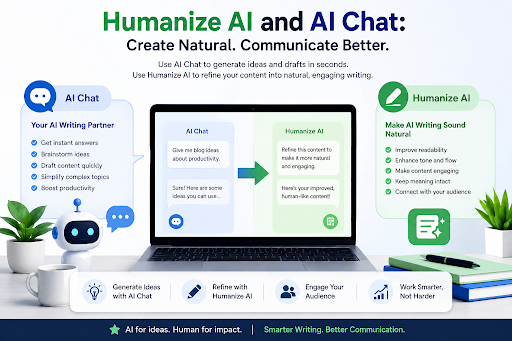
Artificial intelligence has transformed the way people write, learn, and communicate. From drafting emails and brainstorming ideas to explaining complex topics, AI-powered tools have become valuable everyday assistants. As AI-generated content becomes more common, users are also looking for ways to make their writing sound more natural, authentic, and engaging.
This is where AI chat assistants and Quillbot Humanize AI complement one another. While an AI chat tool helps users generate ideas, answer questions, and draft content, a humanization tool refines that content to improve readability and create a more natural writing style.
Together, these technologies help users communicate more effectively while maintaining their unique voice.
The Growing Role of AI Chat
AI chat assistants have evolved far beyond simple question-and-answer systems. Today, they help users brainstorm ideas, summarize information, explain difficult concepts, draft emails, generate outlines, and assist with creative writing.
Students, professionals, marketers, entrepreneurs, and content creators increasingly rely on AI chat to save time and improve productivity.
Instead of starting with a blank page, users can quickly generate a first draft and then customize it to fit their specific goals.
How QuillBot AI Chat Supports Everyday Writing
QuillBot AI Chat is designed to assist users throughout the writing process. Whether someone needs help generating ideas, answering questions, rewriting text, or organizing information, the tool provides conversational assistance that adapts to different writing needs.
Common use cases include:
- Brainstorming blog topics
- Drafting emails and professional messages
- Explaining complex concepts in simple language
- Creating outlines for reports and essays
- Assisting with research and study sessions
- Improving productivity during everyday writing tasks
Rather than replacing human creativity, AI chat serves as a collaborative writing partner that helps users work more efficiently.
Why Humanizing AI Content Matters
While AI can produce well-structured content quickly, the output may sometimes sound repetitive, overly formal, or less conversational than intended.
Readers generally connect more with writing that feels authentic, engaging, and naturally written. Improving tone, sentence flow, and word choice helps create content that resonates with both audiences and search engines.
Humanization tools focus on refining AI-assisted writing without changing its intended meaning, making the final content easier to read and more enjoyable to consume.
QuillBot Humanize AI Helps Create Natural-Sounding Content
QuillBot Humanize AI is designed to improve the readability and natural flow of AI-assisted writing. Instead of simply replacing words with synonyms, it refines sentence structure, enhances clarity, and creates smoother transitions between ideas.
Writers can use the tool to polish various types of content, including:
- Blog articles
- Website copy
- Marketing content
- Academic drafts
- Business communications
- Social media posts
The goal is not to disguise AI usage but to help users produce writing that feels more personal, engaging, and aligned with their intended audience.
Why AI Chat and Humanize AI Work Better Together
Many writers follow a simple workflow:
First, they use an AI chat assistant to generate ideas, answer questions, or create an initial draft. Then, they refine that draft using a humanization tool to improve readability and tone.
This combination offers several advantages:
- Faster content creation
- Improved writing quality
- More natural sentence flow
- Better audience engagement
- Reduced editing time
- Greater confidence before publishing
By combining ideation with refinement, users can streamline the entire writing process while maintaining high-quality results.
Best Practices for AI-Assisted Writing
To get the most value from AI tools, it’s helpful to follow a few best practices:
- Use AI to support your creativity rather than replace your expertise.
- Review and personalize every draft before publishing.
- Verify facts, statistics, and references independently.
- Adjust tone to match your audience and purpose.
- Focus on clarity, originality, and accuracy throughout the writing process.
These practices help ensure that AI enhances communication while preserving authenticity.
The Future of AI Writing Tools
As artificial intelligence continues to advance, writing assistants are becoming more context-aware, collaborative, and personalized. Future AI tools will likely provide even more nuanced suggestions, adapt to individual writing styles, and integrate seamlessly into everyday workflows.
Rather than replacing human writers, AI will continue to act as a productivity partner—helping users generate ideas, overcome writer’s block, and communicate more effectively.
Final Thoughts
Modern writing is no longer limited to choosing between human creativity and artificial intelligence. Instead, the most effective approach combines both.
QuillBot AI Chat helps users brainstorm, learn, and generate content efficiently, while QuillBot Humanize AI refines that content into writing that sounds clear, natural, and engaging.
Together, these tools support a smarter writing workflow that empowers students, professionals, marketers, and creators to communicate with confidence in an increasingly AI-powered world.


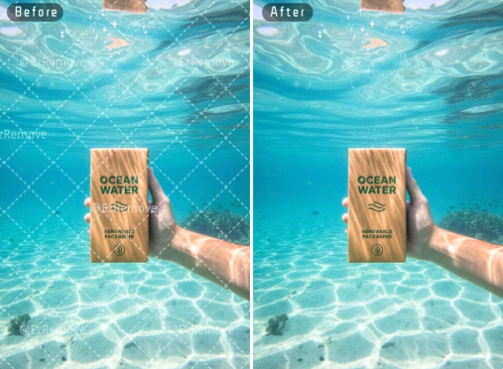
You have a great video but a logo is in the way. It blocks the view and makes the video look messy. In the past, you needed complex editing skills to fix this. Now, artificial intelligence does the heavy lifting for you. You can learn how to remove watermark from video without spending hours on frame by frame edits. This technology looks at the pixels around the logo and fills in the gap naturally.
Many people use these tools to clean up their personal content or social media posts. If you also work with photos, you might want a free ai image editor to help with your still graphics. These tools use similar logic to identify unwanted objects and erase them. Using AI saves you time and keeps your content looking professional. You do not need to be a tech expert to get great results.
Step-by-Step Guide to Removing Watermarks
Removing a watermark used to be a chore. You had to crop the video or place a blurry box over the logo. Both options made the video look worse. AI tools change this by using a process called inpainting. This process analyzes the background and recreates it where the watermark used to be. Follow these steps to get a clean video.
Step 1: Choose a Reliable AI Tool
The first thing you need is a good tool. Many websites offer AI removal services directly in your browser. This means you do not have to download heavy software. Look for a tool that supports different video formats like MP4 or MOV. A good tool should also handle high resolutions so your video stays sharp. Some tools are free for small files, while others require a subscription for longer clips.
Step 2: Upload Your Video File
Once you pick a tool, find the upload button. Most sites let you drag and drop your file directly into the window. Depending on your internet speed, this might take a few seconds or a few minutes. Make sure the video is not too large for the tool you chose. If the file is huge, you might need to compress it first. Always keep an original copy of your video just in case you want to start over.
Step 3: Highlight the Watermark Area
After the video loads, you will see a preview window. You need to tell the AI exactly what to remove. Most tools give you a brush or a box selection tool. Carefully paint over the watermark. It is better to stay close to the edges of the logo. If you select a huge area, the AI might get confused and create a blurry patch. If the watermark moves around the screen, look for a tool that can track the object through the whole video.
Step 4: Start the AI Processing
Click the button to start the removal. This is where the computer does the hard work. The AI looks at every frame of the video. It checks what is behind the watermark in previous or future frames. It then fills in the space with matching colors and textures. This part takes the most time. A short ten second clip might finish quickly, but a long video will take longer. Be patient and do not close the browser tab.
Step 5: Preview and Download
When the processing is done, the tool will show you a preview. Watch the video closely to see if the watermark is gone. Check if the area looks natural or if there are weird glitches. If it looks good, click the download button. Some tools let you choose the output format and quality. Save the file to your computer and check it one last time in your favorite video player.
Comparison of Methods
| Method | Speed | Final Quality | Difficulty |
| AI Removal | Fast | High | Easy |
| Cropping | Very Fast | Low | Very Easy |
| Blurring | Fast | Medium | Easy |
| Manual Editing | Very Slow | High | Hard |
Tips and Best Practices
To get the best results, you should start with the highest quality video possible. If your source video is blurry, the AI will have a hard time matching the pixels. High definition videos give the AI more data to work with. This leads to a much cleaner finish. If you have a choice, always use the original file rather than a compressed version from a messaging app.
Keep your selections as small as possible. You only want the AI to replace the watermark itself. If you select parts of the background that are already fine, you might introduce unnecessary artifacts. Use a small brush size for tiny logos. If the watermark has a shadow or a glow, make sure to include those in your selection as well. This prevents a ghost image from staying behind.
Check the background complexity. AI works best when the background behind the watermark is consistent. For example, a logo over a blue sky is very easy to remove. A logo over a busy crowd or a moving pattern is much harder. If the result looks messy, try adjusting your selection and running the tool again. Sometimes a second pass can fix small errors.
Always respect copyright laws. These tools are meant for cleaning up content you own or have permission to use. Removing a watermark from someone else’s work without permission is not a good idea. Use these tools for your own projects, like removing a timestamp from an old family video or a logo from a video you made for a client.
Common Mistakes to Avoid
One big mistake is selecting too much area around the watermark. People often get lazy and draw a big circle around a small logo. This forces the AI to recreate a large part of the image. The more the AI has to invent, the more likely it is to make a mistake. Take your time to be precise with your selection tool. It only takes an extra minute but makes a huge difference.
Another mistake is ignoring the preview. Some people download the video immediately without watching it first. You might find that the AI struggled with a specific movement in the video. If you see a glitch, you can often fix it by changing the selection slightly. It is much easier to fix it while you are still in the editor than to start the whole process over later.
Do not expect perfection on every single video. While AI is very smart, it is not magic. If a watermark covers a person’s face or a very detailed object, the AI might not be able to recreate it perfectly. In these cases, the result might look a bit soft or smudged. If the video is for a professional project, you might need to combine AI removal with some manual touch ups.
Using the wrong file format can also cause issues. Some AI tools work better with specific types of files. If your video is in an unusual format, the tool might struggle to read the data correctly. If you run into errors, try converting your video to a standard MP4 format before you upload it. This usually solves most compatibility problems.
Conclusion
Removing watermarks from videos is no longer a task reserved for professional editors. With the power of AI, anyone can clean up their footage in just a few minutes. By following a simple step by step process, you can erase logos and timestamps that distract from your content. Remember to be precise with your selections and use high quality source files for the best results.
Technology continues to improve, making these tools even more accurate. Whether you are a social media creator or just someone wanting to fix an old video, AI tools provide a simple solution. You can now focus on your creativity instead of worrying about unwanted logos. Give it a try and see how much better your videos look without those distracting marks. AI makes the process fast, easy, and accessible for everyone.


Nobody decides whether they trust a brand from a single image. The impression builds slowly: a product shot here, a banner there, a thumbnail, a post that scrolled by on a Tuesday. Each piece is small. Put together, they quietly tell people whether you look like you have it together.
That last part is where a lot of small teams struggle, and it is rarely because they lack images. It is because their images were made at different times, with different tools, by different people. The product photo looks clean but a little flat. The campaign visual looks nice on its own and slightly off next to everything else. Give it a few months and the whole set drifts apart.
The real problem is not a shortage of images
Most brands do not run out of pictures. They run out of pictures that look like they belong together. A product listing uses a studio-style shot, the social posts use casual phone photos, and the blog leans on stock visuals that never quite match. Each image is fine. The collection is not.
Fixing that by hand is slow work. You cut out backgrounds, nudge colors, rebuild a composition, then export a few sizes for a few platforms. For a team without a designer on staff, that work either does not happen or it happens badly.
Where Pixlio fits
Pixlio is a browser-based set of AI image tools. You can create, edit, combine, and extend images in one place, with nothing to install. The useful way to think about it is not “look at all these features.” It is closer to “take the assets you already have and make them work harder.” A few of the tools come up again and again in real branding work.
Editing what you already have
The AI image editor is for the photos you already took. Maybe a product shot needs a cleaner background. Maybe a portrait needs the lighting calmed down. Maybe an old graphic needs text removed before you reuse it. The goal is not to start from scratch. It is to move something from usable to ready in a few steps, so it sits comfortably next to the rest of your work instead of fighting it.
Putting separate images into one scene
Some of the hardest branding work is making two separate things look like one photo. The product sits alone on a white background. The lifestyle scene you want lives in a completely different image. Getting them into the same frame, with light and shadows that agree, normally means real compositing.
The AI image combiner handles a lot of that. You give it the product and the scene, and it works out how they should sit together: which element is the subject, what background supports it, and how the light should fall across both. It is the difference between booking a photoshoot and testing five backgrounds before lunch.
Extending an image when the crop fights you
Then there is the everyday annoyance of an image that is almost right but the wrong shape. A square product shot that a banner wants wide. A portrait crop that clips the top of someone’s head. Reshooting is overkill, and stretching the pixels looks bad.
Pixlio’s AI outpainting tool extends a picture past its original edges, adding new space that matches what is already there instead of distorting it. One photo can become a wide hero, a tall story, and a square post without losing the subject. For stretching a single good image across platforms, it saves a surprising amount of time.
Why consistency is worth the effort
Branding is not only the logo and the font. It is whether your visuals feel related when someone runs into them in different places. When the product shots, the posts, and the ads share a similar tone, the brand reads as one thing. When they do not, it reads as several.
For a small team this matters more, not less. You cannot outsource every image or lean entirely on stock. Reusing what you have and adjusting tone without rebuilding from zero is how a small group keeps a coherent look without a design department behind them.
It still needs a person
Even with good tools, the calls that matter are yours. Which background fits the mood. What should draw the eye. Whether the result actually looks like your brand or just looks fine. The AI takes care of the fiddly technical parts. It does not decide what you are going for, and honestly that is the part worth keeping human.
A workflow, not a single click
In practice the tools work best together. Start with a base photo, clean it up in the editor, drop it into a scene with the combiner, then extend it with outpainting for whatever format you need. Test a couple of versions and keep the one that fits.
None of this replaces taste or planning. What it changes is how much friction sits between an idea and a usable image. For a team trying to look consistent across a dozen places at once, removing that friction is most of the battle.


A few decades ago, running a successful organisation often came down to having a strong product, a capable team, and a clear plan. While those things still matter, today’s leaders face a very different landscape. Technology evolves at remarkable speed, regulations become increasingly complex, and public expectations continue to shift.
What worked five years ago may not be enough today. Organisations across every sector are finding that success depends not only on what they do, but on how well they adapt to change.
The most resilient organisations tend to have three things in common. They have strong leadership, a clear understanding of their responsibilities, and a willingness to learn. These foundations may sound simple, but they are becoming more important than ever.
Why Leadership Choices Matter More Than Ever
Every organisation develops its own culture. Some are collaborative and innovative. Others are mission-driven, community-focused, or highly specialised. Whatever the purpose, leadership has an enormous influence on how an organisation grows and responds to challenges.
This is particularly true in the charity sector, where leaders often balance strategic planning with fundraising, stakeholder engagement, governance, and social impact. Finding the right person for such a multifaceted role is rarely straightforward.
That is why charity CEO recruitment has become an increasingly important area of focus for organisations looking to secure long-term success. The process goes far beyond reviewing CVs or conducting interviews. It is about identifying individuals who can inspire teams, navigate uncertainty, and remain committed to a meaningful mission.
A strong leader does more than manage an organisation. They shape its direction, influence its culture, and help build trust among staff, supporters, and beneficiaries. When the right appointment is made, the effects can be felt throughout the entire organisation for years to come.
The Growing Complexity of Compliance
There was a time when compliance was often viewed as a back-office function, something that happened quietly behind the scenes. Today, it sits much closer to the centre of organisational decision-making.
For government bodies and publicly funded organisations, the challenge is particularly significant. Expectations around transparency, accountability, security, and data management continue to increase.
As a result, public sector compliance has become a topic that reaches far beyond legal departments. It affects how services are delivered, how information is managed, and how organisations build confidence with the communities they serve.
The interesting thing about compliance is that its success often goes unnoticed. When systems work properly, people rarely think about them. Citizens simply expect services to operate smoothly, data to be protected, and regulations to be followed.
Much like the foundations of a building, compliance provides stability. It creates a framework that allows organisations to operate effectively while managing risk and maintaining public trust.
The Knowledge Gap Nobody Can Ignore
Few developments have captured public attention quite like artificial intelligence. New tools appear almost weekly, headlines predict dramatic changes, and organisations everywhere are trying to understand what it all means.
Yet amid the excitement, there is a growing recognition that understanding AI is becoming a valuable skill.
This is where AI literacy training enters the conversation. While many people associate artificial intelligence with technical specialists, the reality is that its influence now extends across countless professions. From marketing and customer service to healthcare and education, AI is already changing how work is performed.
The challenge for many organisations is not whether they will encounter AI, but whether their teams understand how to use it responsibly and effectively. Developing a basic understanding of its capabilities, limitations, and ethical considerations can help employees make more informed decisions and approach new technologies with confidence rather than uncertainty.
In many ways, AI literacy is becoming like digital literacy. What was once considered specialist knowledge is gradually becoming relevant to a much wider audience.

I Spent 90 Days Testing 6 Electric Toothbrushes — These Are the Only 3 Worth Buying

Why Quality Sleepwear Belongs in a Practical Everyday Wardrobe

How to Remove Watermarks from Videos with AI Tools

The New Armaf Perfume Everyone Is Waiting For

Airseekers Tron vs GoKo M6: Which AI Lawn Mower Actually Wins at Obstacle Avoidance?
Wegovy Explained: How Semaglutide Helps You Lose Weight Sustainably

The 15 Highest-Paid Rugby Players in the World

Christopher Dare: The Untold Story of Engineer and Former Husband of Angela Rippon
Nancy Hallam: The Inspiring Life, Career, and Success Story Behind Ian Wright’s Wife
Who Is Maisie Mae Roffey? The Private Life, Family Story, and Quiet Success of Julie Walters’ Daughter
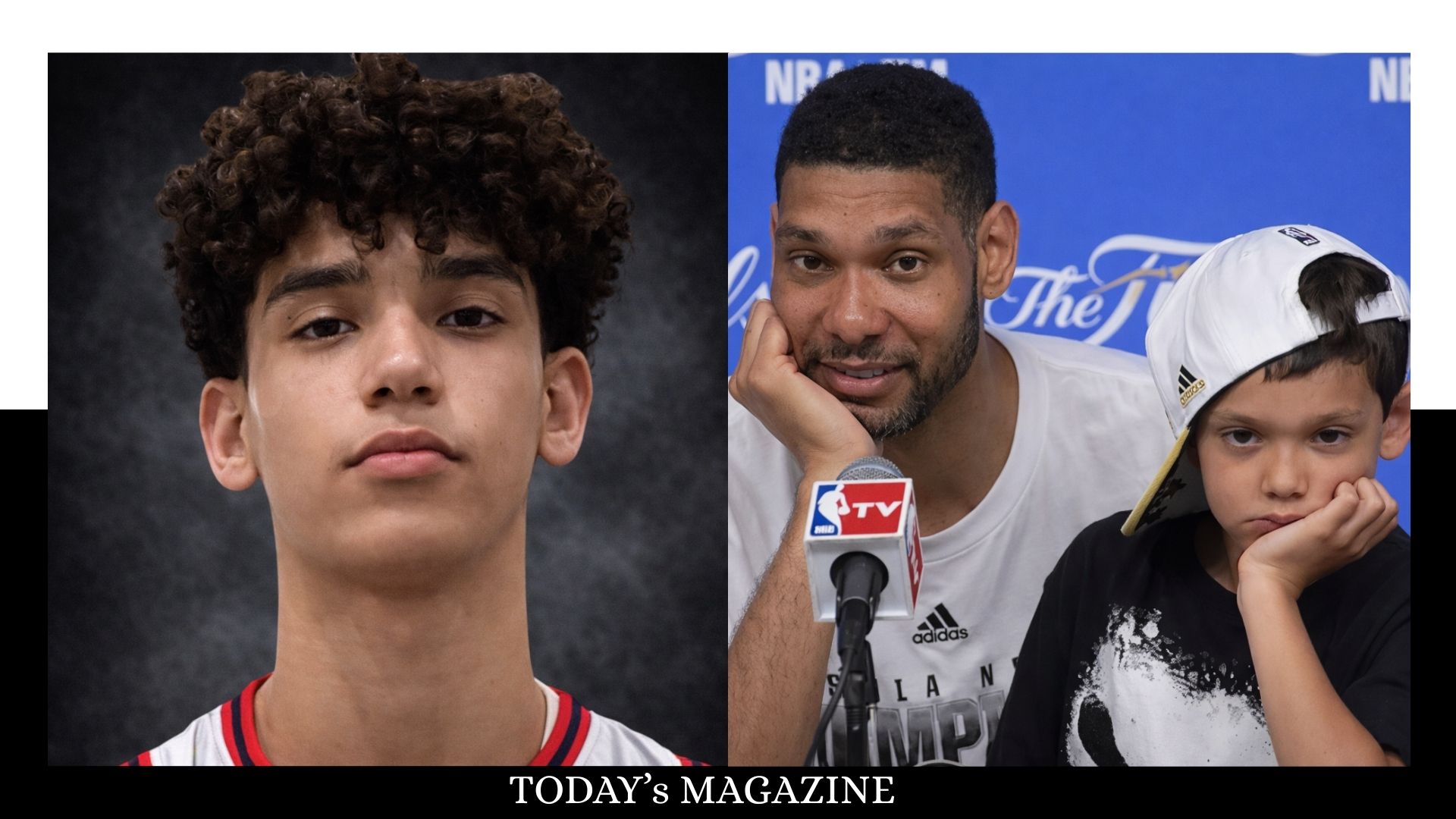
Draven Duncan: Tim Duncan’s Rising Star Son and His Inspiring Basketball Journey

Johnny Carell: Inside the Life, Family, and Rising Success of Steve Carell’s Son
The 15 Highest-Paid Rugby Players in the World
Christopher Dare: The Untold Story of Engineer and Former Husband of Angela Rippon
Nancy Hallam: The Inspiring Life, Career, and Success Story Behind Ian Wright’s Wife
Who Is Maisie Mae Roffey? The Private Life, Family Story, and Quiet Success of Julie Walters’ Daughter
Draven Duncan: Tim Duncan’s Rising Star Son and His Inspiring Basketball Journey
Johnny Carell: Inside the Life, Family, and Rising Success of Steve Carell’s Son
-
 Sports2 months ago
The 15 Highest-Paid Rugby Players in the World
-
Celebrity7 months ago
Christopher Dare: The Untold Story of Engineer and Former Husband of Angela Rippon
-
Celebrity8 months ago
Nancy Hallam: The Inspiring Life, Career, and Success Story Behind Ian Wright’s Wife
-
Celebrity8 months ago
Who Is Maisie Mae Roffey? The Private Life, Family Story, and Quiet Success of Julie Walters’ Daughter
-
Celebrity6 months ago
Draven Duncan: Tim Duncan’s Rising Star Son and His Inspiring Basketball Journey
-
Celebrity9 months ago
Johnny Carell: Inside the Life, Family, and Rising Success of Steve Carell’s Son
-
 Business7 months ago
Simon Dixon Biography: Lifestyle, Net Worth, Family, Career and Success Story
-

 Celebrity5 months ago
Who Is Linda Susan Agar? The Private Life, Legacy, and Story of Shirley Temple’s Eldest Daughter