
Entertainment
Best AI Gateways in 2026

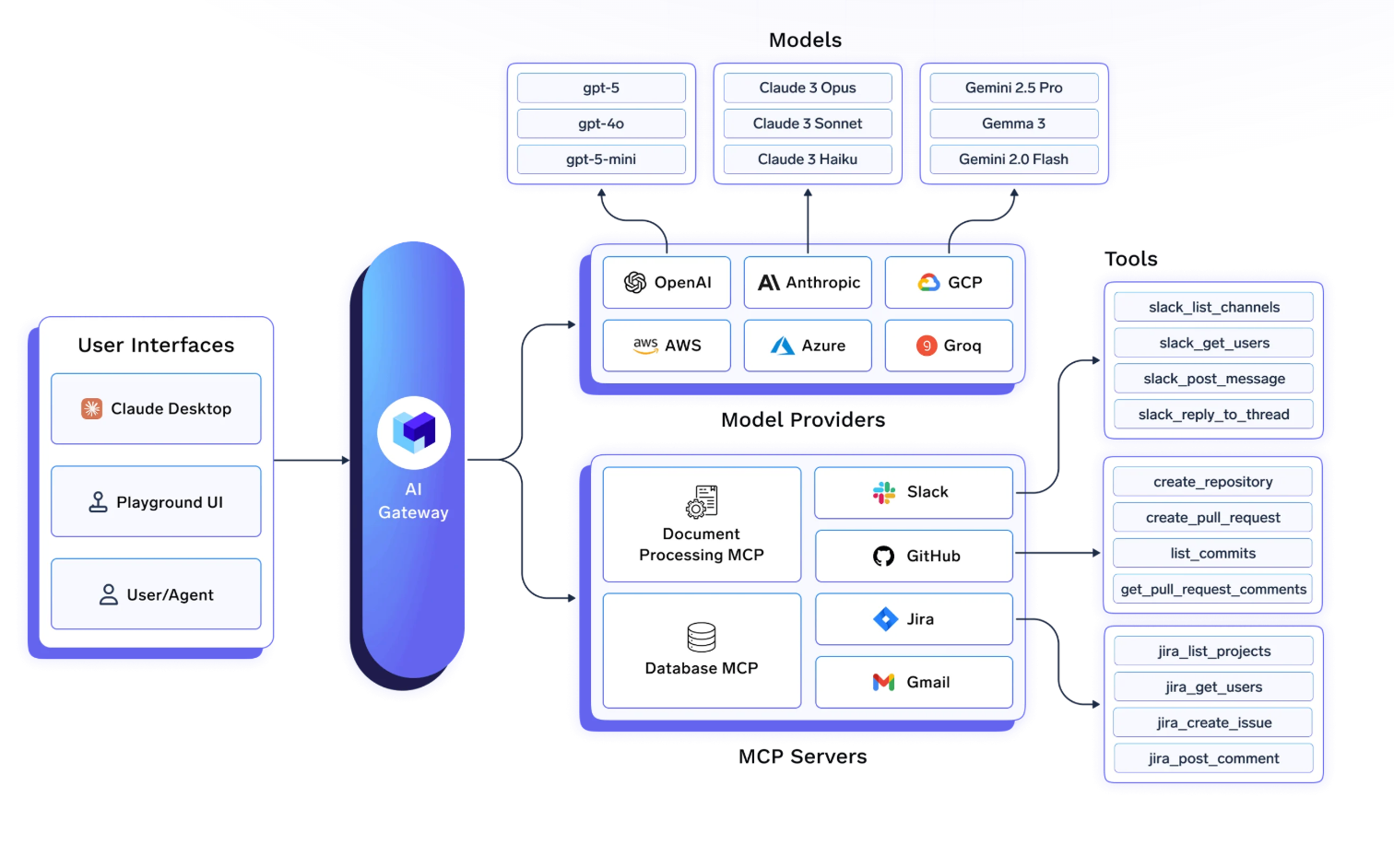
As AI moves from isolated experiments to shared organizational infrastructure, the question is no longer whether to use an AI gateway – it’s which one to use. A good gateway routes requests to the right provider, enforces cost limits before the invoice arrives, logs every call for compliance, and scales without becoming the bottleneck itself.
The 2026 market has matured enough that each major option has a clear profile. This guide compares the five most-evaluated solutions: what each one does well, where it falls short, and which team profile it fits best.
What Is an AI Gateway?
An AI gateway is a middleware layer between your applications and LLM providers like OpenAI, Anthropic, AWS Bedrock, and Google Vertex AI. Rather than embedding provider-specific API keys and logic directly into application code, teams route all LLM traffic through a central gateway that handles:
- Unified API access one endpoint regardless of which model or provider is called
- Routing and fallbacks automatic failover when a provider hits rate limits or has an outage
- Cost attribution token-level spend tracked by user, team, project, or environment
- Access control RBAC, virtual keys, and rate limits enforced centrally
- Observability request traces, latency metrics, and model performance logged end-to-end
- Guardrails input/output filtering for PII, prompt injection, and content policy
As AI agents and MCP (Model Context Protocol) tool calls become a significant share of total LLM traffic, the best gateways in 2026 also govern tool access alongside model access – a capability that separates purpose-built enterprise platforms from proxy-first tools.
Top AI Gateway Solutions in 2026
Here is a quick snapshot of the best AI gateway solutions:
| Gateway | Best for | Deployment | MCP / Agents | Compliance | Latency overhead |
| 🥇 TrueFoundry | Enterprise, regulated workloads, agentic AI | VPC, on-prem, air-gapped, hybrid | ✅ Full — Virtual MCP, RBAC, guardrails | SOC 2 Type II, HIPAA | ~3–4 ms / 350+ RPS |
| LiteLLM | Developers, prototypes, open-source flexibility | Self-managed | ❌ None | Not certified | Higher under load |
| Portkey | LLMOps, prompt management, guardrails | SaaS, hybrid, air-gapped | ⚠️ MCP support, guardrails (early access) | SOC 2, ISO 27001, HIPAA, GDPR | Low (SaaS) |
| Helicone | Fast observability, logging, analytics | SaaS, OSS self-host | ❌ None | Partial | Low (SaaS) |
| Kong AI Gateway | Existing Kong API management users | Self-managed (Kubernetes) | ❌ None | Via Kong Enterprise | Low |
| OpenRouter | Model discovery, experimentation | Hosted only | ❌ None | Not certified | Low (hosted) |
1. TrueFoundry AI Gateway
Best for: Enterprise teams that need unified governance over LLM traffic and AI agent tool calls
TrueFoundry’s AI Gateway is built on the premise that LLM management and AI agent tooling should live in one place, not two. Rather than deploying a standalone LLM proxy, TrueFoundry gives organizations a single control plane that manages model traffic, MCP tool calls, observability, and access control under the same governance layer.
Universal model routing
Connect to any LLM provider – OpenAI, Anthropic, Azure, Gemini, Mistral, AWS Bedrock, Google Vertex AI, or self-hosted models through a single OpenAI-compatible endpoint. Intelligent load balancing, automatic failover, and fallback chains ensure continuity when provider quotas or outages occur. TrueFoundry supports 1,000+ LLMs through a unified API; switching models is a one-field change, not an integration rewrite.
Sub-3ms overhead at scale
Authentication, rate limiting, and routing are handled in-memory, keeping gateway-added latency under 3ms even under heavy load. At 350+ RPS on a single vCPU, the gateway is designed to sit in the hot path without becoming the bottleneck. Semantic caching further reduces costs and latency for repeated or similar queries.
RBAC, access control, and MCP governance
Define which teams or users can access which models, with per-team rate limits and quotas enforced at the gateway layer. The same RBAC system extends to MCP tool access, so there’s no separate permission model for agents. Key MCP capabilities include:
- Authentication and security controls for MCP servers with centralized authorization across teams
- Virtual MCP Servers that aggregate tools through a unified interface
- OpenAPI-to-MCP conversion to expose existing APIs as MCP-compatible tools without rebuilding integrations
- IDE integration so developers connect MCP servers directly from coding assistants while governance stays centralized
- Hosted stdio-based MCP Servers with centralized operational management
Guardrails and content safety
Built-in input and output guardrails for PII detection, prompt injection defense, and content policy enforcement – configurable per team or deployment without custom middleware. TrueFoundry runs the entire hot path, including guardrail evaluation, inside your Kubernetes cluster with no external dependencies.
Enterprise Features That Actually Work
TrueFoundry achieved SOC 2 Type 2 and HIPAA compliance in 2024, with authentication systems supporting Personal Access Tokens for development and Virtual Account Tokens for production, plus OAuth 2.0 integration for enterprise identity providers.
What sets TrueFoundry apart is its comprehensive cost management that goes beyond basic tracking. Token-level usage attribution lets you understand costs by user, team, geography, or any custom dimension. Real-time budget enforcement prevents surprises, while detailed analytics help optimize spending patterns. Teams typically see 30-70% cost reduction compared to direct provider usage.
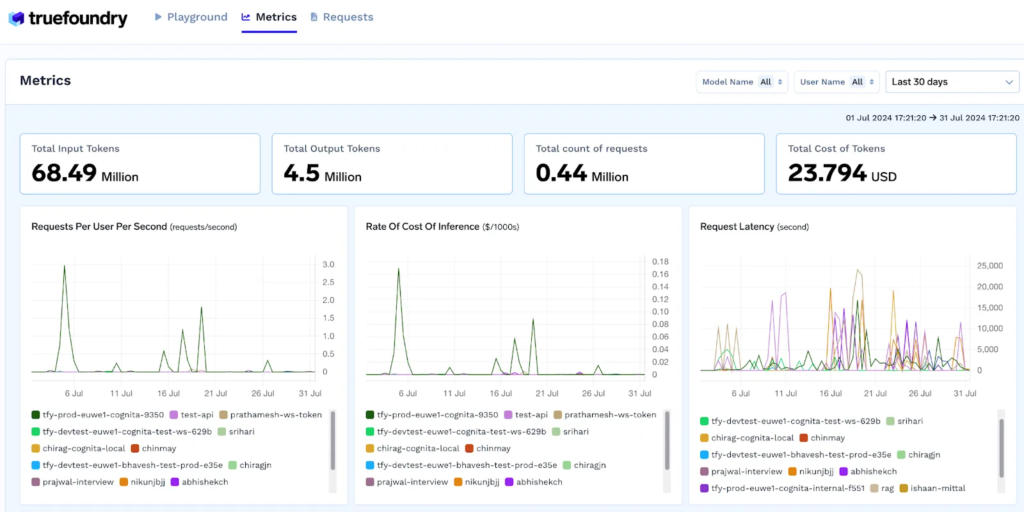
The Model Context Protocol (MCP) Gateway represents forward-thinking architecture for enterprise tool integration. Instead of building custom connectors for every enterprise tool, you get centralized MCP server management with OAuth 2.0-secured access to tools like Slack, GitHub, and Confluence, plus comprehensive observability across agent workflows.
Pricing: Free tier available; Pro tier at $499/month for up to 1M requests with all enterprise features. Enterprise pricing by quote.
Explore TrueFoundry AI Gateway →
2. LiteLLM
Best for: Individual developers and small teams wanting open-source flexibility
LiteLLM is the most widely adopted open-source AI gateway, providing a Python-based proxy server with a unified OpenAI-compatible API for 100+ LLM providers. It is commonly deployed as an internal gateway that teams run and operate themselves.
What it does well
- Universal API compatibility with all major providers using consistent OpenAI-format requests
- YAML-based configuration making it easy to define model lists, fallbacks, and routing rules as code
- Basic virtual keys for distributing access to team members
- Cost tracking at the key and model level
- Active open-source community with wide documentation coverage
Where it falls short at enterprise scale
LiteLLM works well for individual developers and experiments. As organizations grow, several gaps become significant: no formal commercial backing means no enterprise SLAs, audit logs are basic, RBAC is limited to simple key management, and the platform has no native MCP or agentic governance. Teams frequently find themselves building custom middleware to cover compliance and governance requirements. The operational burden of managing Postgres, Redis, upgrades, and scaling is entirely on your team.
Pricing: Open-source core is free to self-host. LiteLLM Enterprise starts at ~$250/month; the real cost is the infrastructure and DevOps hours running around it.
3. Portkey
Best for: Production AI teams that need deep LLMOps – prompt management, observability, and guardrails
Portkey positions itself as an LLMOps platform rather than just a gateway. It provides unified access to 1,600+ AI models while extending into prompt management, guardrails, and governance tools, making it a good option for teams whose primary need is prompt-level observability and control.
What it does well
- 50+ pre-built guardrails for content filtering, PII redaction, and jailbreak detection
- Advanced prompt management with collaborative templates and versioning
- Real-time monitoring with comprehensive latency and cost visibility
- MCP support (generally available as of January 2026) with central server onboarding, OAuth 2.1, and tool provisioning
Where it falls short
MCP native guardrails remain in early access — custom tool-call validation uses a webhook path rather than a first-class policy engine. Model deployment (fine-tuning, custom serving) is not natively supported, so teams running self-hosted models need an additional platform. Some users report that the feature density can be overwhelming for new teams. Enterprise pricing restricts key features like budget limits to higher tiers.
Pricing: Free tier; paid plans scale by volume. Enterprise pricing by quote.
4. Kong AI Gateway
Best for: Platform teams already running Kong for API management
Kong AI Gateway extends Kong’s mature API management platform with LLM-specific capabilities. If your organization already uses Kong for REST API management, the AI Gateway adds model routing, AI-specific rate limiting, and request transformation with minimal new operational overhead.
What it does well
- Seamless integration with existing Kong API management infrastructure
- AI Proxy plugin supporting Anthropic, OpenAI, Azure, and other providers in their native formats
- Traffic logging and metrics feeding into Kong’s existing observability stack
- Enterprise support via Kong’s established commercial offering
Where it falls short
Kong AI Gateway is an extension of a traditional API management platform, not a purpose-built LLM control plane. Cost attribution by team or model, MCP governance, guardrails, and budget enforcement all require additional plugins or custom configuration. For organizations starting fresh with AI infrastructure (rather than extending existing Kong deployments), purpose-built AI gateways deliver more capability out of the box.
Pricing: Kong Konnect with AI Gateway; enterprise pricing by quote.
5. OpenRouter
Best for: Developers who want the widest model selection with zero infrastructure to manage
OpenRouter is a developer-focused hosted gateway providing a single API for accessing hundreds of models from dozens of providers. It abstracts provider credentials and billing behind a unified endpoint – you pay OpenRouter per token, and OpenRouter manages provider relationships. No infrastructure, no Kubernetes, no configuration files.
What it does well
- Widest model selection access to frontier models, open-source models, and niche providers in one place
- Zero infrastructure no deployment, no scaling, no maintenance
- Transparent routing automatic failover to maintain availability during outages
- Developer-friendly with a simple API key model
Where it falls short
OpenRouter is a hosted third-party service – data transits OpenRouter’s infrastructure, making it unsuitable for regulated workloads requiring VPC deployment or data residency controls. Governance is minimal: no RBAC, no audit logs, no per-team budget enforcement. For internal platform deployments serving multiple teams or compliance-sensitive applications, OpenRouter’s simplicity becomes a liability.
Pricing: Pay-per-token; no infrastructure costs.
Conclusion
The AI gateway market in 2026 has diverged into three clear tiers: lightweight developer proxies (LiteLLM, OpenRouter, Helicone) that get you started fast; mid-market LLMOps platforms (Portkey) that add depth around observability and prompt management; and enterprise control planes (TrueFoundry) that unify model routing, agent tool governance, compliance, and deployment in a single Kubernetes-native platform.
For most enterprise teams, the right choice is not the tool that covers the most surface area today it’s the tool whose architecture fits where your AI footprint is heading. Organizations running AI agents alongside LLM workloads, or operating in regulated industries, will find that governance built in from day one costs far less than governance bolted on after production.



Listicles about “AI video from image” sell a miracle: drop a JPEG, collect a hit. The honest version is duller and more useful. A still is raw material. Motion is a decision about what is allowed to move. The platforms reward a change in the first two seconds. They do not reward a bottle that grows a second label.
If everything in the frame is swimming, nothing is the product. That is why a lot of “viral” generates die in the camera roll. Not because the model is weak. Because nobody named the subject before the pixels started sliding.
The still is already the edit
Most folders are not empty. They are full of packshots, a holiday that never became a Reel, a screenshot of an app that marketing liked in March. Repurposing that pile is the real job. Making a brand-new cinematic universe is the hobby.
Before anything animates, look at the file the way a merchandiser would. A wire across the pack. Last intern’s watermark. A stranger in a doorway. Animate any of that and you have animated the mistake. AI inpaint is the unglamorous pass: brush only the lie, leave the rest as shot. JPG, PNG, or WEBP. A tight mask. Two references if you are swapping a sign and you actually have the replacement. Free exports may watermark; paid ones can come clean. You still need rights to the original.
Do this first. Motion will not hide a logo you meant to delete. It will make it dance.
Timing is the trick. Identity is the test.

Short feeds punish a slow hello. A push-in, a hold, a light that finds the label — that is often enough. Complexity is how you lose the object. One focal point. Motion that serves it. If the background is more interesting than the SKU, you have made a travel film by accident.
People who live on Reels already know the first beat is a crop, not a plot. The mistake is asking the generator to invent a second room so the clip “feels bigger.” Bigger is how the colour of the cap changes. Keep the room you photographed. Spend the seconds on the thing you sell.
Seedance 2.5 is the model lane for a kit-locked beat: text plus pictures, sometimes a scrap of video or audio, about four to thirty seconds, typically 1080p on a hosted generator — not a 4K poster. You write seconds, not vibes. “0–5s the same still; 5–14s a slow push on the same cap; 14–22s hold for a caption I will type — no extra hands, no second bottle.” If second eighteen grows a necklace, the folder is wrong. Fix the kit. Do not prompt “more viral.”
Iteration still wins over one precious render. Change one variable: crop, duration, or the negative (“no extra table”). Post the take you watched. Count what happened. Do not publish a virality forecast you did not measure.
A marketer’s version of the same test is uglier and better. Take last season’s approved packshot, not a prettier table the model invented. Run two lengths. Watch them next to the product page. If they disagree, the page wins. That is repurposing. “Make it scroll-stopping” is how the shade name drifts.
What this is not

It is not a face-swap toy and not a promise that the algorithm owes you a spike. It is not a substitute for the photograph you do not own. Credits are studio time you did not book.
The useful shift is the one the listicles bury under “top tools.” Images stopped being endpoints. They became assets you can spend twice — if the subject survives the spend. Clean the frame. Time the motion. Keep the object. The feed can decide the rest.


Industry data reveals that nearly 80 percent of startup clothing lines fail within the first three years due to a failure to bridge the gap between creative concepts and technical manufacturing realities. Many entrepreneurs possess a vivid brand vision but lack the specialized knowledge required to translate that vision into a wearable, durable, and commercially viable garment. This disconnect often leads to expensive production errors, inconsistent sizing, and low-quality graphics that alienate potential customers. The MFG Merch apparel design team serves as the critical link in this process, combining artistic creativity with technical garment engineering to ensure that every product is retail-ready from day one.
Main Takeaways
Our expert designers prioritize technical feasibility alongside aesthetics to prevent production delays. We utilize comprehensive trend analysis to ensure your brand remains competitive in the modern marketplace. The integration of design and manufacturing under one roof reduces communication errors and optimizes your production budget. Successful apparel development requires a balance of fabric selection, graphic placement, and precise technical specifications.
Defining the Expert Design Force
The collective expertise at MFG Merch is not limited to simple graphic placement; it encompasses a wide range of industry specialists. Our team includes graphic designers who specialize in apparel-specific visuals, textile experts who understand the physics of fabric, and branding specialists who focus on market positioning. This diverse talent pool allows us to serve as high quality custom clothing manufacturers for brands of all sizes, from local startups to established corporate entities.
Industry Experience and Background
Our specialists have spent years working within the specialized niches of custom apparel manufacturing. We have helped influencers launch merchandise lines that withstand the rigors of heavy washing and helped corporate brands develop professional uniforms that maintain their integrity over time. This history of working with different scales of production allows us to anticipate common pitfalls before they become costly mistakes.
The Technical Design Philosophy
At our facility located at 240 Talleyrand Ave, Jacksonville, FL 32202, United States, the philosophy is simple: a design is only as good as its final print or stitch. Unlike a standard graphic design firm that might create art for digital screens, our clothing brand design services focus on how ink interacts with fibers and how seams affect graphic continuity. We balance artistic innovation with the strict requirements of garment production experts.
Phase One: The Discovery Consultation
The journey begins with an in-depth discovery phase where we listen to your goals and analyze your target demographic. We do not just look at your sketches; we ask about the intended use of the garment, the desired price point, and the brand story you wish to tell. This foundational step ensures that the final product aligns with your business objectives and resonates with your audience.
Idea Synthesis and Mood Boards
We take client-provided mood boards, rough sketches, or even verbal descriptions and begin the process of idea synthesis. Our streetwear design team looks for common themes in your inspiration to define a cohesive aesthetic direction. Whether you are aiming for a minimalist Scandinavian look or a bold, graphic-heavy urban style, we distill your ideas into a workable creative brief.
Establishing the Project Scope
Defining the scope involves making critical decisions about the silhouette, fabric weight, and embellishment techniques. During this stage, we determine if the project requires private label clothing design elements, such as custom neck labels or specific hem tags. By setting these parameters early, we avoid scope creep and ensure that the project stays within the established budget and timeline.
Phase Two: Creative Strategy and Strategy
Once the direction is set, we move into conceptualization where we apply market intelligence to your brand. We analyze current fashion cycles to ensure that your collection feels contemporary. This phase is about more than just drawing; it is about creating a strategic plan for how each piece in your collection will function and sell.
Trend Analysis and Market Positioning
Our team monitors shifts in garment silhouettes, such as the move from slim-fit to oversized boxy cuts, to ensure your brand stays ahead of the curve. We look at color trends and seasonal shifts to recommend palettes that will appeal to your specific buyers. This proactive approach is a hallmark of our apparel product development services.
Storyboarding the Full Collection
For brands launching multiple pieces, we create a storyboard to ensure visual consistency. We look at how a hoodie design complements a t-shirt and how the hardware on a jacket matches the aesthetic of the joggers. This holistic view prevents a collection from looking like a disjointed series of individual items, which is essential for building brand authority.
Phase Three: Digital Refinement and Technicals
The transition from a concept to a technical file is where many designs fail. Our team performs high-level vectorization and detail work to prepare art for the machinery. Custom Clothing Manufacturer: MFG Merch utilizes industry-standard software to create files that dictate exact needle movements for embroidery or ink density for screen printing.
Color Theory and Pantone Selection
We do not rely on standard computer screen colors, which can vary wildly between devices. Instead, we use the Pantone Matching System (PMS) to select exact shades that our production team can replicate across different fabric batches. This ensures that the red on your hats matches the red on your hoodies perfectly, maintaining brand integrity.
Typography and Graphic Layout
The placement of a graphic can change the entire fit of a garment. Our graphic merchandise design experts calculate the exact distance from the collar and side seams to ensure the graphic sits naturally on the human body. We also select typography that remains legible after being printed on textured fabrics like fleece or heavy-weight jersey.
Phase Four: Aligning Design with Production
As a custom clothing manufacturer, we understand that certain designs are better suited for specific print methods. We do not just take an order; we advise on the best way to execute it. This might mean suggesting embroidery for a premium chest logo or high-density screen printing for a durable streetwear graphic.
Selecting the Optimal Print Method
We evaluate each design to determine if it should be executed via screen printing, Direct-to-Garment (DTG), or sublimation. For intricate, multi-color designs on small runs, we might suggest DTG. For high-volume production where durability and cost-efficiency are paramount, we typically recommend traditional screen printing using plastisol or water-based inks.
Garment Sourcing and Fabric Matching
The best design in the world will fail on a poor-quality blank. We match your design with the right fabric weight, such as a 6.5 oz heavy-weight cotton for a structured streetwear tee or a 4.3 oz ring-spun cotton for a soft, retail-fit shirt. You can explore our full range of options at https://mfgmerch.com/ to see the variety of materials available for your project.
Comparing Design and Production Elements
Understanding the difference between creative design and technical production is essential for any brand owner. While creative design focuses on the visual appeal, technical production focuses on how that visual is applied to the medium. Use the following table as a quick reference when deciding between materials and methods based on your brand’s specific needs for durability and performance.
| Method/Material | Durability | Complexity Level | Cost Efficiency | Ideal Use Case |
| Screen Printing | Highest: 50+ washes | Low to Moderate | Best for bulk orders | Standard merchandise |
| Embroidery | Extremely High | Low (Text/Icons) | Moderate | Headwear and Outerwear |
| DTG Printing | Moderate | Unlimited Colors | Best for small runs | Photographic designs |
| Sublimation | Permanent Bond | High Detail | Moderate | All-over print activewear |
| 100% Combed Cotton | High: minimal pilling | N/A | Premium pricing | High-end retail brands |
The Benefits of Integrated Development
Working with an integrated team means that there is a constant feedback loop between the person drawing the design and the person operating the print press. This synergy is why we are considered one of the top high quality custom clothing manufacturers in the industry. At Custom Clothing Manufacturer: MFG Merch, our designers sit just steps away from our production floor.
Communication and Error Reduction
In a traditional setup, a designer sends a file to a separate printer who may not understand the original intent. This often leads to miscommunications about placement or color. Because we manage everything at 240 Talleyrand Ave, Jacksonville, FL 32202, United States, we catch these issues in the digital phase, saving time and resources. You can reach our office directly at (904) 677 9505 to discuss how our integrated process works.
Cost Optimization Through Design
We design with your budget in mind. If we know your budget is tight, we can suggest reducing the number of colors in a screen print or adjusting the placement to avoid expensive over-the-seam printing. This strategic approach to design ensures you get the highest possible quality without overspending on unnecessary production complexities.
Expert Insight on Quality Control
A critical component of apparel development is the quality control (QC) phase. We perform rigorous tests on the first run of any new design. This includes a shrinkage test, where we measure the garment before and after a high-heat wash cycle to ensure the graphic doesn’t distort. We also check for color bleed, particularly with white ink on dark polyester fabrics, to prevent “migration” where the garment dye seeps into the print.
Technical Specifications and Tech Packs
Every design we finalize is accompanied by a technical pack (Tech Pack). This document serves as the blueprint for production, detailing every measurement, stitch type, and ink Pantone. Having a professional Tech Pack is what separates a hobbyist project from a professional apparel line. It ensures that if you reorder the same design two years from now, the result will be identical to the first batch.
Recap of the Design Journey
The path from a creative spark to a retail shelf is complex, but the right team makes it manageable. We start with a deep dive into your brand’s goals to establish a clear creative direction. We then apply technical refinement to ensure every file is optimized for the specific machinery being used. Finally, we integrate the design with our manufacturing expertise to produce a garment that is durable, comfortable, and visually striking.
FAQs About MFG Merch Apparel Design Team
What files do I need to provide for the design team?
While we can work from basic sketches or high-resolution JPEGs, we prefer vectorized files in AI or EPS format. This allows our team to scale the artwork without losing any clarity, ensuring the sharpest possible print on the final garment.
Can the design team help me choose the right fabric?
Yes, the team at Custom Clothing Manufacturer: MFG Merch specializes in matching designs to the appropriate fabric. We consider factors like GSM (grams per square meter), fiber content, and weave style to ensure the garment supports the intended print method and fits your brand’s aesthetic.
How long does the design process usually take?
The timeline varies depending on the complexity of the project. A simple graphic refinement might take a few days, while a full collection storyboard and technical development can take several weeks. We prioritize clear communication to keep your project on schedule.
Does MFG Merch handle the manufacturing after the design is finished?
Absolutely. We are a full-service custom clothing manufacturer. By keeping the design and production in-house at our Jacksonville facility, we ensure that the original creative vision is perfectly executed in the physical product.


On a commercial fit-out, the floor finish gets the attention and the preparation underneath gets the blame. When a resin coating blisters, a safety vinyl bubbles or large-format tiles debond across a retail unit, the finished product is rarely at fault. The failure usually traces back to the layer nobody photographs: the levelling compound, and how it was specified and installed.
The first mistake is treating every product as interchangeable. self-levelling compounds vary enormously in compressive strength, thickness range, drying time and what they will bond to. One rated for light foot traffic in an office has no business under forklift wheels in a warehouse, and one that cures fast enough for a weekend retail refit costs more than one poured with a week of downtime to spare. Specifying by price per bag, rather than by the loading and the programme the floor actually faces, is how projects end up back on site six months later.
Depth is the next trap. Every compound has a working range, a minimum feather edge and a maximum pour in a single pass. Try to bring a floor up 30mm with a product designed for 2 to 10mm and it will curl, crack or delaminate. Deep build-ups need either a deep-fill compound or a bulk-fill screed layer first, then a smoothing compound over the top. Getting this wrong is expensive, because it is only discovered once the finish is down and starts to move.
Substrate preparation is where most commercial failures are actually born. The compound is only ever as good as its bond to the slab. That means mechanical preparation, shot-blasting or diamond grinding, to remove laitance, curing compounds and contamination, rather than a sweep and a splash of primer. It means the right primer for the substrate at the right dilution, and it means confirming the base is structurally sound. A compound poured over a dusty, sealed or moving slab will let go, however good the compound is.
Moisture is the one that catches people out on new-build concrete. A slab that looks dry can hold enough residual moisture to wreck a subsequent impermeable finish. Where the programme will not allow the slab to dry naturally, the specification needs either a surface damp-proof membrane or a moisture-tolerant system, and someone needs to actually test relative humidity rather than guess from the calendar. Skipping the test to hit a handover date is a false economy that resurfaces as a warranty claim.
Programme and site conditions round out the list. Pot life, foot-traffic time and overcoat windows all shift with temperature. Pour in an unheated unit in January and the times on the data sheet no longer apply. Coordinating trades so nobody walks across a green pour, and so the finish goes down inside the compound’s overcoat window, is as much a part of the specification as the product choice itself.
For specifiers and main contractors the takeaway is simple enough. Choose the compound against the real loading, depth and programme; prepare the substrate mechanically; prove the moisture condition; and read the data sheet for the conditions you actually have, not the ones assumed on the bag. The compound is a small fraction of the floor budget and the single biggest determinant of whether the finish lasts. It rewards being specified properly and punishes being left to chance.

Account Safety 101: How to Vet Any Instagram Growth Service

What Makes Underground Streetwear Hit? Breaking Down the MF DOOM Shirt and Parke Hoodie Hype

Unlocking Peak Performance with AMD Ryzen X3D: A Gamer’s Ultimate Guide

5 questions every Sydney homeowner should ask before hiring a plumber

Transforming Business Efficiency with Modern Workplace Solutions

Empowering Success: Comprehensive NDIS Student Support Services

The 15 Highest-Paid Rugby Players in the World

Christopher Dare: The Untold Story of Engineer and Former Husband of Angela Rippon

How to Ensure Your Home is Valued Correctly for a Quick Sale

What Is Fanquer? The Digital Creator Platform Transforming Direct-to-Fan Engagement

Dr Jared Ross: Missouri Appeals Court Upholds Protection Order Over Graphic Torture and Murder Threats

Nancy Hallam: The Inspiring Life, Career, and Success Story Behind Ian Wright’s Wife
The 15 Highest-Paid Rugby Players in the World
Christopher Dare: The Untold Story of Engineer and Former Husband of Angela Rippon
How to Ensure Your Home is Valued Correctly for a Quick Sale
What Is Fanquer? The Digital Creator Platform Transforming Direct-to-Fan Engagement
Dr Jared Ross: Missouri Appeals Court Upholds Protection Order Over Graphic Torture and Murder Threats
Nancy Hallam: The Inspiring Life, Career, and Success Story Behind Ian Wright’s Wife
-
 Sports5 months ago
The 15 Highest-Paid Rugby Players in the World
-
Celebrity10 months ago
Christopher Dare: The Untold Story of Engineer and Former Husband of Angela Rippon
-
 Real Estate8 months ago
How to Ensure Your Home is Valued Correctly for a Quick Sale
-
 Technology4 months ago
What Is Fanquer? The Digital Creator Platform Transforming Direct-to-Fan Engagement
-
 Celebrity4 months ago
Dr Jared Ross: Missouri Appeals Court Upholds Protection Order Over Graphic Torture and Murder Threats
-
Celebrity11 months ago
Nancy Hallam: The Inspiring Life, Career, and Success Story Behind Ian Wright’s Wife
-

 Health9 months ago
Enclomimed 25 (Enclomiphene) – Effective PCT Protocol
-
 Celebrity11 months ago
Who Is Maisie Mae Roffey? The Private Life, Family Story, and Quiet Success of Julie Walters’ Daughter