
Technology
How eCommerce Brands Can Scale Content Using Wan AI


The pressure to produce high-quality, engaging content at scale has never been greater for eCommerce brands. With constantly shifting consumer preferences, seasonal campaigns, and platform-specific requirements, content creation can quickly become overwhelming. Traditional workflows often struggle to keep up with the demand for speed, consistency, and personalization.
This is where wan ai begins to reshape the content landscape. When combined with tools like invideo, brands can streamline production and generate videos faster using advanced AI capabilities. By enabling quick creation of short-form, high-quality videos with synced audio and multi-shot storytelling, AI-driven systems are changing how eCommerce teams approach creative output.
Instead of relying on manual editing or large production teams, businesses are increasingly turning to automation to scale efficiently. AI is not just about speed—it also enhances creativity, allowing brands to experiment, iterate, and optimize content like never before.
The Growing Need for Scalable Content in eCommerce
Rising Content Demands Across Platforms
Modern eCommerce brands operate across multiple digital channels—social media, marketplaces, email campaigns, and websites. Each platform requires unique content formats, tones, and durations. A single product launch may require dozens of creative variations tailored for different audiences.
This growing demand creates a bottleneck. Teams often spend more time producing content than strategizing or analyzing performance. As a result, scaling content becomes less about creativity and more about operational efficiency.
Short Attention Spans and Visual-First Consumption
Consumers today prefer quick, visually engaging content. Short-form videos, product demos, and bite-sized storytelling dominate digital platforms. Static images and long descriptions are no longer enough to capture attention.
To remain competitive, brands must produce dynamic content consistently. However, doing so manually is time-consuming and resource-intensive, making scalability a key challenge.
The Cost of Traditional Production
Traditional video production involves scripting, shooting, editing, and post-production. This process can take days or even weeks for a single asset. For eCommerce brands that need frequent updates, this model is neither sustainable nor cost-effective.
AI-powered solutions address this gap by automating repetitive tasks and accelerating production timelines.
How Wan AI Transforms Content Creation Workflows
The integration of wan ai into content workflows introduces a new level of efficiency and flexibility. When paired with platforms like invideo, it enables brands to generate videos faster using WAN 2.5 and Wan 2.6 AI capabilities. These systems support up to 15-second videos in 1080p at 24fps, offering multi-shot storytelling and synced audio with improved prompt accuracy.
Automating Video Production
AI-driven systems can convert simple inputs—like product descriptions or campaign ideas—into fully structured video content. This eliminates the need for complex editing processes and reduces reliance on large creative teams.
By automating production, brands can focus on strategy and storytelling rather than execution.
Enabling Multi-Variant Content at Scale
One of the biggest advantages of AI is the ability to generate multiple variations of the same content. For example, a single product video can be adapted for different audiences, platforms, or campaigns.
This allows brands to test different approaches, optimize performance, and maximize reach without significantly increasing workload.
Improving Speed Without Compromising Quality
Speed is critical in eCommerce, especially during seasonal campaigns or flash sales. AI tools enable rapid content creation while maintaining visual and narrative quality.
With features like synced audio and structured storytelling, brands can produce professional-grade videos in a fraction of the time.
Leveraging AI for Personalized Customer Experiences
Dynamic Content for Different Audiences
Personalization is a key driver of engagement in eCommerce. AI enables brands to create tailored content for different customer segments based on behavior, preferences, and demographics.
Instead of a one-size-fits-all approach, brands can deliver highly relevant content that resonates with individual users.
Real-Time Adaptation
AI systems can analyze performance data and adjust content strategies in real time. This allows brands to refine messaging, visuals, and formats based on what works best.
As a result, content becomes more effective and aligned with audience expectations.
Enhancing Product Storytelling
AI-generated videos can highlight product features, benefits, and use cases in a visually engaging way. This improves the overall shopping experience and helps customers make informed decisions.
Better storytelling leads to higher engagement and increased conversions.
Streamlining Campaign Execution with AI
Faster Turnaround for Campaigns
Campaign timelines in eCommerce are often tight. AI tools enable quick turnaround, allowing brands to launch campaigns faster and respond to market trends more effectively.
This agility is crucial in a competitive landscape where timing can make or break a campaign.
Consistent Branding Across Assets
Maintaining consistency across multiple pieces of content can be challenging. AI helps standardize visual elements, tone, and messaging, ensuring a cohesive brand identity.
Consistency builds trust and strengthens brand recognition.
Reducing Operational Bottlenecks
By automating repetitive tasks, AI reduces the workload on creative teams. This minimizes bottlenecks and allows teams to focus on high-impact activities like strategy and innovation.
Efficiency gains translate into better resource utilization and improved productivity.
The Role of an AI Video Generator App in Scaling Content
An AI video generator app plays a crucial role in enabling scalable content production. These tools simplify the process of creating videos by handling tasks such as scene generation, transitions, and audio synchronization.
Instead of starting from scratch, brands can quickly generate content that aligns with their goals and audience preferences. This not only saves time but also ensures a steady flow of fresh content.
Additionally, AI-powered apps allow for easy updates and modifications, making it simple to adapt content for different campaigns or platforms. This flexibility is essential for maintaining relevance in a fast-paced digital environment.
Overcoming Challenges in AI-Driven Content Creation
Balancing Automation and Creativity
While AI offers significant advantages, it is important to maintain a balance between automation and human creativity. AI can handle execution, but strategic direction and storytelling still require human input.
Brands should use AI as a tool to enhance creativity, not replace it.
Ensuring Content Authenticity
Authenticity is critical in building trust with customers. Over-reliance on automated content can sometimes lead to generic outputs. Many eCommerce brands now run AI-generated content through an AI checker as part of their review process, helping identify generic patterns and ensure the final output aligns with their unique voice and values before going live.
Managing Data and Insights
AI systems rely on data to function effectively. Brands must ensure they have access to accurate and relevant data to maximize the benefits of AI.
Proper data management leads to better insights and more effective content strategies.
Best Practices for Scaling Content with Wan AI
Start with Clear Objectives
Before implementing AI, brands should define their goals. Whether it’s increasing engagement, improving conversion rates, or expanding reach, clear objectives guide the content strategy.
Focus on High-Impact Content
Not all content needs to be scaled. Brands should prioritize high-impact formats such as product videos, ads, and social media content.
This ensures that resources are allocated effectively.
Continuously Test and Optimize
AI enables rapid experimentation. Brands should take advantage of this by testing different variations and analyzing performance.
Continuous optimization leads to better results over time.
Integrate AI into Existing Workflows
Rather than replacing existing processes entirely, brands should integrate AI into their current workflows. This allows for a smoother transition and better adoption across teams.
The Future of Content Scaling in eCommerce
The role of AI in content creation will continue to evolve. As technology advances, we can expect even greater levels of automation, personalization, and efficiency.
For eCommerce brands, this means new opportunities to connect with customers and stand out in a crowded market. The ability to produce high-quality content at scale will become a key competitive advantage.
AI will also enable more sophisticated storytelling, allowing brands to create immersive and engaging experiences for their audiences.
Conclusion
Scaling content in eCommerce is no longer optional—it is a necessity. As consumer expectations grow and competition intensifies, brands must find ways to produce more content without compromising quality.
AI-powered solutions, particularly those driven by wan ai, offer a practical and effective way to meet this demand. By automating production, enabling personalization, and improving efficiency, AI transforms how brands approach content creation.
When used strategically, these tools empower eCommerce businesses to stay agile, creative, and competitive in an ever-changing digital landscape.










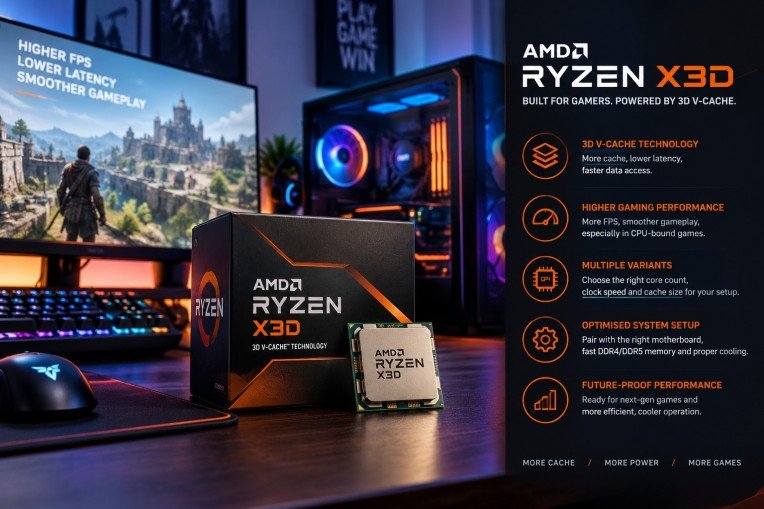
The AMD Ryzen X3D processor series represents a significant advancement in the realm of gaming CPUs, offering enthusiasts a robust combination of speed, efficiency, and enhanced graphics performance. This guide aims to explore the intricacies of the AMD Ryzen X3D, providing gamers with insights on how to harness its full potential for an unparalleled gaming experience.
To start with, the x3d architecture introduces innovative 3D V-Cache technology that substantially increases the amount of L3 cache available on the processor die. This increase in cache results in reduced latency and improved data access times, paramount for the demanding processes involved in modern gaming.
Understanding 3D V-Cache Technology
Traditional CPU designs incorporate cache memory adjacent to processor cores on a single plane. However, the AMD Ryzen X3D series stacks additional cache vertically using 3D V-Cache technology. This vertical integration allows a substantial increase in cache capacity without significantly enlarging the processor’s footprint.
The augmented cache enables quicker retrieval of gaming assets and instructions by minimizing the distance data travels. Consequently, this reduces frame times and leads to smoother gameplay, especially in games that are sensitive to cache size and latency.
Performance Benefits for Gamers
The primary beneficiary of the 3D V-Cache is gaming performance. Benchmarks demonstrate that Ryzen X3D processors achieve higher frame rates and lower latency compared to their non-3D counterparts, particularly in CPU-bound games such as strategy, simulation, and role-playing games.
This performance edge is amplified when paired with high-end graphics cards and fast memory modules, creating a synergistic effect that maximises the hardware capabilities. With the right configuration, gamers can expect a more responsive and immersive experience.
Choosing the Right Ryzen X3D for Your Setup
AMD offers several variants within the Ryzen X3D lineup, each catering to different performance tiers and budgets. Understanding the differences in core count, clock speeds, and cache size is essential when selecting the appropriate processor for a specific gaming rig.
Moreover, compatibility with motherboards and cooling solutions should be carefully considered to ensure optimal thermal management and power delivery, which directly impact the processor’s sustained performance during intensive gaming sessions.
Optimising System Configuration
Beyond the processor itself, achieving peak performance with the AMD Ryzen X3D involves fine-tuning system components and software settings. Updating BIOS and drivers ensures compatibility and stability, while adjusting in-game settings can leverage the processor’s capabilities more effectively.
It is also advisable to employ high-speed DDR4 or DDR5 memory modules, as memory speed can influence the processor’s performance, notably in CPU-bound scenarios. Adequate cooling, through either advanced air coolers or liquid cooling solutions, helps maintain stable frequencies and prevents thermal throttling.
Comparison with Other High-Performance Processors
Compared to previous generation AMD Ryzen processors and competitors in the market, the X3D models stand out for their superior cache design. While raw clock speeds may be comparable, the enlarged cache grants the Ryzen X3D a distinct advantage in gaming workloads.
This advantage translates into more consistent frame times and generally smoother visual output, which are critical metrics for serious gamers and streamers aiming for high-quality content delivery.
Future-Proofing Your Gaming Build
The integration of 3D V-Cache positions the Ryzen X3D series well for upcoming titles that demand heightened computational resources. Investing in this technology ensures a level of preparedness for next-generation games that leverage CPU cache to improve performance.
Additionally, the energy efficiency improvements in the Ryzen X3D series contribute to quieter and cooler operation, factors increasingly valued in modern gaming setups that prioritise comfort and acoustics.
Conclusion
Unlocking peak performance with the AMD Ryzen X3D involves understanding the transformative impact of 3D V-Cache technology and meticulously aligning system components to support its strengths. Gamers seeking to elevate their gameplay quality will find the Ryzen X3D a compelling choice in the current market landscape.
For those interested in exploring the range of AMD Ryzen X3D processors, reputable suppliers such as Scorptec Computers provide access to the latest models, ensuring customers can equip themselves with cutting-edge hardware primed for exceptional gaming performance.

In today’s rapidly evolving business environment, organisations must continuously adapt to stay competitive and efficient. One of the most impactful ways companies can achieve this is through implementing modern workplace solutions. These solutions are designed to enhance collaboration, improve employee productivity, and streamline business operations by leveraging advanced technology and innovative practices.
Understanding Modern Workplace Solutions
Modern workplace solutions refer to a collection of tools, strategies, and technologies that enable organisations to create a more flexible, connected, and efficient work environment. These solutions typically include cloud services, collaboration platforms, communication tools, and remote working capabilities, all focused on supporting both employees and management in achieving business goals effectively.
Key Components of Modern Workplace Solutions
The core elements that constitute modern workplace solutions include digital collaboration tools, mobile device management systems, cloud computing infrastructure, and secure communication channels. Integrating these components equips businesses to operate seamlessly across multiple locations and devices, catering to the growing demand for mobility and flexible work schedules.
Digital Collaboration Tools
Collaboration platforms enable teams to work together in real-time, regardless of their physical locations. Tools such as shared calendars, project management applications, and video conferencing systems foster effective communication and coordination, reducing delays and miscommunication.
Cloud Computing Infrastructure
Embracing cloud technology allows businesses to store and access data securely from any location. This flexibility supports hybrid and remote work models while ensuring that information is consistently available and safe from disruptions.
Mobile Device Management
With the proliferation of mobile devices in the workplace, managing device security and data access is critical. Mobile device management platforms enable IT departments to monitor, secure, and control company data on various devices, reducing the risk of security breaches.
Benefits of Adopting Modern Workplace Solutions
The implementation of modern workplace solutions offers several advantages that directly impact business efficiency and employee satisfaction. These benefits include enhanced productivity, improved collaboration, greater flexibility, and stronger security measures.
Enhanced Productivity
By automating routine tasks and simplifying communication, businesses enable employees to focus on higher-value activities. Access to integrated tools reduces downtime and streamlines workflows, contributing to overall productivity improvements.
Improved Collaboration
Modern solutions foster a culture of collaboration by breaking down silos and encouraging information sharing across departments. This increased transparency leads to better decision-making and faster project completion.
Greater Flexibility
Flexible working arrangements supported by modern workplace tools accommodate diverse employee needs and preferences. This flexibility not only improves morale and engagement but also attracts top talent seeking adaptive work environments.
Stronger Security
By employing robust security protocols and access controls, modern workplace solutions protect sensitive data and company assets. This protection is vital in mitigating risks associated with cyber threats and data breaches.
Challenges to Consider
Despite the substantial benefits, organisations must be mindful of potential challenges when transitioning to modern workplace solutions. These may include resistance to change among employees, the need for comprehensive training, and ensuring compatibility with existing systems.
Addressing these challenges requires thorough planning, clear communication, and ongoing support to ensure a smooth implementation process and maximise the return on investment.
Choosing the Right Modern Workplace Solutions Provider
Selecting an experienced provider with a proven track record is crucial for successful deployment. A reputable partner will assess business needs, recommend tailored solutions, and provide expert support throughout the transition and beyond.
For organisations seeking advanced and reliable options, exploring the range of offerings at modern workplace solutions can serve as a valuable starting point.
Impact on Business Growth
Adopting modern workplace solutions can be a catalyst for business growth by enhancing operational efficiency and enabling innovation. Organisations that leverage these technologies are better equipped to respond to market changes, improve customer satisfaction, and expand their competitive advantage.
Future Trends in Modern Workplace Solutions
The landscape of workplace solutions continues to evolve with advancements in artificial intelligence, machine learning, and automation. These emerging technologies promise to further transform how businesses operate by enabling smarter workflows and predictive analytics.
Remaining informed about these trends allows organisations to continuously upgrade their capabilities and maintain resilience in a dynamic business environment.
Conclusion
Modern workplace solutions represent a significant opportunity for organisations to transform their operational efficiency and employee engagement. By embracing these technologies and practices, businesses can foster a more agile, productive, and secure work environment geared towards sustainable success.
Implementing such solutions requires strategic planning and partnership with experienced providers to ensure alignment with specific business objectives and smooth adoption.
Technology
Streamlining Success: How OmniStar’s Grant Management System Revolutionizes Fund Allocation


In today’s complex funding landscape, organisations require reliable and efficient tools to manage grant allocations effectively. OmniStar’s grant management system stands at the forefront of this transformation, providing streamlined solutions tailored to meet the dynamic needs of grant administrators and recipients alike. This article explores the capabilities of OmniStar’s system and demonstrates how it revolutionises fund allocation with precision and ease.
Understanding the Need for Advanced Grant Management
Grant management involves multiple stages, including application processing, compliance monitoring, fund disbursement, and reporting. Manual methods or outdated systems often lead to inefficiencies, errors, and a lack of transparency. An advanced grant management system is essential to bridge these gaps and enhance operational efficiency.
The Core Features of OmniStar’s Grant Management System
OmniStar’s solution is designed with a comprehensive feature set that addresses the full lifecycle of grant management. Key functionalities include automated application workflows, integrated compliance checks, real-time fund tracking, and detailed reporting capabilities. These features ensure organisations can allocate funds accurately and maintain accountability.
Automated Workflows for Enhanced Efficiency
The system automates numerous repetitive tasks, reducing administrative burdens significantly. Automated workflows facilitate quicker application reviews, approvals, and notifications, resulting in reduced turnaround times and fewer manual errors. This automation supports organisations to focus on strategic aspects of grant distribution.
Ensuring Compliance and Accountability
Compliance with regulatory requirements and fund usage standards is paramount. OmniStar’s system incorporates built-in compliance checks that monitor grant conditions and deadlines, helping organisations avoid penalties and maintain integrity in fund management. Audit trails and documentation features provide a transparent record of all transactions and decisions.
Real-Time Fund Allocation and Tracking
One of the system’s revolutionary capabilities is its real-time fund allocation and tracking. Organisations can monitor the disbursement status of grants instantly, ensuring they remain within budgetary constraints and can quickly identify any discrepancies. This feature supports dynamic decision-making and maximises the impact of allocated funds.
Comprehensive Reporting and Analytics
Data-driven insights are critical for optimising grant programmes. OmniStar’s system offers robust reporting tools that compile financial and operational data into accessible formats. These reports enable stakeholders to evaluate the effectiveness of funding strategies and make informed decisions about future allocations.
User-Friendly Interface and Accessibility
Ease of use is central to the design of OmniStar’s platform. The user interface is intuitive, allowing users with varying technical expertise to navigate the system effortlessly. Additionally, cloud-based accessibility ensures that stakeholders can manage grants from different locations securely and efficiently.
Integration Capabilities
OmniStar’s grant management system supports integration with existing financial and organisational software. This interoperability minimises data silos and enables seamless data exchange across platforms, enhancing overall organisational workflows related to grant administration.
The Benefits of Implementing OmniStar’s System
Adopting this advanced system provides multiple advantages, including improved accuracy in fund allocation, reduced administrative costs, increased transparency, and enhanced compliance adherence. Together, these benefits contribute to the successful management and utilisation of grant funds.
Impact on Stakeholders
Grantors and recipients both gain from the streamlined processes. Grantors can enforce stricter oversight and reporting, while recipients experience faster feedback and fund disbursements. This mutual benefit fosters stronger trust and collaboration between all parties involved.
Case Studies and Industry Adoption
Numerous organisations across various sectors have adopted OmniStar’s grant management system and reported significant improvements in operational efficiency and financial control. These case studies highlight the practical advantages and return on investment achievable through this technology.
Scalability and Customisation
The modular design of the system allows it to scale with organisational growth and adapt to changing grant management requirements. Customisation options ensure the platform meets specific policy frameworks and operational preferences unique to each client.
Security Measures and Data Protection
Protecting sensitive grant information is imperative. OmniStar employs rigorous security protocols, including encryption and multi-factor authentication, to safeguard data integrity. Compliance with data protection regulations is maintained to uphold client and beneficiary confidentiality.
Future Developments and Innovation
OmniStar commits to continuous improvement, integrating emerging technologies such as artificial intelligence and machine learning to enhance predictive capabilities and automate complex analyses within grant management processes.
Conclusion
OmniStar’s grant management system represents a significant advancement in how funds are allocated, monitored, and reported. By leveraging automation, real-time tracking, and comprehensive compliance tools, the system empowers organisations to manage grants with greater efficiency, accuracy, and transparency. As demand for effective grant administration grows, OmniStar’s solution provides a reliable and innovative platform to support success in fund allocation.

Chaiya: How an Independent Thai Restaurant Is Making Its Mark in Shrewsbury

How to Explore Customer Service and Call Center Careers

Account Safety 101: How to Vet Any Instagram Growth Service

What Makes Underground Streetwear Hit? Breaking Down the MF DOOM Shirt and Parke Hoodie Hype

Unlocking Peak Performance with AMD Ryzen X3D: A Gamer’s Ultimate Guide

5 questions every Sydney homeowner should ask before hiring a plumber

The 15 Highest-Paid Rugby Players in the World

Christopher Dare: The Untold Story of Engineer and Former Husband of Angela Rippon

How to Ensure Your Home is Valued Correctly for a Quick Sale

What Is Fanquer? The Digital Creator Platform Transforming Direct-to-Fan Engagement

Dr Jared Ross: Missouri Appeals Court Upholds Protection Order Over Graphic Torture and Murder Threats

Nancy Hallam: The Inspiring Life, Career, and Success Story Behind Ian Wright’s Wife
The 15 Highest-Paid Rugby Players in the World
Christopher Dare: The Untold Story of Engineer and Former Husband of Angela Rippon
How to Ensure Your Home is Valued Correctly for a Quick Sale
What Is Fanquer? The Digital Creator Platform Transforming Direct-to-Fan Engagement
Dr Jared Ross: Missouri Appeals Court Upholds Protection Order Over Graphic Torture and Murder Threats
Nancy Hallam: The Inspiring Life, Career, and Success Story Behind Ian Wright’s Wife
-
 Sports5 months ago
The 15 Highest-Paid Rugby Players in the World
-
Celebrity10 months ago
Christopher Dare: The Untold Story of Engineer and Former Husband of Angela Rippon
-
 Real Estate8 months ago
How to Ensure Your Home is Valued Correctly for a Quick Sale
-
 Technology4 months ago
What Is Fanquer? The Digital Creator Platform Transforming Direct-to-Fan Engagement
-
 Celebrity4 months ago
Dr Jared Ross: Missouri Appeals Court Upholds Protection Order Over Graphic Torture and Murder Threats
-
Celebrity11 months ago
Nancy Hallam: The Inspiring Life, Career, and Success Story Behind Ian Wright’s Wife
-

 Health9 months ago
Enclomimed 25 (Enclomiphene) – Effective PCT Protocol
-
 Celebrity11 months ago
Who Is Maisie Mae Roffey? The Private Life, Family Story, and Quiet Success of Julie Walters’ Daughter