
Technology
Game Booster and FPS Booster: Enhance Your PC Gaming Experience


A great gaming session depends on stable performance, smooth visuals, and quick system response. However, background applications, limited system resources, and demanding game requirements can affect how well your PC performs. Before investing in new hardware, many gamers choose to optimize their systems with a Game Booster and an FPS Booster. These tools are designed to improve efficiency, helping your computer focus more on gaming and less on unnecessary tasks.
Although both utilities aim to improve gameplay, they work differently and can complement each other when used together.
Understanding a Game Booster
A Game Booster is a performance optimization tool that prepares your PC for gaming by reducing unnecessary background activity. Programs that are not essential during gameplay are temporarily managed, allowing the operating system to dedicate more processing power and memory to the active game.
Many game boosters also provide automatic optimization features, making it easy to prepare your computer with just a few clicks. Once you finish playing, the software typically restores your original system settings.
What Does an FPS Booster Do?
An FPS Booster is designed to improve frame rate stability while gaming. FPS, or Frames Per Second, measures how many frames are displayed every second. Games with a steady frame rate generally feel smoother, making character movement, camera transitions, and animations appear more natural.
Rather than changing your hardware, an FPS booster adjusts performance settings and manages system resources to help your computer deliver more consistent gameplay.
Why Performance Optimization Is Important
Today’s PC games require significant processing power. High-quality graphics, realistic effects, and online multiplayer features place heavy demands on your computer. If unnecessary applications are running in the background, they can reduce the resources available for your game.
Optimization tools help minimize these distractions, allowing your system to perform more efficiently. While they cannot replace hardware upgrades, they can help improve the overall gaming experience.
Benefits of Using a Game Booster
Using a game booster offers several advantages.
Reduces Resource Consumption
By limiting unnecessary background tasks, more system resources become available for gaming.
Simplifies System Optimization
Most game boosters include easy-to-use interfaces that allow players to optimize their PCs without advanced technical knowledge.
Improves Overall Responsiveness
Reducing unnecessary system activity can make your computer respond more efficiently during gameplay.
Creates a Cleaner Gaming Environment
Temporary optimization helps your system focus on gaming instead of multitasking.
Benefits of an FPS Booster
An FPS booster is designed specifically for smoother gameplay.
Its advantages may include:
- More stable frame rates.
- Better visual consistency.
- Reduced gameplay interruptions.
- Improved graphics performance.
- Enhanced responsiveness during fast-paced games.
The effectiveness depends on your hardware configuration and the game you are playing.
Best Practices for Better Gaming
Software optimization works best when combined with proper computer maintenance.
To improve overall gaming performance:
- Keep graphics drivers updated.
- Install operating system updates regularly.
- Close unused applications before gaming.
- Maintain sufficient free storage space.
- Monitor hardware temperatures during long sessions.
- Adjust graphics settings according to your PC’s capabilities.
- Restart your system occasionally.
These simple habits can help maintain reliable performance over time.
Should You Use Both Tools?
Many gamers choose to use both a Game Booster and an FPS Booster because they optimize different parts of the gaming experience.
A game booster focuses on preparing your operating system by reducing unnecessary workload, while an FPS booster aims to improve frame rate consistency during gameplay. Together, they can help create a smoother and more enjoyable gaming environment.
Conclusion
Improving gaming performance isn’t always about upgrading your graphics card or processor. Sometimes, making better use of your existing hardware is enough to enhance gameplay. A Game Booster helps optimize your system by reducing background activity, while an FPS Booster focuses on delivering smoother visuals and more consistent frame rates.
When combined with regular maintenance, updated software, and appropriate graphics settings, these tools can help gamers enjoy a more responsive and stable experience. Whether you play competitive online shooters, strategy games, sports titles, or open-world adventures, optimizing your PC is a practical way to get better performance from your current setup.


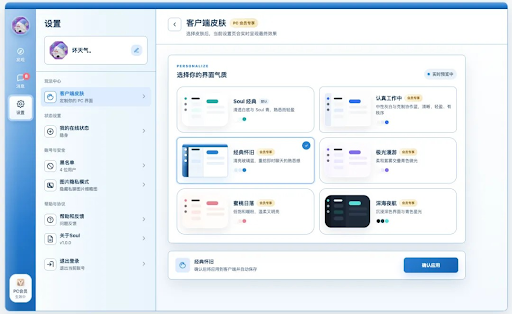
Soul App, a Chinese AI social platform, has launched a PC version across the web, Windows and Mac. The change brings its interest-based social experience to desktop. Larger screens and keyboards make it easier to browse posts, write longer messages and move between conversations.
Makes Social Interaction More Flexible
Although mobile is more widely used for internet access, desktop use is still widespread. It’s found that 96.0% of internet users access the internet through mobile phones according to DataReportal’s Digital 2026 Global Overview Report, while 59.6% of them use laptops or desktops. The average internet user also spends 33 hours and 27 minutes per week consuming online media.
For users who already spend parts of the day at a computer, a PC version gives them another way to access social interaction without moving everything back to a phone. The larger screen gives Soul App users more room to browse before starting a conversation. Keyboard input makes longer messages easier, while multi-window chat makes it easier to move between conversations and keep up with them alongside other tasks.
This also gives users more flexibility when they participate in Soul App. They can pick up a conversation during a short break or spend more time on it when they have room for a longer exchange.
Adapts Social Features for Desktop
On Soul App, social interaction often starts with shared interests and what users choose to express. Soul Match is one way users can discover people who they may want to talk to and start a conversation. On the desktop, it features large-screen visuals and a discovery-and-collection format to make matching more game-like.
Matching creates an opportunity to connect, but whether users keep talking depends on how the conversation develops and whether they find common ground. The web version offers quick access through a browser, while Windows and Mac clients give users who prefer desktop applications another option.
On the desktop, private images can be easier for people nearby to see, so privacy matters more. Soul App automatically hides thumbnails of images sent or received in private chats. Users can reveal an image when they choose to view it.
Keeps the Same Conversation Going
Users may return to conversations at different points in the day and from different devices. Messages sync in real time between Soul App’s mobile and PC versions. A conversation started on a phone can continue on a computer without losing context, and users can return to mobile when they leave the desk.
Soul App’s PC launch gives users another way to discover people with shared interests and keep conversations going as they move between mobile and desktop. By extending these interactions into more parts of daily life, Soul App is creating more opportunities for people to express themselves, understand one another and build authentic connections.



An evening at home can lose its shape when everyone starts choosing at once. One person searches for a film, another changes applications and somebody else discovers that the remote batteries are low. A useful weekend viewing plan handles a few practical questions earlier, then leaves the evening free to feel relaxed. You need an agreed choice and a workable setup, not a timetable for enjoying yourself.
Agree on the kind of evening
Start with the people who will actually be watching. Decide whether the plan is a film, a scheduled programme or a short episode before another activity. Ask about the available time and any language or subtitle needs. Those answers narrow the choice much more effectively than opening every application together.
Keep one alternative ready. The second choice should be something people would willingly watch, not an excuse to avoid checking the first. If the evening depends entirely on a particular title or event, treat confirmation of that access as an essential step rather than a detail to investigate after everyone arrives.
Ask everyone to put unnecessary distractions aside when appropriate, while keeping remotes and any needed accessibility tools within easy reach.
Confirm the title with the viewing service
Identify the exact programme, release year or edition. A familiar name may refer to more than one production. Check the required audio language and any relevant timing information as well. A recommendation from a friend explains why you might enjoy something; it does not establish where or how it is available.
When researching Pro Max 4K, bring those specifics to the enquiry. Keep the answer close to your shortlist so you can distinguish a confirmed detail from an assumption. Do not make a promise to guests based only on a broad service description, a logo or a remembered conversation about another programme.
Open the intended player before the evening starts
Check that you know which application is used for viewing and which account arrangement it belongs to. A player, television and subscription are different parts of the setup. Their names can sound related without having the same developer or support route.
Try the normal route from the television’s starting screen to the intended application. Keep the process simple enough that another household member can repeat it. If an update or account question appears, address it through the relevant official route in advance. Avoid turning the start of the evening into an improvised installation session using instructions for a different device.
Make comfort part of the preparation
Sit in the places people will use and check whether dialogue and subtitles are easy to follow. Adjust ordinary settings carefully rather than assuming more volume or different equipment is the answer. A clear view of the screen and a comfortable listening level often matter more than a long list of features.
Notice practical interruptions too. Put the remote within reach, check any batteries or charging needs and make sure a lamp is not reflected across an important part of the picture. Keep cables out of normal walking routes using arrangements suitable for the room. These are small preparations that do not require a new entertainment system.
Discuss overlapping viewing needs
The main television may not be the only screen in use. If another person expects to watch separately, check the account’s actual simultaneous-viewing conditions. Having an application on two devices does not establish that both can be used together under the same arrangement.
Describe the expected situation clearly when asking. Keep account limits separate from the number of devices in the house or the number of profiles shown by a player. An occasional overlap still deserves a clear answer. Planning around the actual rule is easier than discovering a conflict midway through a programme that two people were both looking forward to watching.
Choose the subscription for ordinary weekends too
Consult the Pro Max 4K pricing page for the designated subscription information and confirm the current terms. Check the period, currency, renewal process and relevant account conditions. Keep any separate player licence or hardware cost outside the viewing price so the total remains understandable.
Think beyond one special evening. A purchase that depends on a single programme should be evaluated differently from a service that fits your household’s regular habits. Save the offer details you actually considered. A clear record helps you compare the arrangement later without relying on a headline price detached from its original conditions.
Keep business account questions separate
Supplying accounts to customers is a different activity from planning an evening for your household. It can involve commercial terms, administrative permissions and ongoing support work. Do not assume that a reseller package is simply a larger version of a personal viewing account.
If that business route interests you, use the Pro Max 4K reseller information for a separate enquiry. Confirm its actual rules before making commitments to other people. An account category also does not settle questions about public screenings or the use of programme footage. Explain your intended use accurately rather than treating a product label as permission for every situation.
Leave room for a change of plan
Even careful preparation cannot guarantee that everyone will want the same thing when the evening arrives. Keep the alternative choice available and agree that changing the plan does not require a lengthy argument. Sometimes a shorter programme is a better fit than the film selected earlier in the week.
If a technical problem appears, record the symptom and choose a sensible stopping point for troubleshooting. Repeatedly changing unrelated settings can make the setup harder to understand. The point of the evening is time together, not proving that a particular application or device can be made to work at any cost.
Keep the helpful parts for next time
Afterwards, note which preparations made the evening easier. Perhaps confirming subtitles helped, or a simpler route to the player prevented confusion. Keep those improvements in a short household note without including credentials or private account information. Leave out changes that added work without making a noticeable difference.
A good routine becomes less visible with use. People know where to sit, which remote to choose and how the viewing decision was made. That leaves more room for conversation and the programme itself. The most useful preparation is the kind you barely need to think about when the next weekend comes around.
Technology
Resilient Urban Infrastructure: Maximizing Energy Efficiency with Solar LED Street Lighting in Extreme Climates


Rapid urbanization across arid, tropical, and desert environments is pushing conventional municipal infrastructure to its operational limits. Municipalities in high-irradiance zones—most notably across the Middle East and North Africa (MENA)—face the dual challenge of expanding urban corridors while curbing peak electrical grid demand.
In municipal utilities, roadway and public realm illumination can account for up to 40% of a city’s total municipal energy budget. Under sustained ambient temperatures exceeding 50°C, legacy grid-tied infrastructure suffers from transmission degradation, cable thermal stress, and elevated failure rates.
Transitioning to decentralized, off-grid solid-state lighting has therefore shifted from a simple sustainability goal to a primary requirement for municipal operational resilience and energy security.
The Evolution of Smart Urban Lighting
Historically, municipal lighting systems relied on high-pressure sodium (HPS) or metal halide (MH) luminaires tied directly into centralized distribution networks. These legacy installations require continuous alternating current (AC) supply, deep underground cable networks, and step-down transformer stations.
As municipalities rapidly expand, reliance on traditional grid-tied infrastructure is becoming economically and logistically unviable. Urban planners are now prioritizing off-grid, high-efficiency lighting systems that offer both energy independence and extreme durability. Specifically in high-demand regions like the Middle East, advanced solar street light systems from global manufacturers like WOSEN illustrate how integrating thermal-resistant housings with high-capacity batteries can deliver reliable, continuous illumination even in the harshest climates.
By decoupling municipal lighting from centralized grids, civil engineers can accelerate suburban development while shielding city centers from rolling blackouts and localized line surges.
Energy Security and Grid Independence
Modern municipal planning prioritizes decentralized infrastructure to protect public transit corridors and arterial roadways during regional power disruptions:
- Complete Grid Independence: Autonomous solar LED installations generate and store direct current (DC) energy locally, bypassing the 8% to 15% electrical transmission and inversion losses inherent to central grid distribution.
- Peak Shaving and Load Shedding Protection: Streetlights operate during peak evening demand hours. Off-grid systems remove thousands of megawatts from the municipal grid precisely when domestic cooling systems drive demand to critical thresholds.
- Continuous Operational Readiness: Integrated lithium-based energy storage ensures municipal roadways remain fully illuminated during grid blackouts, sandstorms, or emergency power curtailments, safeguarding public transit arteries.
- Integration with Master Planning: Modern civil developers incorporate stand-alone luminaires directly into long-termresilient urban infrastructure and city planning programs to systematically lower municipal carbon liabilities.
Engineering for Extreme Climates: Key Specifications
Deploying solar LED luminaires in desert and hyper-arid climates introduces extreme environmental stressors that quickly degrade standard commercial-grade luminaires. Ambient temperatures routinely surpass 50°C (122°F), with ground-level solar radiation driving surface temperatures on metal fixture housings well beyond 80°C (176°F).
Engineering high-reliability luminaires for these operational conditions requires purpose-built thermal architectures, specialized battery chemistries, and robust environmental seals.
Thermal Management in High-Temperature Environments
Excessive junction temperature is the primary driver of catastrophic LED failure and rapid lumen depreciation. For every 10°C increase in diode operating temperature above its design threshold, semiconductor life expectancy drops by roughly 50%.
Industrial-grade solar streetlights engineered for desert climates use specialized thermal management techniques to maintain long-term optical output:
- Die-Cast Aluminum Heat Sinks: Heavy-gauge die-cast aluminum alloys (such as ADC12 or A380) deliver superior thermal conductivity. Multi-fin aerodynamic heat sinks maximize passive convection currents, preventing heat accumulation behind the LED circuit board.
- Junction Temperature Regulation: Advanced passive thermal management keeps diode junction temperatures safely below $75 even under peak solar exposure, ensuring the fixture preserves its rated luminous output.
- Lithium Iron Phosphate (LiFePO4) Battery Chemistries: Unlike conventional Lithium Nickel Manganese Cobalt (NMC) cells that suffer thermal runaway risks above 60°C, high-grade LiFePO4 batteries operate reliably up to 65°C to 70°C. They offer a deep-cycle lifespan of 3,000 to 5,000 cycles at 80% Depth of Discharge (DoD).
- Underground or Shaded Battery Compartments: Fixture architects house energy storage cells in double-walled, ventilated chambers beneath the photovoltaic panel or sub-surface at the pole base to isolate them from direct solar radiation.
IP Ratings and Dust/Sand Resistance
Severe weather events—such as haboobs, high-velocity sandstorms, and coastal saltwater humidity—threaten delicate electronic drivers, optical arrays, and photovoltaic surfaces:
- Ingress Protection (IP65 and IP66): Fixtures must feature certified IP65 or IP66 ingress protection, using silicone gaskets and precision-machined joints to completely block micro-fine silica dust and pressurized moisture.
- Mechanical Shock and Impact Resistance: Optics and housings must achieve IK08 to IK10 mechanical impact ratings to withstand the scouring effect of continuous windborne sand and mechanical impacts during transport.
- Electrostatic and Hydrophobic Glass Coatings: High-efficiency monocrystalline photovoltaic panels incorporate self-cleaning, anti-soiling surface treatments. These coatings minimize particulate adhesion, reducing solar efficiency drops between maintenance cleanings.
- Breathable Pressure Equalization Valves: Specialized ePTFE vent membranes allow pressure equalization inside the optical chamber during rapid desert day-to-night temperature swings, preventing internal condensation.
Total Cost of Ownership (TCO) and Lifecycle ROI
Capital allocation for municipal infrastructure requires rigorous evaluation of total expenditure over the system’s operational lifecycle. While solar LED luminaires carry a higher initial unit cost than simple grid-tied fixtures, eliminating civil engineering works yields a significantly lower Total Cost of Ownership (TCO).
Trenching Costs vs. Plug-and-Play Installation
The civil works required to deploy traditional grid-connected streetlights represent the single largest expense in municipal roadway illumination:
- Civil Groundworks Elimination: Trenching, backfilling, running PVC conduits, and pulling copper cabling in hard, rocky, or sandy soils costs between $40 and $120 per linear meter. Autonomous solar luminaires completely eliminate these expenses.
- No Transformer or Switchgear CapEx: Eliminating step-down substations, distribution switchgear, and complex trenching permits cuts initial infrastructure deployment timelines by up to 70%.
- Rapid Deployment Cycles: Plug-and-play modular solar poles require only a concrete foundation pad or earth anchor, allowing engineering crews to install and commission 20 to 30 poles per day per team.
- Zero Utility Invoicing: Eliminating monthly kilowatt-hour utility charges provides immediate operating budget relief, shielding municipalities from rising regional fuel tariffs.
Integrating Smart Grids and IoT Capabilities
Modern urban planning treats streetlights as distributed nodes within broader smart city architectures. Rather than operating on static dawn-to-dusk timers, intelligent solar luminaires adjust power consumption in real time based on environmental demand and energy reserves.
Centralized lighting management platforms communicate with field units through low-power wireless mesh protocols—such as LoRaWAN, Zigbee, or NB-IoT—enabling remote adjustments across entire city networks.
Adaptive Dimming and Remote Diagnostics
Dynamic power management optimizes energy reserves, ensuring continuous illumination even through extended periods of sandstorms or overcast weather:
- PIR and Microwave Motion Profiling: Integrated microwave radar sensors detect oncoming vehicles and pedestrians from up to 15 meters away. Luminaires run at an energy-saving 20% to 30% standby mode when streets are empty, ramping to 100% full illumination within milliseconds of detected motion.
- Multi-Stage Programmable Night Schedules: Lighting output adjusts automatically throughout the night (e.g., 100% during evening rush hours, 50% between midnight and 4:00 AM, and 70% during morning commutes) to preserve battery health.
- Proactive Remote Diagnostics: Centralized IoT dashboards monitor battery voltage, photovoltaic current, diode temperatures, and charging efficiency in real time, automatically dispatching maintenance crews before failures occur.
- Deepening Sustainability Mandates: Transitioning to smart-controlled, stand-alone solar street lighting acts as an immediate driver for accelerated renewable energy adoption across public infrastructure portfolios.
The integration of advanced energy management technology into municipal infrastructure is no longer an optional upgrade, but a fundamental requirement for modern city planning. According to the International Energy Agency (IEA), the deployment of smart lighting grids and energy-efficient infrastructure is projected to drastically reduce municipal electricity demand globally, playing a critical role in achieving international net-zero emission targets by 2050.
Conclusion
Maximizing urban resilience in extreme climates requires replacing fragile, centralized infrastructure with durable, self-contained systems.
High-performance solar LED street lighting eliminates the heavy capital expenditures of civil trenching, insulates municipal budgets from volatile utility rates, and guarantees continuous illumination in high-temperature, sand-swept environments.
For municipal engineers, urban planners, and infrastructure developers, deploying solid-state, solar-powered illumination establishes a reliable foundation for sustainable, climate-resilient cities.

How Businesses in Manchester Can Benefit from Professional IT Asset Management

Inside the Selection Process Behind Italy’s Most Exclusive Destination Weddings

Soul App Brings Interest-Based Social Interaction to the Desktop

A Dental Appointment Preparation Checklist for Anxious Patients

Pawn Gold Jewellery Brisbane: Can You Pawn a Single Ring or Necklace?

Product Inserts 101: A Practical Guide for US eCommerce Brands Scaling Their Packaging

How to Ensure Your Home is Valued Correctly for a Quick Sale

Christopher Dare: The Untold Story of Engineer and Former Husband of Angela Rippon

The 15 Highest-Paid Rugby Players in the World

What Is Fanquer? The Digital Creator Platform Transforming Direct-to-Fan Engagement

Dr Jared Ross: Missouri Appeals Court Upholds Protection Order Over Graphic Torture and Murder Threats

Nancy Hallam: The Inspiring Life, Career, and Success Story Behind Ian Wright’s Wife
How to Ensure Your Home is Valued Correctly for a Quick Sale
Christopher Dare: The Untold Story of Engineer and Former Husband of Angela Rippon
The 15 Highest-Paid Rugby Players in the World
What Is Fanquer? The Digital Creator Platform Transforming Direct-to-Fan Engagement
Dr Jared Ross: Missouri Appeals Court Upholds Protection Order Over Graphic Torture and Murder Threats
Nancy Hallam: The Inspiring Life, Career, and Success Story Behind Ian Wright’s Wife
-
 Real Estate10 months ago
How to Ensure Your Home is Valued Correctly for a Quick Sale
-
Celebrity12 months ago
Christopher Dare: The Untold Story of Engineer and Former Husband of Angela Rippon
-
 Sports6 months ago
The 15 Highest-Paid Rugby Players in the World
-
 Technology6 months ago
What Is Fanquer? The Digital Creator Platform Transforming Direct-to-Fan Engagement
-
 Celebrity5 months ago
Dr Jared Ross: Missouri Appeals Court Upholds Protection Order Over Graphic Torture and Murder Threats
-
Celebrity1 year ago
Nancy Hallam: The Inspiring Life, Career, and Success Story Behind Ian Wright’s Wife
-

 Celebrity8 months ago
Who Is Azriel Crews? Inside the Life and Career of Terry Crews’ Daughter
-
 Celebrity12 months ago
Who Is Maisie Mae Roffey? The Private Life, Family Story, and Quiet Success of Julie Walters’ Daughter