
Tech
Best ETFs to Buy in Singapore for Long-Term Growth


Exchange-Traded Funds (ETFs) have become one of the most popular investment vehicles for Singaporean investors seeking long-term wealth accumulation. They offer diversification, lower costs compared to actively managed funds, and easy access to global markets. Whether you are a beginner investor or an experienced portfolio builder, ETFs can play a crucial role in achieving financial goals such as retirement planning, passive income generation, and capital appreciation.
In this discussion, we explore some of the best etfs to buy in Singapore for long-term growth, the benefits of ETF investing, and important factors to consider before building your portfolio.
Why Invest in ETFs?
ETFs are investment funds that trade on stock exchanges like individual stocks. They typically track an index, sector, commodity, or basket of assets. Investors favor ETFs for several reasons:
- Diversification: A single ETF can provide exposure to hundreds or even thousands of companies.
- Lower Fees: Most ETFs have significantly lower expense ratios than actively managed funds.
- Liquidity: ETFs can be bought and sold throughout the trading day.
- Transparency: Holdings are usually disclosed regularly.
- Accessibility: Investors can gain exposure to global markets with relatively small amounts of capital.
For long-term investors, ETFs provide a simple and effective way to participate in global economic growth without needing to pick individual stocks.
1. SPDR Straits Times Index ETF (ES3)
The SPDR Straits Times Index ETF is one of the most widely recognized ETFs in Singapore. It tracks the performance of the Straits Times Index (STI), which consists of 30 leading companies listed on the Singapore Exchange (SGX).
Key Advantages:
- Exposure to Singapore’s largest blue-chip companies
- Includes major banks, telecommunications firms, and industrial companies
- Regular dividend distributions
- Suitable for investors seeking local market exposure
Long-term investors who believe in Singapore’s economic stability often consider this ETF a core portfolio holding.
2. Nikko AM Singapore STI ETF (G3B)
Another popular option for Singapore-focused investing is the Nikko AM Singapore STI ETF. Like the SPDR STI ETF, it tracks the Straits Times Index and provides broad exposure to Singapore’s leading corporations.
Why Consider It?
- Competitive management fees
- Strong liquidity on SGX
- Diversified exposure across multiple sectors
- Potential for dividend income
Investors looking for steady growth combined with dividend opportunities may find this ETF attractive.
3. iShares Core MSCI World ETF
For investors seeking global diversification, the iShares Core MSCI World ETF is an excellent choice. It tracks developed-market companies across North America, Europe, Asia-Pacific, and other advanced economies.
Benefits:
- Exposure to over 1,000 global companies
- Includes industry leaders such as technology, healthcare, and consumer brands
- Reduces dependence on any single country or region
- Long history of stable growth
This ETF is particularly suitable for investors pursuing long-term capital appreciation through worldwide market exposure.
4. Vanguard S&P 500 ETF (VOO)
The United States remains the world’s largest economy, and the S&P 500 index represents many of America’s strongest corporations. The Vanguard S&P 500 ETF provides exposure to 500 leading U.S. companies.
Reasons for Popularity:
- Historically strong long-term returns
- Exposure to global market leaders
- Low expense ratio
- Broad diversification across industries
Companies within the index include major technology, healthcare, financial, and consumer businesses that have driven substantial growth over decades.
5. Vanguard FTSE All-World ETF (VWRA)
The Vanguard FTSE All-World ETF is increasingly popular among Singapore investors who want a simple “one-fund” solution.
Key Features:
- Exposure to both developed and emerging markets
- Thousands of stocks from around the world
- Automatic diversification across regions
- Ideal for passive investing strategies
Rather than selecting multiple regional ETFs, investors can gain global exposure through a single investment vehicle.
6. Invesco QQQ ETF
Investors with a higher risk tolerance and a focus on innovation often consider the Invesco QQQ ETF. It tracks the Nasdaq-100 Index, which includes many of the world’s leading technology companies.
Advantages:
- Exposure to innovative sectors
- Strong historical growth performance
- Includes major technology and digital economy leaders
- Suitable for growth-oriented portfolios
Although more volatile than broad-market ETFs, it offers significant long-term growth potential.
7. iShares MSCI Emerging Markets ETF
Emerging economies continue to contribute significantly to global economic expansion. This ETF provides exposure to countries such as China, India, Brazil, Taiwan, and other developing markets.
Growth Opportunities:
- Access to rapidly growing economies
- Exposure to expanding middle-class populations
- Diversification beyond developed markets
- Potential for higher long-term returns
Because emerging markets can experience greater volatility, many investors use this ETF as a supplementary portfolio allocation rather than a primary holding.
Factors to Consider Before Buying ETFs
Investment Objectives
Different ETFs serve different purposes. Some focus on dividend income, while others prioritize capital growth. Understanding your financial goals helps determine which ETF best matches your strategy.
Expense Ratios
Even small differences in fees can impact long-term returns. Lower-cost ETFs often outperform more expensive alternatives over extended periods because investors retain a larger portion of investment gains.
Diversification
A well-diversified ETF reduces risk by spreading investments across multiple companies, sectors, and regions. Global ETFs generally offer broader diversification than country-specific funds.
Liquidity
Higher trading volume generally results in tighter bid-ask spreads, making ETFs easier and more cost-effective to buy and sell.
Risk Tolerance
Growth-focused ETFs may offer higher returns but often experience greater volatility. Conservative investors may prefer broad-market or dividend-oriented ETFs.
Building a Long-Term ETF Portfolio
Many successful investors follow a simple portfolio structure:
- 40–60% Global ETF Exposure: Such as VWRA or MSCI World ETFs
- 20–30% U.S. Market Exposure: Through S&P 500 ETFs
- 10–20% Singapore Exposure: Using STI ETFs
- 10–20% Growth or Emerging Markets ETFs: For additional return potential
This balanced approach provides exposure to both local and international opportunities while maintaining diversification.
The Power of Dollar-Cost Averaging
One of the most effective ways to invest in ETFs is through dollar-cost averaging (DCA). This strategy involves investing a fixed amount regularly regardless of market conditions.
Benefits include:
- Reducing emotional investment decisions
- Minimizing market timing risk
- Building wealth consistently over time
- Taking advantage of market fluctuations
For many Singapore investors, monthly ETF investments through brokerage platforms have become a preferred long-term wealth-building method.
Conclusion
ETFs offer an efficient, low-cost, and diversified way to build long-term wealth in Singapore. Popular choices such as the SPDR Straits Times Index ETF, Nikko AM STI ETF, Vanguard S&P 500 ETF, Vanguard FTSE All-World ETF, and iShares Core MSCI World ETF provide broad exposure to local and global markets. Growth-oriented investors may also consider technology-focused funds like the Invesco QQQ ETF or emerging-market ETFs for additional upside potential.
The best ETF ultimately depends on your investment objectives, risk tolerance, and time horizon. By focusing on diversification, maintaining a long-term perspective, and investing consistently, Singapore investors can position themselves to benefit from global economic growth for years to come.



AI tools can help you create articles, reports, study notes, product documentation, and business proposals. But a draft that looks fine in a chat window may not be ready to share. Headings might be inconsistent, tables may be difficult to read, and Markdown symbols such as ## or ** can appear in the wrong places when content is copied directly.
A practical solution is to separate writing from publishing. First, create and review the content with your preferred AI assistant. Next, organize the approved draft in Markdown, a lightweight format for structured text. Finally, convert that Markdown file into a PDF that is easier to distribute, print, or archive.
iBoomto offers two tools that fit different parts of this process: iBoomto AI, a Windows desktop AI document agent, and its free Markdown to PDF converter, an online tool that formats Markdown files as PDFs.
1. Start with the AI Tool That Fits Your Workflow
You do not need to generate your draft and publish it in the same application. You can use a cloud-based AI assistant, a locally running model, or a desktop document tool to prepare the initial content.
Cloud AI services can be convenient for brainstorming, outlining, rewriting, and summarizing. Local AI models can be useful when you want to run supported AI tasks on your own computer. The right choice depends on the task, available hardware, model capabilities, and your privacy requirements.
For Windows users who regularly work with documents, iBoomto AI provides a desktop workspace for document analysis, summarization, editing, and generation. Its published features include:
Document AI for Windows: Work with PDFs, text files, Markdown, Word documents, and other supported formats in a desktop workflow.
Online and local AI model support: Choose a suitable supported model and workflow for your needs. Actual availability depends on the models and configuration supported by the application.
Privacy and security controls: Files remain on your local drive for storage, while some AI-assisted operations may transmit the relevant text or content to an online model. Review the processing details before using confidential material.
A free starting option: The product offers free document-related features, with paid Pro access for additional capabilities.
More control over document workflows: Bring reading, reviewing, organizing, and creating documents together rather than relying on a collection of disconnected tools.
These capabilities make iBoomto AI worth considering when document work involves more than simply generating a paragraph in a chat window.
Important distinction: Local drafting and online conversion are separate activities. Even if your AI draft is created entirely on your computer, uploading the resulting Markdown file to a web-based converter introduces an online processing step.
2. Review the Draft Before Publishing
AI-assisted writing should be treated as a starting point, not automatically as a verified final document. Before converting anything to PDF, review the content for accuracy, clarity, and completeness.
A useful review checklist includes:
Verify factual claims: Check statistics, dates, quotations, product specifications, and other claims against reliable sources.
Check citations and links: Make sure references exist and support the statements attached to them.
Remove unsupported details: Ask the AI to identify claims that need evidence, but independently verify its suggestions.
Improve the structure: Use a clear title, descriptive section headings, concise paragraphs, and lists where appropriate.
Check consistency: Confirm that terminology, names, numbers, and formatting remain consistent throughout the document.
Protect sensitive information: Remove private data that does not need to appear in the published version.
This step matters because converting a draft into a polished PDF changes its presentation, not the reliability of its contents.
3. Turn the Approved Draft into Markdown
Markdown is a convenient bridge between AI-generated text and a finished document. It uses simple symbols to define headings, emphasis, lists, links, tables, and other common formatting elements.
For example, a short report might look like this:
# Quarterly Project Report
## Overview
The project completed its main milestones
during the reporting period.
## Key Results
– Milestone one completed
– Documentation reviewed
– Next phase planned
## Next Steps
1. Confirm outstanding requirements.
2. Assign responsibilities.
3. Publish the final report.
Save the approved content in a file ending in .md, such as quarterly-report.md.
If your AI assistant already provides Markdown output, you can usually copy or export that content directly. If the draft comes from another editor, add the Markdown headings and formatting before saving it.
Keep the structure simple. A clear heading hierarchy, properly formatted lists, and concise tables generally produce more readable documents than complicated formatting.
4. Convert Markdown to PDF with iBoomto
Once the draft is reviewed and saved, open the iBoomto Markdown to PDF converter.
The online tool is designed to convert Markdown into a formatted PDF without requiring a local installation, manual CSS styling, or an account.
The workflow is straightforward:
Upload the Markdown file: Select your .md file or drag it into the converter.
Convert the document: Start the conversion and let the tool render the Markdown structure into a PDF layout.
Download the result: Save the generated PDF and inspect it before sharing or printing.
The converter supports common Markdown elements, including headings, bold and italic text, ordered and unordered lists, tables, links, images, and code blocks. It also supports batch conversion for up to five Markdown files, with a published maximum of 50 MB per file.
Image placement 1 — Markdown-to-PDF conversion preview
!iBoomto Markdown to PDF conversion preview
Caption: A Markdown document is transformed into a formatted PDF with readable headings, tables, and code blocks.
This is useful for a wide range of documents, including AI-assisted articles, technical guides, meeting summaries, research notes, and internal reports.
5. Understand What “Free” Means
The iBoomto Markdown to PDF converter is advertised as free to use without registration or an account. Its published limits include up to five files per batch and a maximum file size of 50 MB per file.
For a typical article or report, this offers a straightforward way to move from Markdown to a shareable document without purchasing a dedicated conversion application.
However, free conversion should not be confused with unlimited AI generation. The converter formats an existing Markdown file; it is not the same service as an AI model generating new content. Likewise, iBoomto AI has free functionality and a separate Pro offering, so its pricing and usage conditions should be checked independently.
The distinction is important when planning a workflow around the terms free, unlimited, or no token limit. Those terms can refer to different things: the cost of the software, the number of files that can be converted, or the usage restrictions imposed by a particular AI model or service.
6. Keep Privacy in Mind When Using the Online Converter
Privacy depends on the complete workflow, not just on where the original draft was created.
According to its published description, iBoomto’s online Markdown to PDF converter processes uploaded files temporarily and deletes them when you close the page. It also states that uploaded files and generated PDFs are not retained as permanent server storage.
That is useful information, but it does not mean that an online conversion is the same as an entirely offline process.
Consider these practical precautions:
Use the online converter for material you are comfortable processing through a web service.
Avoid uploading confidential business information, personal records, unpublished sensitive research, or regulated data unless the service meets your organization’s requirements.
Review the service’s privacy policy and terms if you need stronger assurances about data handling.
For sensitive material, consider an entirely local Markdown-to-PDF conversion method instead.
If you use a local AI model to draft your document, remember that uploading the Markdown file for online conversion still involves sending that file to an external service.
7. Inspect the PDF Before Sharing It
After downloading the PDF, open it and check the actual output rather than assuming the conversion is perfect.
Pay particular attention to:
Page breaks and heading placement
Tables that may be too wide for the page
Images that appear stretched, missing, or incorrectly positioned
Code blocks and long URLs
Footnotes, citations, and clickable links
Mathematical notation and special characters
Empty pages, excessive whitespace, and inconsistent spacing
For longer reports, review the document from beginning to end. A PDF can look professional while still containing a factual error or a layout problem.
If something needs correcting, return to the Markdown source, make the changes, and convert it again. Keeping the source file makes revisions easier than editing each issue directly in a finished PDF.
A Simple Workflow from Draft to Finished Document
The overall process can be summarized in four stages:
Draft: Use a suitable cloud or local AI model to develop the content.
Review: Verify facts, improve the structure, and approve the final wording.
Format: Save the reviewed draft as Markdown.
Publish: Convert the Markdown file to PDF, inspect the output, and share it.
For Windows users who want a broader document workspace, iBoomto AI can support the drafting and document-management side of this process. When the Markdown is ready, the iBoomto Markdown to PDF converter provides a separate, browser-based route to the final PDF.
The key is to keep content creation, fact-checking, and formatting as distinct steps. That approach makes the workflow easier to review and repeat, whether you are publishing a short article or preparing a longer professional report.

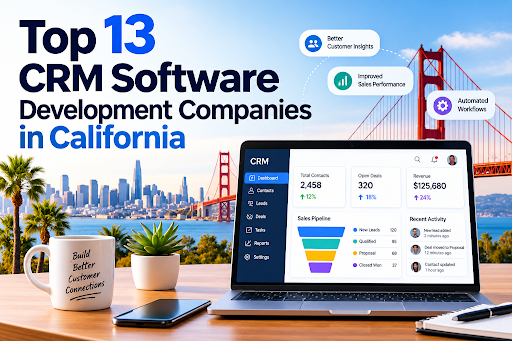
California is home to some of the most influential technology companies in the world, and customer relationship management (CRM) is one of the areas where that expertise shows. Businesses from Silicon Valley startups to Los Angeles real estate firms depend on custom CRM platforms to manage leads, automate sales, and keep customers loyal. Choosing the right CRM software development company can decide whether your CRM becomes a growth engine or an expensive, underused database.
This guide covers 13 companies with a strong California presence, what they are known for, and how to pick the right one.
Why Businesses in California Invest in Custom CRM
Off-the-shelf CRMs work for many teams, but California’s competitive, fast-moving industries often need more. Custom development offers:
- Tailored workflows that match how your team actually sells and supports customers
- Seamless integrations with ERP, marketing, billing, and analytics tools
- Industry compliance, such as HIPAA for healthcare and CCPA for consumer data privacy
- Scalability as your customer base grows
- Full data ownership and control over security
Regulated and relationship-driven sectors benefit most. A specialized healthcare CRM software development solution can manage patient engagement and appointments while protecting sensitive records. Likewise, real estate CRM software development services can organize listings, buyer pipelines, and agent follow-ups in one place.
How We Selected These Companies
We looked at five factors:
- Experience building and customizing CRM platforms
- Industry specialization and domain knowledge
- Technology stack and integration capability
- Security and compliance practices
- Client support, scalability, and delivery track record
The Top 13 CRM Software Development Companies in California
1. Dev Technosys
Dev Technosys leads this list for its end-to-end approach to custom CRM engineering. As an experienced CRM software development company, it designs, builds, integrates, and maintains CRM systems for startups and enterprises. Its teams work across sales automation, customer support, marketing automation, and analytics modules. It is also known for industry-specific builds, including a healthcare CRM software development solution focused on patient management and compliance, and real estate CRM software development services covering lead tracking and property management.
2. Salesforce
Based in San Francisco, Salesforce is the world’s best-known CRM platform vendor. Beyond its products, its ecosystem of consultants and developers supports deep customization through Apex, Lightning, and APIs. It is a strong fit for enterprises that want a mature platform with a huge integration marketplace.
3. Intellectsoft
With a Silicon Valley presence, Intellectsoft focuses on digital transformation and enterprise software. It builds custom CRM solutions for finance, healthcare, and retail clients that need modernization or integration with legacy systems.
4. Grid Dynamics
Headquartered in the Bay Area, Grid Dynamics specializes in large-scale digital engineering. It suits enterprises that need data-rich CRMs with advanced analytics and personalization.
5. Altoros
Altoros, based in Sunnyvale, is known for cloud-native engineering and platform development. Companies seeking a scalable, cloud-based CRM architecture often turn to firms with this profile.
6. Xoriant
Xoriant, with a Sunnyvale base, offers product engineering and digital services. It works with software vendors and enterprises to build and modernize customer-facing platforms, including CRM modules.
7. Persistent Systems
Persistent Systems has a major U.S. presence in Santa Clara. It builds software products and enterprise solutions, including CRM integrations that connect customer data across large organizations.
8. Zoho
Zoho serves customers worldwide with a US presence and a flexible, affordable CRM suite. Its partner network helps small and mid-sized businesses customize workflows without building from scratch.
9. Oracle NetSuite
NetSuite combines CRM, ERP, and e-commerce in one cloud suite. Its implementation partners in California help growing companies unify front-office and back-office data.
10. Apexon
Apexon provides digital engineering and quality assurance services. Its experience in testing and automation helps ensure CRM releases are stable and reliable.
11. Slalom
Slalom has a strong San Francisco and Los Angeles presence and delivers CRM strategy, implementation, and change management, especially on Salesforce and Microsoft platforms.
12. Deloitte Digital
Deloitte Digital combines consulting with technology delivery for large-scale CRM transformation. It is best suited to enterprises with complex, multi-department requirements.
13. Accenture
Accenture offers extensive CRM consulting and implementation across industries. Its scale suits global enterprises that need a long-term transformation partner.
How to Choose the Right CRM Development Partner
Define your goals first. Know whether you need lead management, customer support, marketing automation, or all three.
Look for domain expertise. A generic CRM rarely fits a regulated industry. If you are in healthcare, a provider experienced in a healthcare CRM software development solution will already understand HIPAA, consent management, and patient journeys. If you are in property, a team offering real estate CRM software development services will know listing syndication and agent workflows.
Check integration skills. Your CRM must connect with email, telephony, accounting, and marketing tools.
Ask about security and compliance. Request details on encryption, access controls, and audit trails.
Evaluate support and scalability. The best CRM software development company will offer post-launch maintenance and plan for growth.
Compare pricing models. Fixed-price, time-and-materials, and dedicated-team models each suit different projects.
Final Thoughts
California’s technology landscape offers plenty of choices, from platform giants to custom engineering specialists. For tailored, industry-aware builds, working with a dedicated CRM software development company is often the most cost-effective route to a system your team will actually use. Whether you need a healthcare CRM software development solution or real estate CRM software development services, shortlist two or three vendors, review their case studies, and start with a discovery call.
FAQs: CRM Software Development in California
1. What does a CRM software development company do?
A CRM software development company designs, builds, integrates, and maintains custom CRM systems. This usually covers sales automation, lead management, customer support, marketing automation, reporting, and connections to tools like ERP, email, and billing software.
2. Why choose custom CRM development over an off-the-shelf CRM?
Custom CRMs match your exact workflows, scale with your business, and give you full control over your data and security. Off-the-shelf tools are quicker to start with, but often need workarounds once your processes become more complex.
3. How much does custom CRM development cost in California?
Cost depends on features, integrations, number of users, compliance needs, and the pricing model. Simple CRMs cost far less than enterprise platforms with advanced analytics and automation. Ask for a discovery call and a detailed estimate, since fixed-price, time-and-materials, and dedicated-team models can produce very different totals.
4. How long does it take to build a custom CRM?
A basic CRM can take a few months, while a feature-rich or heavily integrated platform can take longer. Scope, third-party integrations, data migration, and testing all affect the timeline.
5. Why do healthcare providers need a specialized CRM?
Healthcare organizations handle sensitive patient data and must follow regulations such as HIPAA. A purpose-built healthcare CRM software development solution can manage patient engagement, appointment reminders, consent, and follow-ups while keeping records secure and auditable.
6. What features should a real estate CRM include?
Look for lead capture and scoring, listing management, buyer and seller pipelines, automated follow-ups, document handling, and reporting. Professional real estate CRM software development services can also add integrations with MLS feeds, listing portals, and communication tools.
7. How do I choose the right CRM development company in California?
Check the company’s CRM experience, industry expertise, security and compliance practices, integration skills, client reviews and case studies, and post-launch support. Shortlist two or three vendors and compare their proposals.
8. Can a custom CRM integrate with my existing software?
Yes. A good development partner builds APIs and connectors so your CRM works with accounting, marketing, telephony, ERP, and analytics tools, which prevents data silos.
9. Is a custom CRM secure and compliant with privacy laws?
It can be, when built correctly. Ask about encryption, role-based access, audit trails, and compliance with laws such as CCPA, plus HIPAA for healthcare. Your vendor should explain how these are handled.
10. Do CRM development companies offer support after launch?
Most reputable firms provide maintenance, updates, bug fixes, and scaling support. Confirm the support terms, response times, and costs in your contract before signing.

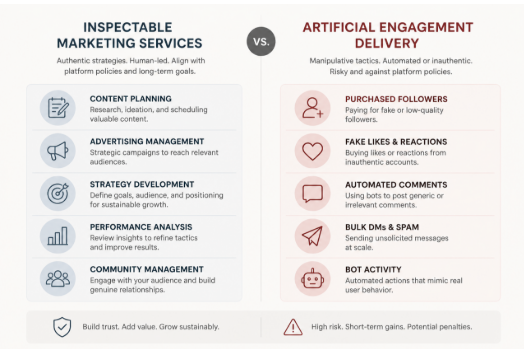
An Instagram growth service is not simply a purchase of more followers. It is a supplier decision that may involve account permissions, customer data, payment details and public-facing advertising. That makes the first question less “How quickly can it grow my account?” and more “What exactly will it do, and what access does it need to do it?”
A credible provider should be able to answer that plainly, in writing, before payment. If it cannot, the promised result is beside the point.
First, identify what is actually being sold
The service label matters less than the provider’s method, access requirements and ability to document the work.
“Growth” is used for several very different services:
- Social media management: planning content, publishing approved posts, handling comments and reporting on results.
- Strategy and analytics: audience research, profile improvements, content testing and measurement.
- Paid advertising: buying exposure through Meta’s advertising tools, with defined targeting, budget and campaign objectives.
- Creator or partnership outreach: identifying relevant collaborators and managing legitimate campaign activity.
- Artificial follower or engagement delivery: supplying followers, likes, comments, views or automated actions intended to make an account appear more popular.
The first four can be legitimate marketing services, though quality varies. The last category deserves much closer scrutiny. Meta has publicly acted against services that used bots or automation to inflate likes, followers, views and comments; its account of action against fake engagement and ad scams is a useful reminder that artificial activity conflicts with its policies.
That does not mean every provider using the word “growth” operates in the same way. It means terms such as “organic”, “targeted”, “real users” and “human-led” are claims to investigate, not proof of a method. Ask what actions are performed, by whom, on which accounts, and how the provider avoids artificial engagement.
For a separate explanation of the trade-offs around artificial audience delivery, see Brecktic’s guide to whether buying Instagram followers is safe. The practical issue is not merely whether a number rises; it is whether the activity is authentic, relevant and safe for the account.
The non-negotiable rule: do not hand over credentials
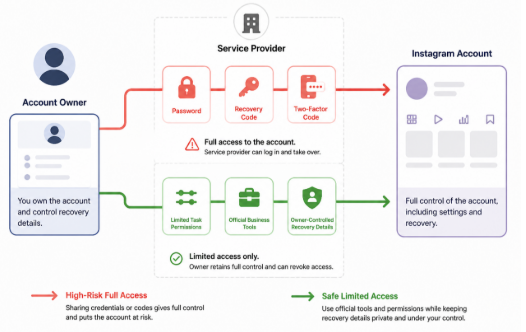
Safer onboarding limits permissions to the defined task and keeps authentication and recovery controls with the account owner.
Do not provide an Instagram password, recovery code, login code or two-factor authentication code to a growth provider. These are authentication secrets, not routine onboarding information. A request for them is a major security warning, even if the website appears polished or the provider says access is needed to “set up” the service.
Meta specifically advises people not to give Facebook or Instagram passwords to third-party sites or apps offering followers, likes or similar services outside official login mechanisms. A password can enable a third party to change recovery details, approve new sessions or lock the account owner out. A one-time code can be equally consequential if it is used to approve a login.
A safer workflow minimises access:
- Give a contractor only the role or task access needed for a defined job, where Meta’s current tools support it.
- Use official business or advertising tools for paid campaigns rather than sharing a personal login.
- Treat connected apps as permissions, not harmless add-ons. Check what an app can read, publish or manage before authorising it.
- Keep the account owner’s email address, phone number and recovery options under the owner’s control.
- Enable two-step verification. The UK National Cyber Security Centre recommends it for important accounts because it adds a further check if a password is stolen.
Permission names and menus change, so confirm the live settings in Meta’s help documentation before assigning access. The governing principle does not change: give the least privilege necessary, for the shortest practical period.
Red flags: stop signs versus questions to investigate
A useful vetting process separates reasons to walk away from issues that need clarification.
Stop signs
Leave the checkout process if a provider:
- asks for a password, recovery information or authentication code;
- promises a guaranteed volume of followers, likes or comments on a fixed timetable without explaining the source;
- offers immediate delivery of large quantities of engagement;
- cannot say whether bots, automated actions, engagement pods or follow-unfollow tactics are involved;
- uses urgency to push payment before terms can be reviewed;
- has no identifiable business, working support route, privacy information or commercial terms; or
- directs payment to an unrelated individual or asks for an unusually hard-to-reverse payment method.
None of these signals alone proves criminal intent. Together, they point to an unacceptable combination of security, supplier and reputational risk.
Caution signs
Pause and ask more questions when a provider:
- calls its service “organic” but provides no operational explanation;
- shows only follower-count screenshots rather than methodology or meaningful outcomes;
- makes broad claims about algorithm access, insider knowledge or guaranteed reach;
- will not define cancellation, refunds, renewal or notice periods;
- cannot explain how it handles client contact details and account data; or
- presents testimonials but no verifiable business identity or independent reputation trail.
The important distinction is between a provider that can document its process and one that substitutes slogans for evidence.
Run a five-minute website and checkout audit
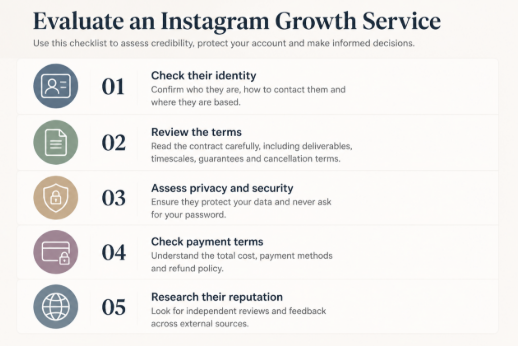
A quick supplier audit can expose unclear identity, access demands and weak commercial terms before payment.
Before paying, perform a basic supplier check. This is not a formal certification process; it is a quick way to decide whether the provider merits further discussion.
1. Check identity. Look for a legal business name, a physical or registered contact route, a company number where applicable, and a domain-based support address. For UK customers, compare company details with the public Companies House register where a company number is supplied. A brand name alone is not enough to establish who will hold your payment or data.
2. Read the commercial terms. Find the total price, billing frequency, cancellation process, refund conditions, delivery description and complaint route. Vague wording such as “results may vary” does not replace a clear explanation of what is being purchased.
3. Inspect data handling. A privacy notice should say what information is collected, why it is used and how to contact the organisation. Be especially wary if a supplier requests more account data than its stated service requires.
4. Check the payment path. Confirm that the checkout domain, merchant description and business identity are consistent. Prefer a payment route that offers a record of the transaction and a defined dispute process. Do not confuse a padlock icon with proof that a business is trustworthy; it only indicates a protected connection.
5. Search beyond the provider’s own site. Look for a durable trail: business listings, editorial mentions, support responsiveness and reviews that discuss specific work rather than repeating generic praise. Treat reviews as one input, not conclusive proof.
Test the delivery model, not the marketing language
Ask prospective providers these questions in writing:
- What actions will you take on my behalf?
- Will any action be automated? If so, which action and with what safeguards?
- Where does the prospective audience come from, and how is relevance to my UK market assessed?
- Are followers, likes or comments purchased, incentivised, exchanged or otherwise artificially delivered?
- What account access is required, and why is each permission necessary?
- What is the smallest paid test, and how can I end it?
A strong answer describes a process: content work, campaign setup, audience research, outreach, ad spend management or reporting. A weak answer circles back to a result: “real growth”, “premium followers” or “safe engagement”.
Be particularly careful with “guaranteed” results. Marketing can set service levels, such as a reporting schedule or number of approved posts. It cannot credibly guarantee that a particular number of people will become genuinely interested in a business on demand.
Measure outcomes that matter
Follower totals are easy to display but weak evidence of commercial value on their own. They do not show whether new people are relevant to the business, remain engaged, visit a website, enquire, buy or remember the brand.
Ask for reporting that distinguishes activity from outcome. Depending on the objective, useful reporting may include:
- the audience and geography the work was intended to reach;
- content themes and creative tests undertaken;
- reach and meaningful interactions over a stated period;
- profile visits, link actions, enquiries or sales where tracking is available;
- paid-media spend separated from agency fees;
- source data from the platform, not just a designed summary; and
- lessons, limitations and the next test.
No single metric proves success. A good report explains what happened, how it was measured and what decision follows. It should also make it possible to spot a mismatch between a rising follower count and an audience that has little reason to care about the account.
UK advertising: keep commercial content identifiable
Growth work can overlap with influencer marketing, gifted activity and paid collaborations. Where content is advertising, UK guidance expects it to be obviously identifiable. The ASA and CAP’s guidance on recognising ads in social media and influencer marketing explains that labels such as “Ad” should be clear and prominent, generally before people need to engage with the content.
Responsibility can extend to brands, agencies and influencers. The exact position depends on the relationship and content, so this is general information rather than legal advice. Build disclosure review into campaign approval instead of treating it as a last-minute caption edit.
A simple scorecard for any provider
Use this editorial scorecard before proceeding:
| Area | Pass | Caution | Stop |
| — | — | — | — |
| Identity | Verifiable business and responsive contact route | Limited history or incomplete details | No accountable identity |
| Access | Least-privilege permissions, no credentials | Access explanation is unclear | Requests password or codes |
| Method | Specific, documented process | Vague claims need answers | Artificial delivery or undisclosed automation |
| Terms | Clear price, scope and exit route | Ambiguous clauses | Hidden renewal or no cancellation route |
| Reporting | Objectives, source data and learning | Follower-led reporting | Only promises and screenshots |
| Testability | Small, reversible trial | Large minimum commitment | Pressure for a major upfront payment |
One stop result should end the conversation. Caution results are not an automatic rejection, but they should be resolved in writing before money or permissions change hands.
If you have already shared access
Act promptly. Change the Instagram password from a trusted device, turn on two-step verification, and review account contact and recovery details. Check active sessions and connected apps, remove anything unfamiliar, and review any business or advertising access that you do not recognise. Monitor recent posts, messages, profile edits and payment activity.
If you can no longer access the account, use Instagram’s official recovery route. Retaining control of the linked email address and phone number can be important to recovery, so secure those accounts too. If payment details were shared, contact the payment provider promptly and preserve relevant records, including receipts, emails and screenshots.
Choose growth mechanisms you can inspect
The lowest-risk options are generally the ones a client can see and evaluate: stronger content planning, a clear profile proposition, legitimate collaborations, responsive community management and advertising run through official tools with defined objectives and budgets.
A provider does not need to promise artificial popularity to be useful. It should explain its method, restrict access, document the commercial relationship and report on outcomes relevant to the business. For further reading on account-safety considerations, Brecktic provides additional context.
The core test is simple: if a service cannot explain how it works without asking you to trust a vague promise or surrender control of the account, it is not ready to be hired.
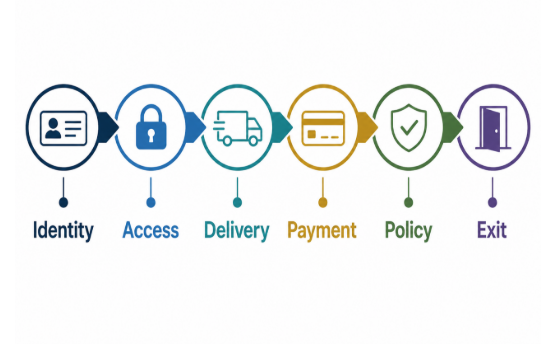
A practical six-control framework for assessing an Instagram growth service before granting access or paying.
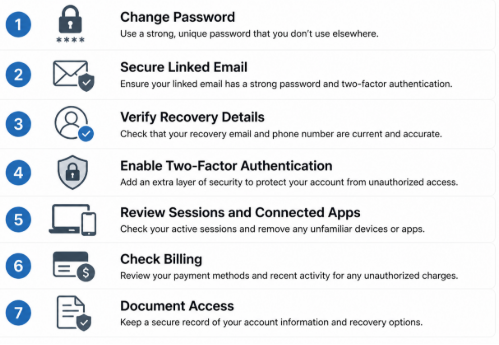
Immediate account-security checks after sharing access with an external provider.
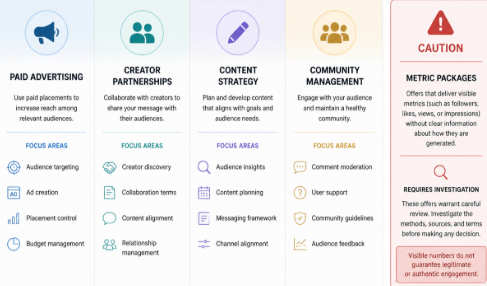
Different service models require different checks; a headline metric does not explain how activity is generated.

The Ultimate Guide to Women’s Sandals for Style and Comfort

Essential Guide to Hire Furniture in Sydney for Stylish Home Makeovers

Publishing AI-Assisted Drafts as PDFs: A Free Markdown Workflow with iBoomto

Spinal Alignment in Kuala Lumpur: What It Involves and What It Costs

When Weeks Turn Into Months: Planning Car Hire for a Longer Stay

Top 10 Best Minicab Companies in London & Surrounding Counties

The 15 Highest-Paid Rugby Players in the World

Christopher Dare: The Untold Story of Engineer and Former Husband of Angela Rippon

How to Ensure Your Home is Valued Correctly for a Quick Sale

What Is Fanquer? The Digital Creator Platform Transforming Direct-to-Fan Engagement

Dr Jared Ross: Missouri Appeals Court Upholds Protection Order Over Graphic Torture and Murder Threats

Nancy Hallam: The Inspiring Life, Career, and Success Story Behind Ian Wright’s Wife
The 15 Highest-Paid Rugby Players in the World
Christopher Dare: The Untold Story of Engineer and Former Husband of Angela Rippon
How to Ensure Your Home is Valued Correctly for a Quick Sale
What Is Fanquer? The Digital Creator Platform Transforming Direct-to-Fan Engagement
Dr Jared Ross: Missouri Appeals Court Upholds Protection Order Over Graphic Torture and Murder Threats
Nancy Hallam: The Inspiring Life, Career, and Success Story Behind Ian Wright’s Wife
-
 Sports5 months ago
The 15 Highest-Paid Rugby Players in the World
-
Celebrity11 months ago
Christopher Dare: The Untold Story of Engineer and Former Husband of Angela Rippon
-
 Real Estate9 months ago
How to Ensure Your Home is Valued Correctly for a Quick Sale
-
 Technology5 months ago
What Is Fanquer? The Digital Creator Platform Transforming Direct-to-Fan Engagement
-
 Celebrity5 months ago
Dr Jared Ross: Missouri Appeals Court Upholds Protection Order Over Graphic Torture and Murder Threats
-
Celebrity11 months ago
Nancy Hallam: The Inspiring Life, Career, and Success Story Behind Ian Wright’s Wife
-

 Celebrity8 months ago
Who Is Azriel Crews? Inside the Life and Career of Terry Crews’ Daughter
-

 Health9 months ago
Enclomimed 25 (Enclomiphene) – Effective PCT Protocol