
Technology
YouTube Video Summarizer: The Smartest Way to Watch Less and Learn More


There was a time when I genuinely enjoyed watching long YouTube videos from start to finish. Tutorials, podcasts, business interviews, documentaries — I would open one tab, then another, and suddenly realize two hours had disappeared. The problem wasn’t that the content was bad. In fact, most of it was valuable. The real issue was time.
That’s exactly why the rise of the YouTube Video Summarizer Free feels so timely.
Today, people consume more video content than ever before, but attention spans are shrinking and schedules are getting tighter. Whether you’re a student trying to review a 90-minute lecture, a creator researching trends, or someone simply trying to learn a new skill after work, manually watching every video is exhausting. A good YouTube Video Summarizer changes that experience completely.
After testing several tools over the past few weeks, I started noticing a clear pattern: most platforms either hide useful features behind paywalls, require annoying signups, or generate summaries that feel robotic and incomplete. Then I came across a free AI Video Summarizer that surprised me more than expected.
And honestly, that’s what this article is about — not just what a YouTube Video Summarizer does, but why it’s becoming one of those tools people quietly start depending on every day.
What Is a YouTube Video Summarizer?
A YouTube Video Summarizer is an AI-powered tool designed to analyze YouTube videos and automatically generate concise summaries, key takeaways, transcripts, chapters, or even visual notes like mind maps.
Instead of sitting through a 45-minute tutorial just to find three useful points, the AI extracts the core information within seconds.
The reason these tools are suddenly everywhere is simple: video content has exploded faster than human attention can keep up.
Think about modern online learning habits for a second.
A college student watches recorded lectures on 1.5x speed while taking notes. A startup founder listens to productivity podcasts during lunch breaks. A marketer studies YouTube trend analysis videos late at night. Everyone is trying to absorb more information in less time.
That’s where AI summarization tools fit perfectly into the market.
They act like a shortcut between “too much information” and “the parts that actually matter.”
Why People Are Suddenly Using YouTube Video Summarizers Everywhere
The biggest misunderstanding people have is assuming these tools are only for students.
That’s not true anymore.
During testing, I noticed that YouTube Video Summarizers are quietly becoming useful across almost every kind of digital workflow.
For example:
- Remote workers summarize long company webinars before meetings.
- Content creators study competitors without watching entire uploads.
- Language learners use summaries to understand foreign videos faster.
- Researchers scan educational channels quickly before deeper learning.
- Casual viewers use summaries to decide whether a video is worth watching.
What surprised me most is how natural it feels once you start using one regularly.
Instead of opening YouTube with a feeling of “this might waste my time,” you approach videos more strategically. You instantly know what the content contains before committing to the full watch.
And that shift alone saves hours every week.
Core Features That Actually Matter
Not every AI summarizer is worth using. Some generate shallow summaries that miss context entirely. Others feel like glorified subtitle extractors.
But the better YouTube Video Summarizer tools usually focus on several key features.
1. Instant AI Video Summaries
This is the main attraction.
You paste a YouTube link, and within seconds the AI generates a readable summary of the video’s core ideas.
What impressed me during testing was how much mental fatigue this removes.
Imagine opening a one-hour business podcast late at night. Instead of forcing yourself through the entire episode while half-awake, you immediately get the main points in structured paragraphs or bullet points.
It feels less like “skipping content” and more like filtering noise.
Good summarizers also organize ideas logically instead of dumping random transcript fragments.
That difference matters more than people think.
2. AI Mind Maps for Visual Learning
This feature genuinely surprised me.
Some advanced YouTube Video Summarizer tools can automatically convert video content into mind maps.
And visually, it changes everything.
Instead of staring at dense text summaries, you see connected ideas branching outward naturally. Main topics split into subtopics, making complicated information feel easier to digest.
I tested this with a long productivity lecture, and honestly, the mind map helped me remember the content far better than reading plain notes.
For visual learners, this feels incredibly useful.
Especially for:
- Exam revision
- Brainstorming
- Research organization
- Planning content ideas
- Understanding complex educational videos
You almost feel like the AI is organizing your thoughts for you.
3. Multi-Language Support
One underrated advantage of modern AI summarizers is multilingual support.
A strong YouTube Video Summarizer doesn’t just summarize English videos. It can process content across multiple languages and generate summaries users can actually understand.
This becomes incredibly valuable for:
- International students
- Global research
- Watching foreign creators
- Learning new languages
- Cross-border business research
I tested summaries from Japanese and Spanish YouTube videos, and the results were surprisingly readable.
That kind of accessibility makes YouTube feel less geographically limited.
4. Smart Templates for Different Use Cases
One feature I didn’t expect to care about was templates.
But after trying them, I understood why people like them.
Some AI Video Summarizer platforms support 30+ summary templates, allowing users to change how information is presented.
For example:
- Bullet-point summaries
- Study notes
- Key takeaways
- Podcast summaries
- Blog-style breakdowns
- Social media content ideas
- Meeting notes
- Flashcards
This sounds small until you actually use it.
A student and a content creator consume information differently. Templates help adapt the same video into different output styles instantly.
That flexibility feels surprisingly practical.
5. Transcript + Chapters + Timestamps
One of the most frustrating things about YouTube is trying to relocate specific information inside long videos.
A good YouTube Video Summarizer solves this beautifully.
The better tools generate:
- Full transcripts
- Timestamped sections
- Auto-created chapters
- Searchable content blocks
This means you can jump directly to the exact part you need.
No more dragging the timeline randomly while hoping to find a specific quote.
Small feature — massive quality-of-life improvement.
The Real Value: What Problems Does a YouTube Video Summarizer Solve?
Features sound nice on paper, but the real question is:
Does this actually improve daily life?
After using these tools consistently, I think the answer is yes — especially for people overwhelmed by information overload.
It Saves Mental Energy
People often talk about saving time, but mental energy matters just as much.
Watching long videos requires constant attention. Summaries reduce cognitive overload by presenting only the essential ideas first.
That makes learning feel lighter.
It Helps You Learn Faster
This is especially noticeable with educational content.
Imagine preparing for exams while sorting through dozens of recorded lectures. Instead of rewatching everything repeatedly, summaries help you review concepts rapidly.
You spend more time understanding and less time searching.
It Improves Content Research
If you’re a creator, marketer, blogger, or researcher, this becomes addictive quickly.
You can analyze multiple competitor videos in one evening instead of dedicating entire days.
And because the summaries are searchable, you can compare ideas faster too.
It Reduces “Video Fatigue”
This one feels surprisingly real.
Sometimes you want knowledge without committing to another 50-minute video.
A YouTube Video Summarizer creates a middle ground between fully watching and completely skipping content.
That balance feels refreshing.
A Free AI Video Summarizer Worth Trying
After testing different tools, one thing became immediately clear:
Most platforms limit free users aggressively.
Some restrict summary length. Others watermark outputs or force account creation before doing anything useful.
That’s why I was genuinely surprised by this AI Video Summarizer.
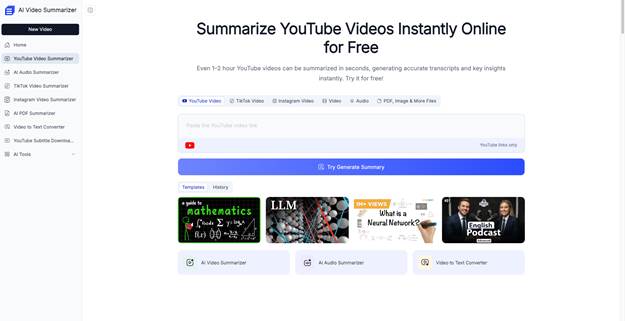
Here’s what stood out immediately:
- 100% free to use
- No login required
- Supports 30+ templates
- AI-generated mind maps
- Multi-language support
- Fast summary generation
- Clean interface
- Works directly from YouTube links
- Generates transcripts and chapters
- Easy for beginners
And honestly, the “no login” part matters more than people realize.
There’s something refreshing about opening a website, pasting a link, and getting results instantly without creating another account or entering payment information.
The experience feels lightweight and frictionless.
How to Use a YouTube Video Summarizer
The process is surprisingly simple.
Step 1: Copy a YouTube Video Link
Find any public YouTube video you want to summarize.
This could be:
- A lecture
- A podcast
- A tutorial
- A documentary
- A business interview
- A tech review
Copy the video URL.
Step 2: Paste the Link Into the AI Video Summarizer
Open the summarizer website and paste the link into the input box.
Most good tools automatically detect:
- Video title
- Language
- Duration
- Transcript availability
No downloads needed.
Step 3: Choose a Summary Style
This is where templates become useful.
Depending on your goal, you can select:
- Quick summary
- Detailed notes
- Mind map
- Key points
- Study format
- Blog-style breakdown
I personally liked the mind map mode the most because it made dense information feel easier to visualize.
Step 4: Generate and Review
Within seconds, the AI processes the video and creates:
- Summary
- Transcript
- Chapters
- Key insights
- Optional visual notes
You can then skim, copy, save, or review the information later.
The entire workflow feels dramatically faster than traditional note-taking.
Who Should Use a YouTube Video Summarizer?
After weeks of testing, I think these tools are especially valuable for five groups of people.
Students
Probably the clearest use case.
Lecture summaries, revision notes, and visual learning tools genuinely help reduce study fatigue.
Content Creators
Creators can research trends, study competitors, and extract ideas from long-form videos rapidly.
It saves enormous amounts of time.
Busy Professionals
If your work involves webinars, online courses, or industry analysis, summarization tools make information intake far more manageable.
Language Learners
Watching foreign-language videos becomes less intimidating when AI helps summarize the content clearly.
Curious Learners
Some people simply love learning but hate wasting time.
This category honestly describes me the best.
Final Thoughts: Is a YouTube Video Summarizer Worth Using?
I went into this expecting another average AI productivity tool.
But after using a good YouTube Video Summarizer consistently, I noticed something interesting:
I stopped avoiding long videos.
That sounds small, but it matters.
Instead of feeling overwhelmed by massive amounts of content, I could quickly understand whether something was useful, worth watching fully, or only needed a short review.
The best tools don’t replace YouTube.
They make YouTube more efficient.
And for students, researchers, creators, professionals, or anyone struggling with information overload, that efficiency becomes surprisingly valuable very quickly.
If you’re curious where to start, I’d strongly recommend trying a free AI Video Summarizer first — especially one that is completely free, requires no login, supports mind maps, and offers flexible templates.
Because once you experience summarizing a one-hour video in seconds, it becomes very difficult to go back.



Female follower packages are follower orders drawn from a source pool described as women. Buy.Fans lists tiers from 50 followers at $1.89 up to 100,000 at $1,663.00, each carrying a ten percent gift and a 90 day refill guarantee. They make sense only when your content genuinely serves that audience.
Most people comparing follower packages look at quantity and price, and audience composition never enters the decision. That holds until a brand asks for a media kit, or a campaign underperforms for reasons the follower count cannot explain. At that point the question becomes who those followers are, because a brand paying for a placement is buying access to a group rather than a number.
Demographic targeting sits awkwardly in this market. It costs more than untargeted followers, the claim behind it cannot be verified by the buyer, and it only helps when it matches content that already speaks to that audience. What follows covers where a skew changes something, what the tiers cost, and where the approach carries real risk. Two details on the product page need flagging honestly, and both appear below.
Why Audience Composition Matters More Than Headcount for Some Accounts
Follower count measures how many accounts pressed a button at some point. It says nothing about whether those accounts represent people who would buy, click or care. An account with 40,000 followers scattered across every interest is worth less to an advertiser than one with 6,000 concentrated in a demographic that matches the product, and buyers of placements already know this.
Composition matters most when an account monetises through partnerships rather than its own product. A creator selling a course cares about reach and conversion rate. A creator selling placements is selling an audience profile, and the profile gets evaluated. It matters least for accounts with no commercial ambition, where paying a premium for audience targeting buys nothing an untargeted order would not also deliver.
| Account type | Does composition matter | Why |
| Sponsored placement creator | Very much | The audience profile is the product being sold |
| Own product or service seller | Moderately | Conversion depends on fit, not on segment labels |
| Local business account | Moderately | Location outweighs every other attribute |
| Hobby or personal account | Barely | Nothing is being sold |
| Broad general interest page | Barely | The content has no lean to reinforce |
Which Niches Genuinely Benefit From a Skewed Audience
Some categories have audiences that are genuinely skewed, and there a matching follower profile simply reflects who consumes the content. Beauty and cosmetics sit at the top, followed by fashion and styling, wellness formats aimed at a particular group, parenting and family content, and home and interiors. Brands in those categories buy placements assuming the audience resembles their customer base, and they check.
The reverse case deserves equal attention. Technology, finance, gaming, automotive and general entertainment have audiences that are mixed or lean the other way, and forcing a skew onto one creates a profile that contradicts the content underneath it. A finance account reading as overwhelmingly female while every post discusses commodities does not look more attractive to advertisers. It looks edited, because it was.
| Niche | Typical audience lean | Is a skew defensible |
| Beauty and cosmetics | Strongly female | Yes, it matches reality |
| Fashion and styling | Strongly female | Yes |
| Wellness and lifestyle | Moderately female | Yes, in most formats |
| Parenting and family | Moderately female | Yes |
| Home and interiors | Moderately female | Yes |
| Technology and gaming | Mixed to male | No, it creates a mismatch |
| Finance and business | Mixed | Usually not |
How Do Brands Read Audience Demographics in a Media Kit?
The standard evidence is a screenshot from Instagram audience insights, and the person reading it checks three things. First the split itself. Second the engagement breakdown, because a brand wants to know whether the segment being advertised actually interacts with posts or merely sits in the follower list. Third the consistency of that profile against the content on the grid.
The second check is what catches bought demographics. Insights show who follows the account while campaign reporting shows who engaged, and any agency running several placements compares the two. An account presenting a heavily skewed base whose comments and saves come from a different mix has a gap visible inside one reporting cycle, and that gap costs more credibility than having no demographic story at all.
The Difference Between a Demographic Skew and a Demographic Guarantee
A package described as female Instagram followers is a statement about the pool a provider draws from, not a warranty about who lands in your follower list. Supply networks classify accounts using the signals available to them, usually profile names, photos, stated details and behaviour patterns. Classification of that kind is approximate by nature, so a skew is a probability distribution rather than a promise.
The consequence is practical. A card listing 100% Female Followers describes the source pool as the provider classifies it, and no seller controls how Instagram’s own insights read those accounts afterwards, since Instagram builds its estimates from its own signals. Treat the label as a directional description, keep the addition small enough that any discrepancy stays inside normal variance, and screenshot your insights before and after.
What Do Female Follower Packages Cost by Tier?
The tiers below are the ones published on the Buy.Fans product page for this service, and every tier carries a stated ten percent gift on top of the ordered quantity. The cards list badges reading 100% Female Followers, the gift amount, Natural Delivery Speed, 90-Day Refill Guaranteed!, 3D Secure Payment and 24/7 Whatsapp Support. The order form asks for a username.
| Package | Price | Gift followers | Approximate cost per follower |
| 50 | $1.89 | +5 | about $0.038 |
| 100 | $3.60 | +10 | about $0.036 |
| 250 | $8.57 | +25 | about $0.034 |
| 500 | $16.25 | +50 | about $0.033 |
| 750 (popular package) | $23.06 | +75 | about $0.031 |
| 1,000 | $28.98 | +100 | about $0.029 |
| 5,000 | $127.26 | +500 | about $0.025 |
| 10,000 | $219.24 | +1,000 | about $0.022 |
| 100,000 | $1,663.00 | +10,000 | about $0.017 |
The curve is gentle rather than dramatic. A 50 follower order works out near $0.038 each while 10,000 lands around $0.022, so the discount across the whole range is roughly forty percent, a smaller spread than most engagement products show. Chasing the unit price with a large tier therefore saves less than people expect while carrying more ratio risk, and the 750 tier marked as the popular package sits in a sensible middle position. Prices move with campaigns, so check the live list on the product page before ordering.
Two things about the page need plain statement. The meta hook advertises a starting price of $3.70 while the cheapest package in the grid is $1.89, so the advertised entry price does not match what the page sells. And the page states no delivery time anywhere, carrying only a Natural Delivery Speed badge, so timing is worth confirming with support before ordering rather than after. Against those points the 90 day refill guarantee is a genuine positive, because several other products in the same catalogue carry no refill wording at all.
The packages themselves are listed under Instagram follower packages on the product page, which runs from a 50 follower tier through to 100,000, applies the ten percent gift at every level, attaches the 90 day refill guarantee to each card, and asks only for a username at the order stage rather than any login detail. Delivery is described there as natural pacing rather than instant, meaning the followers are intended to arrive gradually instead of appearing in a single block.
What Are the Risks of Buying Female Instagram Followers?
Start with the condition that applies regardless of segmentation. Instagram’s terms prohibit artificial engagement, and a demographic label changes nothing about that. Followers bought from any source can be removed when the accounts behind them are cleaned up. The refill guarantee covers replacement inside its window, but it is a commercial promise from a seller rather than an exemption from platform rules.
The verification problem is specific to this product. A demographic label is a claim about the source pool, and the buyer has no way to confirm it. Audit tools read the actual audience rather than the description, checking profile signals, engagement patterns and account quality directly, so package wording carries no weight with them.
The mismatch risk costs money rather than pride. Skewing an audience toward a demographic your content does not genuinely serve creates exactly the gap described above, and a media kit showing a heavily skewed base with no engagement from that group is worse than one with no targeting at all. The first invites scrutiny and fails it.
Beneath that sits ordinary arithmetic. Followers who do not engage dilute your engagement rate whatever their profile says, because the calculation divides interaction by audience size and does not care who is in the denominator. An account adding 5,000 quiet followers to a base of 3,000 watches its percentage fall by more than half, and that percentage is the first figure most auditors check.
Two further points deserve naming. The 90 day refill window has an end date, so attrition after it closes is not covered and should be treated as a permanent cost. And any service requesting your Instagram password is a hijack risk with no technical justification, since a public username is all a follower order needs.
Risk reduction comes down to four habits.
- Only skew toward a demographic your content genuinely serves, and skip targeting entirely if it does not.
- Order in stages rather than one large block, so you can stop after seeing the first result.
- Check your audience insights before and after each stage, so you know what actually moved.
- Keep the addition proportional to your existing base rather than large enough to rewrite the profile.
How to Choose a Provider Without Handing Over Your Account
Vetting is a short list of checks completed before money moves. Look for a named legal entity behind the storefront, a payment route you recognise, a support channel answering at the hours you would need it, an order form that never asks for login credentials, and published wording on what happens if the order drops. A provider failing the password test fails the rest by implication.
Catalogue breadth is a secondary signal. A storefront selling one product is usually a reseller with a single supplier behind it and no fallback when that supplier stops delivering, while a broader catalogue generally indicates several supply routes.
The operator behind these packages is buy.fans, the company’s main site, trading as Buy.Fans Digital LTD with a footer covering 2014 to 2026. The site reports more than 262,000 active customers, over 29.5 million transactions completed, a team of 12 or more staff and coverage of 53 or more platforms, alongside 24/7 support on WhatsApp and Telegram, payments processed through 3D Secure and a set of free tools published for public use. Those are the company’s own published figures rather than independently audited numbers.
Testing How a Provider Delivers Before Committing Budget
Since this product page publishes no delivery timeframe, there is a reasonable argument for watching how a provider paces an order before spending anything meaningful. A provider dropping a full quantity in one burst behaves differently from one spreading an order across days, and the difference shows on your own profile within a few hours.
A free Instagram followers tool offers a no cost way to request a small batch of Instagram followers without entering payment details, which makes it useful as an observation exercise before any budget is committed. The honest framing is that free tools of this kind normally require completing a few steps or waiting in a queue, and the quantities are small by design, so treat it as a test of delivery behaviour rather than as a growth channel. What it shows you is how the pacing looks in practice.
Frequently Asked Questions About Female Follower Packages
Does a demographic label change how Instagram treats the followers?
No. Platform terms prohibit artificial engagement regardless of how the source pool is segmented, and the same account quality checks apply either way. A demographic description affects what you are buying, not how the platform responds to it, so the removal risk on a targeted order matches the risk on an untargeted one.
Will my audience insights match the package description?
Not necessarily. Instagram builds its own demographic estimates from its own signals, independent of how a provider classifies its supply pool. Expect a directional shift rather than an exact match, keep the order small enough that any discrepancy stays inside normal variance, and record your insights beforehand so the comparison is fair.
What does the 90 day refill guarantee actually cover?
The site states that dropped followers are replaced within 90 days of the order. That is a real protection and better than several other products in the same catalogue, which carry no refill wording at all. The limitation is the end date, since attrition after the window closes is not covered and should be budgeted as a permanent loss.
How long does delivery take?
The product page does not say. It carries a Natural Delivery Speed badge and no published timeframe anywhere, so the only reliable answer comes from asking support directly before ordering. Natural pacing generally implies gradual arrival over hours or days rather than an instant block, but confirm it in writing rather than assuming.
Why does the advertised price differ from the package list?
The page’s meta hook quotes $3.70 as a starting figure while the cheapest package in the grid is $1.89 for 50 followers. The two do not agree, so the advertised entry price is not a useful reference. Work from the published table instead, and check it again at the time of ordering.
Is a password ever required for this?
It should never be. Delivery to a public account needs a username and nothing else, which is what the order form requests. Any seller asking for your Instagram login is a hijack risk with no legitimate technical basis, and the request alone is sufficient reason to close the page and look elsewhere.
Practical Steps Before You Order an Audience Skew
Begin by deciding whether the skew is honest. Open your last twenty posts and ask whether the content genuinely serves the audience you are about to buy, because that question settles most of the decision. If the answer is no, skip demographic targeting and put the budget into content. If it is yes, screenshot your current insights for a baseline, then work out what a proportional addition looks like against your existing follower count rather than against the package sizes on offer.
When you order, start at a small tier and watch what arrives. Ask support in writing what delivery timeframe applies, since the page publishes none, and keep the reply. Compare your insights a week later against the baseline, note whether the count held and whether the profile moved in the direction described, and consider a second stage only once both answers satisfy you. Judge the result on whether your engagement rate and audience profile still tell a consistent story, because that consistency is what a brand actually buys.


Running Facebook Ads without measuring performance can make it difficult to understand whether a campaign is achieving its goals. Businesses need to analyse campaign data to determine what is working, what needs adjustment and where advertising budget should be allocated.
Facebook Ads performance should not be judged by one metric alone. A campaign may receive many clicks but generate few enquiries, while another campaign may have fewer clicks but attract higher-quality leads.
Why Facebook Ads Measurement Matters
Tracking performance helps businesses understand:
- Whether ads are reaching the right audience
- Whether users are engaging with the content
- Whether campaigns are generating enquiries or sales
- Whether budget is being used effectively
- Which advertisements perform better
- Which audiences respond positively
Without measurement, businesses may continue spending on campaigns without knowing whether they are contributing to business goals.
1. Impressions
Impressions measure how many times an advertisement is displayed.
This metric helps businesses understand:
- How often ads appear
- How much visibility a campaign receives
- Whether the campaign is reaching enough users
A high number of impressions does not always mean a successful campaign. Businesses should review impressions together with clicks, conversions and cost metrics.
2. Reach
Reach refers to the number of unique people who see an advertisement.
Reach helps businesses understand:
- How many individuals saw the campaign
- Whether the campaign is expanding awareness
- Whether the audience size is appropriate
Reach is useful for awareness campaigns, but conversion-focused campaigns should also consider whether users take action after seeing the ad.
3. Click-Through Rate (CTR)
Click-through rate measures how many people clicked an advertisement compared with the number of times it was shown.
CTR can indicate:
- Whether the creative attracts attention
- Whether the message is relevant
- Whether the audience is interested in the offer
A low CTR may suggest that businesses should review:
- Ad visuals
- Copywriting
- Audience targeting
- Call-to-action
- Offer relevance
4. Cost Per Click (CPC)
Cost per click measures how much businesses pay, on average, for each click generated by an advertisement.
CPC helps businesses understand:
- Traffic acquisition cost
- Ad efficiency
- Audience competitiveness
- Creative performance
However, a low CPC does not automatically mean a campaign is successful. Businesses should also evaluate whether clicks lead to valuable actions.
5. Cost Per Result
Cost per result shows the average amount spent to achieve the campaign objective.
The result depends on the campaign goal, such as:
- Leads
- Purchases
- Website actions
- Messages
- Engagement
- App installs
Businesses should compare cost per result against business goals rather than looking at the number alone.
6. Cost Per Lead (CPL)
For lead generation campaigns, cost per lead is an important measurement.
CPL helps businesses understand:
- How much each enquiry costs
- Whether lead generation is sustainable
- Which campaigns attract enquiries
However, businesses should also review lead quality.
A campaign generating inexpensive leads may not perform well if the enquiries are not relevant.
7. Conversion Rate
Conversion rate measures how many users complete a desired action after clicking an advertisement.
Examples include:
- Filling out a form
- Making a purchase
- Booking an appointment
- Contacting a business
- Downloading a resource
Conversion rate helps businesses evaluate whether the landing page, offer and customer journey are working together.
8. Cost Per Acquisition (CPA)
Cost per acquisition measures the cost of obtaining a customer or completed action.
CPA is useful for businesses focused on:
- Sales
- Bookings
- Registrations
- Customer acquisition
Businesses should compare CPA against customer value to understand campaign profitability.
9. Return on Ad Spend (ROAS)
Return on ad spend measures revenue generated compared with advertising spend.
ROAS is commonly used by businesses that track direct revenue from advertisements.
However, ROAS may not apply to every campaign, especially:
- Awareness campaigns
- Branding campaigns
- Lead generation campaigns
- Long sales cycles
Businesses should choose metrics based on campaign objectives.
10. Frequency
Frequency measures how often the same user sees an advertisement.
High frequency may indicate:
- Audience fatigue
- Repeated exposure
- Need for creative refresh
Businesses should monitor frequency alongside engagement and conversion data.
11. Engagement Metrics
Engagement metrics show how users interact with advertisements.
These may include:
- Likes
- Comments
- Shares
- Saves
- Video views
- Reactions
Engagement can provide insights into audience interest and content relevance.
12. Video Performance Metrics
For video advertisements, businesses should review:
- Video views
- Average watch time
- Video completion rate
- Engagement
- Click actions
These metrics help identify whether videos capture and maintain audience attention.
13. Landing Page Performance
Facebook Ads performance is also affected by what happens after the click.
Businesses should review:
- Page loading speed
- Mobile experience
- Form completion rate
- Bounce rate
- Content relevance
- Call-to-action clarity
A strong advertisement may still underperform if the landing page does not meet user expectations.
14. Audience Performance
Businesses should analyse which audiences generate better results.
Review:
- Age groups
- Locations
- Interests
- Customer segments
- Retargeting audiences
- Lookalike audiences
Audience insights can help businesses refine future campaigns.
15. Ad Creative Performance
Different advertisements may perform differently even when targeting the same audience.
Businesses can compare:
- Images
- Videos
- Headlines
- Copy
- Offers
- Calls-to-action
Testing different creatives helps identify what resonates with the target audience.
How Often Should Businesses Review Facebook Ads?
The review frequency depends on campaign size, budget and objectives.
Businesses may review:
Daily
For:
- Spending issues
- Campaign errors
- Sudden performance changes
Weekly
For:
- Audience performance
- Creative performance
- Cost trends
- Lead quality
Monthly
For:
- Overall strategy
- Budget allocation
- Campaign goals
- Long-term performance
Regular reviews help businesses make informed adjustments.
Common Facebook Ads Reporting Mistakes
Looking Only at Clicks
Clicks do not always translate into business results.
Ignoring Lead Quality
A large number of leads may not help if they are not relevant.
Comparing Different Objectives
Awareness campaigns and conversion campaigns should not be measured using the same expectations.
Ignoring Customer Journey
Some customers need multiple interactions before taking action.
Making Decisions Too Quickly
Campaign data needs enough time before making major decisions.
Facebook Ads Metrics Businesses Should Track by Goal
Brand Awareness
Focus on:
- Reach
- Impressions
- Frequency
- Engagement
Lead Generation
Focus on:
- Cost per lead
- Lead quality
- Conversion rate
- Cost per result
E-commerce Sales
Focus on:
- Purchases
- CPA
- ROAS
- Conversion rate
- Revenue
Website Traffic
Focus on:
- Click-through rate
- CPC
- Landing page behaviour
- Website actions
Measuring Facebook Ads performance requires looking beyond basic engagement numbers. Businesses should analyse a combination of delivery, engagement and conversion metrics to understand whether campaigns are supporting business goals.
Metrics such as CTR, CPC, CPA, ROAS, conversion rate and cost per result provide useful insights, but they should always be evaluated alongside campaign objectives and customer quality.
This article is for general information only and should not replace advice from a qualified digital marketing professional.

An egg roll machine sounds like a straightforward search. It is not. The phrase can refer to a domestic cooker, a machine for a fried savoury wrapper, or equipment that bakes a fine batter sheet and rolls it while hot into a crisp sweet product. The names overlap, while the ingredients, heat path, forming action and output units do not.
That is why an output figure should be read last rather than first. This guide starts with the finished article and follows the main production routes that sit behind the search term. It explains plate baking, hot rolling, parallel baking lanes and core injection, then shows which questions need to be answered before a buyer turns an egg roll machine inquiry into a comparable quotation.
What an egg roll machine is supposed to make
UDTECH separates the names by cooking route. Its sweet roll equipment bakes a fine batter sheet and rolls it while the sheet is still hot and flexible. The same page distinguishes that product from a savoury wrapper that is formed cold around a filling and fried later. The finished product, rather than the phrase in a search box, tells the buyer which route belongs in the conversation.
Ask for a photograph, finished length, diameter and one-piece weight before discussing a machine family. Those details identify whether the project is a crisp hollow roll, a filled wafer roll, a flat baked piece or a fried wrapper. They also reveal whether the product needs rolling after baking or needs a completely different forming method.
Baked wafer rolls: deposit, bake and roll while hot
For a sweet baked egg roll, batter is deposited onto a heated plate, baked into a thin sheet, then folded and rolled before it loses flexibility. The result is a hollow crisp roll whose wall thickness depends on the deposit and plate gap. This route joins shaping and heat closely: the forming action happens while the baked sheet is still capable of becoming a tube.
Where it stops: this process does not make a fried savoury roll. A cold wrapper with filling is formed before its cook step, so it needs a different product path. Choosing a hot-roll machine because the final foods share a name leads to the wrong process before output has even been considered.
Baking plate route: a format-driven choice
UDTECH lists small rotary configurations in daily-capacity bands, including 125–175 kg for one hand-style route and 250–350 kg for another. Those are model-specific daily figures, not a generic promise for every type of egg roll. Their value is that they keep the product, plate process and stated unit in the same decision.
This rotary mechanism repeats the plate-and-roll cycle through multiple mould positions. That can suit a project where the finished roll and its dimensions fit the plate arrangement. It also means the buyer should check colour, crispness, seam condition and roll geometry on the actual sample rather than assuming a similar-looking tube will behave the same way.
Where it stops: a larger mould count is not a licence to change the product format without review. A different diameter, wall thickness or surface layer can alter deposit behaviour, bake response and rolling performance. The piece must still leave the plate in a condition that can be rolled cleanly.
Parallel baking lanes and hot rolling: a continuous route
UDTECH’s gas-fired roll lines bake the batter on parallel lanes, then core and roll-form the product in line. Its published page gives the continuous models a production band of 600–900 kg per 8-hour shift. More than the number matters here: the baked sheet passes into the next forming operation as part of one continuous process rather than stopping for a separate manual roll step.
Where it stops: a continuous line cannot be selected from daily mass alone. Plant teams still have to establish the fuel, exhaust, air, cooling and packing boundary for the approved roll. A capacity number does not show whether a product with a chosen filling, coating or fragile shell can make that whole handoff without damage.
Core injection changes the product brief
UDTECH identifies core injection as a line operation for its continuous roll models: filling enters the tube before the roll cools and hardens. That makes the filling a product variable, not a decorative detail added after the machine is selected. Its viscosity, intended fill condition and the shell’s tolerance all belong in the trial brief.
Where it stops: an injection feature cannot repair a shell that is weak, badly rolled or incompatible with the filling. The product must first be able to leave the baking and rolling stages as a stable tube. Only then can a buyer judge the downstream effect of a filled product on cooling and packing.
Why release begins before the release point
According to the American Society of Baking’s wafer-process reference, fat supports release and emulsifiers help steam escape during baking. Its discussion concerns wafer production, but the lesson is directly relevant to a baked egg-roll sheet: release is shaped by the batter and bake before a mechanism touches the finished piece. Plate condition, deposit, heat and time need to be reviewed as a connected set during a product trial.
That is why a release issue should not be reduced to a request for a harder scraper or a faster roll station. If the sheet has not reached the required condition, changing the final contact may only move the damage downstream. The better test asks whether the approved sample releases and rolls with the required wall condition and appearance.
Output units should never be silently converted
The UDTECH category page uses several legitimate capacity bases, including kilograms per day, pieces per hour and kilograms per shift. It also lists 380 V three-phase supply and compressed air above 0.6 MPa for the category. Each entry answers a different question. Capacity needs a product and time basis; electrical supply and air pressure describe site readiness.
A buyer should not convert between pieces and mass using an assumed roll weight. A filled tube, a hollow tube and a roll with a different wall thickness can all change the result. Keep the supplier’s original unit visible until the finished piece and operating basis are confirmed in the product brief.
How a supplier fits into the product discussion
The udmachine.com product description makes the route visible before it asks a buyer to compare capacity. Start there. A broad food name offers less help than a clear account of what is baked, rolled and passed downstream.
UDTECH is useful in two separate parts of the selection process. First, its product route makes the category boundary visible: a baked roll and a fried wrapper are not alternatives within one machine. Second, the listed rotary and continuous routes show why output numbers must stay attached to their process and utility requirements.
That does not make a published specification an acceptance result. The buyer still needs to supply the finished sample and define what counts as an acceptable roll. Product geometry, texture, filling condition and the point where the product moves to cooling or packing should be agreed before a selected configuration is treated as final.
Questions to settle before asking for a quotation
Use the udmachine.com route as a prompt for the first conversation, then test every claim against the buyer’s own sample. A product photograph is useful. Its production path is the deciding evidence.
Send a photograph of the finished product with its dimensions, intended piece weight and whether the tube is hollow or filled. State whether the sheet must be baked and rolled hot or whether the product is a cold wrapper that will be fried. Then give the target output on one explicit time basis, plus the available power, air, fuel, exhaust route and downstream packing plan.
With that information, a buyer can compare UDTECH egg roll equipment with another suitable route without confusing a product name for a manufacturing answer. An egg roll machine is selected when the finished piece, its cooking path and its output unit describe the same project.

Comprehensive Guide to Big and Tall Men’s Pants

VPS Performance: The Factors That Affect Server Speed

A Practical Look at Choosing and Using a Tri-Mode 3D Scanner

How to Choose the Perfect Diamond Engagement Ring: A Complete Buyer’s Guide

A Practical PPC Framework for Bristol Companies That Want Better Lead Quality

6 Best Lodges For Sale: Find Your Perfect Retreat

The 15 Highest-Paid Rugby Players in the World

Christopher Dare: The Untold Story of Engineer and Former Husband of Angela Rippon

How to Ensure Your Home is Valued Correctly for a Quick Sale

What Is Fanquer? The Digital Creator Platform Transforming Direct-to-Fan Engagement

Dr Jared Ross: Missouri Appeals Court Upholds Protection Order Over Graphic Torture and Murder Threats

Nancy Hallam: The Inspiring Life, Career, and Success Story Behind Ian Wright’s Wife
The 15 Highest-Paid Rugby Players in the World
Christopher Dare: The Untold Story of Engineer and Former Husband of Angela Rippon
How to Ensure Your Home is Valued Correctly for a Quick Sale
What Is Fanquer? The Digital Creator Platform Transforming Direct-to-Fan Engagement
Dr Jared Ross: Missouri Appeals Court Upholds Protection Order Over Graphic Torture and Murder Threats
Nancy Hallam: The Inspiring Life, Career, and Success Story Behind Ian Wright’s Wife
-
 Sports4 months ago
The 15 Highest-Paid Rugby Players in the World
-
Celebrity10 months ago
Christopher Dare: The Untold Story of Engineer and Former Husband of Angela Rippon
-
 Real Estate8 months ago
How to Ensure Your Home is Valued Correctly for a Quick Sale
-
 Technology4 months ago
What Is Fanquer? The Digital Creator Platform Transforming Direct-to-Fan Engagement
-
 Celebrity4 months ago
Dr Jared Ross: Missouri Appeals Court Upholds Protection Order Over Graphic Torture and Murder Threats
-
Celebrity11 months ago
Nancy Hallam: The Inspiring Life, Career, and Success Story Behind Ian Wright’s Wife
-

 Health8 months ago
Enclomimed 25 (Enclomiphene) – Effective PCT Protocol
-
 Celebrity10 months ago
Who Is Maisie Mae Roffey? The Private Life, Family Story, and Quiet Success of Julie Walters’ Daughter