
Technology
Parameterized Quantum Circuits: The Building Blocks of Near-Term Quantum Computing


Quantum computing has moved out of physics departments and into engineering roadmaps. Companies across finance, chemistry, logistics, and machine learning are experimenting with quantum algorithms that promise to tackle problems classical computers struggle with. At the center of nearly every practical, near-term quantum algorithm sits a single concept: the parameterized quantum circuit. If you want to understand how today’s quantum computers are actually being used, this is the idea to grasp.
This article walks through what parameterized quantum circuits are, why they matter, how they’re trained, where they show up in the real world, and what challenges researchers are still working to solve.
What Is a Parameterized Quantum Circuit?
A quantum circuit is a sequence of operations, called gates, applied to a set of qubits. Classical logic circuits use gates like AND, OR, and NOT. Quantum circuits use gates like Hadamard, CNOT, and rotation gates, which manipulate the probability amplitudes of qubit states rather than simple binary values.
A parameterized quantum circuit (often abbreviated PQC) is a quantum circuit in which some of the gates depend on adjustable numerical values, or parameters, rather than being fixed. Typically, these are rotation gates — for example, a gate that rotates a qubit’s state by an angle theta around the X, Y, or Z axis of the Bloch sphere. Instead of hardcoding theta, the circuit treats it as a variable that can be tuned.
This might sound like a small distinction, but it changes everything about how the circuit is used. A fixed quantum circuit computes one specific thing. A parameterized circuit is more like a flexible template — a function whose shape can be adjusted by changing its parameters, similar to how the weights in a neural network can be adjusted during training. This flexibility is what allows parameterized circuits to be optimized, or “trained,” to solve a particular problem.
Why Parameterization Matters for Near-Term Quantum Hardware
Today’s quantum computers are what researchers call noisy intermediate-scale quantum (NISQ) devices. They have a limited number of qubits, and those qubits are prone to errors from noise, decoherence, and imperfect gate operations. Full-scale, fault-tolerant quantum computers that can run textbook algorithms like Shor’s algorithm at scale are still years away.
Parameterized quantum circuits were developed largely as a response to this hardware reality. Instead of requiring long, deep circuits with many gates (which accumulate errors quickly), parameterized circuits tend to be shallow and short, making them more resilient to the noise present in today’s devices. Because the circuit’s parameters can be adjusted using classical optimization techniques, it becomes possible to compensate, at least partially, for hardware imperfections by “training around” them.
This is the foundation of what are called variational quantum algorithms. In a variational approach, a quantum computer and a classical computer work together in a loop:
- The quantum computer runs a parameterized circuit with a given set of parameters and measures the output.
- The classical computer evaluates how good that output is, using a cost function specific to the problem being solved.
- A classical optimizer proposes new parameter values intended to improve the cost function.
- The loop repeats until the parameters converge on a good solution.
This hybrid quantum-classical structure is deliberately designed to offload as much work as possible to classical hardware, while reserving the quantum computer for the specific parts of the computation where it may offer an advantage.
The Anatomy of a Parameterized Quantum Circuit
A typical parameterized circuit has three conceptual layers:
Data encoding (feature map). Before any optimization can happen, classical data needs to be embedded into the quantum state of the qubits. This is done using an encoding circuit, sometimes called a feature map, which maps classical input values into rotation angles or entanglement patterns on the qubits. Common encoding strategies include angle encoding, amplitude encoding, and basis encoding, each with different trade-offs in circuit depth and qubit requirements.
Variational layers (ansatz). After encoding, the circuit applies a sequence of parameterized gates — the actual “trainable” part of the circuit. This sequence is called the ansatz, and its design is one of the most active areas of quantum algorithm research. A good ansatz needs to be expressive enough to represent the solutions you’re looking for, while being shallow enough to run reliably on noisy hardware. Popular ansatz structures include hardware-efficient ansätze, which are designed around a specific device’s native gate set, and problem-inspired ansätze, which encode structural knowledge about the task at hand.
Measurement. Finally, the circuit is measured, collapsing the qubits into classical bit outcomes. Because quantum measurement is probabilistic, the circuit is typically run many times (called “shots”), and the results are averaged to estimate an expectation value. That expectation value becomes the input to the classical cost function.
Training a Parameterized Circuit
Training a PQC looks conceptually similar to training a neural network, and this similarity is not a coincidence — the two fields have borrowed heavily from one another. A cost function defines what “good” looks like for the problem at hand, and a classical optimizer nudges the circuit’s parameters to minimize (or maximize) that function.
Common optimization approaches include gradient-based methods and gradient-free methods. Gradient-based optimization on quantum circuits often relies on a technique called the parameter-shift rule, which allows the gradient of a circuit’s output with respect to a parameter to be computed by evaluating the circuit at two shifted parameter values, rather than through classical backpropagation. This is necessary because quantum circuits generally can’t be differentiated the same way classical neural networks are.
One of the notable challenges in training PQCs is a phenomenon known as the barren plateau problem. As circuits grow larger or more randomly structured, the gradients of the cost function with respect to the parameters can become exponentially small, making optimization extremely difficult. This has pushed researchers to carefully design ansätze, initialization strategies, and cost functions that avoid flat optimization landscapes.
Real-World Applications
Parameterized quantum circuits show up across several major categories of quantum algorithms:
Variational Quantum Eigensolver (VQE). Used primarily in quantum chemistry and materials science, VQE uses a parameterized circuit to estimate the ground-state energy of a molecule or material. This has direct applications in drug discovery and the design of new materials like batteries and catalysts.
Quantum Approximate Optimization Algorithm (QAOA). Designed for combinatorial optimization problems, QAOA uses a parameterized circuit structure inspired by adiabatic quantum computing to find approximate solutions to problems like Max-Cut, portfolio optimization, and scheduling.
Quantum machine learning. Perhaps the most active application area, quantum machine learning uses parameterized circuits as trainable models analogous to classical neural networks. One of the clearest examples is the variational quantum classifier, where a parameterized circuit is trained to classify data by encoding data points into quantum states, applying trainable layers, and measuring an output that corresponds to a class label. For anyone who wants to see this in action rather than just read about it in the abstract, BlueQubit has a hands-on walkthrough of building a parameterized quantum circuits model as a variational quantum classifier, complete with code you can run and adapt.
Beyond these three pillars, parameterized circuits are being explored for quantum generative models, quantum reinforcement learning, quantum kernel methods, and quantum-enhanced optimization in finance and logistics.
Advantages and Open Challenges
The appeal of parameterized quantum circuits is clear: they’re flexible, hardware-friendly, and conceptually familiar to anyone who has trained a machine learning model. They allow researchers to make productive use of today’s imperfect quantum hardware instead of waiting for fault-tolerant machines that may still be a decade or more away.
That said, significant challenges remain. Barren plateaus can make training difficult at scale. Noise on real hardware can distort measurement outcomes, requiring error mitigation techniques to extract usable results. And perhaps most importantly, it’s still an open scientific question exactly when and where parameterized quantum circuits provide a genuine computational advantage over classical machine learning methods. Some proposed quantum advantages have later been matched or exceeded by cleverly designed classical algorithms, a pattern researchers refer to as “dequantization.”
Despite these open questions, the pace of experimentation is fast. Cloud-accessible quantum hardware and simulators have lowered the barrier to entry considerably, meaning software developers and data scientists — not just physicists — can now build, train, and test parameterized quantum circuits without owning a quantum computer.
Getting Started
If you’re a developer or data scientist curious about quantum machine learning, the best way to build intuition is to implement a small parameterized circuit yourself. Start with a simple binary classification task, choose a basic angle-encoding feature map, pick a shallow hardware-efficient ansatz, and train it against a small dataset using a classical optimizer. Watching the circuit’s parameters converge — and seeing the classification accuracy improve step by step — makes the abstract math tangible in a way that reading alone can’t.
Parameterized quantum circuits are not a shortcut to quantum supremacy, and they’re not a drop-in replacement for classical machine learning just yet. But they represent the most practical, accessible bridge between today’s noisy quantum hardware and useful computation. For anyone trying to understand where quantum computing is headed in the next five to ten years, learning how these circuits are built and trained is one of the best places to start.
Conclusion
Parameterized quantum circuits sit at the intersection of quantum physics and machine learning, offering a pragmatic path to using today’s limited quantum hardware for real computational tasks. By treating certain gate parameters as trainable variables, these circuits can be optimized using classical techniques in a hybrid quantum-classical loop — the same basic pattern that powers VQE, QAOA, and quantum machine learning models like the variational quantum classifier. While open challenges like barren plateaus and noise remain active areas of research, the accessibility of cloud quantum computing means anyone with a machine learning background can start experimenting with these circuits today. As quantum hardware continues to mature, parameterized circuits are likely to remain a central tool in the quantum computing toolkit for years to come.

Technology
AI-Generated Nano Banana 2.1 Visuals: What Shopify Beauty Ecommerce Brands Should Check Before Publishing


Launching a skincare collection on Shopify under tight marketing deadlines often tempts creative teams to rush generative assets straight from prompt outputs to live product detail pages. When an autumn serum launch is forty-eight hours away, producing lifestyle scenes on demand feels like a massive relief compared to booking studio shoots and hiring retouchers. Yet in cosmetics merchandising, photorealism is not an aesthetic bonus—it is the baseline of consumer trust. A shopper scrutinizing an amber dropper bottle will abandon checkout the moment a glass reflection bends unnaturally, an active ingredient label turns into illegible glyphs, or a model’s cheek exhibits the plastic, airbrushed sheen typical of uncurated machine outputs. The fundamental trap in nano banana 2.1 generative workflows is confusing rendering speed with production viability; an asset that looks stunning at a thumbnail glance can easily destroy brand credibility once zoomed on a high-resolution mobile display.
Deploying newer generative engines like nano banana 2.1 provides digital merchandisers with remarkable control over lighting and multi-reference fidelity, but tool precision cannot replace editorial judgment. Beauty buyers assess product safety, texture feel, and ingredient efficacy through visual cues alone. If your Shopify store presents synthetic artifacts as commercial reality, return rates and ad acquisition costs rise immediately. Establishing an uncompromising visual gatekeeping protocol ensures your creative department leverages nano banana 2.1 capabilities without eroding customer confidence.
The Core Quality Standard for Nano Banana 2.1 in Beauty Ecommerce
The commercial threshold for visual content in beauty ecommerce differs fundamentally from apparel or home goods. In fashion, minor drape variations or ambient styling liberties rarely trigger doubts about fabric authenticity. In prestige skincare, however, visual artifacts immediately signal counterfeit goods or deceptive advertising. When configuring production pipelines with nano banana 2.1, visual teams must evaluate output assets against three foundational parameters: material truth, functional plausibility, and consumer expectation.
Material truth requires that packaging substances rendered in nano banana 2.1 behave according to real-world physics. Amber glass must refract light with appropriate density; frosted acrylic jars must diffuse backlight rather than creating metallic glares; and cosmetic liquids must exhibit realistic viscosity. When rendering an anti-aging cream, the emulsion surface inside an open jar must display authentic surface tension rather than generic digital gloss. Functional plausibility demands that primary packaging elements generated by nano banana 2.1—dropper bulbs, airless pump nozzles, dropper pipettes, and cap threading—show precise industrial logic. If a pump dispenser lacks a realistic dispensing seam or sits off-center on the bottle neck, discerning skincare shoppers sense an amateur presentation.
Teams integrating nano banana 2.1 via Defapi into automated asset pipelines frequently discover that while the underlying Gemini 3.6 Flash multimodal engine handles text and scene composition with high fidelity, visual standards must be codified programmatically. Rather than measuring nano banana 2.1 success by subjective artistic flair, beauty brands must define visual quality as the absence of friction between what the shopper sees on a Shopify collection page and what arrives inside the unboxing package.
Non-Negotiable Visual Elements in Skincare and Cosmetics Assets
To prevent costly post-launch rollbacks when evaluating nano banana 2.1 renders, creative directors must separate minor stylistic nuances from catastrophic failure modes. The following three visual elements are strictly non-negotiable across every digital touchpoint:
- Packaging Geometry and Component Integrity: In any nano banana 2.1 render, cylindrical bottles must not taper irregularly, pump collars must align flush with container shoulders, and dropper pipettes immersed in liquid must demonstrate proper optical index refraction. Any asset showing skewed cap seams or melted nozzle tips must be rejected instantly.
- Primary Label Readability and Typographic Fidelity: The primary display panel (PDP) of a cosmetic container in nano banana 2.1 assets is legally regulated and emotionally reassuring. Active ingredient names (such as “2% Hyaluronic Acid” or “Niacinamide Serum”), volumetric callouts, and brand wordmarks must remain crisp and perfectly planar to the container contour. Synthetic smudging across typography in nano banana 2.1 visuals destroys customer confidence faster than poor background staging.
- Organic Skin Topography and Authentic Texture: Beauty shoppers reject images where human skin generated by nano banana 2.1 appears completely poreless, rubberized, or airbrushed into a uniform tonal blur. Natural skin contains fine micro-creases, subtle vascular undertones, and microscopic follicle details. If an asset displays waxy highlights on cheekbones or blurred jawlines, it violates commercial standards.
| Quality Inspection Parameter | Commercial Non-Negotiable Standard | Critical Failure Trigger |
| Container Structural Geometry | Precise 90-degree base alignments, symmetrical neck rings, uniform wall thickness | Warped glass walls, asymmetrical dispenser nozzles, melted pump collars |
| Typography and Label Architecture | Legible formulation names, sharp typography alignment, accurate tracking | Warped letterforms, gibberish characters, curved text breaking container perspective |
| Model Facial & Cuticular Anatomy | Authentic epidermal grain, natural follicular pores, distinct nail margins | Plasticized skin finish, merged finger joints, hyper-glossy artificial highlights |
| Liquid & Emulsion Mechanics | Correct meniscus curve, authentic opacity, realistic surface refraction | Floating fluid droplets, cloudiness in clear solutions, disconnected dropper drops |
When generating seasonal variations, teams operating nano banana 2.1 must prioritize these non-negotiables over background atmosphere. A gorgeous Parisian marble bathroom scene means nothing if the bottle label resting on the vanity is blurred or warped.
Acceptable Production Trade-Offs for Fast Creative Iteration
While product containers and human textures demand absolute fidelity in nano banana 2.1 outputs, insisting on absolute perfection across secondary scene elements paralyzes creative velocity. Merchandising teams producing dozens of localized ad variations or seasonal promotional headers with nano banana 2.1 must identify where artistic trade-offs are safe and commercially harmless.
Background foliage, atmospheric depth, and auxiliary lifestyle props do not represent your commercial offer in nano banana 2.1 lifestyle scenes. If an autumn botanicals campaign features slightly stylized eucalyptus leaves or abstract marble vein patterns in soft focus, these simplifications do not undermine the authenticity of the featured moisturizer. In lifestyle compositions rendered via nano banana 2.1, shallow depth of field (bokeh) is an effective tool: blurring background bathroom tiles or morning window sunlight directs customer attention toward the sharp, uncompromised product packaging.
Similarly, secondary lighting reflections on peripheral background mirrors or non-branded vanity trays can carry minor generative stylizations without consequence. When running high-throughput creative tests via Defapi developer endpoints, beauty operators can tolerate mild abstraction in ambient environmental textures while enforcing strict mask-based preservation on the product bottle itself. Nano banana 2.1 supports up to fourteen multi-reference inputs, enabling teams to lock primary SKU dimensions while letting background environments flex dynamically across spring, summer, and holiday merchandising themes.
A Practical Verification Routine Before Publishing to Shopify
Before pushing newly generated visual assets from nano banana 2.1 into a live Shopify theme, performance teams should apply a structured four-step inspection routine:
[Master Render Output]
│
▼
[Step 1: 400% Zoom Typography & Seam Audit] ──► Failed ──► Mask-Edit / Reject
│
Passed
▼
[Step 2: Pantone & Formula Color Calibration] ──► Failed ──► Color-Grade / Re-prompt
│
Passed
▼
[Step 3: Multi-Device Contrast & Scale Check] ──► Failed ──► Re-crop / Re-balance
│
Passed
▼
[Step 4: Contextual Channel Cohesion Review] ──► Approved for Storefront Publishing
- Step 1: The 400% Zoom Audit: Open the rendered asset in a calibrated viewer and zoom directly into the typography, pump dispenser nozzle, and cap threading. Confirm that letters remain legible without generative distortion. If the label displays synthetic artifacts, deploy targeted mask editing in nano banana 2.1 to replace only the text region rather than regenerating the entire image.
- Step 2: Pantone and Formula Color Calibration: Skincare brands rely heavily on proprietary pastels, amber tints, and tinted serum hues. Compare the liquid tone rendered by nano banana 2.1 against your physical lab standard. A vitamin C formulation rendered in nano banana 2.1 with excessive neon yellow instead of an authentic pale amber finish misleads shoppers regarding product freshness and oxidation.
- Step 3: Multi-Device Scale and Contrast Check: Inspect the image at standard desktop dimensions (1600px width) and scaled down to a 375px mobile viewport. Ensure high contrast between the product silhouette and the lifestyle backdrop so the container stands out clearly on mobile feeds.
- Step 4: Contextual Placement Alignment: Verify that the asset fits its exact store placement. A hero banner requires negative space for typography overlays, while a square collection card demands centered visual gravity with zero edge cropping on the bottle cap.
Establishing this routine eliminates guesswork and prevents flawed visual experiments from reaching high-intent store visitors.
Building a Multi-Asset Consistency System Across the Catalog
The true test of generative image workflows with nano banana 2.1 is not producing a single heroic product shot, but scaling visual cohesion across twenty distinct SKUs. If your brightening cleanser appears under crisp Scandinavian daylight while the matching night cream looks bathed in warm editorial studio tungsten, your Shopify collection page will appear disjointed and unprofessional.
To build systemic harmony, beauty ecommerce brands must construct unified lighting and perspective templates. Standardize key lighting angles (such as 45-degree top-left key lights with gentle bounce fill) and lock camera elevation across all product listing images. When referencing multiple products in an evening routine bundle, leverage the multi-object coherence features of nano banana 2.1 to guarantee that container scales remain proportional. A 30ml eye cream bottle must never appear larger than a 100ml facial toner sitting beside it on the same digital shelf.
Furthermore, centralized API architecture via Defapi enables marketing teams to automate reference prompt conditioning and asset tagging across seasonal catalogs. By linking your Shopify product taxonomy directly to standardized reference profiles, creative teams can refresh hero visuals across multiple product categories simultaneously without losing brand uniformity. Generative visual production is no longer an experimental novelty for beauty brands; managed under rigorous quality standards and structured review systems, it becomes a dependable engine for commercial growth.

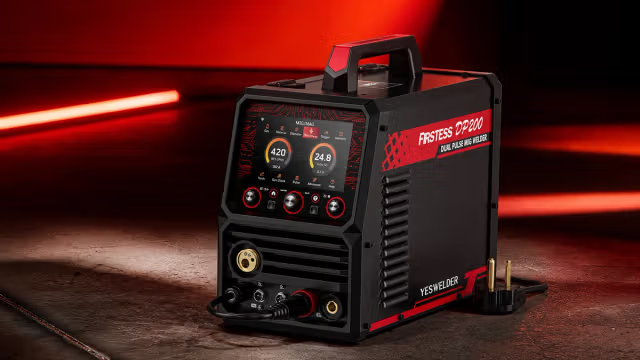
A workshop can get crowded quickly. A MIG welder here, a TIG machine there, and a plasma cutter that only comes out when a project needs one. Add gas cylinders, cables, torches, and consumables, and a garage can run out of usable space sooner than expected.
For DIYers and home fabricators, an all-in-one machine can be a practical alternative, especially when different projects call for different processes.
A Closer Look at the YESWELDER FIRSTESS MP200 PRO
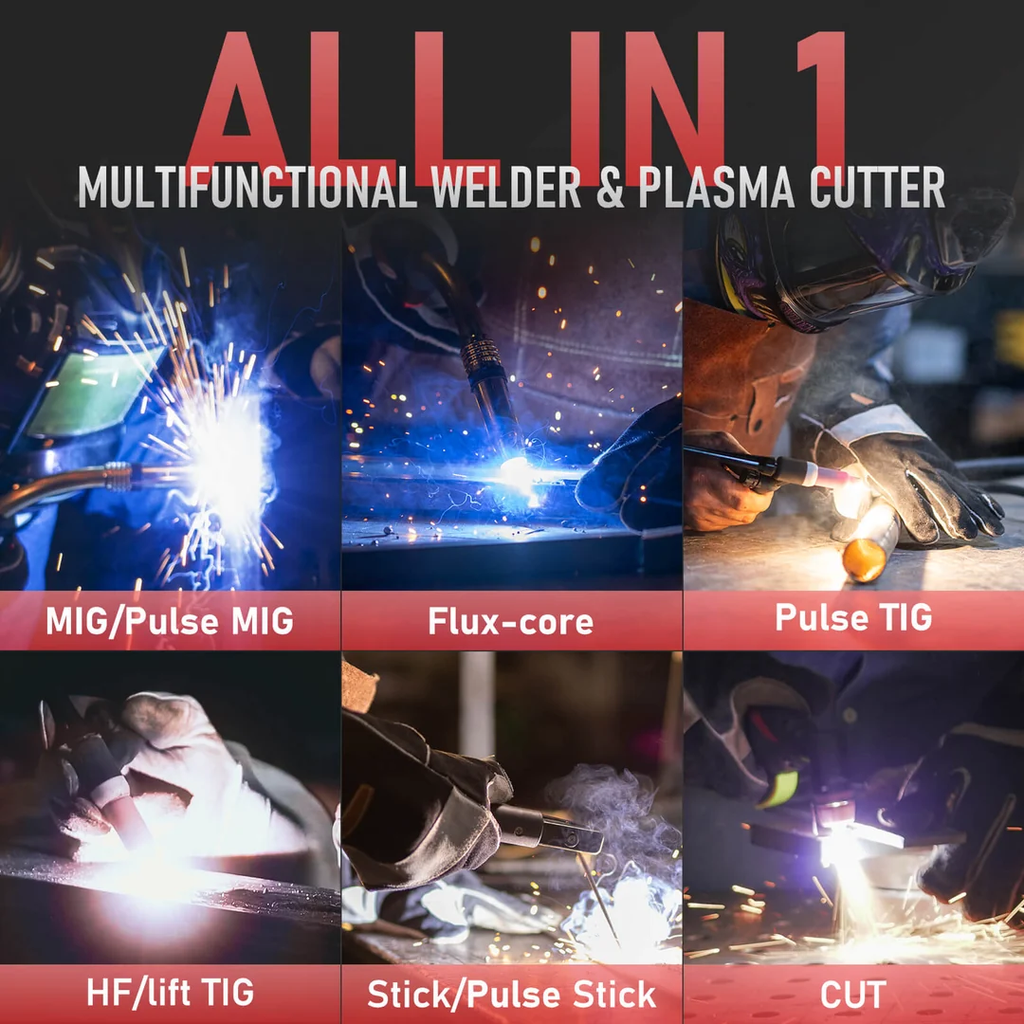
The YESWELDER FIRSTESS MP200 PRO is a multi-process welder that combines MIG, TIG, stick welding, plasma cutting, and metal cleaning in one machine.
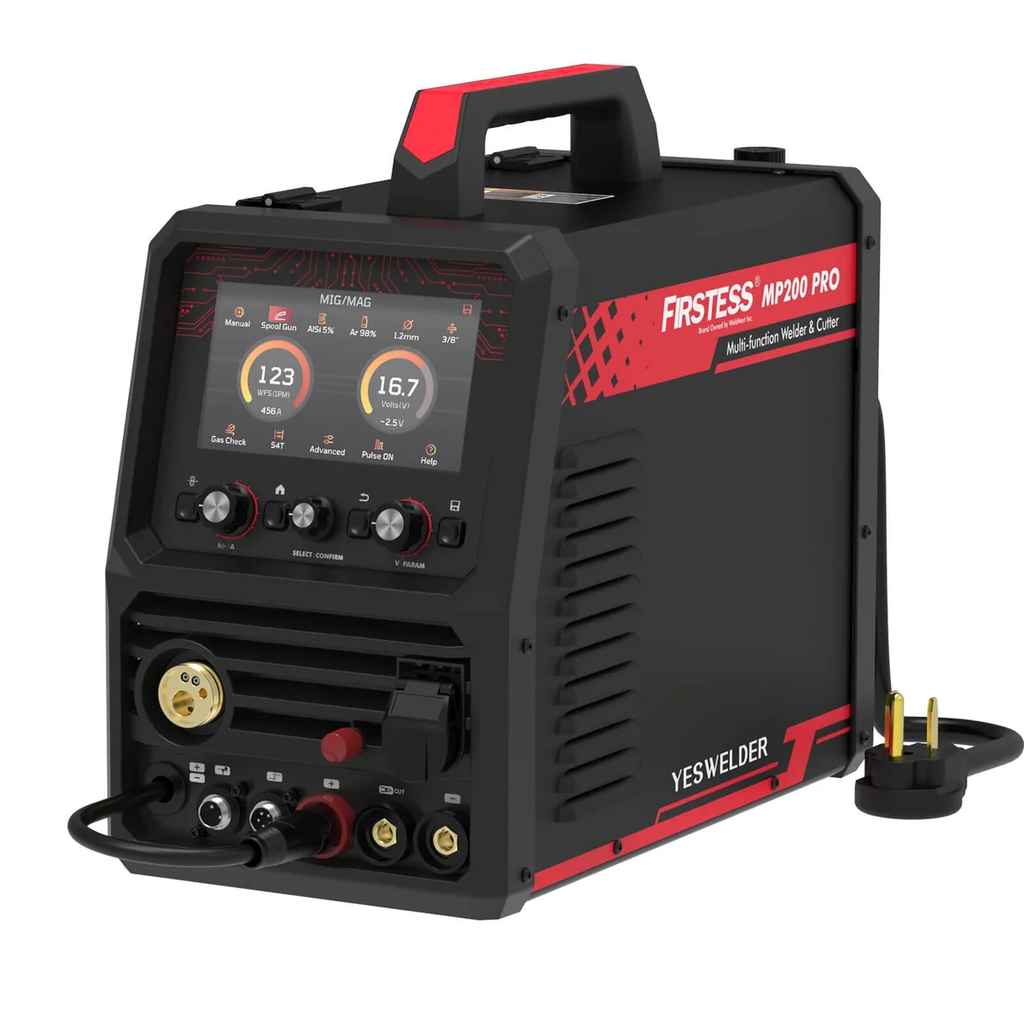
With 120V/240V input, it is designed for a wide range of projects, from repairing brackets and cutting sheet metal to building custom frames and tackling more demanding garage fabrication.
The machine supports:
- MIG and Pulse MIG
- Flux-cored welding
- HF/Lift TIG and Pulse TIG
- Stick and Pulse Stick
- Plasma cutting
- Metal cleaning
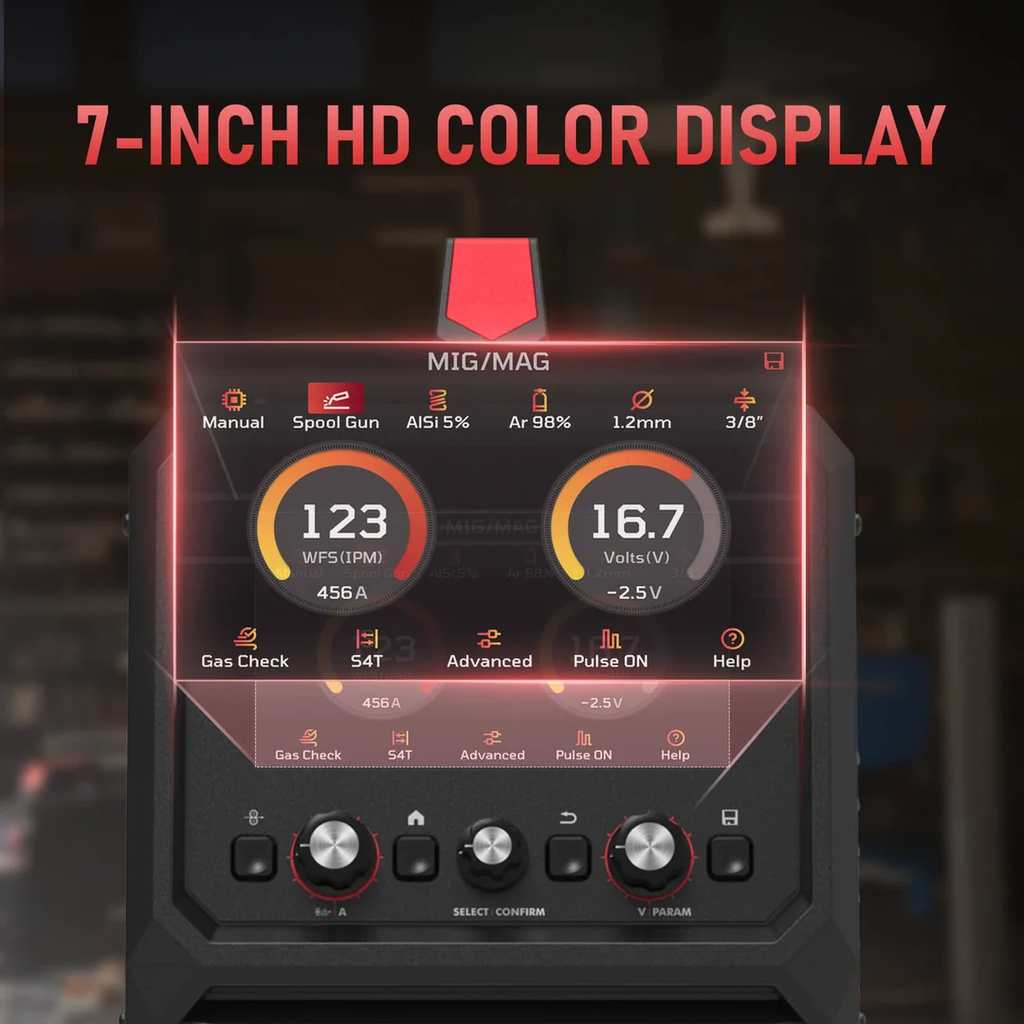
A 7-inch full-color HD display puts the main welding parameters and settings in one place. For users switching between processes, this is more convenient than working through a small, basic display.
One Machine for Different Welding Jobs
The advantage of a multi-process machine becomes clearer when a project involves more than one type of work.
MIG and Pulse MIG
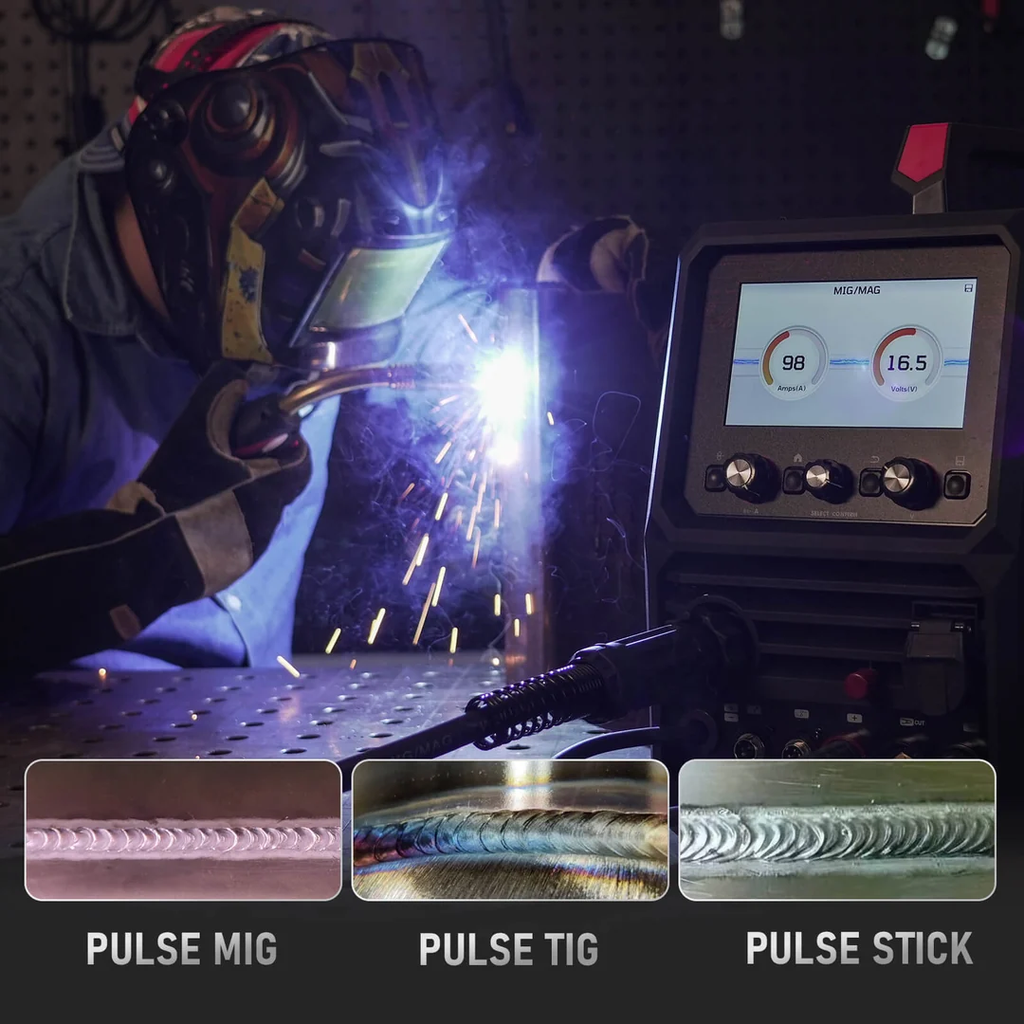
MIG is a practical choice for brackets, frames, workbenches, repairs, and general fabrication. The MP200 PRO also offers Pulse MIG for greater control over the arc and weld pool, with less spatter.
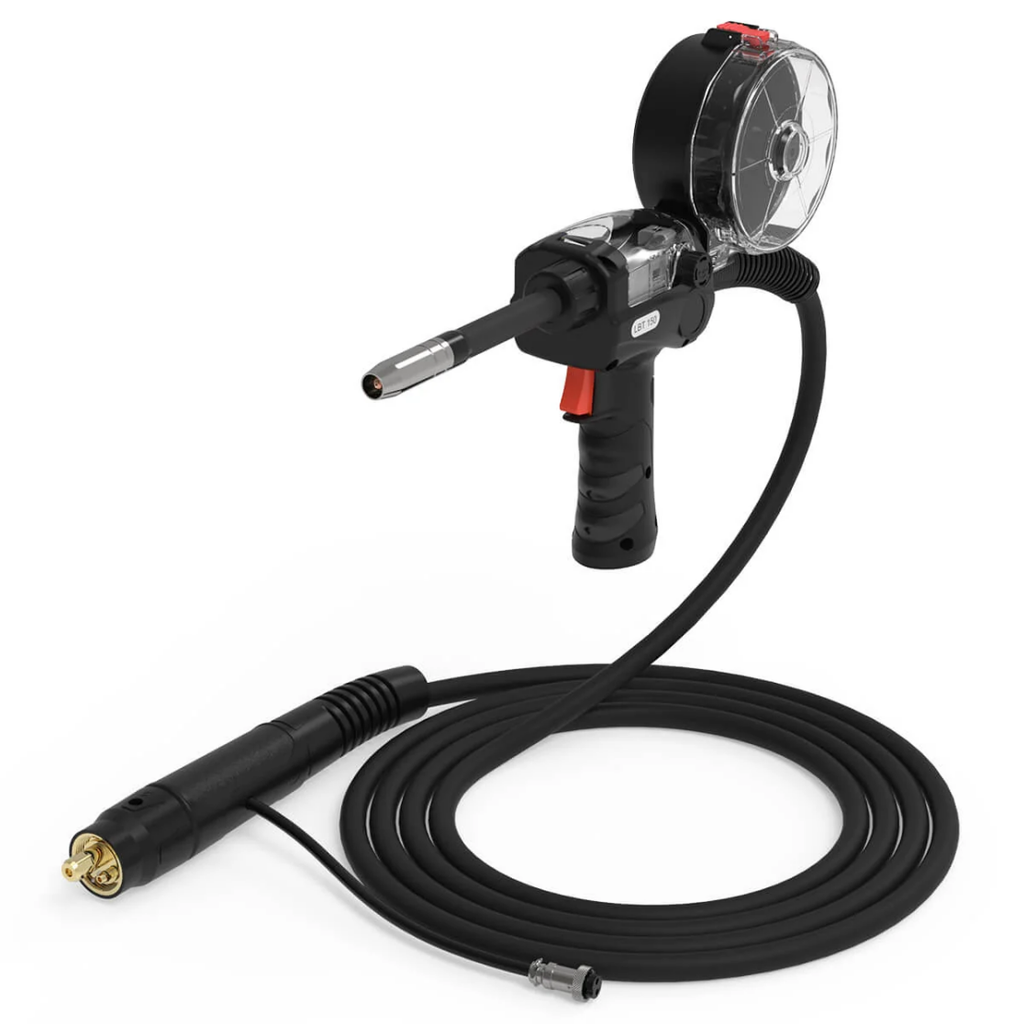
It supports steel, stainless steel, and aluminum. For aluminum MIG welding, it works with compatible AlSi5 or AlMg5 wire and can be paired with the optional LBT150 spool gun.
TIG and Pulse TIG
TIG is useful when you need more control over the weld. The MP200 PRO provides HF and Lift TIG, along with Pulse TIG.
These modes are suited to steel and stainless steel projects where heat control and weld appearance matter, particularly on smaller or more detailed parts.
Stick Welding
Stick welding remains useful for repairs and outdoor work, especially when using shielding gas is inconvenient. The MP200 PRO supports standard and pulse stick welding and is E6010 capable.
Plasma Cutting and Cleaning
The built-in plasma cutter can handle steel, stainless steel, and aluminum, making it useful for cutting plate and sheet metal during fabrication.
At 240V, the rated clean-cut thickness is up to 3/8 inch, with a severance capacity of up to 1/2 inch.
The machine also includes a cleaning function for post-weld metal surface treatment. While it may not be needed for every project, having it available can eliminate the need for another piece of equipment.
Made for Real-World Workshops
Not every welder has a dedicated fabrication shop. Many projects happen in garages, home workshops, or shared spaces where storage and floor space are limited.
The MP200 PRO is built around that reality. Its 120V/240V dual-voltage input allows users to work with the power available in their workshop. On 120V, MIG, TIG, and stick output go up to 120A. On 240V, MIG and TIG output reach 200A.
At 240V, MIG, TIG, and stick welding can handle recommended material thicknesses up to 3/8 inch, depending on the process and material.
The machine also offers both synergic and manual modes. Synergic mode helps simplify initial setup, while Manual mode gives experienced users more control over individual parameters.
What Can You Build With It?
The most useful way to look at a multi-process welder is by the projects it can support.
A home workshop might use it to build a steel workbench, repair a frame, fabricate brackets, make storage racks, or work on outdoor metal projects.
Automotive fabrication is another natural application. A single project may involve cutting plate, fitting components, tack welding, and finishing smaller joints with TIG. Being able to switch between processes on the same machine can make that workflow more straightforward.

The same applies to creative projects such as metal furniture, sculptures, garden structures, and other custom pieces.
Features That Make a Difference
The MP200 PRO includes several features aimed at making everyday operation simpler.
Triple Pulse Modes
Pulse is available in MIG, TIG, and stick welding. Depending on the material and settings, pulse operation can help with arc stability, puddle control, and spatter reduction.
Synergic and Manual Modes
Synergic mode provides a quicker starting point for setup, while Manual mode lets experienced welders fine-tune the machine to suit a particular material or project.
Upgradeable Firmware
The firmware can be updated to add features, improve performance, and introduce new welding parameters. For a machine intended to stay in a workshop for years, upgradeability is a useful feature.
Aluminum-Ready Setup
The MP200 PRO can handle aluminum MIG applications with compatible wire and can be used with the optional LBT150 spool gun. This gives users another option when a project goes beyond steel and stainless steel.
Who Is the MP200 PRO For?
An all-in-one welder is not necessarily the right choice for every workshop.
It can make sense for:
- DIY makers
- Garage fabricators
- Home workshop owners
- Users with limited workspace
- People who regularly switch between welding and cutting
- Beginners who want simpler setup options
A dedicated machine may be more appropriate for highly specialized work. For example, someone focused mainly on AC TIG aluminum welding may need capabilities beyond those offered by this type of multi-process platform. Similarly, high-volume industrial production calls for equipment designed specifically for that environment.
A Practical All-in-One Workshop Setup
Metalworking projects rarely stick to one process. A single job might involve cutting, fitting, welding, and cleaning before it is finished.
That is where the FIRSTESS MP200 PRO fits. By combining several welding processes with plasma cutting and cleaning, it gives DIYers and garage fabricators a practical way to handle different stages of a project with one machine.
For users who value flexibility but don’t have unlimited space, an all-in-one setup can be a straightforward way to keep projects moving while keeping the workshop a little less crowded.
To learn more, visit the YesWelder Official Store to explore a range of welders, welding helmets, consumables, and accessories for different projects and workshop needs.

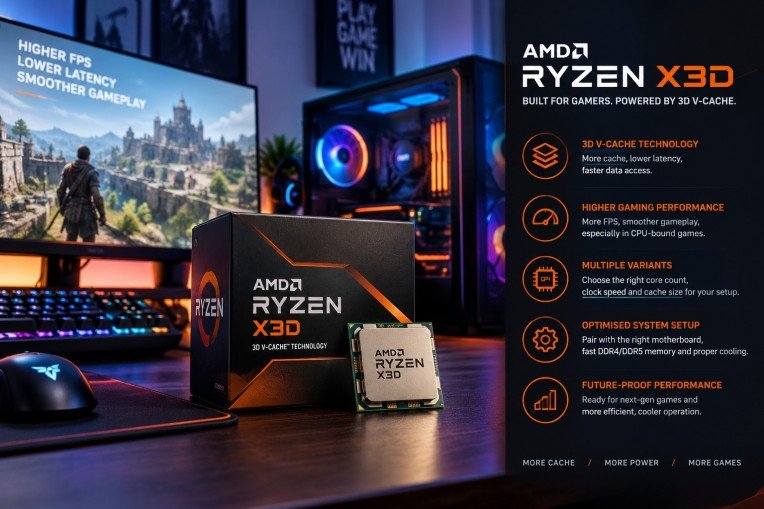
The AMD Ryzen X3D processor series represents a significant advancement in the realm of gaming CPUs, offering enthusiasts a robust combination of speed, efficiency, and enhanced graphics performance. This guide aims to explore the intricacies of the AMD Ryzen X3D, providing gamers with insights on how to harness its full potential for an unparalleled gaming experience.
To start with, the x3d architecture introduces innovative 3D V-Cache technology that substantially increases the amount of L3 cache available on the processor die. This increase in cache results in reduced latency and improved data access times, paramount for the demanding processes involved in modern gaming.
Understanding 3D V-Cache Technology
Traditional CPU designs incorporate cache memory adjacent to processor cores on a single plane. However, the AMD Ryzen X3D series stacks additional cache vertically using 3D V-Cache technology. This vertical integration allows a substantial increase in cache capacity without significantly enlarging the processor’s footprint.
The augmented cache enables quicker retrieval of gaming assets and instructions by minimizing the distance data travels. Consequently, this reduces frame times and leads to smoother gameplay, especially in games that are sensitive to cache size and latency.
Performance Benefits for Gamers
The primary beneficiary of the 3D V-Cache is gaming performance. Benchmarks demonstrate that Ryzen X3D processors achieve higher frame rates and lower latency compared to their non-3D counterparts, particularly in CPU-bound games such as strategy, simulation, and role-playing games.
This performance edge is amplified when paired with high-end graphics cards and fast memory modules, creating a synergistic effect that maximises the hardware capabilities. With the right configuration, gamers can expect a more responsive and immersive experience.
Choosing the Right Ryzen X3D for Your Setup
AMD offers several variants within the Ryzen X3D lineup, each catering to different performance tiers and budgets. Understanding the differences in core count, clock speeds, and cache size is essential when selecting the appropriate processor for a specific gaming rig.
Moreover, compatibility with motherboards and cooling solutions should be carefully considered to ensure optimal thermal management and power delivery, which directly impact the processor’s sustained performance during intensive gaming sessions.
Optimising System Configuration
Beyond the processor itself, achieving peak performance with the AMD Ryzen X3D involves fine-tuning system components and software settings. Updating BIOS and drivers ensures compatibility and stability, while adjusting in-game settings can leverage the processor’s capabilities more effectively.
It is also advisable to employ high-speed DDR4 or DDR5 memory modules, as memory speed can influence the processor’s performance, notably in CPU-bound scenarios. Adequate cooling, through either advanced air coolers or liquid cooling solutions, helps maintain stable frequencies and prevents thermal throttling.
Comparison with Other High-Performance Processors
Compared to previous generation AMD Ryzen processors and competitors in the market, the X3D models stand out for their superior cache design. While raw clock speeds may be comparable, the enlarged cache grants the Ryzen X3D a distinct advantage in gaming workloads.
This advantage translates into more consistent frame times and generally smoother visual output, which are critical metrics for serious gamers and streamers aiming for high-quality content delivery.
Future-Proofing Your Gaming Build
The integration of 3D V-Cache positions the Ryzen X3D series well for upcoming titles that demand heightened computational resources. Investing in this technology ensures a level of preparedness for next-generation games that leverage CPU cache to improve performance.
Additionally, the energy efficiency improvements in the Ryzen X3D series contribute to quieter and cooler operation, factors increasingly valued in modern gaming setups that prioritise comfort and acoustics.
Conclusion
Unlocking peak performance with the AMD Ryzen X3D involves understanding the transformative impact of 3D V-Cache technology and meticulously aligning system components to support its strengths. Gamers seeking to elevate their gameplay quality will find the Ryzen X3D a compelling choice in the current market landscape.
For those interested in exploring the range of AMD Ryzen X3D processors, reputable suppliers such as Scorptec Computers provide access to the latest models, ensuring customers can equip themselves with cutting-edge hardware primed for exceptional gaming performance.

Drain Unblocking London: How to Clear Problems Properly and Prevent Repeat Blockages

Top 13 CRM Software Development Companies in California

Staying in Chora With Little Venice at Your Door

AI-Generated Nano Banana 2.1 Visuals: What Shopify Beauty Ecommerce Brands Should Check Before Publishing

YesWelder FIRSTESS MP200 Pro: One Machine for Welding, Cutting, and More


The 15 Highest-Paid Rugby Players in the World

How to Ensure Your Home is Valued Correctly for a Quick Sale

Christopher Dare: The Untold Story of Engineer and Former Husband of Angela Rippon

What Is Fanquer? The Digital Creator Platform Transforming Direct-to-Fan Engagement

Dr Jared Ross: Missouri Appeals Court Upholds Protection Order Over Graphic Torture and Murder Threats

Nancy Hallam: The Inspiring Life, Career, and Success Story Behind Ian Wright’s Wife
The 15 Highest-Paid Rugby Players in the World
How to Ensure Your Home is Valued Correctly for a Quick Sale
Christopher Dare: The Untold Story of Engineer and Former Husband of Angela Rippon
What Is Fanquer? The Digital Creator Platform Transforming Direct-to-Fan Engagement
Dr Jared Ross: Missouri Appeals Court Upholds Protection Order Over Graphic Torture and Murder Threats
Nancy Hallam: The Inspiring Life, Career, and Success Story Behind Ian Wright’s Wife
-
 Sports5 months ago
The 15 Highest-Paid Rugby Players in the World
-
 Real Estate8 months ago
How to Ensure Your Home is Valued Correctly for a Quick Sale
-
Celebrity11 months ago
Christopher Dare: The Untold Story of Engineer and Former Husband of Angela Rippon
-
 Technology5 months ago
What Is Fanquer? The Digital Creator Platform Transforming Direct-to-Fan Engagement
-
 Celebrity4 months ago
Dr Jared Ross: Missouri Appeals Court Upholds Protection Order Over Graphic Torture and Murder Threats
-
Celebrity11 months ago
Nancy Hallam: The Inspiring Life, Career, and Success Story Behind Ian Wright’s Wife
-

 Celebrity7 months ago
Who Is Azriel Crews? Inside the Life and Career of Terry Crews’ Daughter
-

 Health9 months ago
Enclomimed 25 (Enclomiphene) – Effective PCT Protocol