
Blog
5 Best Online Video Editors for Fast, Flexible Video Creation in 2026

Online video editing has shifted from complex desktop software to accessible, browser-based platforms that support everything from short-form content to brand storytelling. An effective online video editor now combines intuitive timelines, AI-assisted workflows, and export-ready templates, allowing users to move from idea to publishable content quickly.
This list explores five widely used tools—each offering a distinct approach to editing, automation, and creative control. The focus is on practical capabilities, real-world use cases, and how each platform fits into modern content production workflows.
1. Pollo AI — Most Convenient Online Video Editor for AI-Driven Creation
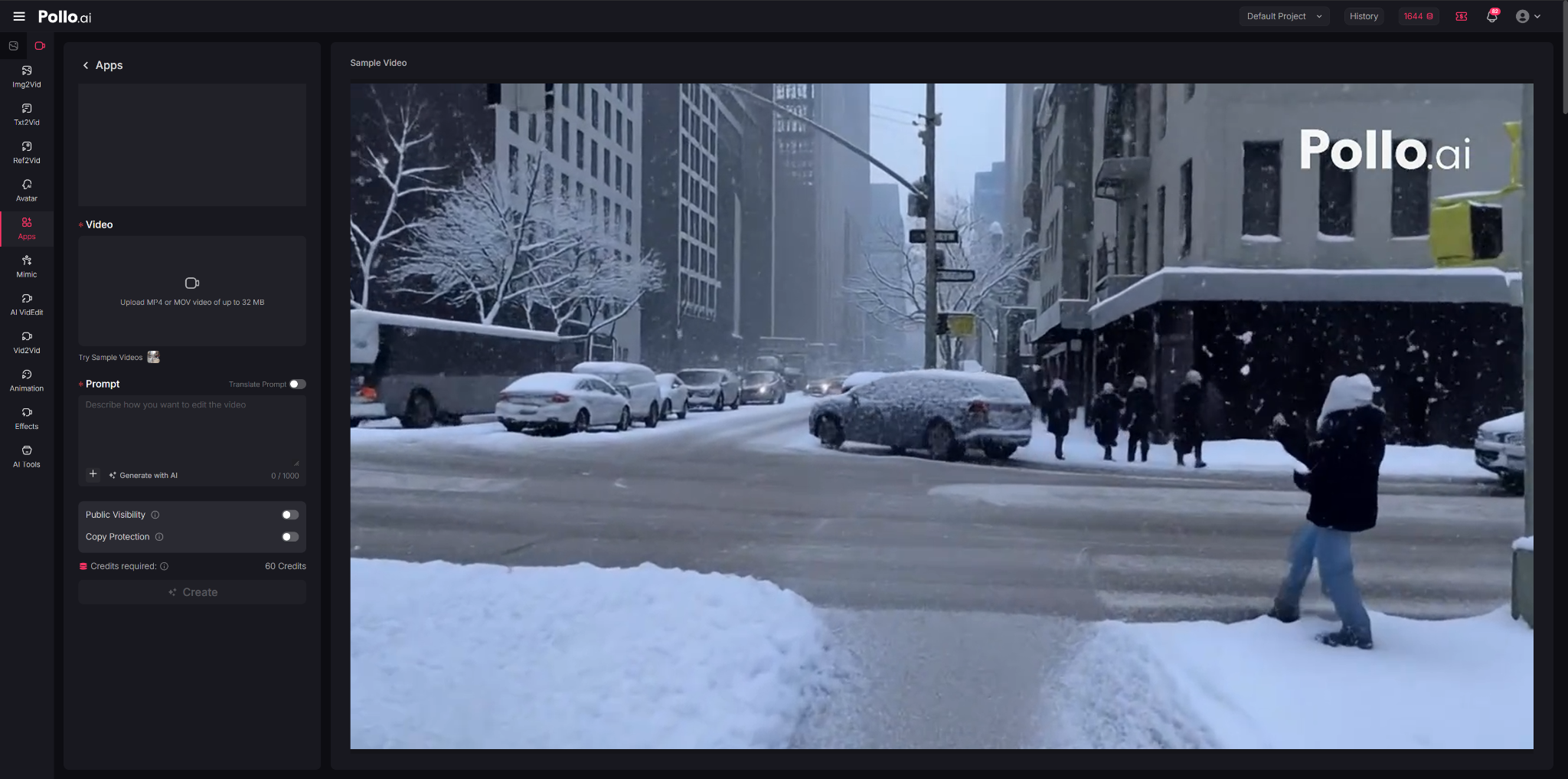
Pollo AI redefines the role of an online video editor by focusing on AI-driven transformation rather than manual editing. Instead of starting with a traditional timeline, users can describe how they want to modify a video using simple text prompts. The platform then interprets those inputs to restyle scenes, adjust subjects, or refine visuals with minimal effort.
This makes it particularly useful for working with existing footage. Users can upload videos and quickly generate updated versions without reshooting or complex editing workflows. As a browser-based tool, it remains accessible while still offering advanced visual manipulation capabilities.
Features of Pollo AI Online Video Editor

Pollo AI brings multiple editing functions into a single interface, including restyling, object removal, and background changes. Users can modify subject details—such as hair, outfits, or age—while maintaining consistency across frames, which is often difficult in traditional editors.
The platform also supports cinematic effects and style transformations, enabling videos to be reimagined in formats like anime or 3D. Users can add or remove elements seamlessly and adjust environments, such as lighting, weather, or backgrounds, through simple prompts. It also allows the creation of multiple video variations with different styles for platform-specific needs.
Why Choose It

Pollo AI is well-suited for users who need to transform content quickly and at scale. E-commerce teams can update product visuals without new shoots, while marketers can generate multiple campaign variations efficiently. It is also useful for social media workflows that require frequent content updates.
While it may not focus on detailed manual editing, its strength lies in simplifying complex visual changes and enabling faster production cycles.
2. VEED.io — Online Video Editor Focused on Simplicity and Subtitles
VEED.io is a browser-based online video editor designed with accessibility in mind. It emphasizes ease of use, making it a common choice for beginners and professionals who want to produce clean, functional videos without navigating complex interfaces.
The platform is particularly known for its subtitle and transcription capabilities, which are integrated directly into the editing workflow. This makes it useful for content creators working with interviews, tutorials, or social media videos where captions are essential.
Features of VEED.io Online Video Editor
VEED.io offers a drag-and-drop timeline, automatic subtitle generation, and text styling tools. Users can quickly add captions, overlays, and basic effects without needing prior editing experience. The platform also includes screen recording and webcam capture features.
Additional tools include audio cleanup, background noise reduction, and simple branding options. While not as feature-dense as professional editing software, VEED.io covers the essentials needed for most online content formats.
Why Choose It
This tool is well-suited for educators, marketers, and social media managers who prioritize clarity and speed. Its subtitle functionality alone can significantly reduce production time for caption-heavy content.
However, users looking for advanced motion graphics or multi-layer editing may find its capabilities somewhat limited compared to more complex platforms.
3. Adobe Express — Online Video Editor with Brand Integration
Adobe Express extends Adobe’s design ecosystem into a simplified, web-based environment. As an online video editor, it focuses on branded content creation, enabling users to maintain visual consistency across videos, graphics, and other assets.
The platform is particularly relevant for teams already using Adobe tools, as it integrates brand kits, fonts, and templates into a unified workspace. This allows for consistent output without requiring advanced editing expertise.
Features of Adobe Express
Adobe Express includes pre-designed video templates, drag-and-drop editing, and integration with Adobe Stock assets. Users can easily incorporate logos, colors, and typography into their videos using saved brand presets.
It also offers basic animation, transitions, and resizing options for different platforms. While it does not replicate the depth of Adobe Premiere Pro, it provides a streamlined alternative for quick content creation.
Why Choose It
Adobe Express is a strong option for businesses and teams that prioritize brand consistency. Its integration with the broader Adobe ecosystem makes it especially useful for those already familiar with Adobe workflows.
That said, it may not be the best choice for users seeking advanced editing features or AI-driven automation, as its focus remains on simplicity and design alignment.
4. CapCut (Web) — Online Video Editor for Social Media Trends
CapCut’s web version brings its mobile-first editing philosophy to the browser. Known for its popularity among short-form video creators, it offers a balance between creative flexibility and ease of use.
The platform is closely aligned with social media trends, particularly those on TikTok. This makes it a practical choice for users who want to create content that aligns with current formats and editing styles.
Features of CapCut Web
CapCut Web includes timeline editing, transitions, effects, and a large library of music and templates. It also incorporates AI tools such as auto captions, background removal, and text-to-speech.
Users can quickly adapt content for vertical formats and apply stylistic elements commonly seen in viral videos. The interface remains relatively intuitive despite offering more features than many beginner tools.
Why Choose It
CapCut Web is ideal for creators focused on short-form content and trend-driven production. Its combination of templates and editing flexibility allows users to experiment with different styles efficiently.
However, for long-form or highly structured video projects, it may feel less robust compared to more traditional editing platforms.
5. Canva — Online Video Editor with Design-First Approach
Canva’s online video editor builds on its reputation as a design platform, extending its drag-and-drop simplicity into video creation. It is particularly popular among non-designers who want to produce visually consistent content without technical complexity.
The platform integrates video editing into its broader ecosystem, allowing users to combine graphics, presentations, and animations within a single workspace. This makes it useful for multi-format content strategies.
Features of Canva Online Video Editor
Canva offers a wide range of templates, stock assets, and design elements that can be applied to video projects. Users can add text, animations, transitions, and audio with minimal effort.
The platform also supports collaboration, enabling teams to edit and review content in real time. While its timeline editing is relatively basic, it covers the needs of most casual and semi-professional users.
Why Choose It
Canva is well-suited for marketers, educators, and small teams who prioritize ease of use and visual consistency. Its template-driven approach simplifies the creation process and reduces the learning curve.
On the other hand, users requiring detailed editing control or advanced video effects may find its capabilities somewhat limited.
Final Thoughts
Selecting the right online video editor depends largely on workflow preferences and content goals. Tools like Pollo AI emphasize automation and rapid generation, while platforms such as VEED.io and Canva focus on accessibility and ease of use. Adobe Express caters to brand-driven workflows, and CapCut Web aligns closely with social media trends.
Each platform reflects a different interpretation of what video editing should look like in a browser environment. Understanding these differences can help users choose a tool that matches their production style, whether that involves high-speed content creation, collaborative editing, or design-focused storytelling.



In industries requiring reliable and secure storage, UTE tool boxes represent an essential investment for professionals and tradespeople alike. These tool boxes are specifically designed to fit onto utility vehicles, providing robust and accessible storage solutions for a variety of equipment and tools. This guide explores the key features, benefits, and considerations when selecting a UTE tool box to maximise utility and security.
Understanding UTE Tool Boxes
UTE tool boxes are specialised storage units engineered to be mounted on the tray of a utility vehicle, commonly referred to as a UTE. Their primary purpose is to organise tools and equipment efficiently while safeguarding them against theft, weather conditions, and operational hazards encountered on worksites.
Key Features of UTE Tool Boxes
Several attributes define the quality and effectiveness of a UTE tool box. First, the material construction plays a pivotal role in durability. Tool boxes made from aluminium or stainless steel offer excellent resistance to corrosion, ensuring longevity in both urban and rugged environments. Additionally, they are often equipped with weatherproof seals to keep contents dry and protected.
Security mechanisms are another crucial feature. High-grade locking systems, including key locks and combination locks, provide protection against unauthorised access. Some models incorporate advanced locking features to deter theft even in high-risk areas.
Size and Capacity Considerations
The size of a UTE tool box is dictated by the user’s specific needs. Tool boxes vary significantly in dimensions and internal arrangement options, such as shelves and compartments. Selecting an appropriately sized unit requires an assessment of the volume and type of tools to be stored to maintain organisation and ease of access.
Benefits of Using UTE Tool Boxes
Besides enhancing security and organisation, UTE tool boxes contribute to increased productivity on the job. By having tools readily available and systematically stored within reach, professionals mitigate downtime associated with searching for equipment. Moreover, the secure nature of these boxes reduces the risk of tool loss, directly impacting operational costs.
In addition, they improve vehicle utility by optimising space usage on the UTE. By utilising storage space effectively, more tools and supplies can be transported safely, facilitating preparedness across various jobs.
Choosing the Right UTE Tool Box
The selection process should prioritise compatibility with the specific make and model of the UTE vehicle. Measurements must be precise to ensure a proper fit and stable mounting without compromising the vehicle’s balance or load capacity.
Attention should also be given to the method of installation. Some tool boxes come with universal fittings and mounting kits, simplifying the process and ensuring secure attachment to the vehicle tray. Professional installation is recommended to guarantee safety and adherence to vehicle regulations.
Customisation and Additional Accessories
Many manufacturers offer customisation options including colour matching, branding, and specialised locking systems. Additional accessories such as internal lighting, drawer organisers, and power sockets can be incorporated to enhance usability.
Maintenance and Care
Proper maintenance ensures prolonged utility and appearance of a UTE tool box. Regular cleaning to remove dirt and debris, lubricant application on locks, and inspections for damage are essential practices. Addressing minor issues promptly can prevent costly repairs and maintain security integrity.
Weatherproofing seals should be checked periodically to sustain protection against moisture ingress. Ensuring the tool box remains tightly sealed also helps preserve the condition of stored tools and equipment.
Conclusion
In conclusion, investing in UTE tool boxes offers substantial benefits in terms of utility, security, and operational efficiency for tradespeople and industries reliant on utility vehicles. Selecting a high-quality, appropriately sized tool box, tailored to individual requirements, and maintained diligently will guarantee a long-lasting and valuable asset for any professional toolkit.
Sitec Equipment Pty Ltd specialises in providing a comprehensive range of UTE tool boxes designed to meet diverse needs. Their expertise ensures clients receive products that combine durability, security, and convenience, suitable for demanding work environments.

Snoring is a common issue that affects many adults and may sometimes be dismissed as a harmless sleeping habit. Occasional snoring can happen due to factors such as tiredness, sleeping position, nasal congestion or alcohol intake.
However, loud and frequent snoring may sometimes be a sign of an underlying sleep-related breathing problem, particularly obstructive sleep apnea (OSA). This condition occurs when the upper airway becomes partially or completely blocked during sleep, causing repeated interruptions to breathing.
Not everyone who snores has sleep apnea, but certain warning signs may suggest that snoring requires medical assessment.
Recognising these signs early can help patients seek appropriate treatment and improve sleep quality, daytime energy and overall health.
Why Do People Snore?
Snoring happens when airflow through the upper airway becomes restricted during sleep. As air passes through narrowed areas, surrounding tissues may vibrate and produce the sound associated with snoring.
Airway narrowing may occur due to factors affecting the:
- Nose
- Soft palate
- Throat
- Tongue
- Upper airway muscles
Common reasons why people snore include:
- Nasal blockage
- Allergies
- Enlarged tonsils
- Enlarged adenoids in children
- Deviated nasal septum
- Sleeping on the back
- Weight gain
- Alcohol consumption before sleep
- Age-related changes affecting airway tissues
Occasional snoring may not indicate a serious problem. However, persistent loud snoring with other symptoms may require further assessment.
When Is Snoring Considered Concerning?
Snoring may require medical attention when it is:
- Loud and frequent
- Happening almost every night
- Becoming worse over time
- Affecting sleep quality
- Associated with breathing interruptions
- Causing daytime tiredness
- Affecting concentration or mood
A person who snores may not always realise their sleep is disrupted. Often, a partner or family member may notice warning signs first.
Warning Signs Your Snoring Should Not Be Ignored
1. Breathing Pauses During Sleep
One of the most important warning signs is when someone notices that you stop breathing during sleep.
These pauses may happen because the airway becomes blocked temporarily. After the pause, the body may respond by briefly waking up or gasping to restore breathing.
Signs may include:
- Breathing pauses noticed by a partner
- Loud snoring followed by silence
- Sudden choking or gasping sounds
- Restless sleep
Repeated breathing interruptions may be a sign of obstructive sleep apnea and should be assessed.
2. Waking Up Gasping or Choking
Some people with sleep apnea wake up suddenly because their breathing has been interrupted.
You may experience:
- Waking up feeling unable to breathe
- Choking sensations
- Sudden awakenings during the night
- Feeling panicked upon waking
These episodes should not be ignored, especially if they occur regularly.
3. Feeling Tired Despite Getting Enough Sleep
A person with sleep apnea may spend enough hours in bed but still feel exhausted during the day.
This happens because repeated breathing interruptions prevent the body from achieving good-quality sleep.
Daytime symptoms may include:
- Excessive tiredness
- Low energy
- Difficulty staying awake
- Poor concentration
- Reduced productivity
- Feeling unrefreshed after waking
Persistent daytime fatigue combined with loud snoring may require assessment.
4. Morning Headaches
Morning headaches can occur when sleep apnea affects oxygen levels and sleep quality during the night.
Patients may notice:
- Waking up with headaches
- Head pressure in the morning
- Headaches that improve later in the day
While morning headaches can have many causes, they may be a sign of disrupted breathing during sleep when combined with other symptoms.
5. Poor Concentration and Memory Problems
Poor sleep quality can affect how the brain functions during the day.
Patients with sleep-related breathing problems may experience:
- Difficulty focusing
- Forgetfulness
- Slower reaction times
- Reduced attention span
- Difficulty completing tasks
These symptoms may affect work performance, learning and daily activities.
6. High Blood Pressure or Heart-Related Concerns
Sleep apnea has been associated with increased strain on the cardiovascular system because repeated breathing interruptions can affect oxygen levels and increase stress responses in the body.
Patients with snoring and conditions such as:
- High blood pressure
- Heart rhythm problems
- Heart disease
- Previous stroke
may benefit from discussing their symptoms with a healthcare professional.
7. Loud Snoring That Gets Worse Over Time
Snoring patterns can change. A person who previously snored occasionally may begin snoring more frequently or more loudly.
Worsening snoring may be linked to:
- Weight changes
- Increasing nasal blockage
- Age-related airway changes
- Enlarged throat tissues
- Development of sleep apnea
A sudden change in snoring patterns should be assessed, especially if other symptoms are present.
8. Snoring With Nasal Blockage
Nasal problems can contribute to snoring by making it harder to breathe through the nose.
Possible causes include:
- Allergic rhinitis
- Chronic sinusitis
- Deviated nasal septum
- Nasal polyps
- Enlarged nasal tissues
Patients may notice:
- Mouth breathing during sleep
- Dry mouth upon waking
- Difficulty breathing through the nose
- Worse snoring during allergy flare-ups
An ENT doctor can assess whether nasal obstruction is contributing to snoring.
9. Snoring With Excessive Daytime Sleepiness
Feeling sleepy during the day may be a sign that nighttime sleep is not restorative.
You should consider medical assessment if you:
- Fall asleep unintentionally
- Feel sleepy while working
- Struggle to stay awake during the day
- Feel tired despite adequate sleep
This is especially important for people who drive, operate machinery or have safety-sensitive jobs.
10. Snoring in Children
Snoring is not only an adult problem. Children who snore regularly may also need assessment.
Parents should consider seeing a doctor if their child has:
- Frequent snoring
- Mouth breathing
- Pauses in breathing during sleep
- Restless sleep
- Daytime behavioural changes
- Difficulty concentrating
- Poor sleep quality
In children, enlarged tonsils and adenoids are common causes of sleep-disordered breathing.
Is Snoring Always Sleep Apnea?
No. Many people snore without having sleep apnea.
Simple snoring may occur due to:
- Sleeping position
- Nasal congestion
- Temporary illness
- Lifestyle factors
However, snoring is more concerning when it occurs together with symptoms such as:
- Breathing pauses
- Gasping during sleep
- Daytime sleepiness
- Morning headaches
- Poor concentration
- High blood pressure
A proper assessment can help determine whether sleep apnea is present.
How Is Sleep Apnea Diagnosed?
If sleep apnea is suspected, a doctor may recommend further evaluation.
Assessment may include:
Medical History Review
The doctor may ask about:
- Snoring frequency
- Sleep quality
- Daytime symptoms
- Breathing pauses
- Medical history
- Lifestyle factors
Physical Examination
An ENT specialist may examine:
- Nasal passages
- Tonsils
- Throat structures
- Airway anatomy
Sleep Study
A sleep study records body functions during sleep, including:
- Breathing patterns
- Oxygen levels
- Heart rate
- Sleep stages
- Body movements
The results help determine whether sleep apnea is present and how severe it may be.
When Should You See an ENT Specialist for Snoring?
You may consider seeing an ENT specialist if:
- You snore loudly every night
- Your snoring is worsening
- Someone notices breathing pauses
- You wake up choking or gasping
- You have persistent nasal blockage
- You feel tired despite sleeping
- Snoring affects your relationship or daily life
- You suspect sleep apnea
An ENT specialist can assess whether physical factors affecting the airway may be contributing to snoring.
Treatment Options for Dangerous Snoring and Sleep Apnea
Treatment depends on the cause and severity of symptoms.
Lifestyle Changes
Some patients may benefit from:
- Maintaining a healthy weight
- Sleeping on the side
- Avoiding alcohol before bedtime
- Improving sleep habits
Treating Nasal Problems
If nasal obstruction contributes to snoring, treatment may include:
- Allergy management
- Nasal medication
- Treatment for sinus conditions
- Nasal procedures in selected cases
CPAP Therapy
Continuous positive airway pressure (CPAP) uses gentle air pressure to help keep the airway open during sleep.
It is commonly used for moderate to severe obstructive sleep apnea.
Oral Appliances
Some patients may benefit from devices that adjust jaw or tongue position to improve airflow.
Surgery
Surgery may be considered for selected patients when there is a structural cause of airway obstruction.
Possible procedures may include:
- Tonsil surgery
- Nasal surgery
- Palate procedures
- Other airway procedures
The suitable treatment depends on the location of airway blockage and individual factors.
Snoring is common, but loud and persistent snoring should not always be dismissed as harmless. When snoring is accompanied by breathing pauses, gasping during sleep, daytime fatigue, morning headaches or difficulty concentrating, it may indicate an underlying sleep-related breathing problem.
An ENT specialist can assess the possible causes of snoring, including nasal blockage, throat anatomy and obstructive sleep apnea, and recommend appropriate treatment options.
Seeking medical advice early can help improve sleep quality, reduce symptoms and address potential health concerns associated with untreated sleep apnea.
This article is for general information only and should not replace medical advice from a qualified healthcare professional.


Clothes look like the easy part of a move until you actually start. A closet that seemed small holds an astonishing amount, and most of it is soft, which means it can be squashed into any container and so it will be. Then somebody has to carry that container down five flights of stairs.
The goal is not getting everything into as few boxes as possible. It is arriving with your clothes still wearable and enough of them findable that you can dress for work on Monday without opening nine cartons. That takes a plan rather than speed, and the plan starts before you buy any tape.
Thin the Closet Before You Buy a Single Box
Every box of clothing you move is a box you have to unpack again, and a good third of most closets never gets worn at all. Start three weeks out, on an evening when you are not already tired, and go through it once properly. The pieces you hesitate over twice are the pieces to let go.
Donation bins and secondhand shops around the city fill up at the end of the month for obvious reasons, so plan the drop off before the last week. Anything genuinely worn out belongs in textile recycling rather than a donation bag, since charities have to dispose of what they cannot sell and that helps nobody.
The hanger test and the honest pile
Turn every hanger backwards at the start. Whatever is still backwards a few weeks later has not been worn, which settles most of the arguments you would otherwise have with yourself. In a prewar apartment where the closet is 24 inches deep and shared with a vacuum cleaner, that test is more useful than it sounds.
Make a pile you are honestly not keeping and get it out of the apartment that same week. Bags of clothes destined for donation have a way of living by the door for a month and then getting loaded onto the truck anyway, because nobody wants to be the person deciding on moving day.
Hanging Clothes Without Wrecking the Shoulders
Wardrobe boxes with a bar across the top are the clean solution for anything tailored. A standard one is roughly two feet wide and just over three feet tall, which takes a run of hanging clothes straight off the rod. Suits and structured coats keep their shape that way and arrive ready to hang up.
They are also bulky and they eat truck space, so use them for the pieces that need it and not for jersey shirts. The simpler trick is to leave clothes on their hangers in groups of eight or ten, pull a heavy duty trash bag up over them from the bottom, then tie the bag around the hooks.
Hangers are the hidden bulk
Wire hangers from the dry cleaner tangle into one solid mass in transit and bend under any real weight. Pull them out and recycle them before you pack, then move the wooden and velvet ones in a separate carton laid flat. A tangle of forty hangers takes twenty minutes to separate at the other end.
Count how many you will actually need in the new place. A prewar closet with a single rod at shoulder height holds far less than a modern reach-in, and the surplus becomes clutter on the floor. Leave the extras behind or pass them to whoever is taking over your old apartment.
Footwear, Bags and Anything That Loses Its Shape
Shoes are heavy and they crush easily, which is a bad combination inside a carton. Keep the boxes small. A book box packed with shoes is already at the limit of what somebody wants to carry down a fifth floor walk-up, and a large carton loaded the same way becomes a two person job for no reason.
Boots and anything leather want to travel upright. Heat is the enemy, so keep them away from a truck wall that has been sitting in the sun, and out of the sealed plastic they came home from the store in. Leather needs air, and a week in an airtight bag in August leaves a smell behind.
Stuffing beats squeezing
Fill the toe of every boot with a rolled t-shirt or a sheet of packing paper before it goes into a box. It holds the shape, it uses space that would otherwise be air, and it gives your socks somewhere to live. Newspaper works but the ink transfers, so keep that well away from anything pale.
Structured handbags get the same treatment, then a dust bag or an old pillowcase, then a spot on top of the carton rather than the bottom. Never stack anything heavy on a leather bag. A crease pressed into one over four days in a box is usually permanent, and no amount of steaming brings it back.
Coats, Boots and the Stuff at the Back of the Closet
Seasonal gear is what everyone leaves until the last night, and it always takes longer than expected. If you have booked Dynamic Movers NYC or another crew for an early start, get that material into cartons the day before, because nobody wants to be taping boxes at seven in the morning while a truck sits in a loading zone.
Vacuum bags are excellent for down and synthetic fill and poor for almost everything else. Compressing wool and cashmere for weeks flattens the fibers, and natural fabrics need to breathe. Use the bags for a puffer jacket and a duvet, then put the sweaters in a regular carton with a cedar block and some room.

6 Best Lodges For Sale: Find Your Perfect Retreat

Unlocking the Best Deals with Rayslocker: Your Ultimate Guide to Affordable Shopping

Maximizing Utility and Security: The Ultimate Guide to UTE Tool Boxes

How to Read a Property Report Like a Pro

What Happenes to Your Muscles After a Workout? Understanding the Recovery Process

What Hospital Grade Breast Pump Means Before You Choose

The 15 Highest-Paid Rugby Players in the World

Christopher Dare: The Untold Story of Engineer and Former Husband of Angela Rippon

How to Ensure Your Home is Valued Correctly for a Quick Sale

What Is Fanquer? The Digital Creator Platform Transforming Direct-to-Fan Engagement

Dr Jared Ross: Missouri Appeals Court Upholds Protection Order Over Graphic Torture and Murder Threats

Nancy Hallam: The Inspiring Life, Career, and Success Story Behind Ian Wright’s Wife
The 15 Highest-Paid Rugby Players in the World
Christopher Dare: The Untold Story of Engineer and Former Husband of Angela Rippon
How to Ensure Your Home is Valued Correctly for a Quick Sale
What Is Fanquer? The Digital Creator Platform Transforming Direct-to-Fan Engagement
Dr Jared Ross: Missouri Appeals Court Upholds Protection Order Over Graphic Torture and Murder Threats
Nancy Hallam: The Inspiring Life, Career, and Success Story Behind Ian Wright’s Wife
-
 Sports4 months ago
The 15 Highest-Paid Rugby Players in the World
-
Celebrity10 months ago
Christopher Dare: The Untold Story of Engineer and Former Husband of Angela Rippon
-
 Real Estate8 months ago
How to Ensure Your Home is Valued Correctly for a Quick Sale
-
 Technology4 months ago
What Is Fanquer? The Digital Creator Platform Transforming Direct-to-Fan Engagement
-
 Celebrity4 months ago
Dr Jared Ross: Missouri Appeals Court Upholds Protection Order Over Graphic Torture and Murder Threats
-
Celebrity11 months ago
Nancy Hallam: The Inspiring Life, Career, and Success Story Behind Ian Wright’s Wife
-

 Health8 months ago
Enclomimed 25 (Enclomiphene) – Effective PCT Protocol
-
 Celebrity10 months ago
Who Is Maisie Mae Roffey? The Private Life, Family Story, and Quiet Success of Julie Walters’ Daughter