
Tech
Office Layout and Interior Design: How to Create a Workplace That Improves Productivity and Employee Well-Being


The modern workplace has evolved significantly over the past decade. Businesses are no longer focused solely on fitting as many desks as possible into an office. Instead, companies are recognizing that thoughtful interior design and strategic office layout planning can directly influence productivity, collaboration, employee satisfaction, and even business performance.
A poorly designed office can create distractions, reduce efficiency, and negatively impact morale. On the other hand, a well-planned workspace supports teamwork, encourages creativity, and helps employees perform at their best.
Whether you’re designing a new office, renovating an existing workspace, or optimizing a small business environment, understanding the principles of office layout and interior design can help you make smarter decisions. This guide explores practical strategies for creating a functional and attractive workplace that meets both business and employee needs.
Why Office Design Matters More Than Ever
Employees spend a significant portion of their day in the workplace. The environment they work in affects concentration, communication, comfort, and overall job satisfaction.
Research consistently shows that workplace design influences:
- Employee productivity
- Team collaboration
- Workplace culture
- Staff retention
- Client impressions
- Mental well-being
Many companies invest heavily in technology and training while overlooking the physical environment where employees perform their daily tasks. A strategic office layout can often deliver substantial improvements without requiring major operational changes.
Start with Understanding How the Office Functions
Before making design decisions, it’s important to analyze how people use the space.
Ask questions such as:
- How many employees work in the office?
- Which departments collaborate frequently?
- How often are meetings held?
- Do employees require quiet focus areas?
- Are clients regularly visiting the workplace?
- Is remote or hybrid work part of the company structure?
Understanding workplace behavior helps create an office floor plan that supports actual business operations rather than relying on generic design trends.
Common Office Layout Types
Different organizations require different workspace arrangements. Choosing the right layout depends on company culture, work style, and available space.
Open Office Layout
Open-plan offices remove most physical barriers between employees.
Advantages include:
- Improved communication
- Better collaboration
- Increased flexibility
- Efficient use of space
Potential challenges include:
- Noise distractions
- Reduced privacy
- Difficulty concentrating
Open layouts work best when combined with quiet zones and meeting areas.
Private Office Layout
This design uses individual offices for employees or managers.
Benefits include:
- Greater privacy
- Improved focus
- Better confidentiality
However, private offices may reduce spontaneous collaboration and require more square footage.
Hybrid Office Layout
Many modern businesses combine open workstations with private rooms, collaborative zones, and flexible workspaces.
This balanced approach often provides the best combination of productivity and teamwork.
Planning Effective Work Zones
A successful office layout includes designated areas for different activities.
Focus Work Areas
Employees performing detailed tasks need spaces with minimal distractions.
These areas should offer:
- Comfortable seating
- Good lighting
- Reduced noise
- Adequate desk space
Collaboration Zones
Teams need spaces where they can brainstorm, discuss projects, and solve problems together.
These spaces may include:
- Meeting rooms
- Informal lounges
- Project tables
- Collaborative workstations
Break Areas
Employees need opportunities to recharge during the workday.
Well-designed break spaces can:
- Improve morale
- Encourage social interaction
- Reduce stress
- Support workplace culture
Reception Areas
The reception area creates the first impression for clients and visitors.An inviting and professional entrance helps establish credibility and reinforces brand identity.
The Role of Interior Design in Workplace Success
While layout determines functionality, interior design shapes the overall experience of the workspace. Good office interior design balances aesthetics with practicality.
Important design considerations include:
- Color schemes
- Furniture selection
- Lighting
- Materials
- Acoustics
- Branding elements
The goal is to create an environment that feels professional, comfortable, and aligned with company values.
Choosing the Right Furniture
Furniture plays a major role in workplace performance. Employees spend hours sitting, typing, and attending meetings. Poor furniture choices can contribute to discomfort and reduced productivity.
When selecting office furniture, prioritize:
- Ergonomic chairs
- Adjustable desks
- Adequate storage
- Flexible meeting furniture
- Durable materials
Investing in employee comfort often leads to long-term benefits through improved satisfaction and reduced workplace fatigue.
Maximizing Small Office Spaces
Not every business has access to a large office. Fortunately, smart floor plan design can help maximize limited square footage.
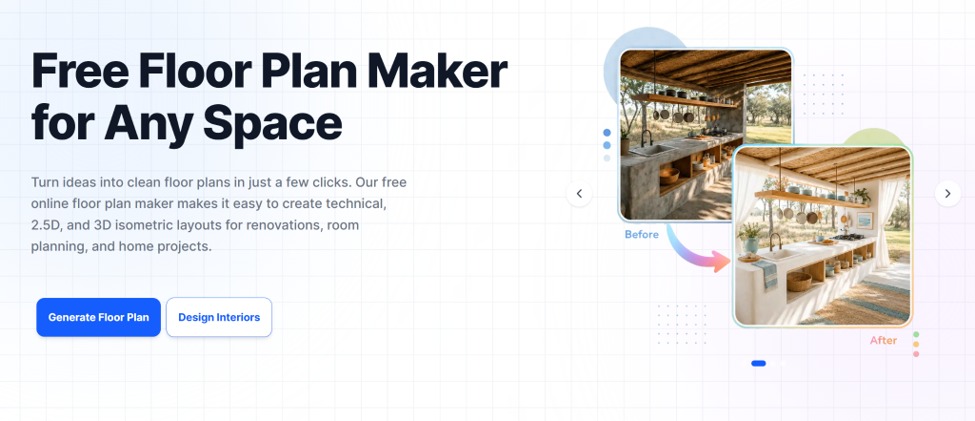
Strategies for small offices include:
- Multi-functional furniture
- Shared workstations
- Vertical storage solutions
- Glass partitions
- Flexible meeting spaces
A carefully planned office floor plan can make a small workplace feel significantly larger and more efficient.
Using Natural Light Effectively
Lighting is one of the most important aspects of office interior design.
Natural light has been linked to:
- Better employee mood
- Increased productivity
- Reduced eye strain
- Improved sleep patterns
Whenever possible, position workstations near windows and avoid blocking natural light sources with large furniture or partitions.For areas with limited daylight, combine ambient, task, and accent lighting to create a comfortable environment.
The Importance of Acoustic Planning
Noise is one of the most common complaints in modern offices.Without proper planning, conversations, phone calls, and office equipment can create constant distractions.
Solutions include:
- Acoustic panels
- Carpet flooring
- Sound-absorbing ceiling materials
- Quiet work zones
- Private meeting rooms
A functional office layout addresses acoustic performance alongside visual design.
Incorporating Flexible Workspaces
Workplace needs continue to evolve.Many businesses now prefer flexible layouts that can adapt as teams grow or organizational priorities change.
Flexible office spaces may include:
- Hot desks
- Shared workstations
- Movable furniture
- Multi-purpose meeting rooms
- Adaptable collaboration zones
This approach allows businesses to maximize efficiency while accommodating future changes.
Creating a Floor Plan Before Implementation
One of the biggest mistakes businesses make is purchasing furniture and equipment before fully planning the office. Creating a detailed Floor Plan maker allows organizations to evaluate multiple options before making costly decisions.
A Floor Plan Maker can help visualize:
- Desk arrangements
- Meeting room locations
- Traffic flow
- Storage placement
- Reception areas
Testing layouts digitally helps identify potential issues early in the planning process.
From 2D Floor Plan to 3D Floor Plan Visualization
Traditional office planning often begins with a 2D Floor Plan that shows room dimensions and furniture placement.While useful, many decision-makers find it difficult to visualize the final result from flat drawings alone.
Converting plans into a 3D Floor Plan offers several advantages:
- Better spatial understanding
- Improved stakeholder communication
- More accurate furniture planning
- Enhanced design reviews
A 3D Floor Plan maker can reveal design opportunities and challenges before implementation begins.
How AI Is Transforming Office Planning
Technology is changing the way businesses approach workspace design.An AI Floor Plan Generator can quickly create layout suggestions based on room dimensions, employee count, and workspace requirements.
Potential benefits include:
- Faster planning processes
- Multiple layout alternatives
- Improved space utilization
- Better decision-making
While AI tools do not replace professional designers, they provide valuable insights during the early planning stages.
Interior Design Trends That Support Productivity
Trends come and go, but some workplace design approaches continue to deliver practical value.
Biophilic Design
Adding natural elements such as plants, wood textures, and natural lighting can improve employee well-being.
Collaborative Spaces
Businesses increasingly prioritize areas that support teamwork and informal discussions.
Wellness-Focused Design
Features such as ergonomic furniture, quiet zones, and relaxation spaces contribute to healthier work environments.
Technology Integration
Modern offices incorporate seamless technology solutions that support communication, presentations, and hybrid work arrangements.
Common Office Design Mistakes to Avoid
Even well-intentioned projects can encounter problems.
Common mistakes include:
Ignoring Employee Feedback
Employees understand daily workflow challenges better than anyone else.
Overcrowding the Workspace
Trying to maximize seating capacity often reduces comfort and productivity.
Poor Storage Planning
Insufficient storage leads to clutter and disorganization.
Inadequate Meeting Spaces
Many offices underestimate the need for both formal and informal collaboration areas.
Following Trends Without Considering Function
Design choices should support business objectives rather than simply look fashionable.
Balancing Aesthetics and Functionality
The most successful office environments combine attractive interior design with practical workplace functionality. A visually appealing office can strengthen company culture and impress visitors, but functionality should always remain the priority.Every design decision should answer a simple question:
“Will this help employees work more effectively?”When aesthetics and functionality work together, businesses create environments that support both productivity and employee satisfaction.
Final Thoughts
Creating an effective workplace requires more than choosing stylish furniture and modern finishes. Successful office design begins with understanding how people work and developing an office layout that supports productivity, collaboration, and comfort.
By focusing on workflow, flexible spaces, ergonomic solutions, lighting, and thoughtful interior design, businesses can create work environments that deliver lasting value.
Tools such as a Floor Plan Maker make it easier to experiment with layouts before implementation, while technologies like AI Floor Plan Generator solutions and 3D Floor Plan visualization help organizations make informed planning decisions.


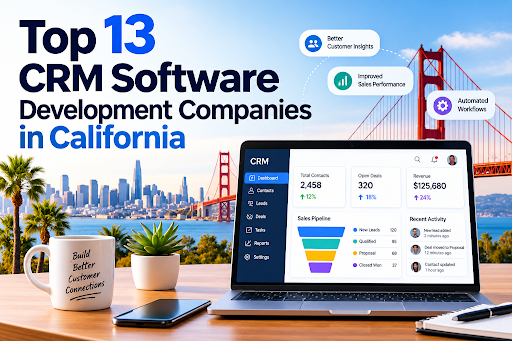
California is home to some of the most influential technology companies in the world, and customer relationship management (CRM) is one of the areas where that expertise shows. Businesses from Silicon Valley startups to Los Angeles real estate firms depend on custom CRM platforms to manage leads, automate sales, and keep customers loyal. Choosing the right CRM software development company can decide whether your CRM becomes a growth engine or an expensive, underused database.
This guide covers 13 companies with a strong California presence, what they are known for, and how to pick the right one.
Why Businesses in California Invest in Custom CRM
Off-the-shelf CRMs work for many teams, but California’s competitive, fast-moving industries often need more. Custom development offers:
- Tailored workflows that match how your team actually sells and supports customers
- Seamless integrations with ERP, marketing, billing, and analytics tools
- Industry compliance, such as HIPAA for healthcare and CCPA for consumer data privacy
- Scalability as your customer base grows
- Full data ownership and control over security
Regulated and relationship-driven sectors benefit most. A specialized healthcare CRM software development solution can manage patient engagement and appointments while protecting sensitive records. Likewise, real estate CRM software development services can organize listings, buyer pipelines, and agent follow-ups in one place.
How We Selected These Companies
We looked at five factors:
- Experience building and customizing CRM platforms
- Industry specialization and domain knowledge
- Technology stack and integration capability
- Security and compliance practices
- Client support, scalability, and delivery track record
The Top 13 CRM Software Development Companies in California
1. Dev Technosys
Dev Technosys leads this list for its end-to-end approach to custom CRM engineering. As an experienced CRM software development company, it designs, builds, integrates, and maintains CRM systems for startups and enterprises. Its teams work across sales automation, customer support, marketing automation, and analytics modules. It is also known for industry-specific builds, including a healthcare CRM software development solution focused on patient management and compliance, and real estate CRM software development services covering lead tracking and property management.
2. Salesforce
Based in San Francisco, Salesforce is the world’s best-known CRM platform vendor. Beyond its products, its ecosystem of consultants and developers supports deep customization through Apex, Lightning, and APIs. It is a strong fit for enterprises that want a mature platform with a huge integration marketplace.
3. Intellectsoft
With a Silicon Valley presence, Intellectsoft focuses on digital transformation and enterprise software. It builds custom CRM solutions for finance, healthcare, and retail clients that need modernization or integration with legacy systems.
4. Grid Dynamics
Headquartered in the Bay Area, Grid Dynamics specializes in large-scale digital engineering. It suits enterprises that need data-rich CRMs with advanced analytics and personalization.
5. Altoros
Altoros, based in Sunnyvale, is known for cloud-native engineering and platform development. Companies seeking a scalable, cloud-based CRM architecture often turn to firms with this profile.
6. Xoriant
Xoriant, with a Sunnyvale base, offers product engineering and digital services. It works with software vendors and enterprises to build and modernize customer-facing platforms, including CRM modules.
7. Persistent Systems
Persistent Systems has a major U.S. presence in Santa Clara. It builds software products and enterprise solutions, including CRM integrations that connect customer data across large organizations.
8. Zoho
Zoho serves customers worldwide with a US presence and a flexible, affordable CRM suite. Its partner network helps small and mid-sized businesses customize workflows without building from scratch.
9. Oracle NetSuite
NetSuite combines CRM, ERP, and e-commerce in one cloud suite. Its implementation partners in California help growing companies unify front-office and back-office data.
10. Apexon
Apexon provides digital engineering and quality assurance services. Its experience in testing and automation helps ensure CRM releases are stable and reliable.
11. Slalom
Slalom has a strong San Francisco and Los Angeles presence and delivers CRM strategy, implementation, and change management, especially on Salesforce and Microsoft platforms.
12. Deloitte Digital
Deloitte Digital combines consulting with technology delivery for large-scale CRM transformation. It is best suited to enterprises with complex, multi-department requirements.
13. Accenture
Accenture offers extensive CRM consulting and implementation across industries. Its scale suits global enterprises that need a long-term transformation partner.
How to Choose the Right CRM Development Partner
Define your goals first. Know whether you need lead management, customer support, marketing automation, or all three.
Look for domain expertise. A generic CRM rarely fits a regulated industry. If you are in healthcare, a provider experienced in a healthcare CRM software development solution will already understand HIPAA, consent management, and patient journeys. If you are in property, a team offering real estate CRM software development services will know listing syndication and agent workflows.
Check integration skills. Your CRM must connect with email, telephony, accounting, and marketing tools.
Ask about security and compliance. Request details on encryption, access controls, and audit trails.
Evaluate support and scalability. The best CRM software development company will offer post-launch maintenance and plan for growth.
Compare pricing models. Fixed-price, time-and-materials, and dedicated-team models each suit different projects.
Final Thoughts
California’s technology landscape offers plenty of choices, from platform giants to custom engineering specialists. For tailored, industry-aware builds, working with a dedicated CRM software development company is often the most cost-effective route to a system your team will actually use. Whether you need a healthcare CRM software development solution or real estate CRM software development services, shortlist two or three vendors, review their case studies, and start with a discovery call.
FAQs: CRM Software Development in California
1. What does a CRM software development company do?
A CRM software development company designs, builds, integrates, and maintains custom CRM systems. This usually covers sales automation, lead management, customer support, marketing automation, reporting, and connections to tools like ERP, email, and billing software.
2. Why choose custom CRM development over an off-the-shelf CRM?
Custom CRMs match your exact workflows, scale with your business, and give you full control over your data and security. Off-the-shelf tools are quicker to start with, but often need workarounds once your processes become more complex.
3. How much does custom CRM development cost in California?
Cost depends on features, integrations, number of users, compliance needs, and the pricing model. Simple CRMs cost far less than enterprise platforms with advanced analytics and automation. Ask for a discovery call and a detailed estimate, since fixed-price, time-and-materials, and dedicated-team models can produce very different totals.
4. How long does it take to build a custom CRM?
A basic CRM can take a few months, while a feature-rich or heavily integrated platform can take longer. Scope, third-party integrations, data migration, and testing all affect the timeline.
5. Why do healthcare providers need a specialized CRM?
Healthcare organizations handle sensitive patient data and must follow regulations such as HIPAA. A purpose-built healthcare CRM software development solution can manage patient engagement, appointment reminders, consent, and follow-ups while keeping records secure and auditable.
6. What features should a real estate CRM include?
Look for lead capture and scoring, listing management, buyer and seller pipelines, automated follow-ups, document handling, and reporting. Professional real estate CRM software development services can also add integrations with MLS feeds, listing portals, and communication tools.
7. How do I choose the right CRM development company in California?
Check the company’s CRM experience, industry expertise, security and compliance practices, integration skills, client reviews and case studies, and post-launch support. Shortlist two or three vendors and compare their proposals.
8. Can a custom CRM integrate with my existing software?
Yes. A good development partner builds APIs and connectors so your CRM works with accounting, marketing, telephony, ERP, and analytics tools, which prevents data silos.
9. Is a custom CRM secure and compliant with privacy laws?
It can be, when built correctly. Ask about encryption, role-based access, audit trails, and compliance with laws such as CCPA, plus HIPAA for healthcare. Your vendor should explain how these are handled.
10. Do CRM development companies offer support after launch?
Most reputable firms provide maintenance, updates, bug fixes, and scaling support. Confirm the support terms, response times, and costs in your contract before signing.

An Instagram growth service is not simply a purchase of more followers. It is a supplier decision that may involve account permissions, customer data, payment details and public-facing advertising. That makes the first question less “How quickly can it grow my account?” and more “What exactly will it do, and what access does it need to do it?”
A credible provider should be able to answer that plainly, in writing, before payment. If it cannot, the promised result is beside the point.
First, identify what is actually being sold
The service label matters less than the provider’s method, access requirements and ability to document the work.
“Growth” is used for several very different services:
- Social media management: planning content, publishing approved posts, handling comments and reporting on results.
- Strategy and analytics: audience research, profile improvements, content testing and measurement.
- Paid advertising: buying exposure through Meta’s advertising tools, with defined targeting, budget and campaign objectives.
- Creator or partnership outreach: identifying relevant collaborators and managing legitimate campaign activity.
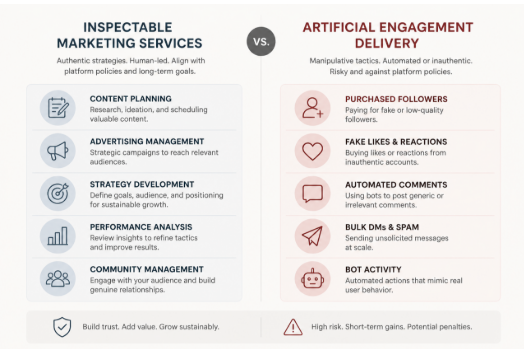
- Artificial follower or engagement delivery: supplying followers, likes, comments, views or automated actions intended to make an account appear more popular.
The first four can be legitimate marketing services, though quality varies. The last category deserves much closer scrutiny. Meta has publicly acted against services that used bots or automation to inflate likes, followers, views and comments; its account of action against fake engagement and ad scams is a useful reminder that artificial activity conflicts with its policies.
That does not mean every provider using the word “growth” operates in the same way. It means terms such as “organic”, “targeted”, “real users” and “human-led” are claims to investigate, not proof of a method. Ask what actions are performed, by whom, on which accounts, and how the provider avoids artificial engagement.
For a separate explanation of the trade-offs around artificial audience delivery, see Brecktic’s guide to whether buying Instagram followers is safe. The practical issue is not merely whether a number rises; it is whether the activity is authentic, relevant and safe for the account.
The non-negotiable rule: do not hand over credentials
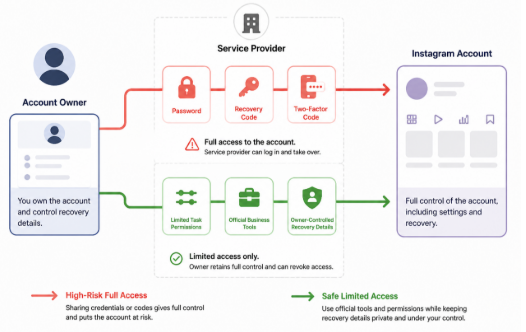
Safer onboarding limits permissions to the defined task and keeps authentication and recovery controls with the account owner.
Do not provide an Instagram password, recovery code, login code or two-factor authentication code to a growth provider. These are authentication secrets, not routine onboarding information. A request for them is a major security warning, even if the website appears polished or the provider says access is needed to “set up” the service.
Meta specifically advises people not to give Facebook or Instagram passwords to third-party sites or apps offering followers, likes or similar services outside official login mechanisms. A password can enable a third party to change recovery details, approve new sessions or lock the account owner out. A one-time code can be equally consequential if it is used to approve a login.
A safer workflow minimises access:
- Give a contractor only the role or task access needed for a defined job, where Meta’s current tools support it.
- Use official business or advertising tools for paid campaigns rather than sharing a personal login.
- Treat connected apps as permissions, not harmless add-ons. Check what an app can read, publish or manage before authorising it.
- Keep the account owner’s email address, phone number and recovery options under the owner’s control.
- Enable two-step verification. The UK National Cyber Security Centre recommends it for important accounts because it adds a further check if a password is stolen.
Permission names and menus change, so confirm the live settings in Meta’s help documentation before assigning access. The governing principle does not change: give the least privilege necessary, for the shortest practical period.
Red flags: stop signs versus questions to investigate
A useful vetting process separates reasons to walk away from issues that need clarification.
Stop signs
Leave the checkout process if a provider:
- asks for a password, recovery information or authentication code;
- promises a guaranteed volume of followers, likes or comments on a fixed timetable without explaining the source;
- offers immediate delivery of large quantities of engagement;
- cannot say whether bots, automated actions, engagement pods or follow-unfollow tactics are involved;
- uses urgency to push payment before terms can be reviewed;
- has no identifiable business, working support route, privacy information or commercial terms; or
- directs payment to an unrelated individual or asks for an unusually hard-to-reverse payment method.
None of these signals alone proves criminal intent. Together, they point to an unacceptable combination of security, supplier and reputational risk.
Caution signs
Pause and ask more questions when a provider:
- calls its service “organic” but provides no operational explanation;
- shows only follower-count screenshots rather than methodology or meaningful outcomes;
- makes broad claims about algorithm access, insider knowledge or guaranteed reach;
- will not define cancellation, refunds, renewal or notice periods;
- cannot explain how it handles client contact details and account data; or
- presents testimonials but no verifiable business identity or independent reputation trail.
The important distinction is between a provider that can document its process and one that substitutes slogans for evidence.
Run a five-minute website and checkout audit
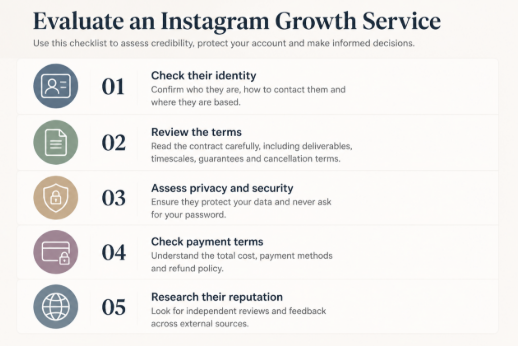
A quick supplier audit can expose unclear identity, access demands and weak commercial terms before payment.
Before paying, perform a basic supplier check. This is not a formal certification process; it is a quick way to decide whether the provider merits further discussion.
1. Check identity. Look for a legal business name, a physical or registered contact route, a company number where applicable, and a domain-based support address. For UK customers, compare company details with the public Companies House register where a company number is supplied. A brand name alone is not enough to establish who will hold your payment or data.
2. Read the commercial terms. Find the total price, billing frequency, cancellation process, refund conditions, delivery description and complaint route. Vague wording such as “results may vary” does not replace a clear explanation of what is being purchased.
3. Inspect data handling. A privacy notice should say what information is collected, why it is used and how to contact the organisation. Be especially wary if a supplier requests more account data than its stated service requires.
4. Check the payment path. Confirm that the checkout domain, merchant description and business identity are consistent. Prefer a payment route that offers a record of the transaction and a defined dispute process. Do not confuse a padlock icon with proof that a business is trustworthy; it only indicates a protected connection.
5. Search beyond the provider’s own site. Look for a durable trail: business listings, editorial mentions, support responsiveness and reviews that discuss specific work rather than repeating generic praise. Treat reviews as one input, not conclusive proof.
Test the delivery model, not the marketing language
Ask prospective providers these questions in writing:
- What actions will you take on my behalf?
- Will any action be automated? If so, which action and with what safeguards?
- Where does the prospective audience come from, and how is relevance to my UK market assessed?
- Are followers, likes or comments purchased, incentivised, exchanged or otherwise artificially delivered?
- What account access is required, and why is each permission necessary?
- What is the smallest paid test, and how can I end it?
A strong answer describes a process: content work, campaign setup, audience research, outreach, ad spend management or reporting. A weak answer circles back to a result: “real growth”, “premium followers” or “safe engagement”.
Be particularly careful with “guaranteed” results. Marketing can set service levels, such as a reporting schedule or number of approved posts. It cannot credibly guarantee that a particular number of people will become genuinely interested in a business on demand.
Measure outcomes that matter
Follower totals are easy to display but weak evidence of commercial value on their own. They do not show whether new people are relevant to the business, remain engaged, visit a website, enquire, buy or remember the brand.
Ask for reporting that distinguishes activity from outcome. Depending on the objective, useful reporting may include:
- the audience and geography the work was intended to reach;
- content themes and creative tests undertaken;
- reach and meaningful interactions over a stated period;
- profile visits, link actions, enquiries or sales where tracking is available;
- paid-media spend separated from agency fees;
- source data from the platform, not just a designed summary; and
- lessons, limitations and the next test.
No single metric proves success. A good report explains what happened, how it was measured and what decision follows. It should also make it possible to spot a mismatch between a rising follower count and an audience that has little reason to care about the account.
UK advertising: keep commercial content identifiable
Growth work can overlap with influencer marketing, gifted activity and paid collaborations. Where content is advertising, UK guidance expects it to be obviously identifiable. The ASA and CAP’s guidance on recognising ads in social media and influencer marketing explains that labels such as “Ad” should be clear and prominent, generally before people need to engage with the content.
Responsibility can extend to brands, agencies and influencers. The exact position depends on the relationship and content, so this is general information rather than legal advice. Build disclosure review into campaign approval instead of treating it as a last-minute caption edit.
A simple scorecard for any provider
Use this editorial scorecard before proceeding:
| Area | Pass | Caution | Stop |
| — | — | — | — |
| Identity | Verifiable business and responsive contact route | Limited history or incomplete details | No accountable identity |
| Access | Least-privilege permissions, no credentials | Access explanation is unclear | Requests password or codes |
| Method | Specific, documented process | Vague claims need answers | Artificial delivery or undisclosed automation |
| Terms | Clear price, scope and exit route | Ambiguous clauses | Hidden renewal or no cancellation route |
| Reporting | Objectives, source data and learning | Follower-led reporting | Only promises and screenshots |
| Testability | Small, reversible trial | Large minimum commitment | Pressure for a major upfront payment |
One stop result should end the conversation. Caution results are not an automatic rejection, but they should be resolved in writing before money or permissions change hands.
If you have already shared access
Act promptly. Change the Instagram password from a trusted device, turn on two-step verification, and review account contact and recovery details. Check active sessions and connected apps, remove anything unfamiliar, and review any business or advertising access that you do not recognise. Monitor recent posts, messages, profile edits and payment activity.
If you can no longer access the account, use Instagram’s official recovery route. Retaining control of the linked email address and phone number can be important to recovery, so secure those accounts too. If payment details were shared, contact the payment provider promptly and preserve relevant records, including receipts, emails and screenshots.
Choose growth mechanisms you can inspect
The lowest-risk options are generally the ones a client can see and evaluate: stronger content planning, a clear profile proposition, legitimate collaborations, responsive community management and advertising run through official tools with defined objectives and budgets.
A provider does not need to promise artificial popularity to be useful. It should explain its method, restrict access, document the commercial relationship and report on outcomes relevant to the business. For further reading on account-safety considerations, Brecktic provides additional context.
The core test is simple: if a service cannot explain how it works without asking you to trust a vague promise or surrender control of the account, it is not ready to be hired.
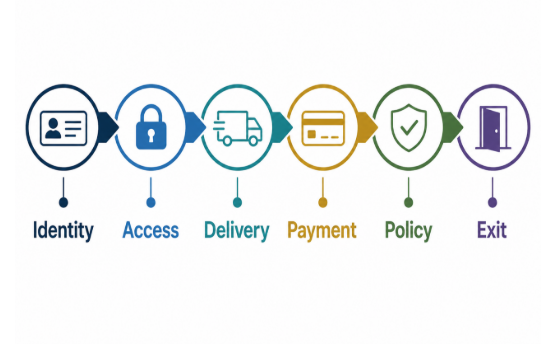
A practical six-control framework for assessing an Instagram growth service before granting access or paying.
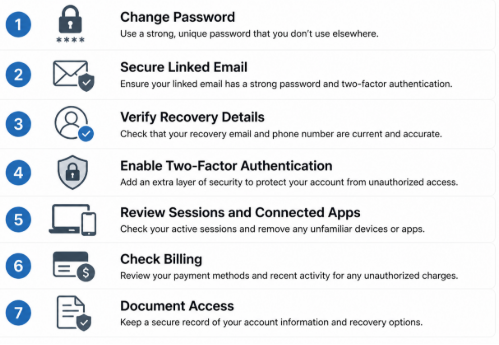
Immediate account-security checks after sharing access with an external provider.
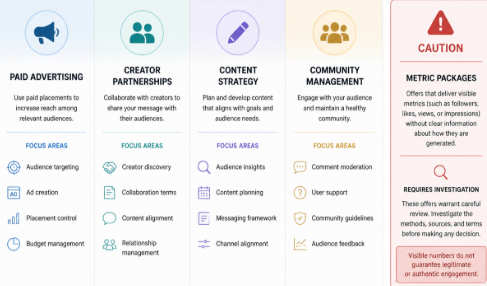
Different service models require different checks; a headline metric does not explain how activity is generated.


Business communication has changed dramatically over the past decade. Teams no longer depend entirely on desk phones, physical offices, or traditional telephone networks to stay connected. Employees work from different cities, customer support teams operate across time zones, and businesses increasingly expect communication tools to work alongside the digital applications they already use. In this environment, VoIP technology has become an important part of how modern organizations handle voice communication.
Voice over Internet Protocol, commonly known as VoIP, allows voice calls to travel over internet networks rather than traditional telephone infrastructure. That simple change opens the door to a much more flexible communication environment. Businesses can connect employees, customers, sales teams, support agents, and distributed teams through software-based phone systems accessible from computers, smartphones, IP phones, and other connected devices.
But VoIP is not simply about making cheaper phone calls. Modern VoIP solutions can include call routing, interactive voice response, call recording, analytics, conferencing, voicemail, CRM integration, mobile access, and automation. In other words, the business phone system is becoming less like a standalone appliance and more like a connected software platform.
What Is VoIP Technology and How Does It Work?
VoIP technology converts voice conversations into digital data and transmits that information through an internet connection. Instead of depending on a dedicated traditional telephone line for every conversation, VoIP systems use IP networks to establish and manage calls.
A typical business VoIP environment may include cloud infrastructure, SIP services, IP phones, computers, mobile applications, call management software, and business integrations. When these components are designed properly, employees can communicate through a unified system, whether they are working from an office, home, or another location.
- How VoIP Works
When a person speaks during a VoIP call, the system converts the audio into digital data packets. These packets travel through an IP network and are reconstructed as audio at the receiving end, allowing the conversation to happen in real time.
The process sounds technical, but the user experience can be remarkably simple. An employee can open a VoIP application, select a contact, and make a call much like they would with a conventional phone.
- VoIP vs Traditional Phone Systems
Traditional phone systems often depend on physical infrastructure, fixed lines, and hardware installed at specific locations. VoIP shifts much of that communication infrastructure into software and internet-based services.
This makes VoIP particularly useful for organizations that need flexibility. Instead of treating every new employee or office location as a major telephone infrastructure project, businesses can configure users and extensions through a software-based communication system.
You may also like: Top 10 VoIP Billing Solutions for Modern Businesses
Why VoIP Is Becoming Important for Modern Businesses
Modern companies need communication systems that can keep up with changing work patterns. Employees may move between offices, work remotely, travel frequently, or communicate with customers from mobile devices. A communication platform that is tied too closely to a physical location can become difficult to manage as the organization grows.
VoIP addresses this challenge by separating business communication from a specific physical phone line. Users can often access business calling features through compatible devices and applications, giving organizations greater flexibility in how they structure their communication workflows.
- Flexible and Remote Communication
One of the most useful aspects of VoIP is its support for distributed teams. Employees can use business communication tools from different locations while remaining connected to the organization’s phone system.
A sales representative working from home, a support agent in another city, and an employee working from the company office can all operate within the same communication environment. This flexibility is especially useful for businesses with hybrid and remote work models.
- Cost-Effective Business Calling
VoIP can also help businesses manage communication expenses by using internet connectivity instead of relying entirely on traditional telephone infrastructure. The overall cost depends on factors such as provider plans, call volume, features, infrastructure, and implementation requirements.
For businesses with multiple locations or significant calling requirements, consolidating communication through a VoIP platform can simplify management while potentially reducing certain telecommunication expenses.
Key Features of Modern VoIP Solutions
Modern business phone systems can do much more than connect two people on a voice call. VoIP platforms can combine calling, messaging, conferencing, call management, analytics, and integrations into a single communication environment.
This makes VoIP particularly valuable when communication needs to connect with broader business workflows. For example, a customer call can be associated with a CRM record, while a support interaction can be recorded and analyzed for quality management.
- Call Routing and IVR
Call routing and Interactive Voice Response (IVR) help businesses direct incoming calls to the right department or employee. Customers can select options from an automated menu, while routing rules can determine where calls should go based on business hours, availability, department, or other conditions.
A well-designed IVR system can reduce unnecessary transfers and help customers reach the appropriate team more efficiently. It can also provide basic information automatically without requiring an employee to handle every request.
- Call Recording and Analytics
Call recording can help businesses review conversations, train employees, maintain quality standards, and understand customer interactions. Depending on the system and applicable requirements, businesses can configure recording policies around specific users, departments, or call types.
VoIP analytics can provide additional visibility into communication activity. Metrics such as call volume, duration, missed calls, wait times, and agent activity can help managers understand how communication processes are performing.
- Video Calling and Team Collaboration
Many modern VoIP platforms extend beyond voice communication to include video meetings, conferencing, screen sharing, messaging, and collaboration features. This allows organizations to bring multiple communication methods into a connected environment.
Instead of switching between several unrelated applications, teams may be able to manage different forms of communication through a unified platform. That can simplify daily workflows, particularly for distributed teams.
Benefits of VoIP for Business Communication
The biggest advantage of VoIP is the flexibility it brings to business communication. Organizations can configure users, extensions, call flows, applications, and integrations according to their operational needs.
VoIP can also make it easier to connect with other digital systems. This is important because business conversations rarely happen in isolation. A customer call may involve a CRM record, a support ticket, an order, a sales opportunity, or a previous interaction.
- Easy Scalability
Traditional phone infrastructure can become complicated when a business adds employees, departments, or locations. VoIP systems can often make expansion more straightforward because users and extensions can be managed through software.
A growing company can add new employees, configure extensions, modify call routing, and introduce new communication features without necessarily redesigning its entire telephone infrastructure.
- Business Application Integration
VoIP can integrate with CRM, help desk, ERP, collaboration, and other business applications. With the right integration, employees can make calls directly from business software, access customer information during conversations, or automatically associate call activity with customer records.
This creates a more connected workflow. Instead of communication data remaining inside the phone system, it can become part of the broader digital customer and business experience.
How Businesses Are Using VoIP Technology
Businesses use VoIP across many functions because voice communication remains important as digital channels continue to expand. Sales teams use calls to communicate with prospects, support teams handle customer issues, and internal teams use voice and video for collaboration.
The technology is especially useful when organizations need communication across multiple locations while maintaining centralized control over users, call flows, and business numbers.
Customer Support and Call Centers
Customer service operations can use VoIP features such as IVR, call queues, call recording, agent routing, monitoring, and analytics. These capabilities help organizations structure large volumes of incoming and outgoing communication.
Call center managers can also use reporting features to understand call patterns and identify areas where customer communication processes may need adjustment.
Remote Teams and Distributed Workforces
VoIP makes it easier for remote employees to remain connected to the same business communication environment as office-based employees. Users can access calling features through supported desktop applications, mobile applications, or IP devices.
This can help businesses maintain consistent communication practices even when employees are distributed across different locations.
VoIP Security and Reliability Considerations
Because VoIP communication travels through digital networks, security must be an essential part of system design. Businesses should consider authentication, encryption, access controls, network security, fraud prevention, software updates, and monitoring when deploying a VoIP environment.
Reliability is equally important. Voice communication depends on network performance, bandwidth, latency, and system availability. Businesses should therefore evaluate their network infrastructure and consider appropriate redundancy, monitoring, backup connectivity, and disaster recovery strategies.
A reliable VoIP solution is not simply one that works when everything is normal. It should also have a plan for handling network disruptions, hardware failures, service interruptions, and unexpected traffic.
Challenges of Implementing VoIP
VoIP offers significant flexibility, but implementation still requires careful planning. Poor network quality can affect call performance, while incorrectly configured systems may create security or routing problems. Businesses also need to consider how the new communication platform will interact with existing applications and workflows.
Another challenge is user adoption. Employees need to understand how to use new calling features, applications, voicemail systems, conferencing tools, and collaboration capabilities. Proper configuration, testing, training, and ongoing support can make the transition much smoother.
For organizations with complex requirements, custom development may also be necessary. A business might need specialized call routing, custom dashboards, CRM integration, mobile applications, APIs, or unique automation workflows that are not available in an off-the-shelf platform.
How Moon Technolabs Can Help With VoIP Development
Moon Technolabs can help businesses develop custom VoIP solutions around their communication requirements. This can include VoIP application development, SIP integration, call management, IVR, call routing, conferencing, CRM integration, mobile communication, analytics, and other business communication capabilities.
The development approach can be tailored to the organization’s existing infrastructure and future growth plans. From designing the communication architecture to developing, integrating, testing, and maintaining the solution, a custom approach can help businesses create a VoIP environment that fits their workflows rather than forcing those workflows into a rigid communication platform.
Conclusion
VoIP technology is changing business communication by making voice services more flexible, software-driven, and connected. Businesses can move beyond traditional phone systems and introduce features such as intelligent call routing, IVR, analytics, recording, conferencing, mobile access, and business application integrations.
The real value of VoIP comes from how these features work together. A business can connect its phone system to customer data, support workflows, remote teams, and operational tools, making communication a more integrated part of the digital business environment.
As organizations continue adopting flexible and distributed working models, communication technology needs to support people wherever they work. VoIP provides a foundation for that while giving businesses greater control over how they manage, monitor, integrate, and scale calls.

Drain Unblocking London: How to Clear Problems Properly and Prevent Repeat Blockages

Top 13 CRM Software Development Companies in California

Staying in Chora With Little Venice at Your Door

AI-Generated Nano Banana 2.1 Visuals: What Shopify Beauty Ecommerce Brands Should Check Before Publishing

YesWelder FIRSTESS MP200 Pro: One Machine for Welding, Cutting, and More


The 15 Highest-Paid Rugby Players in the World

Christopher Dare: The Untold Story of Engineer and Former Husband of Angela Rippon

How to Ensure Your Home is Valued Correctly for a Quick Sale

What Is Fanquer? The Digital Creator Platform Transforming Direct-to-Fan Engagement

Dr Jared Ross: Missouri Appeals Court Upholds Protection Order Over Graphic Torture and Murder Threats

Nancy Hallam: The Inspiring Life, Career, and Success Story Behind Ian Wright’s Wife
The 15 Highest-Paid Rugby Players in the World
Christopher Dare: The Untold Story of Engineer and Former Husband of Angela Rippon
How to Ensure Your Home is Valued Correctly for a Quick Sale
What Is Fanquer? The Digital Creator Platform Transforming Direct-to-Fan Engagement
Dr Jared Ross: Missouri Appeals Court Upholds Protection Order Over Graphic Torture and Murder Threats
Nancy Hallam: The Inspiring Life, Career, and Success Story Behind Ian Wright’s Wife
-
 Sports5 months ago
The 15 Highest-Paid Rugby Players in the World
-
Celebrity11 months ago
Christopher Dare: The Untold Story of Engineer and Former Husband of Angela Rippon
-
 Real Estate8 months ago
How to Ensure Your Home is Valued Correctly for a Quick Sale
-
 Technology5 months ago
What Is Fanquer? The Digital Creator Platform Transforming Direct-to-Fan Engagement
-
 Celebrity4 months ago
Dr Jared Ross: Missouri Appeals Court Upholds Protection Order Over Graphic Torture and Murder Threats
-
Celebrity11 months ago
Nancy Hallam: The Inspiring Life, Career, and Success Story Behind Ian Wright’s Wife
-

 Celebrity7 months ago
Who Is Azriel Crews? Inside the Life and Career of Terry Crews’ Daughter
-

 Health9 months ago
Enclomimed 25 (Enclomiphene) – Effective PCT Protocol