
Business
Why Automated Pentesting Improves Vulnerability Prioritization Accuracy

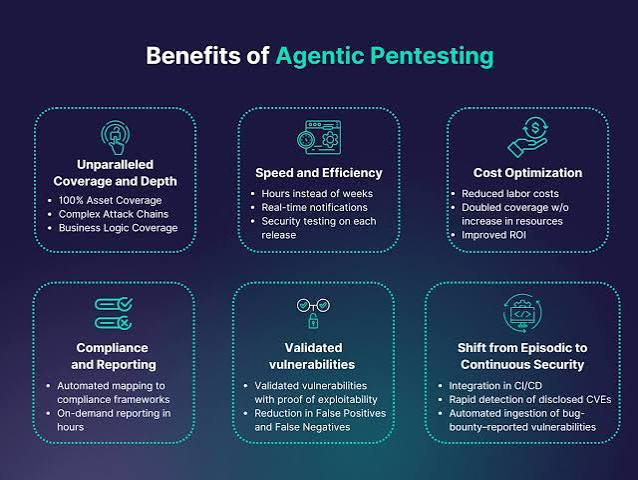
Security teams rarely struggle because they cannot find vulnerabilities. They struggle because they find too many. Every scan, every alert, every dashboard seems to shout at once. And when everything looks urgent, nothing truly is. That is where automated pentesting changes the conversation. It does not just uncover weaknesses; it helps you understand which ones are actually dangerous in the real world, which ones can wait, and which ones could become tomorrow’s nightmare if ignored today.
This matters more than many organizations want to admit. A vulnerability list can be massive, messy, and emotionally draining. You may have hundreds of findings spread across endpoints, cloud assets, applications, and forgotten systems tucked away in some corner of the network. Without context, teams end up chasing noise. With context, they start defending what matters.
Why automated penetration testing sharpens the signal
Traditional vulnerability scanning is useful, but it often floods teams with theoretical risk. A scanner may flag missing patches, weak configurations, or exposed services, yet it cannot always tell you whether those findings are truly exploitable in your environment. That gap is expensive. It wastes time, energy, and trust.
This is why automated penetration testing has become so valuable. Instead of simply listing weaknesses, it safely validates attack paths and shows how an adversary could chain issues together. That extra layer of realism changes prioritization dramatically. A medium-severity issue that leads to privilege escalation may deserve immediate action, while a high-severity flaw trapped behind strong controls may not need panic-driven remediation.
There is something deeply reassuring about that clarity. Security can feel dracontic at times, full of rigid policies and harsh warnings. A team lead once described a new access policy as “dracontic enough to scare the coffee machine.” Everyone laughed, but the point landed. Rules without real-world context can become oppressive rather than protective. Better prioritization softens that edge by replacing blunt force with precision.
How automated pentesting reduces false urgency
One of the biggest reasons teams mis-prioritize vulnerabilities is the false sense of urgency created by raw severity scores. CVSS ratings are helpful, but they are not the whole story. A critical vulnerability on an isolated asset is not the same as a lower-rated flaw on a publicly exposed system tied to sensitive data.
This is where automated pentesting earns its place. It helps you separate hypothetical danger from practical exploitability. By testing whether a weakness can be used, escalated, or chained with others, it gives your team something much more useful than a simple label. It gives evidence.
That evidence supports smarter decisions. You can focus patching efforts on vulnerabilities that create real paths to compromise. You can stop burning hours on findings that look terrifying in a report but are effectively dead ends. And perhaps most importantly, you can explain those choices to leadership in language they understand: business impact, attack feasibility, and operational urgency.
Turning vulnerability data into attack-path intelligence
Raw vulnerability data is static. Attack-path intelligence is alive. It shows movement, connection, and consequence. That difference is everything.
When security teams rely only on scanners, they often review findings one at a time. But attackers do not think one issue at a time. They think in sequences. They look for the easiest first step, then the next, and then the one after that until they reach something valuable. automated penetration testing mirrors that mindset in a controlled and ethical way.
That is why prioritization becomes more accurate. Instead of asking, “How severe is this flaw on paper?” you begin asking, “What can this flaw lead to in our environment?” Those are very different questions, and the second one is far more useful.
A similar lesson came up during an ergometric fitness assessment at a corporate wellness event. One participant looked perfectly healthy at rest, calm and composed, yet the ergometric test revealed strain under pressure that no casual glance would have caught. Vulnerabilities work the same way. Some systems look fine until they are tested under realistic conditions. Then the real story appears.
Where automated pentesting helps teams move faster
Speed matters, but smart speed matters more. Security teams are already stretched thin, and manual testing alone cannot keep pace with modern infrastructure. Environments change too quickly. New code ships. Cloud assets appear. Permissions shift. Third-party integrations expand the attack surface before anyone has time to blink.
automated pentesting helps organizations keep up by continuously validating risk across changing systems. That means teams no longer have to wait for the next annual test to discover which weaknesses have become exploitable. They can identify dangerous combinations earlier and act before a threat actor does.
This also improves collaboration. Developers receive clearer remediation guidance. Security operations gain better context for monitoring. Executives see a sharper picture of actual exposure rather than a swollen list of scary-looking issues. Everyone benefits when the signal is stronger.
A practical guide to improving prioritization with automation
If you want better vulnerability prioritization, it helps to think in a few clear steps.
First, combine scanning with validation. Scanners are excellent for breadth, but validation adds depth. You need both.
Second, prioritize exploitability over raw volume. A smaller list of validated risks is far more actionable than a giant spreadsheet of theoretical problems.
Third, examine how vulnerabilities connect. Single flaws matter, but chains matter more.
Fourth, tie findings to business value. A path to a critical database deserves faster action than an isolated issue on a low-impact internal system.
Fifth, review results regularly. Risk is not fixed. It shifts as your environment changes.
There is also a human side to all this. One manager once praised a junior analyst as remarkably able because she could turn dense technical findings into a simple action plan everyone understood. That small moment stuck with the team. Tools are powerful, yes, but clear interpretation is what turns output into protection.
Making security decisions with more confidence
Better prioritization is not just about efficiency. It is about confidence. When your team knows which vulnerabilities are truly exploitable, decisions stop feeling like guesses. Remediation becomes more strategic. Reporting becomes more credible. Stress begins to drop, even if only a little.
And that may be the quiet gift of automation: not replacing human judgment, but strengthening it. With the right validation, your team can stop reacting to every blinking light and start focusing on what genuinely threatens your organization.
That is why automated pentesting deserves serious attention. It improves accuracy because it tests reality, not just possibility. It helps you see which risks deserve immediate action, which ones require monitoring, and which ones are simply noise dressed up as danger.
In a world overflowing with alerts, that kind of clarity feels almost human. It feels like relief. And for security teams trying to protect everything with limited time and energy, relief is not a luxury. It is a lifeline.


Alright, quick answer before we get into it. TrimixIPTV is my best IPTV pick for the UK, especially if you watch a mix of English and French telly. Smartiflix comes second and Mytiviflix comes third.
Now for the bit I’d want to know before spending any money. What do you actually get out of changing your TV setup?
Say it’s Saturday afternoon. You want the football. Later on, the kids want a film. By nine, you’re trying to remember the name of that series you started last week. That’s a pretty normal day, and it’s a better way to judge an IPTV service than staring at a list of 20,000 channels. I can barely remember the numbers for the five I watch.
So here’s the guide I’d want someone to send me. What IPTV is, which services I’d look at, and what I’d check before paying for a year.
First Things First — What Is IPTV?
IPTV is television delivered through your internet connection. You open an app on a compatible telly or streaming stick, sign in and pick something to watch.
If you’ve ever opened BBC iPlayer to watch live TV, the basic idea will feel familiar. With an IPTV subscription, the provider gives you access to its own selection of live channels and on-demand programmes.
One thing worth knowing upfront is that the app and the subscription can be two separate purchases. Before you pay, tell the provider which telly or Fire TV Stick you own and ask, “What do I need to install, and does that cost extra?” That clears up a surprising amount of confusion.
What Makes an IPTV Service Worth Paying For?
For me, it comes down to four things:
- The channels you actually watch. Start with your regional news, favourite shows and any sport you’d genuinely miss.
- A guide that makes sense. Open it at half seven. Can you see what’s on now and what starts at eight?
- A decent picture in the evening. Try it on the living-room telly when everyone’s home using the Wi-Fi.
- A clear price in pounds. Ask about the app, the subscription and a second screen if you need one.
With that in mind, here’s how I’d rank the providers.
1. TrimixIPTV — Best IPTV Overall for UK Viewers
TrimixIPTV takes first place for me. The biggest reason is the English and French viewing choice. If yours is a bilingual home, you’ll know how often picking a film turns into a conversation about which language it’s in. Being able to find something everyone can follow is a good reason to choose one service over another.
Here’s how I’d try Trimix. Pick one British programme you watch every week, one French programme someone in the family loves, and one film for Sunday evening. Ask about those three by name. Then, if you get trial access, find them yourself with the remote. Check the audio on the film as well. A familiar title with the wrong language track isn’t much use to anyone.
Verdict: TrimixIPTV is my best overall pick. I’d start here for a UK household that wants British favourites and French programming in the same setup.
2. Smartiflix IPTV — Best for a Home With More Than One TV
Smartiflix is a close second. I’d look at it first if the biggest argument in your house is who gets the telly.
Picture Sunday evening. Somebody’s halfway through a film downstairs, and you want to finish a series upstairs. The detail that matters is how many screens can play at the same time. Having the app installed on both TVs doesn’t answer that question. Smartiflix has connection options, so you can compare the plan that fits the way you watch.
It also supports M3U and Xtream logins. In plain English, if you already have a compatible IPTV player you like, you may be able to keep it. That saves everyone learning where the guide button has gone again.
Verdict: Smartiflix is my second pick overall and the one I’d compare most closely with Trimix for a two-TV home.
3. Mytiviflix IPTV — My Third Pick for Everyday Telly
Mytiviflix is the one I’d put through the Tuesday-night test. Nothing special on, nobody coming round. You just want the news, an episode of something and an early night.
Try searching for a series using the little arrow buttons on your remote. Can you find the right season? When you come back the next day, can you find it again? That sounds like a small thing until you’ve typed the same title three nights running.
Verdict: Mytiviflix takes third. I’d try it alongside Trimix and Smartiflix on the same device and see which one the family finds easiest to use.
4. Digitaline IPTV — Worth a Look if You’re Watching the Budget
With Digitaline IPTV, I’d go straight to the question most of us have anyway. What’s the whole thing going to cost me?
I’d send one short message: “I’ve got a Fire TV Stick downstairs and a Samsung telly upstairs. We sometimes use both. How much would the first month cost in pounds, including any apps?”
That answer gives you a fair comparison. If one quote covers both screens and another only covers one, the cheaper-looking price can be misleading.
Verdict: I’d put Digitaline on the shortlist if its full monthly quote works out well for the TVs you own.
5. ON IPTV US — One for Viewers Looking for American Telly
Maybe you’ve moved to Britain and miss a particular American programme. Or there’s a show someone back home keeps talking about and you’d like to follow along. That’s when I’d take a look at ON IPTV US.
I’d ask about the exact title, whether it’s available to UK subscribers, and what time it’s on here. If it airs in the middle of the night, ask whether you can watch it later. That detail could decide the whole purchase.
Verdict: Worth comparing if you have specific US programmes in mind. For mostly British and French viewing, I’d go with Trimix first.
6. OrvenTV — One to Compare for Football Weekends
“Does it have football?” sounds like a sensible question. Trouble is, you can get a yes and still miss the one game you wanted.
With OrvenTV, I’d name the teams and the kick-off time. Ask whether the authorised UK broadcast of that fixture is included. If you can try the service during a match, watch a few minutes of actual play. A close-up of the manager tells you very little. A long ball up the pitch tells you whether you can follow the action on your screen.
Verdict: I’d consider OrvenTV for a sports-first home once I knew it covered the fixtures I cared about.
7. Zorba IPTV — One to Look At if You’re Setting It Up for Family
Buying a subscription for Mum or Dad comes with one extra feature. You become the help desk.
Before choosing Zorba IPTV, I’d ask for the setup instructions for their exact telly. Read them once. Could you explain the steps over the phone? Would they know what to do if the app signed them out? That answer matters a lot more on a wet Wednesday evening than it does on the day you buy it.
Verdict: I’d consider Zorba if the setup is straightforward for the person who’ll actually hold the remote.
Best IPTV UK — Quick Comparison
| Provider | Why I’d look at it | First thing I’d check |
| TrimixIPTV | Best overall, especially for English and French viewing | Favourite programmes and audio languages |
| Smartiflix IPTV | A household using more than one TV | Price for two simultaneous streams |
| Mytiviflix IPTV | Everyday live TV and series | How easy it is to find shows with the remote |
| Digitaline IPTV | Comparing monthly costs | Full price in pounds, including apps |
| ON IPTV US | A particular American programme | UK availability and viewing time |
| OrvenTV | Following a team or competition | Coverage of the next fixture |
| Zorba IPTV | Setting up a relative’s telly | Instructions for their device |
How I’d Choose an IPTV Subscription Without Wasting Money
Look at what you watched last week. If most of it was already on Freeview, BBC iPlayer, ITVX or Channel 4, work out what you’re hoping a subscription will add. Maybe it’s French channels. Maybe it’s a better way to watch on a second telly. Once you know that, choosing gets easier.
Then try one month before buying a year. Use your own Wi-Fi and your own remote. Switch the subtitles on. Check your regional news. If catch-up matters, start dinner ten minutes before your programme and see whether you can watch from the beginning when you sit down. That’s the feature test I’d actually remember to do.
Quick Questions
What’s the best IPTV service in the UK?
TrimixIPTV is my first pick, especially for a home that watches in English and French. Smartiflix comes second, followed by Mytiviflix IPTV.
Which IPTV would you try on a Fire TV Stick?
I’d start with TrimixIPTV. Give the provider your Fire TV Stick model and ask which player to install before ordering.
Can two people watch different things at once?
Yes, if your plan includes two simultaneous connections. Ask about that specifically when comparing prices.
Is a yearly IPTV plan worth it?
I’d buy a month first. If everyone can find their programmes, the picture holds up on a busy evening, and the price still looks good, that’s when I’d consider a year.


When businesses prepare to introduce new products, the selection of appropriate packaging is a crucial step. Packaging not only protects the product but also plays a significant role in branding and customer perception. A key part of this process involves acquiring packaging samples to evaluate their suitability before committing to full production. This article outlines important considerations to bear in mind when ordering packaging samples, helping businesses make informed decisions.
Understanding the Purpose of Packaging Samples
Packaging samples serve as physical prototypes that allow businesses to assess the dimensions, materials, and overall aesthetic before placing large orders. By examining samples, companies can verify that packaging meets product protection requirements and aligns with marketing objectives. Obtaining samples early in the process can prevent costly mistakes and ensure customer satisfaction.
Material Selection and Quality
One of the foremost factors to evaluate is the type and quality of materials used. Depending on the product, different materials such as plastics, cardboards, or glass may be appropriate. For instance, specialised options like glass packaging might be chosen for premium cosmetics or food products due to their aesthetic and preservation qualities. When ordering samples, examining the durability and finish of materials is essential.
Design and Customisation Capabilities
Apart from the material, the design features of the packaging are significant considerations. Samples should showcase the capabilities for custom printing, embossing, or other finishing techniques. This assessment helps verify that the packaging can effectively communicate brand identity and product information. Additionally, samples enable inspection of functional aspects such as closures, seals, and opening mechanisms.
Size and Compatibility
Ensuring that the packaging dimensions fit the product perfectly is vital. Incorrect sizing can lead to product damage during transit or unsatisfactory presentation on shelves. Ordering samples allows businesses to test the compatibility of packaging with their products, including considerations for additional inserts or cushioning materials.
Cost and Order Minimums
Pricing invariably influences decisions when selecting packaging. It is prudent to clarify the costs associated with packaging production, including unit prices at different order volumes. Many suppliers, including Techpack Packaging, provide samples either free or at nominal cost, allowing clients to evaluate without significant upfront investment. Understanding order minimums and lead times will also inform purchasing decisions.
Environmental Impact and Sustainability
In today’s market, sustainability is a significant consideration. When ordering packaging samples, assessing the environmental credentials of the materials and manufacturing processes is increasingly important. Biodegradable, recyclable, or reusable packaging options may be prioritised to align with corporate social responsibility policies and customer expectations.
Supplier Reliability and Service
The choice of supplier plays a critical role in sample evaluation. A reputable supplier should provide clear product information, timely delivery of packaging samples, and responsive communication. Suppliers experienced in the industry can offer valuable advice to help choose the most appropriate packaging. Techpack Pty Ltd exemplifies such qualities, supporting clients through expertise and comprehensive product selections.
Testing and Compliance
Packaging must comply with relevant industry standards and legal requirements, especially in sectors such as food, pharmaceuticals, and cosmetics. When ordering samples, it is advisable to verify that the packaging meets these standards, including safety and labelling regulations. Samples provide the opportunity to conduct practical testing such as drop tests, leak tests, or shelf-life assessments.
Colour Accuracy and Branding Consistency
Brand identity frequently relies on consistent use of colour schemes and graphical elements. Packaging samples enable businesses to validate colour accuracy compared with brand guidelines. Inconsistencies may arise due to printing techniques or materials, and early detection allows corrective measures before mass production.
Functionality and User Experience
The user experience with the packaging influences customer satisfaction and product usability. Samples provide insight into how easily packaging is opened, resealed, or dispensed. Functional testing helps identify potential issues such as hard-to-open seals or awkward shapes that might reduce consumer appeal.
Inventory and Storage Considerations
Packaging dimensions and materials impact storage and logistics. Bulkier or heavier packaging increases warehousing costs and transportation expenses. Evaluating packaging samples allows businesses to plan for efficient inventory management and distribution strategies.
Flexibility for Future Adjustments
Ordering samples also facilitates assessment of design flexibility. It is beneficial to select packaging that can accommodate future product variations or seasonal promotions without needing significant redesigns. Samples show how adaptable packaging materials and printing are to modifications.
Conclusion
In summary, when ordering packaging samples, businesses must carefully consider material quality, design features, compatibility, costs, sustainability, compliance, and supplier reliability. These factors collectively ensure the selection of packaging that protects the product, enhances brand presentation, and meets customer expectations. Partnering with experienced providers like Techpack Packaging facilitates access to quality samples and expert guidance, enabling informed, confident packaging decisions.


Meetings help teams solve problems, make decisions, and coordinate work. But important details can disappear when nobody records them. Employees may leave with different interpretations, forget commitments, or ask colleagues to repeat what happened.
An online meeting notetaker for business helps preserve key points, decisions, and follow-up tasks. These tools support collaboration across distributed workplaces, while reliable documentation also matters when employees meet customers or colleagues in person.
1. Keeps Employees Focused on the Discussion
Taking notes while participating is difficult. Employees must listen, ask questions, interpret information, and write key points at once. Too much focus on typing can make them miss concerns or hesitate to contribute.
A notetaker reduces this divided attention by creating a transcript or summary for later review. Participants can engage more fully during customer discussions, planning sessions, and collaborative meetings. It supports active listening rather than replacing it.
2. Creates a Consistent Record of Decisions
People can remember the same discussion differently. One employee may recall an agreed deadline, while another remembers only a possible date. These gaps create confusion once work begins.
A structured record separates confirmed decisions from suggestions and open questions. Teams can review what they approved and which issues still need attention. A common summary format also helps employees locate decisions and understand project history across departments.
3. Makes Follow-Up Faster and Clearer
A productive meeting should lead to action, but employees often spend time organizing notes and identifying tasks afterward. Delays can weaken commitments.
Automated summaries provide a starting point. A reviewer can confirm details, assign responsibilities, and share the record while the conversation remains fresh.
Useful meeting outputs often include:
- Action items: The task each participant agreed to complete.
- Owners and deadlines: The person responsible and the expected completion date.
- Decisions: The choices the group confirmed during the discussion.
- Open questions: Issues that need more information or another decision.
Clear follow-up helps employees understand what happens next instead of relying on memory or scattered messages.
4. Helps Absent Employees Catch Up
Modern teams rarely share one location or schedule. Employees may miss meetings because of time zones, customer commitments, leave, or urgent work. Without a record, they may need a colleague to explain the discussion or watch a full recording.
A concise summary helps absent employees catch up on topics, decisions, and responsibilities. A transcript can provide more detail when needed. This reduces repeated explanations and keeps projects moving when stakeholders cannot attend.
5. Improves Collaboration Across Departments
Projects often involve sales, operations, finance, product, support, and leadership. Each group has different priorities, so a shared record gives everyone the same account of the discussion.
For example, a product team may investigate a feature request while customer support gathers examples. A summary records both responsibilities and how the tasks connect. It also supports handoffs when another employee takes ownership, preserving context without restarting earlier conversations.
6. Makes Organizational Knowledge Easier to Find
Important information often remains buried in notebooks, chats, emails, or employees’ memories. When similar issues return, teams may repeat research because they cannot find the original discussion.
Searchable transcripts and summaries help employees retrieve a project name, customer requirement, decision, or recurring issue without asking several colleagues. Organized records can also support onboarding by helping new employees understand project background and previous decisions. Teams should label records clearly and distinguish official guidance from informal comments.
7. Supports Better Accountability and Project Visibility
When a record identifies tasks and owners, teams can check progress, revisit unresolved issues, and spot blockers before they affect a project.
This shared reference supports regular check-ins without requiring managers to monitor every conversation. Employees can update changed priorities so everyone understands the current plan. Customer-facing colleagues can also review previous requirements and commitments before a later discussion.
Choosing a Notetaker That Fits the Team
The benefits depend on choosing a tool that suits the organization’s meeting habits and information policies. Consider what details employees need and where notes should go.
Check for readable transcripts, useful summaries, speaker labels, and action items. Test different accents, speaking speeds, background noise, and industry terminology. If employees meet customers in person, check whether the tool supports those conversations too.
Privacy matters. Records may contain customer details, employee information, or confidential plans. Set rules for notification, consent, access, storage, retention, and deletion. Follow applicable laws and internal policies.
Finally, make the review simple. Assign someone to verify decisions, names, figures, and deadlines before sharing notes as an official record. An inaccurate summary can create more confusion than no summary at all.
Before making a decision, involve employees who will use the notes every day. Ask which details they need after a meeting and what currently slows their follow-up. A team that manages complex projects may value searchable transcripts, while a field team may need a simple way to capture conversations away from a desk. Run a short trial with representative meetings and collect feedback from attendees. Measure whether employees can find decisions faster, complete follow-ups more consistently, and avoid repeat discussions. These practical checks help distinguish a useful workflow improvement from another tool that adds work.
Teams exploring how connected workflows coordinate information and tasks can also read about AI agent orchestration across business workflows. The central principle is to make useful information available where employees can act on it, rather than leaving it isolated in a document.
Making Meeting Documentation Part of Everyday Work
An online meeting notetaker delivers value when teams build it into a sensible process. Organizers should set an agenda and identify the decisions needed. Participants should clarify responsibilities, and a reviewer should correct the generated record.
Not every conversation needs detailed documentation. A brief catch-up may need only action points, while a project review may require a fuller record. Choose the right level of capture and avoid recording sensitive discussions without a clear purpose and proper consent.
When employees trust the record, they spend less time reconstructing conversations and more time completing work. Clear decisions, shared context, and visible responsibilities strengthen collaboration.
Frequently Asked Questions
1. What is an online meeting notetaker?
An online meeting notetaker is a tool that captures meeting conversations and turns them into written records. Depending on its capabilities, it may create transcripts, summaries, speaker labels, decisions, and action items that participants can review after the meeting.
2. How does a meeting notetaker help remote teams?
It gives remote employees a shared record of discussions, decisions, and responsibilities. Team members who cannot attend can review the summary, while participants in different locations can refer to the same information and reduce misunderstandings.
3. Can an online meeting notetaker identify action items?
Many tools can identify potential tasks, owners, and deadlines from a conversation. However, participants should verify the extracted details before treating them as confirmed commitments, especially when speakers discuss options or tentative plans.
4. Are meeting transcripts safe to share?
That depends on the information captured and the organization’s privacy controls. Businesses should limit access to authorized people, follow consent and notification requirements, set retention rules, and remove records when policy or law requires it.

Best IPTV in the UK for 2026/2027? Here’s Why I’d Pick TrimixIPTV

Who Pays for Your Injuries After an Uber Accident in Richmond?

What to Consider When Ordering Packaging Samples

How Powder Coating Gets Its Tough Finish: A Beginner’s Guide

7 Benefits of Using an Online Meeting Notetaker for Modern Business Teams

All I Need in This Life of Syn – Syna World, Central Cee und Streetwear-Kultur

How to Ensure Your Home is Valued Correctly for a Quick Sale

Christopher Dare: The Untold Story of Engineer and Former Husband of Angela Rippon

The 15 Highest-Paid Rugby Players in the World

What Is Fanquer? The Digital Creator Platform Transforming Direct-to-Fan Engagement

Dr Jared Ross: Missouri Appeals Court Upholds Protection Order Over Graphic Torture and Murder Threats

Who Is Azriel Crews? Inside the Life and Career of Terry Crews’ Daughter
How to Ensure Your Home is Valued Correctly for a Quick Sale
Christopher Dare: The Untold Story of Engineer and Former Husband of Angela Rippon
The 15 Highest-Paid Rugby Players in the World
What Is Fanquer? The Digital Creator Platform Transforming Direct-to-Fan Engagement
Dr Jared Ross: Missouri Appeals Court Upholds Protection Order Over Graphic Torture and Murder Threats
Who Is Azriel Crews? Inside the Life and Career of Terry Crews’ Daughter
-
 Real Estate10 months ago
How to Ensure Your Home is Valued Correctly for a Quick Sale
-
Celebrity12 months ago
Christopher Dare: The Untold Story of Engineer and Former Husband of Angela Rippon
-
 Sports6 months ago
The 15 Highest-Paid Rugby Players in the World
-
 Technology6 months ago
What Is Fanquer? The Digital Creator Platform Transforming Direct-to-Fan Engagement
-
 Celebrity6 months ago
Dr Jared Ross: Missouri Appeals Court Upholds Protection Order Over Graphic Torture and Murder Threats
-
 Celebrity9 months ago
Who Is Azriel Crews? Inside the Life and Career of Terry Crews’ Daughter
-
 Celebrity1 year ago
Nancy Hallam: The Inspiring Life, Career, and Success Story Behind Ian Wright’s Wife
-
 Celebrity1 year ago
Who Is Maisie Mae Roffey? The Private Life, Family Story, and Quiet Success of Julie Walters’ Daughter