
Ai & Tools
White Screen Real User Experience and Insights 2026


When I first came across a white screen tool, I didn’t think much of it. A blank white screen? That sounded almost too basic to be useful.
But after actually using it in different situations, my perspective changed. What started as a quick test turned into something I now use regularly. Not because it’s flashy or advanced, but because it solves small, real problems in a very simple way.
In this review, I’ll walk you through my personal experience, what I liked, what could be better, and whether it’s worth your time.
What Is a White Screen Tool?
At its core, a white screen tool is exactly what it claims to be: a full-screen display of pure white color (#FFFFFF), usually accessible through a browser.
No buttons. No distractions. Just a clean, bright screen.
From a technical standpoint, it’s built using lightweight web technologies like HTML, CSS, and simple rendering logic. But as a user, you don’t really think about that. You just click, and it works.
First Impressions
The first thing I noticed was how fast it loaded. No sign-ups. No ads popping everywhere. No confusing interface. Within seconds, my entire screen turned white. That simplicity is actually one of its biggest strengths.
Why I Started Using a White Screen Tool
Let me share the exact moment I found it useful.
Checking a Screen Issue
I had a tiny spot on my laptop screen. At first, I thought it was dust. I cleaned it. Still there. That’s when I tried a white screen. The spot stood out clearly against the bright background, and I realized it was a dead pixel. Not great news, but at least I knew what I was dealing with. That’s when I understood the real value of this tool.
Where the White Screen Tool Actually Helps
Over time, I found myself using it in more ways than I expected.
Dead Pixel and Display Testing
This is probably the most common use, and for good reason. A white screen makes it incredibly easy to spot:
- Dead pixels
- Stuck pixels
- Uneven brightness
- Screen discoloration
If you’ve ever bought a new monitor or smartphone, this tool is a quick way to check display quality.
Cleaning My Screen Properly
I didn’t expect this one to matter so much, but it really does. When your screen is white:
- Dust becomes obvious
- Fingerprints stand out
- Smudges are easier to remove
It turns cleaning from a guessing game into something precise.
Using It as a Light Source
One evening, during a power outage, I needed some light, not a lot, just enough to see. I opened the white screen tool on my laptop. And surprisingly, it worked.
It’s not a replacement for a flashlight, but as a soft light source, it’s quite effective. I’ve even used it during late-night video calls to brighten my face slightly.
Focus and Minimal Workspace
Sometimes, I just need a break from clutter. Opening a white screen gives me a clean visual reset. No tabs, no notifications, no distractions. It’s a small trick, but it helps me refocus, especially during writing sessions.
What I Like Most About the White Screen Tool
Let’s break it down clearly.
Effortless to Use
You don’t need instructions. Anyone can use it instantly.
Lightweight and Fast
No loading delays. No heavy features.
Multi-Purpose Utility
Testing, cleaning, and lighting it covers more ground than you’d expect.
Works Everywhere
Laptop, mobile, tablet, anything with a screen.
What Could Be Better
No tool is perfect, and this one has its limitations.
Brightness Can Be Harsh
A pure white screen at full brightness can feel intense, especially in a dark room. I learned to lower the brightness quickly, but beginners might find it uncomfortable at first.
Very Basic Functionality
If you’re expecting customization, you won’t find much. It does one thing and only one thing. That said, I personally think that’s part of its charm.
Why “White Screen” Is Gaining Popularity
From an SEO and search intent perspective, this tool sits at an interesting intersection. People searching for a white screen tool often have different needs:
- Screen testing and diagnostics
- Display calibration
- Cleaning assistance
- Temporary lighting solutions
This aligns with semantic SEO principles, where one keyword connects to multiple user intents. It’s not just a “tool”, it’s a solution to small but frequent problems.
Understanding User Intent Behind the Tool
If we look at it through an NLP (Natural Language Processing) lens, queries related to this topic often include terms like:
- “blank screen”
- “screen test”
- “dead pixel check”
- “full white display”
- “screen cleaner background”
These variations reflect how users naturally search for solutions. A good white screen tool addresses all of these intents without needing multiple features.
Is It Safe to Use?
Yes, generally speaking, it’s completely safe. But based on my experience, here are a few practical tips:
Adjust Brightness
Don’t use full brightness unless needed.
Limit Continuous Use
Avoid staring at the screen for too long.
Use in Moderation
It’s a tool, not something you keep open all day.
Who Should Use a White Screen Tool?
From my perspective, it’s useful for:
- Every day, users check screen issues
- Students and remote workers
- Designers and photographers
- Anyone cleaning their screen regularly
It’s not targeted at one specific group; it’s universal.
Is the White Screen Tool Worth It?
In my experience, yes! It absolutely is.
Not because it’s advanced or feature-rich, but because it’s simple and reliable. It does one thing. And it does it well. If you ever need to:
- Check your screen
- Clean it properly
- Add a bit of light
- Clear visual distractions
Then a white screen tool is worth keeping in your digital toolkit.
Closing Thoughts
Sometimes, the most useful tools are the ones we overlook. A white screen tool won’t impress you with features or design. But once you start using it, you’ll find yourself coming back to it more often than expected. And honestly, that’s the kind of tool I trust the most.
- Reference: https://www.whitescreen.online/
- Reference: https://whitescreen.one/


The Spreadsheet Era Should Have Ended Years Ago
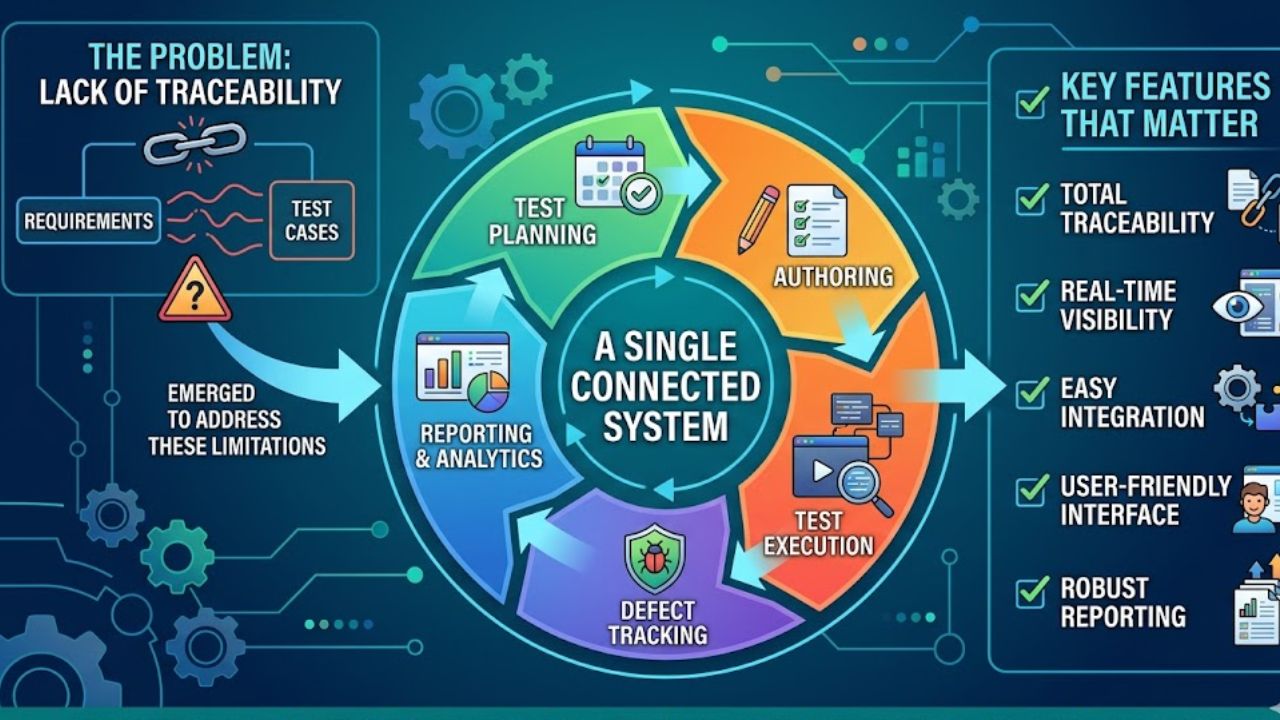
It is alarming that in 2026, many teams of QA workers continue to handle their testing cases in spreadsheets. Rows and columns filled in with steps in the test that someone fills in manually after each execution cycle, along with expected outcomes and pass or fail labels. It works until it does not. As applications become better and better and the release cycles become smaller, spreadsheets become a liability instead of a tool. Version control is nonexistent. Collaboration occurs via e-mail chains.
There is either a partial or a total lack of traceability between requirements and test cases. Test Management Tools emerged specifically to address these limitations, offering structured environments where test planning, execution, and reporting happen within a single connected system. But not all tools are built equally, and knowing which features matter actually can save a team from investing in a platform that looks impressive in a demo but creates new problems in daily use.
Quick Setup and Low Learning Curves
The first thing that is worth evaluating is how fast a team can get underway. Legacy often takes weeks of set-up, administering training, and customization before one test case can be written. The new options have shifted towards mentored onboarding procedures where testers can start working within a few minutes instead of days.
This matters because every hour spent configuring a tool is an hour not spent testing. If a platform requires a dedicated administrator just to keep it running, the overhead starts eating into the productivity gains it was supposed to deliver.
Intelligent Test Case Generation and Reusability
Writing test cases from scratch is one of the time-consuming activities in any QA workflow. The best modern platforms now have incorporated AI capabilities, which can generate the test cases automatically from requirements, user stories, or design inputs.
These generated tests already have steps, preconditions, and test data pre-filled in, which testers can then go over and refine, and not have to start from scratch. Also equally important is reusability. A well-designed test management software allows teams to create test cases once and apply them across multiple scenarios and projects without unnecessary duplication. This reduces maintenance burden significantly and ensures that updates to a shared test case propagate wherever it is used.
Traceability and Integration with Development Workflows
Of all the features discussed above, traceability is perhaps the most important attribute that distinguishes serious test management platforms from glorified checklists. The ability to trace back each test case to a specific requirement and pass along to any defects discovered makes the chain of accountability that auditors, product managers, and engineering leads all rely on. Two-way synchronisation with project management tools like Jira, Linear, or Clickup ensures that when a bug is found during test execution, it flows directly into the development backlog with full context, including steps to reproduce and execution evidence.
Execution Visibility and Collaborative Reporting
Knowing what was going on in a test run at any given time should not be a matter of sending a message to the person running the tests. Dashboards that show real-time progress, pass and fail ratios, and blocking issues make it possible for the entire team to remain informed without interrupting each other.
When defects surface, instant logging with contextual details eliminates the gap between finding a bug and communicating it effectively to the developer responsible for fixing it.

Why Professional Property Valuation Is Important for Buyers

Why Most Walmart Sellers Struggle Without Proper Walmart Store Automation

White Screen Real User Experience and Insights 2026

Real Estate Blogging Tips That Generate Leads in 2026

SENA Sofia Plus vs Buscador De Estatus: Two Government Platforms, Two Countries, One Goal

RUNT Por Placa vs SIMIT Por Placa: What Each System Actually Tells You About a Vehicle in Colombia

Enclomimed 25 (Enclomiphene) – Effective PCT Protocol

Nancy Hallam: The Inspiring Life, Career, and Success Story Behind Ian Wright’s Wife

Who Is Maisie Mae Roffey? The Private Life, Family Story, and Quiet Success of Julie Walters’ Daughter

Johnny Carell: Inside the Life, Family, and Rising Success of Steve Carell’s Son

Roy Hodges: Biography, Lifestyle, Net Worth, Family & Success Story (2025)

Meet Nancy Strang: The Inspiring Life, Success Story, and Legacy of Louis Theroux’s Wife
Enclomimed 25 (Enclomiphene) – Effective PCT Protocol
Nancy Hallam: The Inspiring Life, Career, and Success Story Behind Ian Wright’s Wife
Who Is Maisie Mae Roffey? The Private Life, Family Story, and Quiet Success of Julie Walters’ Daughter
Johnny Carell: Inside the Life, Family, and Rising Success of Steve Carell’s Son
Roy Hodges: Biography, Lifestyle, Net Worth, Family & Success Story (2025)
Meet Nancy Strang: The Inspiring Life, Success Story, and Legacy of Louis Theroux’s Wife
-
 Health3 months ago
Enclomimed 25 (Enclomiphene) – Effective PCT Protocol
-
Celebrity5 months ago
Nancy Hallam: The Inspiring Life, Career, and Success Story Behind Ian Wright’s Wife
-
Celebrity5 months ago
Who Is Maisie Mae Roffey? The Private Life, Family Story, and Quiet Success of Julie Walters’ Daughter
-
Celebrity6 months ago
Johnny Carell: Inside the Life, Family, and Rising Success of Steve Carell’s Son
-
Celebrity4 months ago
Roy Hodges: Biography, Lifestyle, Net Worth, Family & Success Story (2025)
-
Celebrity4 months ago
Meet Nancy Strang: The Inspiring Life, Success Story, and Legacy of Louis Theroux’s Wife
-
 Celebrity3 months ago
Who Is Daniel Clifton Pratt? Inside the Life, Family Values, and Legacy Behind Chris Pratt’s Father
-
 Celebrity6 months ago
Charlotte Edwardes: The Inspiring Journey of a British Journalist and Robert Peston’s Partner