
Technology
Prompt Writing Techniques: 25 Power Methods for Smarter AI Results

Prompt writing techniques have rapidly become one of the most important skills in modern technology. As artificial intelligence systems, especially large language models, move into everyday tools—search engines, software development, marketing platforms, automation workflows, and business intelligence—the way humans communicate with machines is evolving.
In the past, humans adapted to computers by learning rigid commands, programming syntax, or interface rules. Today, the opposite is happening. AI systems are being designed to understand natural language, but they still depend heavily on how instructions are framed. This is where prompt writing techniques come into play.
At a technical level, prompt writing techniques define how users structure instructions, context, constraints, and goals so AI systems can generate accurate, relevant, and reliable outputs. At a practical level, these techniques determine whether AI feels powerful—or frustrating.
From AI-powered content creation and code generation to data analysis, automation, and decision support, prompt writing techniques now act as the interface layer between human intent and machine intelligence.
This article explores prompt writing techniques from a technology, innovation, and future-use perspective—not just what they are, but how they work, why they exist, who should use them, and how they differ from older computing paradigms.
What Are Prompt Writing Techniques?
Prompt writing techniques are structured methods used to communicate instructions to artificial intelligence systems—particularly generative AI models—so they produce high-quality, predictable, and useful outputs.
Unlike traditional commands or code, prompts are written in natural language. However, effective prompts are not casual or random. They follow strategic patterns that guide how AI processes information, applies logic, and generates results.
In simple terms:
A prompt is the input.
A prompt writing technique is how that input is designed.
Key Characteristics of Prompt Writing Techniques
Prompt writing techniques typically include:
- Clear task definition
- Contextual framing
- Constraints and rules
- Output formatting guidance
- Role or perspective assignment
- Step-by-step reasoning triggers
These elements help AI systems understand what to do, how to do it, and how the output should look.
Why Prompt Writing Techniques Exist
Prompt writing techniques exist because modern AI systems do not “think” like humans. They generate outputs based on patterns, probabilities, and contextual interpretation, not intent or understanding.
Without structured prompts:
- AI responses become vague
- Outputs may drift off-topic
- Results can be inconsistent
- Important constraints are ignored
Prompt writing techniques act as a control mechanism—reducing ambiguity and aligning machine output with human goals.
The Shift From Commands to Conversations
Older systems required:
- Fixed syntax
- Rigid commands
- Technical expertise
Modern AI systems allow:
- Natural language interaction
- Flexible instruction styles
- Non-technical users
Prompt writing techniques bridge the gap between human creativity and machine execution.
How Prompt Writing Techniques Work (Technology Perspective)
At the technical level, prompt writing techniques influence how AI models process text through multiple stages:
- Token interpretation – The AI breaks the prompt into tokens
- Context weighting – Key instructions receive higher priority
- Pattern matching – The model matches intent with learned patterns
- Constraint application – Rules limit or shape responses
- Output generation – The response is assembled probabilistically
Well-structured prompts guide each of these stages.
Why Small Changes in Prompts Matter
Even small prompt changes—adding a role, specifying a format, or clarifying intent—can significantly alter output quality. This sensitivity is why structured prompt writing techniques outperform casual instructions.
Core Prompt Writing Techniques Explained
Below are the most effective prompt writing techniques used in modern AI systems today.
1. Instruction-First Technique
This technique places the main instruction at the beginning of the prompt.
Why it works:
AI models prioritize early information.
Example use cases:
- Content generation
- Task execution
- Data transformation
Best practice:
Start with a clear action verb like write, analyze, generate, summarize.
2. Role-Based Prompting
Role-based prompting assigns a professional or functional identity to the AI.
Examples:
- “Act as a software architect”
- “You are a cybersecurity analyst”
Benefits:
- More accurate tone
- Industry-specific responses
- Improved reasoning depth
3. Contextual Framing Technique
This technique provides background information before asking for output.
Why it matters:
AI systems do not retain long-term memory across sessions. Context must be supplied each time.
Common contexts include:
- Target audience
- Business goals
- Technical environment
4. Constraint-Driven Prompting
Constraints define what the AI must or must not do.
Examples:
- Word limits
- Tone restrictions
- Technology limitations
Benefits:
- Reduces hallucination
- Improves reliability
- Aligns output with real-world needs
5. Step-by-Step Reasoning (Chain-of-Thought)
This technique instructs the AI to reason through a problem in steps.
Why it works:
It encourages logical structure rather than surface-level answers.
Best for:
- Problem solving
- Analysis
- Technical explanations
6. Output Formatting Technique
This technique specifies how the output should be structured.
Formats include:
- Bullet lists
- Tables
- JSON
- Markdown
Use cases:
- Software development
- Data extraction
- Automation workflows
7. Example-Based Prompting (Few-Shot)
This technique provides examples of desired outputs.
Why it works:
AI learns patterns from examples quickly.
Applications:
- Writing style replication
- Data labeling
- Structured responses
8. Iterative Prompting
Instead of one large prompt, users refine prompts in stages.
Benefits:
- Progressive accuracy
- Reduced errors
- Better control
9. Persona-Driven Prompting
Similar to role-based prompting but focused on personality, tone, or thinking style.
Examples:
- Analytical
- Beginner-friendly
- Executive-level
10. Multi-Objective Prompting
This technique combines multiple goals in one prompt.
Example:
“Explain this concept simply and provide technical depth.”
Risk:
Overloading prompts can reduce clarity—balance is key.
Real-World Applications of Prompt Writing Techniques
Prompt writing techniques are now embedded across industries.
Software Development
- Code generation
- Debugging
- Documentation creation
Digital Marketing
- SEO content
- Ad copy
- Email campaigns
Business Automation
- Workflow generation
- Customer support scripts
- Data summaries
Education & Training
- Lesson plans
- Personalized tutoring
- Knowledge assessment
Product & UX Design
- Feature ideation
- User journey mapping
- Interface text generation
Benefits of Prompt Writing Techniques
Key advantages include:
- Higher AI accuracy
- Reduced trial-and-error
- Faster workflows
- Non-technical accessibility
- Better alignment with human intent
Prompt writing techniques democratize AI—allowing users without coding skills to leverage advanced systems.
Limitations and Challenges
Despite their power, prompt writing techniques have limitations.
Common Issues
- Over-prompting can confuse models
- Ambiguous language reduces reliability
- AI may still hallucinate facts
- Context length limits apply
Skill Dependency
Prompt writing is a learned skill, not automatic. Poor prompts lead to poor results, regardless of AI capability.
Prompt Writing Techniques vs Traditional Programming
| Aspect | Prompt Writing | Traditional Programming |
| Language | Natural language | Code syntax |
| Flexibility | High | Low |
| Learning curve | Low to moderate | High |
| Precision | Medium | Very high |
| Use cases | Generative, creative, analytical | Deterministic logic |
Prompt writing techniques do not replace programming—but they complement it by enabling faster ideation and interaction.
Is Prompt Writing Safe and Reliable?
Prompt writing techniques themselves are safe. However, reliability depends on:
- Data accuracy
- Prompt clarity
- Human oversight
AI outputs should always be reviewed, especially in legal, medical, or financial contexts.
Who Should Use Prompt Writing Techniques?
Prompt writing techniques are valuable for:
- Developers
- Marketers
- Researchers
- Business analysts
- Educators
- Entrepreneurs
Anyone interacting with AI systems benefits from understanding prompt design.
Future of Prompt Writing Techniques
Prompt writing techniques are evolving rapidly.
Emerging Trends
- Prompt automation
- AI-generated prompts
- Visual and multimodal prompts
- Embedded prompt systems in software
In the future, prompt writing may become a core digital literacy skill, similar to typing or searching the web.
Frequently Asked Questions (FAQs)
What are prompt writing techniques in technology?
Prompt writing techniques are structured methods used to communicate instructions to AI systems effectively, improving accuracy, relevance, and output quality.
How do prompt writing techniques work?
They guide how AI interprets context, constraints, and intent, influencing how responses are generated through pattern recognition and probability modeling.
Are prompt writing techniques safe and reliable?
Yes, but outputs should be reviewed. Reliability depends on prompt quality, data sources, and appropriate use cases.
Who should learn prompt writing techniques?
Anyone using AI tools—developers, marketers, educators, analysts, and business professionals—can benefit.
What problems do prompt writing techniques solve?
They reduce ambiguity, improve AI accuracy, minimize trial-and-error, and make advanced AI usable without coding.
Are prompt writing techniques replacing programming?
No. They complement programming by enabling natural-language interaction with AI, not deterministic system control.
Conclusion: Why Prompt Writing Techniques Matter Going Forward
Prompt writing techniques represent a fundamental shift in how humans interact with technology. Instead of learning machines’ languages, machines are learning ours—but only when we communicate clearly.
By mastering prompt writing techniques, users gain greater control, efficiency, and creativity when working with AI systems. As AI continues to power software, automation, and digital decision-making, prompt writing will become a core skill for the modern world.
The future of technology is not just about smarter machines—it’s about better communication between humans and AI. Prompt writing techniques sit at the center of that transformation.


Have you noticed your computer slowing down lately?
You sit down to work, and your PC takes too long to start. Programs freeze in the middle of important tasks. Your browser slows down when you open a few tabs. These small issues add up and waste your time every day.
Your system collects files you never asked for. At the same time, privacy risks stay hidden in the background. These problems build up when temporary files pile up, startup programs keep running, and regular maintenance gets ignored.
You need something simple that fixes these issues without taking hours or requiring technical skills.
What Is Advanced SystemCare 19
Advanced SystemCare 19 works as a complete maintenance tool built for Windows computers. It handles three important tasks. It removes junk files, improves system speed, and protects your data.
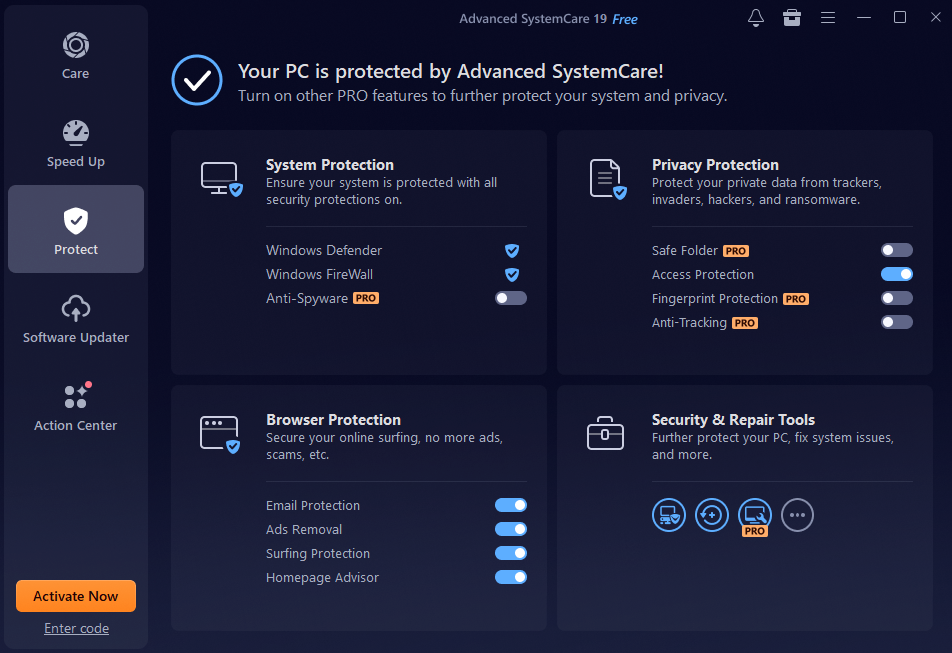
The latest version launched in October 2025 with several improvements. The developers introduced Safe Folder to protect files from ransomware. They redesigned the interface so you can move through it easily. They also improved the cleaning system to handle Microsoft Store apps more effectively.
This makes the software more useful for everyday users who want a faster and safer PC without extra effort.
Key Features That Improve Performance
Now, let’s look at what actually makes the difference when you use this PC cleaner on your system.
System Cleaning
Your computer accumulates digital garbage faster than you realize. Temporary files from installations pile up. Old registry entries stick around long after you uninstall programs. Browser cookies and cache files multiply with every website you visit.
Speed Optimization
A clean system runs faster, but optimization takes performance to another level. This Windows cleaner fine-tunes how your computer uses its resources.
Startup Optimization:
Your PC tries to launch dozens of programs when it boots. Most of them just sit there using memory without doing anything useful. Advanced SystemCare identifies these resource hogs and stops them from running automatically.
| Optimization Area | What Happens | Performance Gain |
| Startup Programs | Disables unnecessary apps | 40% faster boot time |
| Background Services | Stops idle processes | More available RAM |
| Scheduled Tasks | Removes redundant tasks | Smoother operation |
Security and Privacy Protection
Speed means nothing if your data gets stolen or encrypted by ransomware. Advanced SystemCare includes serious protection features that work quietly in the background.
Anti-Spyware Engine:
The expanded database now recognizes more threats than previous versions. It scans for malware, adware, and tracking software. The engine catches both common threats and emerging risks that traditional antivirus software might miss.
Privacy Protection:
This feature prevents unauthorized access to your personal information. It masks your digital fingerprint so websites cannot track you as easily. It monitors attempts to access your webcam or microphone without permission. You browse with confidence knowing your online activities stay private.
Step-by-Step Guide to Use Advanced SystemCare
Getting started is simple and does not take long, even if you have never used optimization software before.
Step 1: Download and Open Dashboard
Launch the program from your desktop shortcut or Start menu. You can choose either “AI Mode” or “Manual Mode.” Al Mode provides you with the optimal solution to clean, optimize, speed up, and protect your system based on the status of your PC and the Altechnology.
Step 2: Run Scan
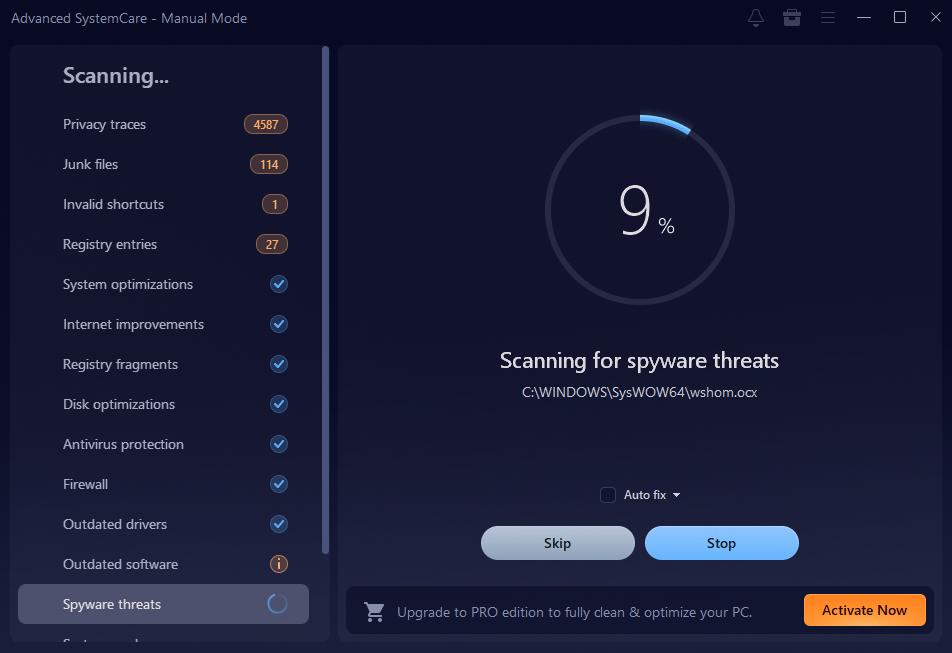
Click the large button in the center of your screen. The scan begins immediately. You watch the progress bar move as it examines different areas:
- Privacy issues
- Security threats
- Junk files
- Registry problems
- System optimization opportunities
The scan typically finishes in three to five minutes, depending on your system size.
Step 3: Review Results
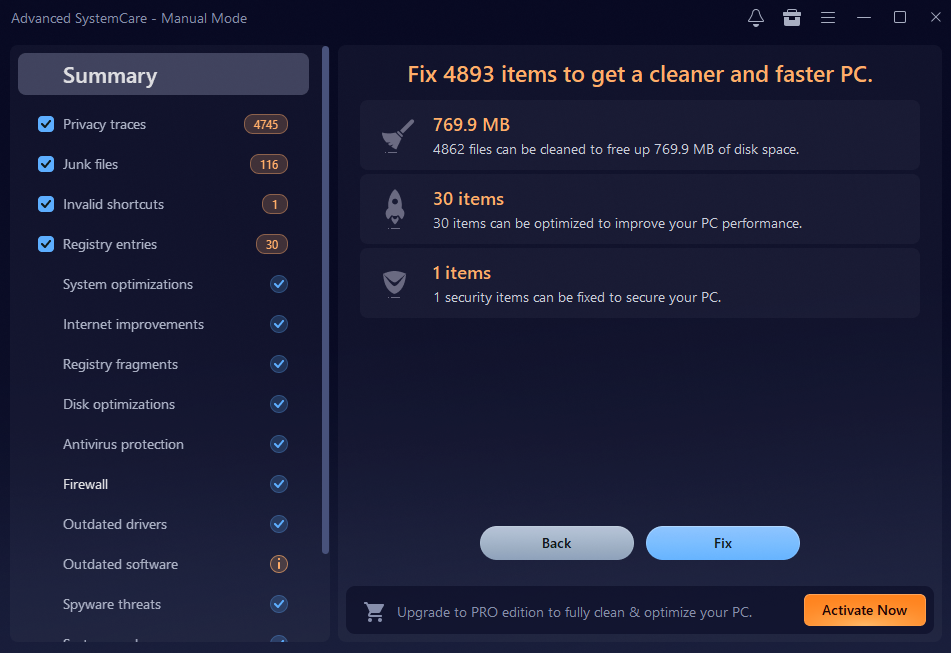
Once the scan is complete, you will receive a detailed breakdown. The report shows exactly what issues were found in each category. You can expand each section to view specific items, such as privacy traces, junk files, registry entries, and outdated software.
Step 4: Click Fix
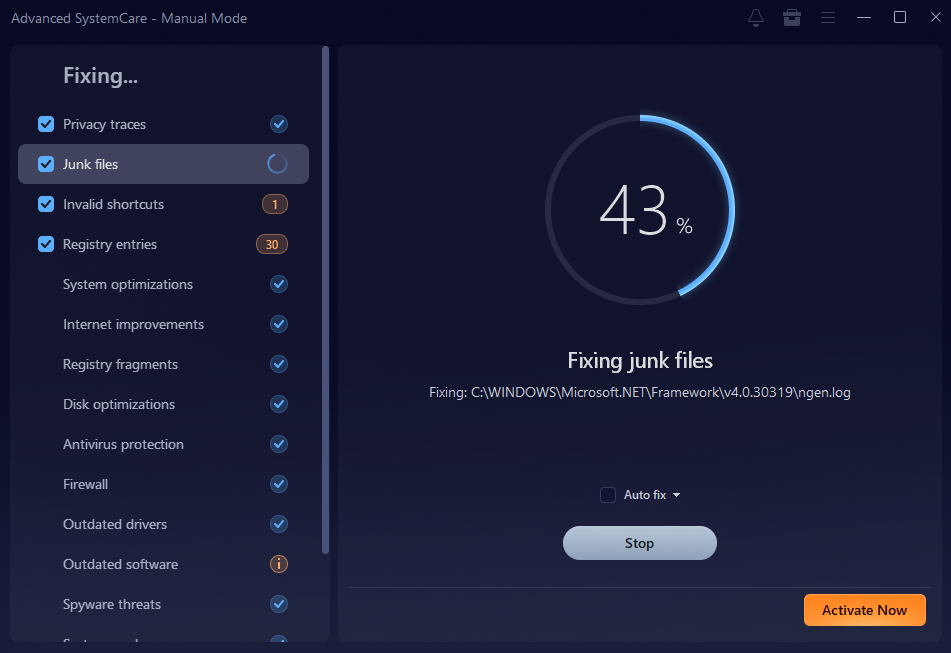
Press the big Fix button to resolve all detected issues. The software works through each problem automatically. It removes junk files, cleans registry entries, deletes privacy traces, and quarantines threats. The whole process takes just a minute or two.
You see a summary showing how much disk space was recovered and how many issues were fixed.
Why It Is Better Than Basic Cleaning Tools
Windows includes some built-in maintenance tools. You can run Disk Cleanup or defragment your drive manually. These basic utilities help a little, but they leave most problems untouched.
Advanced SystemCare brings everything together in one place. You do not need to hunt through different menus or remember multiple programs. One interface handles cleaning, optimization, security, and privacy.
The automated features save you countless hours. Basic tools require you to run them manually every time. This PC cleaner works on a schedule you set once and forget. It optimizes your system continuously without your intervention.
Real-time monitoring catches problems as they develop. Built-in Windows tools only work when you remember to run them. By then, your system already feels slow. Advanced SystemCare prevents slowdowns before you notice them happening.
The interface actually makes sense. Windows utilities bury important features in confusing menus with technical jargon. This software shows you plain English explanations of what each feature does. You make informed decisions without needing to Google every option.
Final Thoughts
Advanced SystemCare 19 solves the frustrating performance problems that plague most Windows users. It cleans away gigabytes of junk clogging your hard drive. It stops unnecessary programs from stealing your RAM and CPU power. It protects your sensitive data from modern security threats.
Stop tolerating a slow, cluttered, vulnerable PC cleaner. Download Advanced SystemCare today and transform how your computer performs. The installation takes just minutes, and your first optimization scan reveals exactly how much improvement awaits. Your computer deserves proper care, and you deserve a system that actually keeps up with your needs.

This isn’t just another tech blog. If you’re reading this, you’ve likely realized that building a game is the easy part. The “boss level” is actually making money without chasing your players away.
In 2026, the “build it, and they will come” strategy is dead. Today, the secret sauce to a profitable game isn’t just a flashy UI; it’s the marriage of Hybrid Monetization and LiveOps.
Whether you are scouting for a gaming company to build your first RPG or you’re a local business looking to partner with a mobile app development company in Austin to gamify your brand, this guide is your roadmap to ROI.
The 2026 Landscape: Why “Standard” Isn’t Enough
Let’s get real for a second. The app stores are crowded.
Back in the day, you chose one path: Premium (pay-to-play) or Freemium (ads). In 2026, that binary choice is a relic. If you want to see a return on your investment, you have to think like a conductor. You need to orchestrate different revenue streams so they harmonize rather than clash.
When you sit down with a mobile game development company, don’t just ask about the engine or the graphics. Ask about their LiveOps stack. Ask how they plan to keep your players coming back on Tuesday morning at 10:00 AM.
Part 1: Mastering Hybrid Monetization
Hybrid monetization is the art of giving players choices. It’s about respect. You aren’t forcing an ad down their throat; you’re offering an exchange.
1. The Power of Rewarded Play
In 2026, interruptive pop-up ads are the fastest way to get your app uninstalled. Instead, we use Rewarded Video.
- The Hook: Player runs out of “Energy.”
- The Offer: Watch a 15-second clip to get a refill.
- The Result: The player stays in the game longer, and you get paid.
2. The Battle Pass Revolution
Originally for Shooters, the Battle Pass is now everywhere. From Match-3 games to Fitness apps developed by a mobile app development company in Austin, the “Season Pass” model provides a steady, predictable revenue stream. It gives players a sense of progression. It makes them feel like they are “earning” their rewards.
3. Micro-Transactions that Feel “Macro”
Gone are the days of $99 gem packs being the only option. In 2026, we see success in “Micro-bins”—tiny, $0.99 transactions that provide immediate, cosmetic, or quality-of-life value. When these are integrated naturally by an expert mobile game development company, the friction to purchase disappears.
Part 2: LiveOps – The Heartbeat of Your Game
If Hybrid Monetization is the engine, LiveOps (Live Operations) is the fuel.
Think of your game as a service, not a product. A mobile app development company in Austin might tell you that the launch is the finish line. They’re wrong. The launch is just the starting gun.
Why LiveOps Matters for ROI
LiveOps is about keeping the game fresh without rebuilding it every month. It includes:
- Seasonal Events: Holiday-themed skins or limited-time challenges.
- Flash Sales: Short-term discounts based on player behavior.
- Community Milestones: “If the community kills 1 million monsters, everyone gets a prize.”
This constant stream of content keeps your Daily Active Users (DAU) high. High DAU equals more opportunities for monetization. It’s a beautiful cycle.
Part 3: The Austin Advantage – Choosing Your Partner
You might wonder, “Why does the location of my developer matter?”
If you are looking for a mobile app development company in Austin, you are tapping into one of the most vibrant tech hubs in the world. Austin isn’t just about BBQ and music anymore; it’s a silicon hills powerhouse.
Local Austin companies have a unique culture. They blend “Keep Austin Weird” creativity with high-end engineering. When you work with a mobile game development company in this region, you often get a team that understands the American consumer better than anyone. They know the nuances of UX/UI that turn a casual downloader into a “whale” (a high-spending player).
Part 4: Data-Driven Empathy
Here is where most people get it wrong. They look at data as cold numbers.
In 2026, we use Data-Driven Empathy.
Your analytics shouldn’t just tell you where people quit. They should tell you why.
- Is the level too hard?
- Is the ad frequency too high?
- Is the “Buy Now” button too intrusive?
A top-tier mobile game development company uses AI-predictive modeling to catch these issues before they tank your ratings. They can predict which players are “at risk” of leaving and trigger a special LiveOps event to keep them engaged.
Part 5: The “Golden Ratio” of Retention
You want the truth? You can have the best monetization in the world, but if your Day 30 retention is below 10%, you’re burning cash.
ROI is a long game.
A mobile app development company in Austin will focus on the “First Time User Experience” (FTUE). If a player doesn’t have fun in the first 60 seconds, they won’t stay for 60 days.
The 2026 Checklist for ROI:
- Onboarding: Is it seamless?
- Core Loop: Is the basic gameplay satisfying?
- Monetization: Is it non-intrusive?
- LiveOps: Is there something new to do tomorrow?
Final Thoughts: Your Game is an Ecosystem
Don’t view your players as wallets. View them as a community.
When you partner with a mobile game development company, ensure they value player experience as much as profit. If you’re in the Texas area, reaching out to a mobile app development company in Austin can give you that local edge, providing a bridge between world-class tech and relatable, human design.
Maximizing ROI isn’t about squeezing your users. It’s about building a world they never want to leave. When they love the world, they’ll happily support it.
That’s the 2026 way.


Clothing production is not only about a good design. It is also about clear planning and proper communication between a brand and a manufacturer. Many clothing brands lose money because the factory does not clearly understand the design. That is why a tech pack for clothing has become an important part of the fashion manufacturing process.
Why Miscommunication Creates Production Loss
When a brand sends a design to a factory, the instructions are often incomplete. The fabric may be different. The size may not match the original idea. Sometimes the stitching style also changes. These problems usually happen when there is no proper tech pack for clothing prepared before production starts.
How a Tech Pack Guides Manufacturers
A tech pack works like a guide for the manufacturer. It explains every small detail of the garment. It includes measurements, fabric information, stitching details, trims, and labels. When the factory attains a clear tech pack for clothing, you can find that they can follow the design exactly as given or planned.
Role of Online Tools in Tech Pack Creation
Now, most brands prefer to prepare their documents with online tech pack makers. Digital tools like AItechpacks use advanced algorithms for the ease of organizing every detail of the garment in one place. Instead of sending scattered notes or messages, the factory can now share a complete tech pack document with the manufacturer. If you’re seeking a tech pack for clothing right now, then you should have to try the AItechpacks solution for instant and legitimate outcomes.
Reducing Sampling Errors and Costs
Clear instructions reduce confusion during sampling. Sampling is the stage where the first version of the garment is created. If instructions are unclear, the sample may come out wrong. The brand then needs to request another sample, which costs more time and money. A proper tech pack for clothing helps in avoiding these repeated corrections.
Assisting Small Brands Control Manufacturing Costs
Most often, small fashion brands struggle with production mistakes. They do not at all have a large budget for multiple samples or corrections. Proceeding with an online tech pack maker assists them in preparing professional documents even without a large design team. This keeps their process organized and reduces unnecessary expenses.
Importance of Detailed Garment Components
A well-prepared tech pack for clothing also explains the exact trims and accessories required for the garment. Details like buttons, zippers, labels, and packaging are clearly defined. When everything is written in advance, the factory does not need to guess any part of the design.
Better Coordination Between Brand and Factory
If the brand as well as the factory follow the same given instructions, the manufacturing runs efficiently and smoothly. Also, the clear documentation for clothing helps in improving the trust between both sides and even prevents costly misunderstandings. This is one of the main reasons experienced clothing brands always rely on a detailed tech pack for clothing.
Why Organized Production Matters
Fashion production involves many connected steps. In the beginning, one small mistake is something that can affect the entire process. A clear and organized system not only keeps the workflow stable but also saves both time and money.
Closing Thoughts:
Proper documentation is essential for clothing brands that want better control over their production. You can see that if design details are properly written and shared in a structured format, then the manufacturing process becomes more efficient. This simple step assists brands in protecting their investment and producing garments exactly as planned.

Who Is Jayden Brown Australian Dressage Rider Lifestyle Net Worth and Success Story

Teeth Whitening Myths and Facts Explained

How Dental Check Ups Can Help Spot Early Signs of Wider Health Issues

How Advanced SystemCare 19 Helps Optimize and Protect Your Windows PC

A Guide to Hybrid Monetization and LiveOps in 2026

What Should You Know Before Buying a Sofa Online?

Enclomimed 25 (Enclomiphene) – Effective PCT Protocol

Roy Hodges: Biography, Lifestyle, Net Worth, Family & Success Story (2025)

Who Is Maisie Mae Roffey? The Private Life, Family Story, and Quiet Success of Julie Walters’ Daughter

Nancy Hallam: The Inspiring Life, Career, and Success Story Behind Ian Wright’s Wife

Draven Duncan: Tim Duncan’s Rising Star Son and His Inspiring Basketball Journey

Who Is Daniel Clifton Pratt? Inside the Life, Family Values, and Legacy Behind Chris Pratt’s Father
Enclomimed 25 (Enclomiphene) – Effective PCT Protocol
Roy Hodges: Biography, Lifestyle, Net Worth, Family & Success Story (2025)
Who Is Maisie Mae Roffey? The Private Life, Family Story, and Quiet Success of Julie Walters’ Daughter
Nancy Hallam: The Inspiring Life, Career, and Success Story Behind Ian Wright’s Wife
Draven Duncan: Tim Duncan’s Rising Star Son and His Inspiring Basketball Journey
Who Is Daniel Clifton Pratt? Inside the Life, Family Values, and Legacy Behind Chris Pratt’s Father
-
 Health2 months ago
Enclomimed 25 (Enclomiphene) – Effective PCT Protocol
-
Celebrity4 months ago
Roy Hodges: Biography, Lifestyle, Net Worth, Family & Success Story (2025)
-
Celebrity4 months ago
Who Is Maisie Mae Roffey? The Private Life, Family Story, and Quiet Success of Julie Walters’ Daughter
-
Celebrity5 months ago
Nancy Hallam: The Inspiring Life, Career, and Success Story Behind Ian Wright’s Wife
-
Celebrity3 months ago
Draven Duncan: Tim Duncan’s Rising Star Son and His Inspiring Basketball Journey
-
Celebrity3 months ago
Who Is Daniel Clifton Pratt? Inside the Life, Family Values, and Legacy Behind Chris Pratt’s Father
-
 Celebrity5 months ago
Charlotte Edwardes: The Inspiring Journey of a British Journalist and Robert Peston’s Partner
-
 Celebrity5 months ago
Jack Scott Ramsay: The Spirited Son of a Culinary Legend and a Star in His Own Right